Zhongshan K-mate General Electronics BTH068N Manuale utente

BTH068N
Multifunction Hi-Fi Bluetooth headset
User’s manual

Contents
Brief introduction…………...…………………………..…..................1
Before use………………………………………………..............……..1
1. Overview…………………………………………………................……1
2. Charging the Headsets…………………………………………..........…2
Getting started……..……………………………………..............……2
1. Turning on/off the headsets………………………………...........….......2
2. Pairing headsets with Bluetooth devices…………………......……..….3
1) How to enter pairing mode………………….……........…………….3
2) Pairing headset with a Bluetooth cell phone via Bluetooth……......3
3) Pairing headset with a Bluetooth cell phone via NFC.......................4
4) Pairing headset with a Bluetooth transmitter via Bluetooth…........4
5) Pairing headset with Multi-devices via Bluetooth…………....…….5
3. Making calls with the headset………………………….........……….6
4. Playing music………………………............…………………….…......8
5. LED indicator…………………………............……………………....10
6. Factory Reset……………………………............………………..….10
Care and maintenance……………………...............………..………..10
FAQs……………………………………...……...............……………..11
Specification……………………………...………..............………..…12

Welcome to use this Bluetooth stereo headset, BTH068N. Please read this
user’s manual carefully before use.
Brief introduction
BTH068N is a Hi-Fi Bluetooth stereo headset. Foldable and retractable
design is very easy to take with you. It supports calling and music function ,
you can make calling wireless and enjoy high quality Bluetooth music as
you want .It also supports NFC function and can quickly connect with
Bluetooth cellphone which have NFC function.
Before use
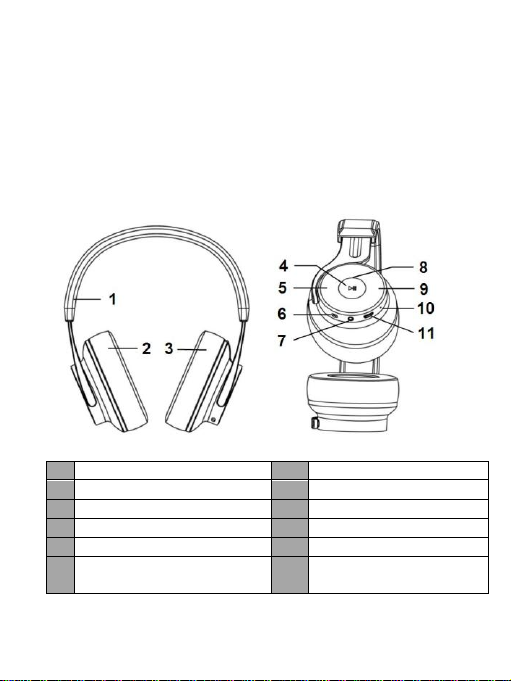
1. Overview
1
Retractable headband
7
Line-in jack
2
Left speaker
8
LED indicator
3
Right speaker
9
Volume up
4
MFB button/NFC zone
10
Built-in Microphone
5
Volume down
11
Charging jack
6
Switch button:Turn on/Turn
off/Pairing
1

2. Charging the headset
The headset comes with a built-in rechargeable battery, prior to using it, it is
recommended to charge the battery fully for the first time.
When the headset is low power, the headset emits waring tones every 5
minutes and the red LED flashes. Please recharge the battery of the headset.
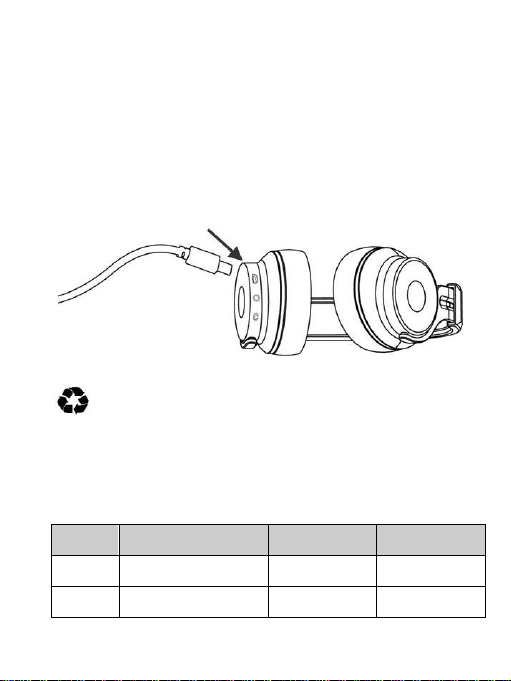
The way of charging as following:
1. Plug USB charging cable into the standard USB port
2. Plug another side of USB cable to the Micro USD jack of headset
Red light on: Charging
Red light off: Finish charging
3. It will takes about 3 hours to finish charging
Remarks:
1) The battery is recyclable.
2) Batteries (battery pack or batteries installed) shall not be exposed to
excessive heat place, such as sunshine, fire or the like.
Getting started
1. Turning on/off the headset
Functio
ns
Operation
LED indicator
Prompt tone
Turning
on
Switch button at ON
positon
Blue light on
one second
Power on
Turning
off
Switch button at OFF
positon
Red light on
one second
Power off
2

Remark: The headset will be standby mode if turned on but not connected
with devices.
2. Pairing the headset with Bluetooth devices
1) How to enter pairing mode
Functio
ns
Operation
LED indicator
Prompt tone
Enter
pairing
mode
Keep the switch button
to Bluetooth logo
about two seconds
Red and blue
LED flash
alternately
Pairing
Remark: Pairing mode will last 2 minutes. If no devices can be connected
after 2 minutes, it will return to standby mode automatically.
2) Pairing the headset with a Bluetooth cell phone via Bluetooth
Prior to using the headset for the first time, you have to pair it with a
Bluetooth-enabled cell phone. The pairing procedures are subject to
different models of cell phones. Please refer to your cell phone user’s
manual for further information. The general pairing procedures are as
follows:
1) Keep your headset and phone within 1 meter when pairing;
2) Make the headset enter pairing mode (please refer to “How to enter
pairing mode);
3) Activate your cell phone’s Bluetooth function and set your cell phone to
search for Bluetooth devices within range, and select “BTH068N” from
the list of devices shown;
4) After successful connecting, blue LED of headset flashes twice every 4
seconds and emits “Connected”
Remarks:
If the cellphone tips enter pairing password please enter “0000”and
confirm
After pairing is successful, the headset and the cell phone will remember
each other, they will no need to re-pair next time. Every time the headset
is turned on, it will connect to last connected device automatically.
If the headset is not connected with any devices(turned on already),short
press any button(MFB button,volume up,volume down),the headset will
try to connected to last connected devices.
3

If the headset and devices out of connected because of over range,it will
connected automatically if have back to effective range within five
minutes.If overtime,short press any button(MFB button,volume
up,volume down) can connect again.
3) Pairing headset with a Bluetooth cell phone via NFC
BTH068N support NFC function, it can quickly connect with Bluetooth cell
phone via NFC.Please active the NFC function of cellphone firstly and
switch button of headset at ON positon,then keep NFC zone of them in
touch and they will quick connected.
Remarks:
The screen of cellphone must be in unlocked mode
during pairing via NFC
In the first time of pairing,please not take the
cellphone away till BTH068 enter pairing mode,or
it may cause fail.
The NFC chip of cell phone and headset must
be in 1 centimeter during pairing,or it may cause fail.
It can connected via NFC if headset turned
on but not connected with devices; and it can
disconnect via NFC if headset already connected with headset
4) Pairing the headset with a Bluetooth transmitter via Bluetooth
You can connect the headset to a Bluetooth transmitter to enjoy music
wirelessly. Hereby take BTT005 (Bluetooth transmitter, not included in
accessories) for example. The pairing steps are as follows:
1) Keep your headset and transmitter within
1 meter when pairing;
2) Make the headset enter pairing mode
(Please refer to “How to enter pairing
mode);
3) Turn on the Bluetooth transmitter and
make it enter paring mode. It will search
for Bluetooth devices automatically and send a pairing request;
4) After successful pairing and connecting, the headset emits “Connected”
and blue LED of the headset flashes twice every 4 seconds.
4

Remarks:
The pairing password of BTH068N is “0000”. So, the headset can only
pair with a Bluetooth transmitter whose pairing password is “0000”.
If pairing still fails after several tries, please refer to the Bluetooth
transmitter’s user’s manual for further information.
5) Pairing headsets with Multi-devices via Bluetooth
The headset can connect with two Bluetooth devices at most. If you want to
finish the multi-pairing, please refer to the following steps:
1) Firstly, pair and connect the headset with Bluetooth device one (refer to
“pairing the headset with a Bluetooth cell phone);
2) Turn off the headset and make it enter paring mode again, pair and
connect with Bluetooth device two(refer to “pairing the headset with a
Bluetooth cell phone);
3) Operate Bluetooth device one to connect with headset. The headset has
already connected with Bluetooth device one and two, the headset also
can connect with these two devices automatically next time.
Remarks:
The steps of turn on/off the multi-pair function as follows:
Turn off multi-pair function: the headset in standby mode, not connect
with device, press MFB and volume down button about two seconds
simultaneously and hear prompt tone”Disablemultipoint”.
Turn on multi-pair function: the headset in standby mode, not connect
with device, press MFB and volume up button about two seconds
simultaneously and hear prompt tone”Enablemultipoint”
To improve the stabilization of headset, we suggest you turn off the
multi-pair function when you only connect with one cell phone.
5

Making a call with the headset
1) Basic operation
Function
s
Status of
headset
Operation
Prompt tone
Cancel a
call
Calling
Short press
once
Call terminated
Answer
a call
Incoming
ringing
Short press
once
Answer
Reject a
call
Incoming
ringing
Press about
two seconds
Reject
End a
call
During a call
Short press
once
Call terminated
Volume
up
During a call
Short press
volume “+”
N/A
Volume
down
During a call
Short press
volume “-”
N/A
Transfer
conversa
tion to
mobile
phone
During a call
Long press
button for 2
seconds
Transfer audio
Transfer
conversa
tion to
headset
During a call
Long press
button for 2
seconds
Transfer audio
Microph
one
mute
During a call
Press volume “+”
about two
seconds
Mute on
Cancel
mute
During a call
(microphone
mute)
Press volume
“-” about two
seconds
Mute off
6

Voice
dial
connected
device
Short press
button and
volume “+” at
same time
Voice redial
Redial
the last
number
connected
device
Double click
Last number
redial
Warning: Excessive pressure from earphones and headphones can
cause hearing loss.
Remark:
When the volume of headset on Max or Min level,it will prompt
once”DU”.
When the headset under microphone mute mode, you will hear two tone
“DuDu”continuously every 10 seconds.
When pressing the answer button on some mobile phones, the call will be
transferred to the mobile phone. You can switch the call to the headset by
using the conversation switch button or through operating on the mobile
phone. Please refer to your mobile phone user manual for further
information.
2) Three-ways call operation
Functions
Status of headsets
Operation
Answer new call and
end current call
There are second
incoming call
Short press
once
Answer new call and
retain current call
There are second
incoming call
Double click
button
Switch calls
Keep conversation
Double click
button
End current call and
switch retain call
Keep conversation
Short press once
7

3) Connecting with two cell phones to make a call
Functions
Status of headset
Operation
Retain phone call #1
and answer phone
call #2
During phone call #1,
phone 2 has incoming
call
Double click
button
End phone call #1
and answer phone
call #2
During phone call #1,
phone 2 has incoming
call
Short press
once
Switch call
During call, one of
phone call is retained
Double click
button
End current call,
back to retain phone
call
During call, one of
phone call is retained
Short press
once
4.Playing music
1)Bluetooth mode
When the headset connects to a mobile phone or Bluetooth transmitter
which supports A2DP, you can enjoy music wirelessly through the headset.
Functions
Status of
headset
Operation
Volume up
Playing music
Short press “+”button
Volume
down
Playing music
Short press “―”button
Last track
Playing music
Long press “―”button
Next track
Playing music
Long press “+”button
Pause
Playing music
Short press button once
play
Pausing
Short press button once
Notes:
When the volume is adjusted to Max it will emits “Maximum
Volume”;and emits short tone”DU”when to Min volume.
If you want to remote control last/next song, pause/play, it needs your
Bluetooth mobile phone or Bluetooth transmitter paired with the headset
to support AVRCP profile, please refer to the user’s manual of your
mobile phone or Bluetooth transmitter for further information.
8
Indice
Altri manuali Zhongshan K-mate General Electronics Cuffia