
ZiLOG ZMOTION Manuale utente

Copyright ©2010 by Zilog®, Inc. All rights reserved.
www.zilog.com
Introduction
This Quick Start Guide acquaints users with Zilog’s ZMOTION™Development Kit and
provides instructions for setting up and using the kit to demonstrate its basic operation.
The following topics are covered:
•Getting Started: the quickest way to get the board up and running; see page 4
•Installing the Pyroelectric Sensor – see page 5
•Installing the Lens – see page 8
•Installing ZDSII and the USB Smart Cable – see page 15
•Download and Run the Sample Project – see page 19
•Board Design Information – see page 24
Kit Contents
•ZMOTION™Development Board
•USB Smart Cable Debugger
•0.9" Focal Flat Lens Holder
•0.77" Focal Circular Lens Holder
•Selection of Lenses
•Selection of Pyroelectric sensors
•DB9–DB9 serial cable
•Wall mount power supply
•CD with Sample applications and product documentation
•CD with ZDSII
•Various mounting hardware
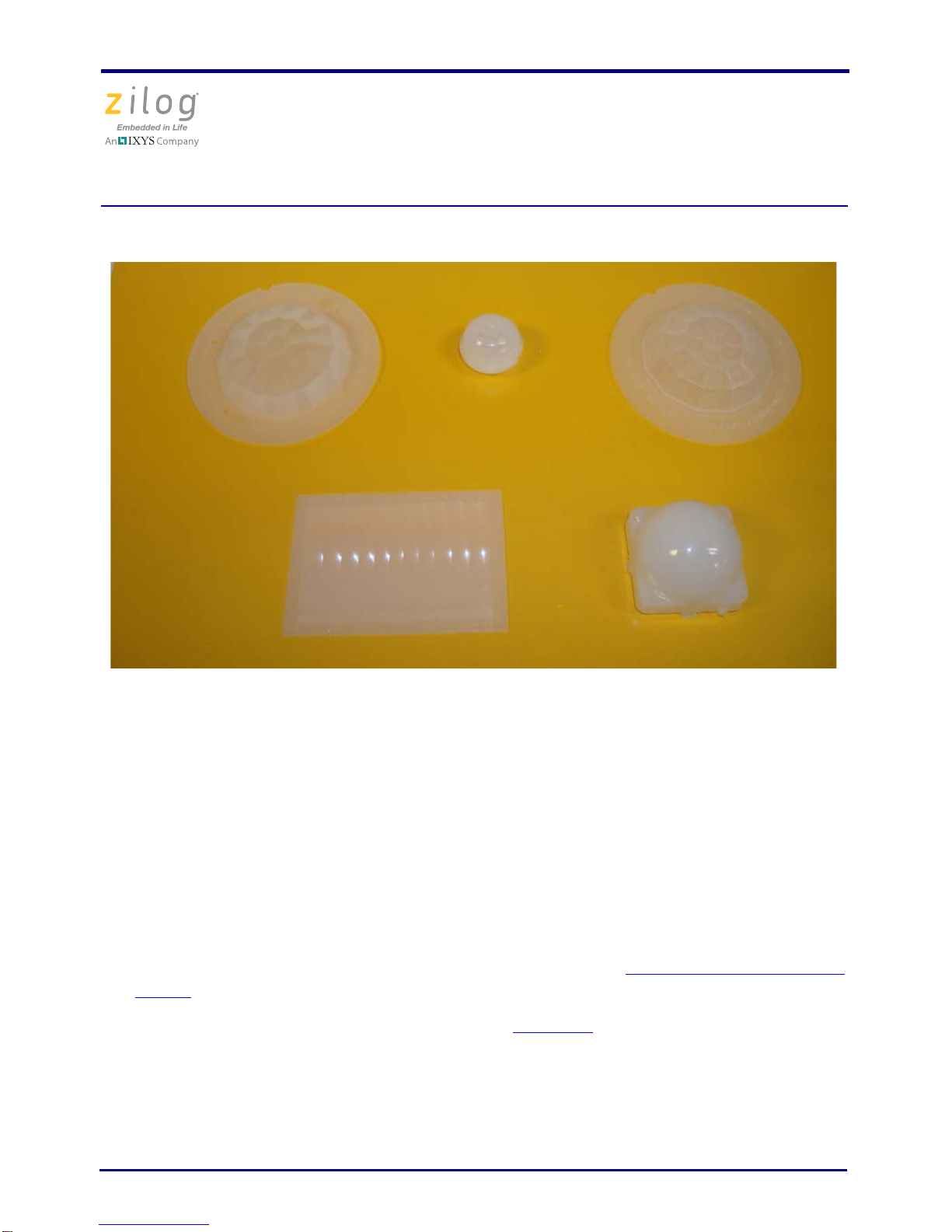
Figures 1 through 3 show images of the components of the kit plus the sensors and lenses
it contains. The Getting Started section follows on page 4.
ZMOTION™ Detection and
Control Development Kit
Quick Start Guide QS007601-1010

ZMOTION™ Detection and Control Development Kit
Quick Start Guide
QS007601-1010 Page 2 of 28
Figure 1. ZMOTION™ Development Kit Components
0.77” Focal Circular
Lens Holder (1)
Mica Washers
(2)
Machine Screws
and Nuts
2 - #4-40 x ¾”
4 - #4-40 x ½”
0.9” Focal Flat
Lens Holder (1)
Lenses
(5)
Pyroelectric
Sensors (3)
USB Smart
Cable (1)
ZDS II &
Application CDs (2)
Power Supply
(1)
ZMOTION
Development
Board (1)
DB9–DB9
Serial Cable (1)

ZMOTION™ Detection and Control Development Kit
Quick Start Guide
QS007601-1010 Page 3 of 28
Figure 2. The Three Pyroelectric Sensors, from left to right:
RE200B-P, SDA02-54-P, and SBDI46-504AA
ZMOTION™ Detection and Control Development Kit
Quick Start Guide
QS007601-1010 Page 4 of 28
Getting Started
The kit contains several lens and pyroelectric sensor options. To provide a quick method
of getting the kit up and running, the ZMOTION™MCU is initially programmed with a
ZMOTION_Basic project using the RE200B-P pyroelectric sensor and the CWM 0.5GI
V1 lens. By installing the pyroelectric sensor and the lens and then applying power, the
basic operation of the kit can be observed.
To get started with the kit, observe the following brief procedure.
1. Install the RE200B-P pyroelectric sensor as outlined in the Installing the Pyroelectric
Sensor section that follows.
2. Install the CWM 0.5 GI V1 lens as described on page 8.
3. Insert the power supply output connector into jumper J1 on the ZMOTION™Develop-
ment Board and apply AC power to the power supply.
4. The Blue power LED will illuminate and the Red LED will initially illuminate and re-
main on until the pyroelectric sensor stabilizes –a period of approximately 5 to 30 sec-
Figure 3. The Five Lenses contained in this ZMOTION™ Development Kit

ZMOTION™ Detection and Control Development Kit
Quick Start Guide
QS007601-1010 Page 5 of 28
onds. After the PIR sensor has stabilized, the Red LED turns OFF, to turn ON only
when motion is detected.
5. To test this procedure, wave your hand over the lens and notice the LED turning ON
for approximately 1 second.
The following sections describe the operation of the kit in more detail, including how to
download and debug your own ZMOTION™project.
Installing the Pyroelectric Sensor
The Pyroelectric sensor used on the ZMOTION™Development Board can be changed by
inserting the device into the appropriate socket. Proper orientation is ensured by aligning
the tab on the sensor to the silkscreened tab on the circuit board. The tab on each 3-pin
pyroelectric sensor aligns to the silkscreened tab labeled U9.
Ensure that the leads on the pyroelectric sensor are trimmed such that the device sits flush
on the board. If the leads are too long and the device is not firmly seated on the board,
focal length will be affected and performance will be reduced. A mica washer (provided)
must be installed between the pyroelectric sensor and the socket to ensure that the sensor’s
metal can will not come into contact with the sockets on the board, as shown in Figure 4.

ZMOTION™ Detection and Control Development Kit
Quick Start Guide
QS007601-1010 Page 6 of 28
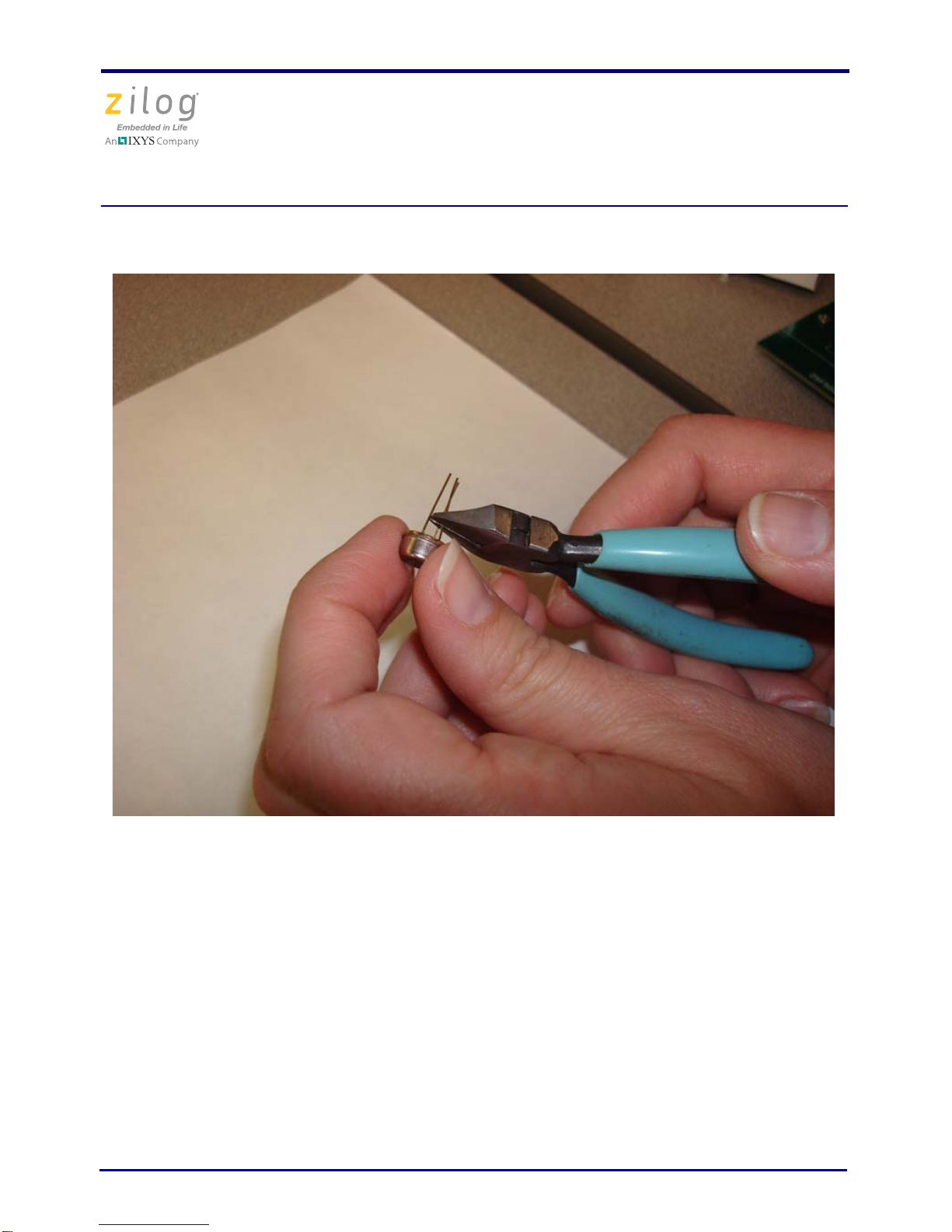
The leads on the pyroelectric sensor should be trimmed no shorter than 2.3mm (.090") and
no longer than 3.3mm (0.130"), as indicated in Figure 5. For more information about the
Pyroelectric Sensor socket, see page 26.
Figure 4. Pyroelectric Sensor installation
ZMOTION™ Detection and Control Development Kit
Quick Start Guide
QS007601-1010 Page 7 of 28
Figure 5. Trimming the leads on the pyro prior to installation

ZMOTION™ Detection and Control Development Kit
Quick Start Guide
QS007601-1010 Page 8 of 28
Installing the Lens
The ZMOTION™Development Board supports four lens mounting options, as indicated
in Table 1.
Installation Note: When mounting the ZMOTION development board vertically or from
the ceiling, special consideration should be taken regarding the height and levelness of the
board. Be sure to follow the lens manufacturer’s recommended height requirements to
ensure optimal performance.
Attaching the PIR Sensor Lens
This clip-on lens slides atop the PIR sensor and the notch on the PIR sensor aligns with the
notch in the base of the lens. Note the two notches in the base of the lens; the correct notch
to use is the one that is in line with the notch in the middle of the lens and aligned with the
horizontal axis of the beam pattern, as shown in Figure 6.
Table 1. Lens Mounting Options
Lens Mounting Lens Supported
PIR Sensor Clip On NCL-9(26)
Circuit Board Clip In CWM 0.5 GI V1
Circular Lens Holder 0.77 Focal CM 0.77 GI V3
CM 0.77 GI V5
Flat Lens Holder 0.9 Focal AA 0.9 GI T1

ZMOTION™ Detection and Control Development Kit
Quick Start Guide
QS007601-1010 Page 9 of 28
Figure 6. NCL-9(26) Lens and PIR Sensor installed
on the ZMOTION™ Development Board

ZMOTION™ Detection and Control Development Kit
Quick Start Guide
QS007601-1010 Page 10 of 28
Attaching the Circuit Board Lens
This clip-in lens style clips directly into the circuit board over top the PIR sensor. There
are 4 mounting clips on the lens that are aligned with the slots in the circuit board. Note
the locating tab on the side of the lens is to be aligned with the silkscreened tab, as indi-
cated in Figure 7.
Circular Lens Holder
The circular lens holder, shown in Figure 8 is a 2-piece assembly that provides a 0.77"
focal length mounting.
Figure 7. Assembled clip-in lens installed on the ZMOTION Development Board
Altri manuali per ZMOTION
1
Indice
Altri manuali ZiLOG Sensore di sicurezza


