
ZKT T Series Manuale utente

TS200-T Series Tripod Turnstile User Manual
P a g e |1Copyright©2020 ZKTECO CO., LTD. All rights reserved.
Thank you for choosing our product. Please read the instructions carefully
before operation. Follow these instructions to ensure that the product is
functioning properly. The images shown in this manual are for illustrative
purposes only.

About the Manual
This manual introduces the operations of TS200-T Series Tripod Turnstile product.
All figures displayed are for illustration purposes only. Figures in this manual may not be exactly consistent
with the actual products.
Document Conventions
Conventions used in this manual are listed below:
GUI Conventions
For Software
Convention
Description
Bold font
Used to identify software interface names e.g. OK,Confirm,Cancel
>
Multi-level menus are separated by these brackets. For example, File > Create >
Folder.
For Device
Convention
Description
< >
Button or key names for devices. For example, press <OK>
[ ]
Window names, menu items, data table, and field names are inside square brackets.
For example, pop up the [New User] window
/
Multi-level menus are separated by forwarding slashes. For example,
[File/Create/Folder].
Symbols
Convention
Description
This implies about the notice or pays attention to, in the manual
The general information which helps in performing the operations faster
The information which is significant
Care taken to avoid danger or mistakes
The statement or event that warns of something or that serves as a
cautionary example.

Table of Contents
1 TECHNICAL SPECIFICATIONS.........................................................................................................................5
2 UNPACKING AND TESTING THE TRIPOD TURNSTILE..................................................................................6
2.1 ARM INSTALLATION...........................................................................................................................................................6
2.2 POWER-ON TEST BEFORE INSTALLATION...............................................................................................................................6
3 EQUIPMENT INSTALLATION.......................................................................................................................... 7
3.1 INSTALLATION CONDITIONS................................................................................................................................................7
3.2 CABLING..........................................................................................................................................................................8
3.3 INSTALLATION.................................................................................................................................................................. 9
4 FUNCTION OVERVIEW.................................................................................................................................. 10
4.1 DIP SWITCH FUNCTION................................................................................................................................................... 10
4.2 WIRED REMOTE CONTROL(OPTION).............................................................................................................................11
4.3 WIRELESS REMOTE CONTROL(OPTION).........................................................................................................................12
5 EQUIPMENT PRECAUTIONS AND MAINTENANCE.................................................................................... 13
5.1 PRECAUTIONS.................................................................................................................................................................13
5.2 MAINTENANCE............................................................................................................................................................... 14
6 TROUBLESHOOTING..................................................................................................................................... 15
ATTACHMENT 1 FACTORY SETTINGS............................................................................................................ 16
ATTACHMENT 2 CONNECTION DIAGRAM OF CONTROL BOARD AND ACCESS CONTROL PANEL........17
Please read this document carefully before installation and using the device.
1Technical Specifications
Input Voltage
AC 100~120V
/200~240V,
50Hz /60Hz
Arm Length (mm)
580
Operating Environment
Indoor and Outdoor
(shelter)
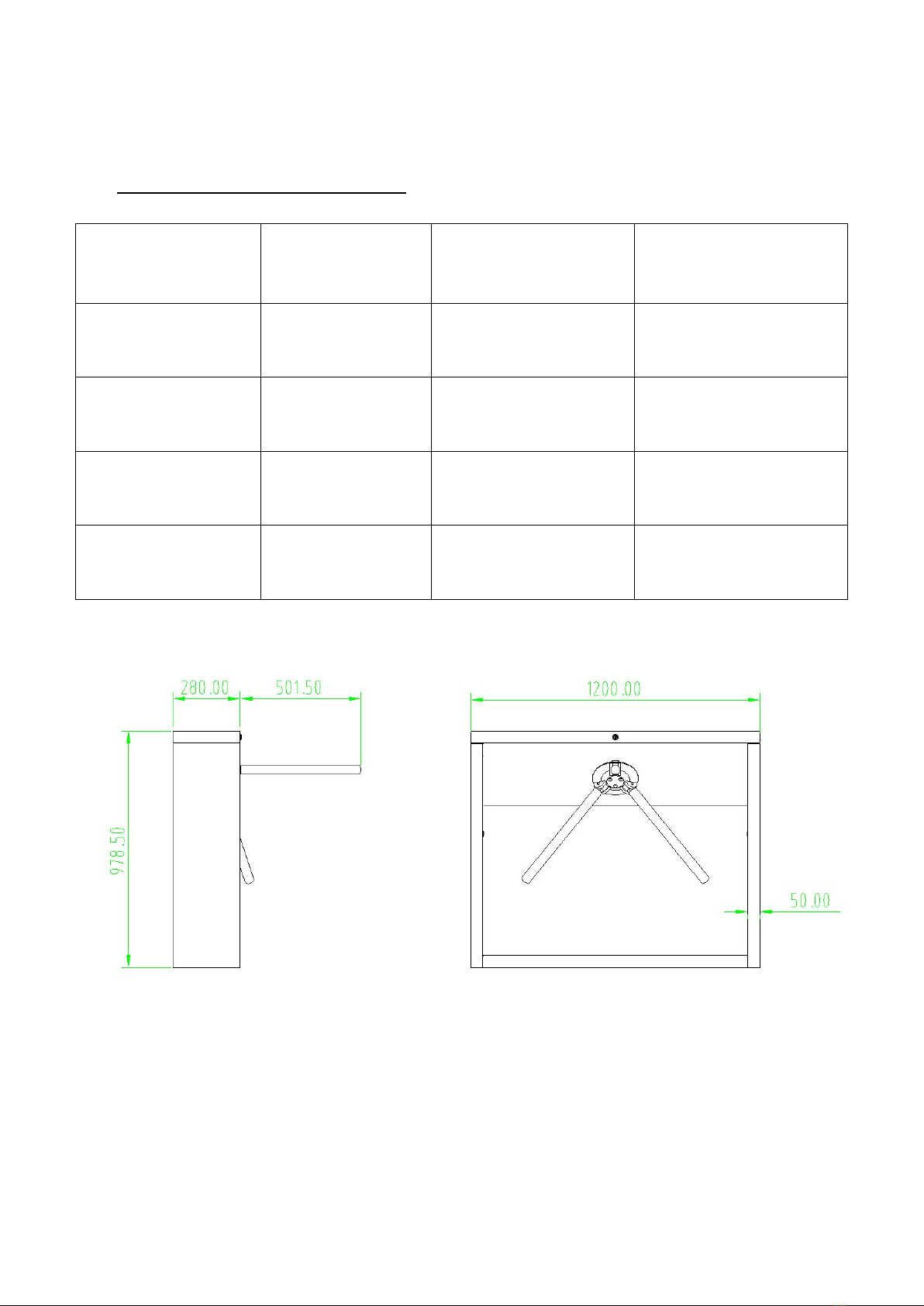
Dimension(mm) (Figure 1)
L = 1200, W = 280, H = 980
Operating Temperature
-28ºC ~ 60ºC
Package Size (mm)
L = 1275, W = 370, H = 1063
Operating Humidity
5% ~ 85%
Flow Rate
Max 30 passages / minute
Input Control Signal
Dry contact
Rated Power
18 W
Figure 1
2Unpacking and Testing the Tripod Turnstile
2.1 Arm Installation
In order to prevent the arm from damaging during transportation, the arm will not be initially installed to
the devices.
Installation procedure
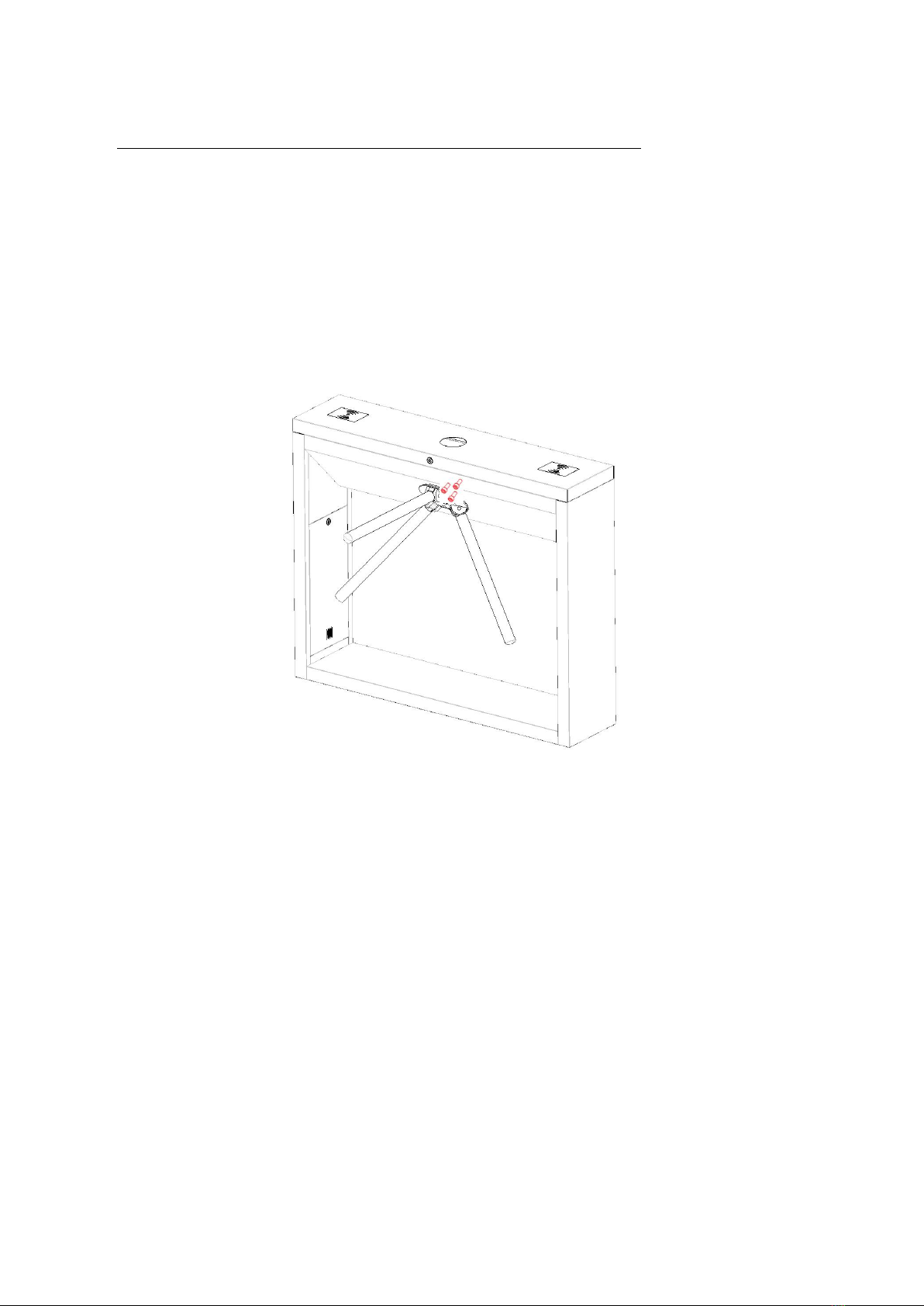
Put the arm kit into the hole of cabinet; make sure the screw holes match with mechanism core, then
tighten 3 hex screws, as shown in Figure 2-1.
Figure 2-1
2.2 Power-on Test before Installation
1. Please make sure that the power requirements are strictly met to avoid permanent damages to the
unit. Input voltage: AC 100~120V /200~240V.
Note: The tripod turnstile must be connected to the ground (earth).
2. Power on and wait 30s for the tripod turnstile to finish the self-check program.
3. Lift the arms manually, as shown in Figure 2-2.
4. Check whether the tripod turnstile and the LED indicators work properly.
If there is any problem, please contact the supplier.
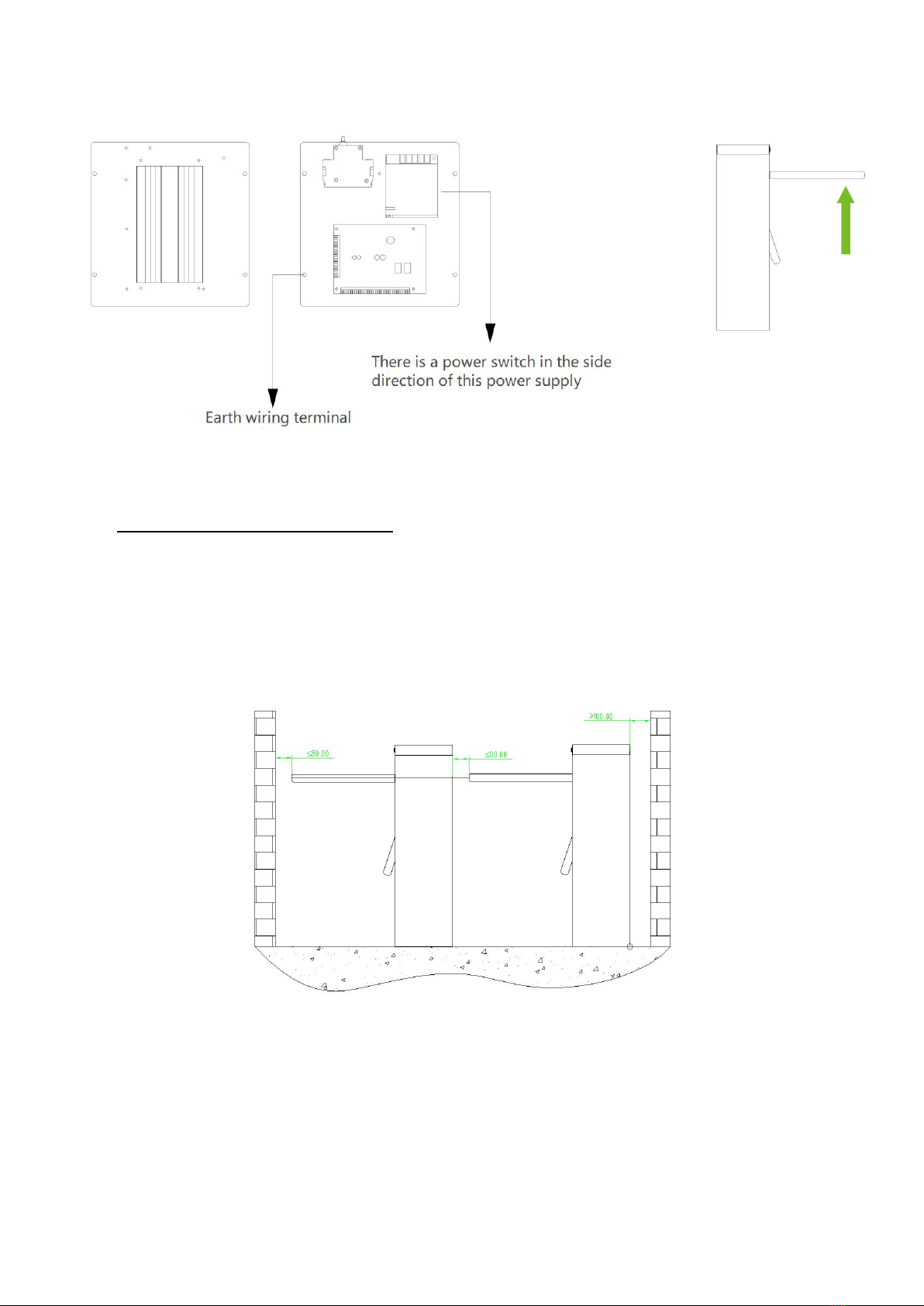
Figure 2-2
3Equipment Installation
3.1 Installation Conditions
The equipment must be installed on concrete ground, ensuring that expansion bolts can be secured firmly.
You are suggested to install an assistant framework or fence to form a passageway, as shown in Figure 3-1.
Figure 3-1
Notes:
1. When installing the tripod turnstile against the wall, please reserve a distance of at least 100 mm in
order to open the cover for future adjustment and maintenance.
2. The spare space from the end of the arm shall not be greater than 80 mm (see Figure 3-1).
Lift upwards
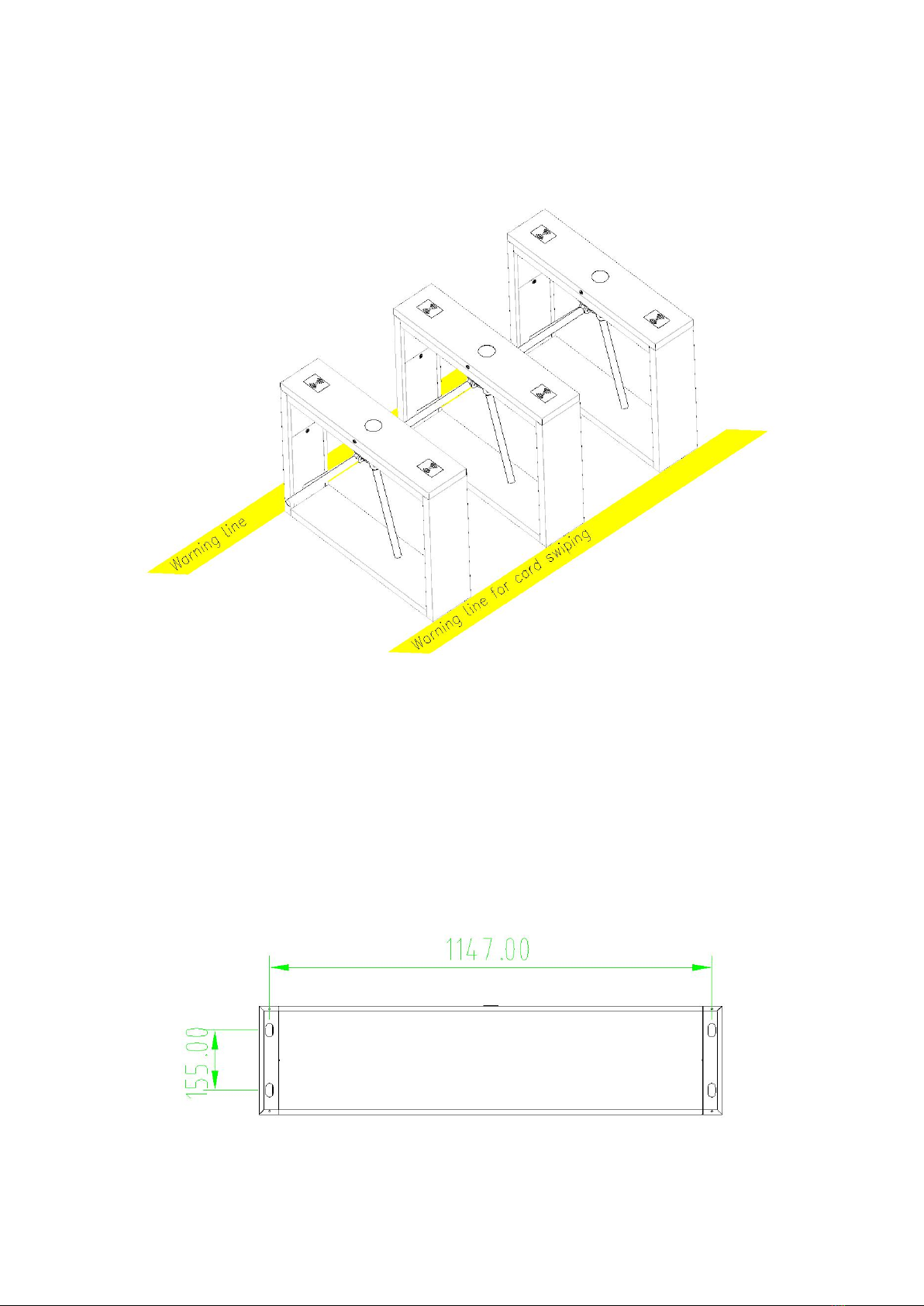
3. You are also recommended to set a warning line for card swiping (see Figure 3-2). The warning line
prompts users to swipe cards in a particular area, which would greatly reduce the probability of
equipment failure caused by improper operations.
Figure 3-2
3.2 Cabling
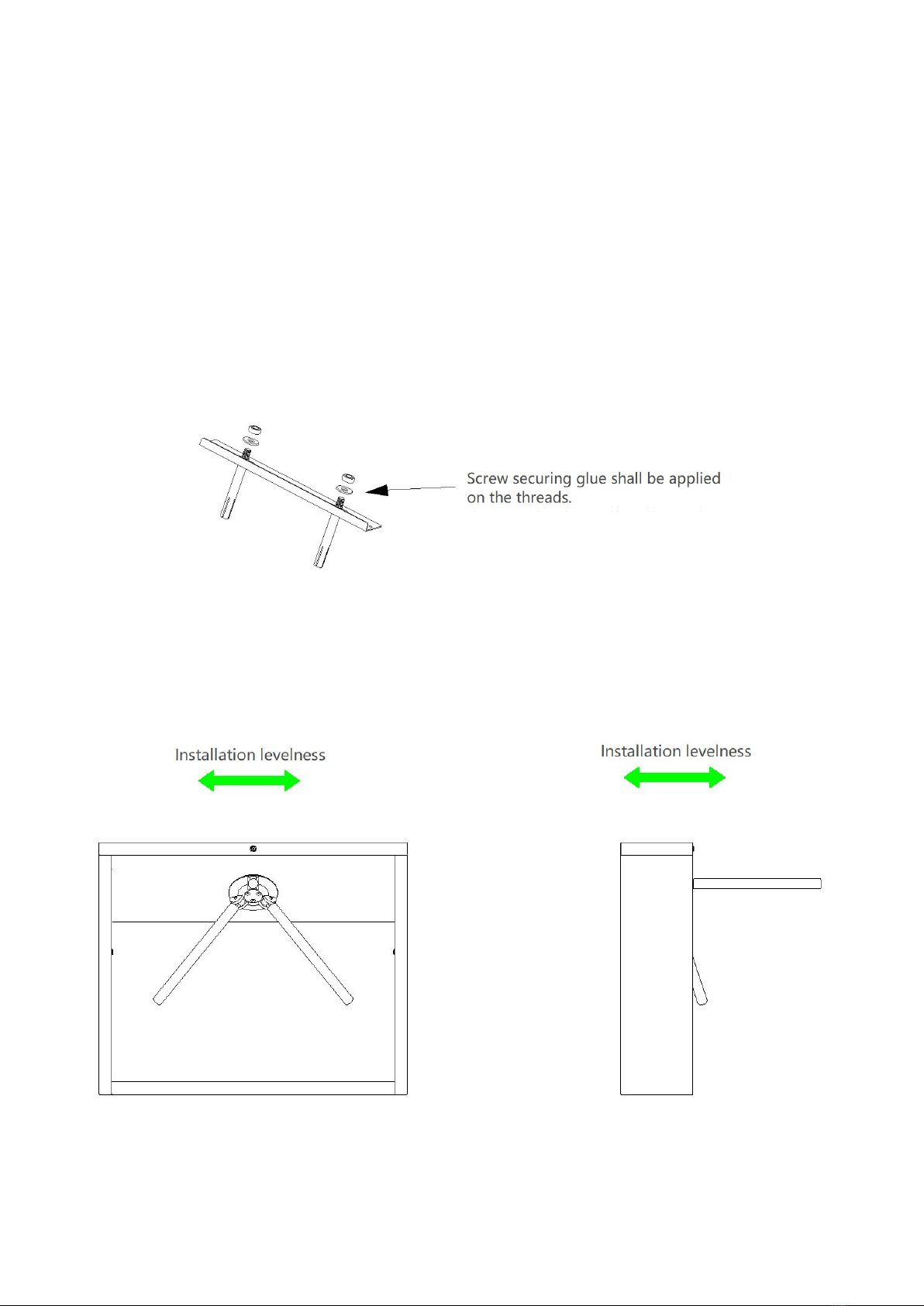
There are inlets in the bottom plate for cabling, as shown in Figure 3-3. Units of all data is millimeter.
Power supply and communication wire should go through the inlet. Cable protection covers are
suggested to use if it is surface mounted.
Warning: The tripod turnstile must be connected to the ground (earth); there is wiring interface near the
power switch.
Figure 3-3
3.3 Installation
1. Drill holes.
Drill holes according to the locations of holes as shown in Figure 3-3.
2. Fix the mounting plate to its original position.
Place the mounting plate properly, then apply screw securing glue on the surface and threads of the
expansion bolts, install four expansion bolts to secure the mounting plate, and use a horizontal ruler to
test the levelness of the mounting plate. If the mounting plate is not levelled, adjust it with the gaskets
provided. Note that all the four expansion bolts must be installed properly, as shown in Figure 3-4.
Figure 3-4
3. Install the turnstile on the mounting plate and tighten the screws. Apply screw securing glue before
using and putting gaskets on the screws to adjust the direction of the turnstile. If the tripod turnstile is
not levelled,you can place gaskets to adjust, as shown in Figure 3-5.
Figure 3-5

4Function overview
4.1 DIP Switch function
Dial code description:
The DIP switch is divided in eight dial codes from KE-1 to KE-8(KE-4 and KE-5 are disabled in SATT1.4).
Move the switch up to turn ON and down to OFF.
Description of function Setting:
*Dial 0 to turn off
*Dial 1 to turn on
Dial code function item:
Unmanned passage time(KE-1,KE-2,KE-3):
Switch Status
Time Period
000 (OFF OFF OFF)
5S (Default)
001 (OFF OFF ON)
10s
010 (OFF ON OFF)
15s
011 (OFF ON ON)
20s
100 (ON OFF OFF)
30s
101 (ON OFF ON)
40s
110 (ON OFF ON)
50s
111 (ON ON ON)
60s
Memory Swipe Mode(KE-6): Turn on Alarm Mode (KE-8)
Dial 1(ON) to tun on. Dial 1(ON) to turn on.
Dial 0(OFF) to turn off. Dial 2(OFF) to turn off
Questo manuale è adatto per i seguenti modelli
1
Indice


