
Zokop BM8021 Manuale utente

1
BREAD MAKER
INSTRUCTION MANUAL
Model NO.:BM8021

2
IMPORTANT SAFEGUARDS
Before using the electrical appliance, the following basic
precautions should always be followed:
1. Read all and save these instructions.
2. Before using check that the voltage of wall outlet corresponds to
the one shown on the rating plate.
3. This appliance is not intended for used by persons (including
children) with reduced physical, sensory or mental capabilities,
or lack of experience and knowledge, unless they have been
given supervision or instruction concerning use of the
appliances by a person responsible for their safety.
4. Close supervision is necessary when any appliance is used by
or near children. Children should be supervised to ensure that
they do not play with the appliance.
5. Do not touch hot surfaces. Use handles or knobs. Always use
oven mitts to handle hot bread pan or hot bread.
6. Do not put hand inside oven chamber after bread pan is
removed. Heating unit will still be hot.
7. To protect against electric shock do not immerse cord, plugs, or
bread maker in water or other liquid.
8. Unplug from outlet when not in use and cleaning. Allow to cool
before putting or taking off parts, or before cleaning the
appliance.

3
9. Do not operate any appliance with a damaged cord or plug or
after the appliance malfunctions, or is dropped or damaged in
any manner. Return the appliance to manufacturer or the
nearest authorized service agent for examination, repair or
electrical /mechanical adjustment.
10. The use of accessory attachments not recommended by the
appliance manufacturer may cause injuries.
11. Do not use outdoors and household use only.
12. Do not let cord hang over edge of table or counter or touch hot
surface.
13. Do not place on or near a hot gas or electric burner, or in a
heated oven.
14. Extreme caution must be used when moving an appliance
containing hot oil or other hot liquids.
15. Never switch on the appliance without properly placed bread
pan filled ingredients.
16. Never beat the bread pan on the top or edge to remove the pan,
this may damage the bread pan.
17. To disconnect, turn all controls off(START/STOP);then remove
plug from wall outlet.
18. Do not place eyes or face in close proximity with tempered
glass viewing window ,in the event that the safety glass breaks.
19. This appliance has been incorporated with a grounded plug.
4
Please ensure the wall outlet in your house is well earthed.
20. Do not touch any moving or spinning parts of the machine when
baking.
21. Do not operate the appliance for other than intended use.
22. Clean oven interior carefully. Do not scratch or damage heating
element tube.
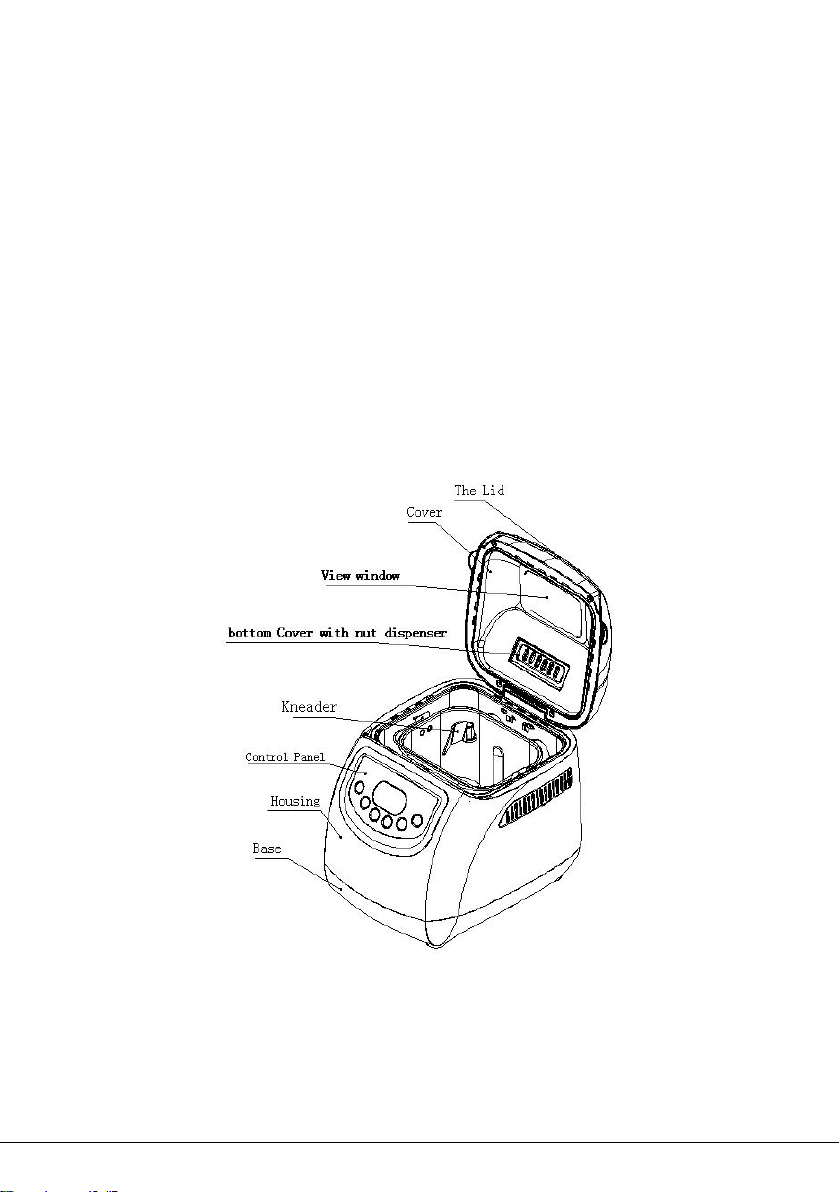
PARTS AND FEATURES

5
FUNCTION INTRODUCTION
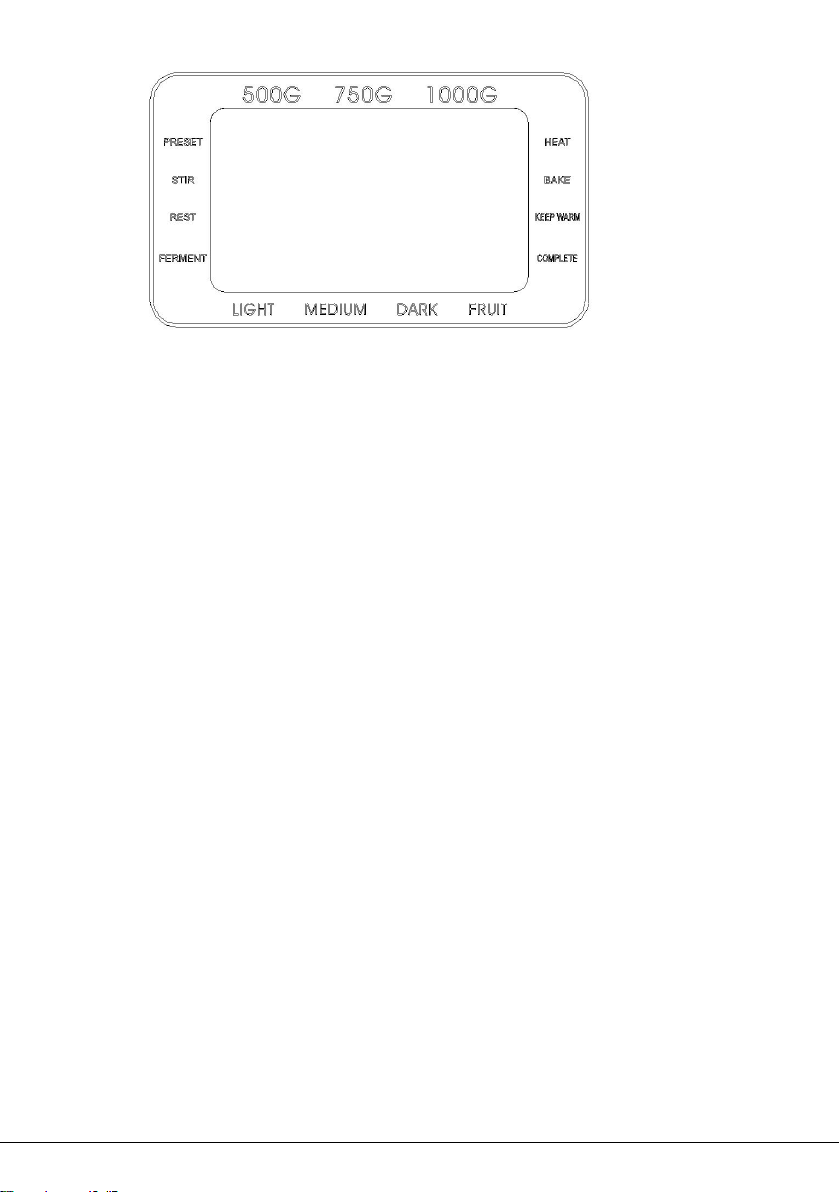
CONTROL PANEL
6
AFTER POWER ON
Plug the bread maker into power supply, a beep will be heard and
“3:00” will be displayed. But the colon between the “3” and “00”
don’t flash constantly. And “1” is the default program. The arrows
point to “750g” and “MEDIUM” as they are default settings.
START/STOP BUTTON
Press the START/STOP button once to start a program. The
indicator will light up, and the colon in the time display begin to flash
and the program will start. Any other button is inactivated except the
START/STOP button after a program has begun.
Press the START/STOP button for 0.5 seconds and shift to pause
state ,if no operation in 3 minutes, the program will continue
processing unit the setting program completed.
Press the START/STOP button for 3 seconds to cancel a program,
then a beep will be heard, it means that the program has been

7
switched off. This feature will help to prevent any unintentional
disruption to the operation of program.
To remove bread, press the START/STOP button to end the baking
cycle.
PREPROGRAMMED MENU
Press MENU button to select your desired programs. Each time it is
pressed (accompanied by a short beep) the program will vary. Press
the button discontinuously, the corresponding program number will
be cycled to show on the LCD display.
CRUST COLOR
Press COLOR button to select your desired setting: Light, Medium,
or Dark crust.
WEIGHT
Press the Weight button to choose your desired gross weight (500g,
750g, 1000g).
DELAY TIMER(“ or ”)
Use the DELAY TIMER feature to start the bread maker at a later
time. Press” or ”buttons to increase the cycle time shown on
the LCD display. Add up to 15 hours including the delay time and

8
bread making program.
NOTES:
Set the Delay Time after selecting PROGRAM MENU, WEIGHT,
and CRUST COLOR.
Do not use the timer function with recipes that include dairy or
other ingredients, such as eggs, milk, cream, or cheese.
You must decide how long it will be before your bread is ready
by pressing the “or ”. Please note the delay time should
include the baking time of program. After baking program is
complete he bread machine will shift to the Keep Warm setting
for 1 hour. Before start making bread, press the program menu
and crust color are select first, the n pressing “or ”to
increase or decrease the delay time at the increment of 10
minutes. The maximum delay is 15 hours.
POWER INTERRUPTION
In the event of a power outage, the process of making bread will
continue automatically within 10 minutes, even without press
START/STOP button .If the interruption time is longer than 15
minutes, the unit will not continue running and the LCD display will
revert back to the default setting. If the dough has started rising,
discard the ingredients in the bread pan and start over. If the dough
has not entered the rising phase when the power cord is remove
from wall outlet. You can press the START/STOP button to continue
9
the program from the beginning.
WARNING DISPLAY
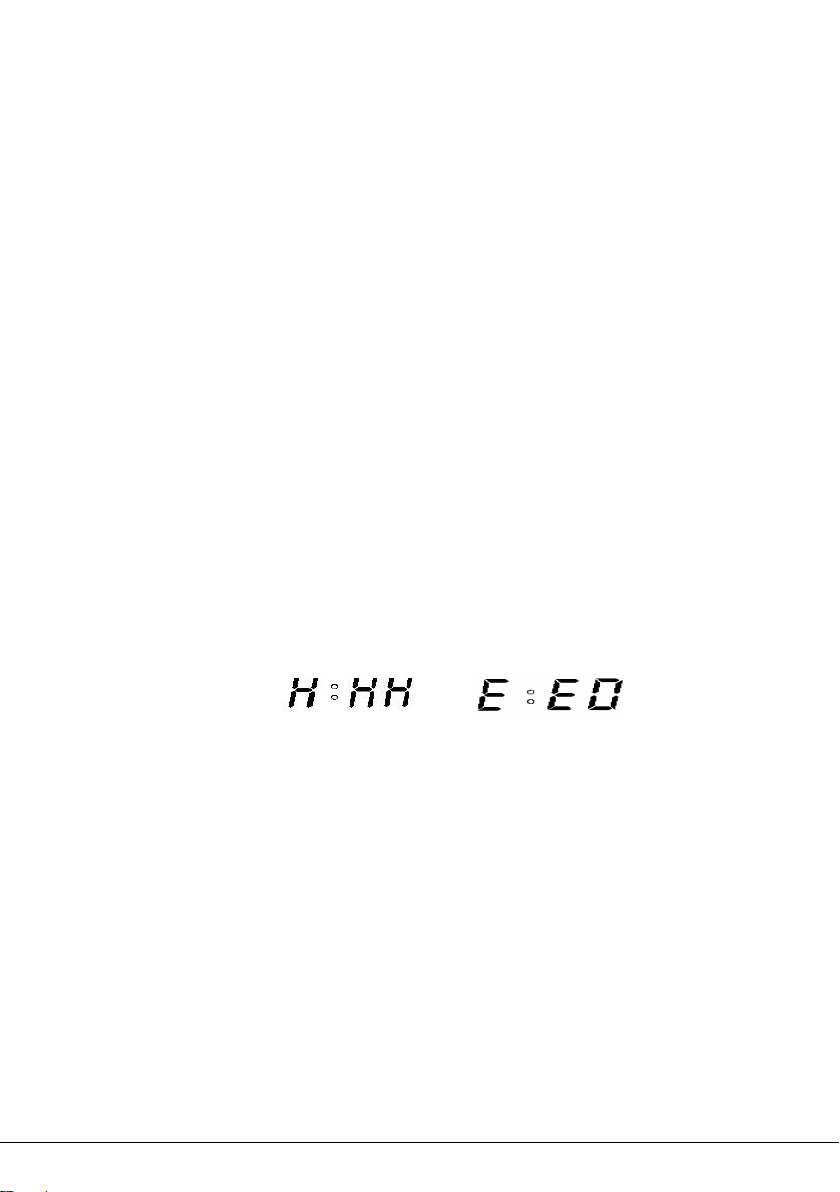
”HHH”-This warning means that the temperature inside of the
bread pan is too high. Press START/STOP button(see below
figure1)to stop the program, unplug the power cord, open the top
lid, and let the machine cool down completely for 10-20minutes
before restarting.
”EE0”-This warning means that the temperature sensor is
disconnected. Press START/STOP button(see below figure2) to
stop the program, unplug the power cord. Please check the
sensor by the nearest authorized service agent for examination,
repair or electrical /mechanical adjustment.
Figure 1 Figure 2
KEEP WARM
After baking program is complete, the bread machine will beep 10
times and shift to Keep Warm setting for 1 hour. It will be displayed
“0:00 ”.
To cancel the Keep Warm process, press the START/STOP button
for 3 seconds.
TIP: Removing bread immediately after baking program is complete

10
will prevent crust from becoming darker.
Using the fruit & nut dispenser
If you wish to add nuts or seeds to your loaf, and keep the best
flavor, better not put them into flour at the first preparation. Or they
would be too stir to lose flavor and texture.
Automatic adding add-ins function will help you without waiting by
the side of bread maker. Tip in the nuts or seeds at dispenser in the
lid. Close the lid then start the programme, after approximately 30
minutes (the exact time is programme dependent), the nut
dispenser will operate 3 times to push the bottom cover open, to
ensure all the contents have dispensed.
BEFORE THE FIRST USE
Wash and dry bread pan and kneading paddle.
Note: Do not use metal utensils in bread pan since they may
damage the non-stick surface.
CAUTION! Falling Object Hazard. Bread maker can wobble and
walk during kneading cycle. Always position it in the center of
counter away from the edge.
1.Check for any missing or damaged parts..
2.Clean all the parts according to “CLEANING AND
MAINTENANCE”.
Indice


