Zte Telstra 4GX HD Manuale utente

Telstra 4GX HD
A475
User Guide
ZTE Australia provides dedicated support with a local call centre and social media outreach.
Search ‘ZTE Australia’ on Facebook , Google+ and Twitter to keep in touch.
© ZTE 2016 Ver 1.0 Jan 2016
The SAR value for this device is published on ztemobiles.com.au

Copyrights
Copyright © 2016 by ZTE Corporation
All rights reserved.
No part of this publication may be quoted, reproduced, translated or used in any form or by
any means, electronic or mechanical, including photocopying and microfilm, without the
prior written permission of ZTE Corporation.
ZTE Corporation reserves the right to modify technical parameters and specifications in
this guide, and promptly correct the contents in the guide that are inconsistent with the
latest documents. All modifications shall be compiled in a new version of User Manual
without prior notice.
ZTE Corporation keeps the right to make the final explanation to this guide.
Trademarks
Android is a trademark of Google, Inc.
All other trademarks and copyrights remain the property of their respective owners.

Third-party Applications Statement
During the installation process of some third-party applications, issues of repeated restart
or abnormal operation of software might be caused by incompatibility of the third-party
applications rather than the phone.
Installation of a third-party ROM or non-official operating system (commonly called ‘rooting’
your device) might bring unwanted security risks and may make your device inoperable.
ZTE Corporation will not be liable for the security threats brought by upgrade of the
operating system.
System Recovery for lost passwords
If you have set a device PIN, Pattern or Password lock and have lost or forgotten your code
there are two possible solutions.
1. If you have setup a Google Account (your G Mail account) then enter the wrong
password 5 times to be prompted for your Google Account Password to open your device.
2. If you have not set up a Google Account in your handset then perform a factory reset:
Power Off your device. Press and hold the Volume Up key, then press the power key.
Select Recovery Mode > Factory Reset

Contents
Getting started................................................................................................................... 1
Key definitions..................................................................................................... 3
Inserting and Removing the SIM card ................................................................ 4
Inserting and Removing Memory card (optional) ............................................... 5
Inserting the battery ............................................................................................ 6
Removing the battery.......................................................................................... 7
Charging the Battery........................................................................................... 8
Getting to know your phone ............................................................................................ 9
Screen control..................................................................................................... 9
Volume Controls................................................................................................ 10
Home screen......................................................................................................11
Switch to sleep mode (turn off the display) ...................................................... 13
Wake up your phone......................................................................................... 14
Secure your device ........................................................................................... 14
Make and answer calls ................................................................................................... 15
Make a call........................................................................................................ 15

Answer a call..................................................................................................... 16
Reject a call ...................................................................................................... 16
End a call .......................................................................................................... 17
Adjust the volume ............................................................................................. 17
Turn the speaker on or off................................................................................. 17
Add a multi party or Conference call ................................................................ 17
Use touch tones during a call for automated call systems............................... 17
Contacts ........................................................................................................................... 18
Add new contact ............................................................................................... 18
Delete contacts ................................................................................................. 19
Edit contact details............................................................................................ 19
Search contacts ................................................................................................ 19
Add a contact to Favorites ................................................................................ 19
Import/Export contacts...................................................................................... 20
Share a contact................................................................................................. 20
Using Google Contacts..................................................................................... 20
Use Contacts to block an incoming caller ........................................................ 21
Messaging ...................................................................................................................... 22
Send messages ................................................................................................ 22

Receive messages ........................................................................................... 23
Message thread ................................................................................................ 23
Message Settings ............................................................................................. 24
Gmail................................................................................................................................. 24
Set up an Gmail account for the first time ........................................................ 24
Connectivity..................................................................................................................... 25
Wi-Fi.................................................................................................................. 26
Bluetooth® ........................................................................................................ 27
Bluetooth Low Energy (Bluetooth Smart) ......................................................... 28
Connect to a Computer to transfer files............................................................ 29
Settings ............................................................................................................................ 30
Airplane mode................................................................................................... 30
Device ............................................................................................................... 30
Accounts and sync............................................................................................ 32
Language .......................................................................................................... 33
Date & time ....................................................................................................... 33
About phone...................................................................................................... 34
Experiencing Multimedia................................................................................................ 34

Camera ............................................................................................................. 34
Camcorder ........................................................................................................ 35
Gallery............................................................................................................... 36
Music Player ..................................................................................................... 36
Sound Recorder................................................................................................ 36
FM radio ............................................................................................................ 37
More Applications ........................................................................................................... 38
Chrome ............................................................................................................. 38
File manager ..................................................................................................... 40
Clock ................................................................................................................. 40
Calculator.......................................................................................................... 41
Calendar ........................................................................................................... 42
Downloads ........................................................................................................ 43
Manage applications ....................................................................................................... 44
Install new applications ..................................................................................... 44
Uninstall applications ........................................................................................ 45
Technical Specifications ................................................................................................ 46
Troubleshooting .............................................................................................................. 48

Declaration of RoHS compliance .................................................................................. 52
Disposal of your old phone............................................................................................ 53

1
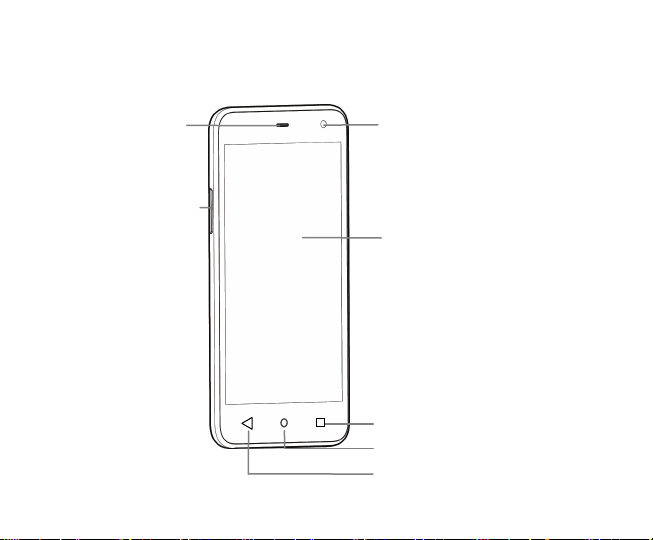
Receiver
Front camera
Recent Apps
Home
Back
Volume key
Display
Getting started

2
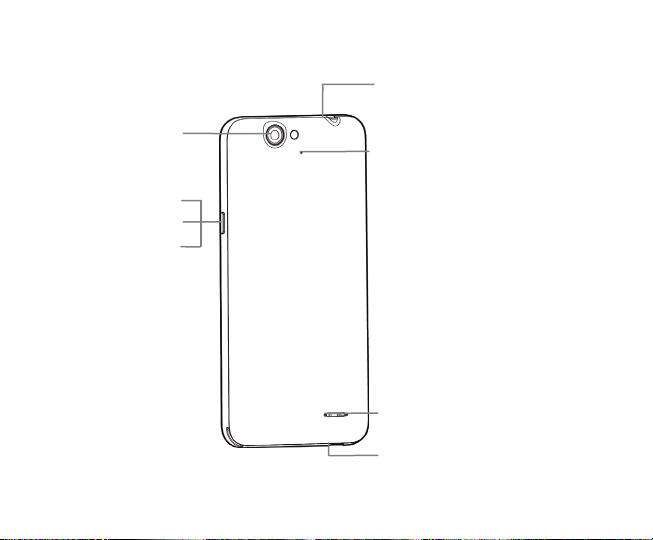
Headset jack
Back camera
USB port
Power
Reset
Lock key
Noise-reduction MIC
Speaker
Questo manuale è adatto per i seguenti modelli
1
Indice
Altri manuali Zte Telefono cellulare