
ZyXEL Communications NAS540 Supplemento

1
NAS540
Application Notes
Version 1.00
Oct, 2014

2
Contents
1. NAS Starter Utility .............................................................................................................. 4
1.1 NAS Starter Utility Installation.................................................................................... 4
1.2 NAS540 Initialization ................................................................................................... 5
1.3 Network Setting............................................................................................................ 6
1.4 DeskTop........................................................................................................................ 7
1.5 Network Drive............................................................................................................... 8
1.6 Shared Folder............................................................................................................. 10
1.7 myZyXELcloud ........................................................................................................... 11
1.8 Run the Initialization Wizard..................................................................................... 12
2. myZyXELcloud-Agent...................................................................................................... 13
2.1 Sign in.......................................................................................................................... 13
2.1.1 Sign in with Facebook........................................................................................ 13
2.1.2 Sign in with Google............................................................................................. 15
2.1.3 Sign up ................................................................................................................. 16
2.2 Pair NAS540............................................................................................................... 17
2.3 Unpair NAS540........................................................................................................... 21
3. Storage............................................................................................................................... 23
3.1 Create Volume............................................................................................................ 24
3.1.1 Create single volume on RAID......................................................................... 24
3.1.2 Create Disk Group.............................................................................................. 26
3.2 Repair volume............................................................................................................. 29
3.3 Delete Volume............................................................................................................ 31
4. Administrator..................................................................................................................... 32
4.1 Network........................................................................................................................ 33
4.2 Auto-upload Service .................................................................................................. 36
4.3 Dropbox....................................................................................................................... 42
4.4 Using the zDownload Folder.................................................................................... 47
4.5 WebDAV...................................................................................................................... 48
4.6 Media Server............................................................................................................... 51
5. PlayZone............................................................................................................................ 54
5.1 File Browser................................................................................................................ 55
5.2 Application Zone......................................................................................................... 56

3
5.3 Playzone Settings...................................................................................................... 57
5.4 Music............................................................................................................................ 58
5.5 Photo............................................................................................................................ 59
5.6 Video............................................................................................................................ 60
6. Status Center.................................................................................................................... 62
7. External Volume............................................................................................................... 63
8. APP Center ....................................................................................................................... 65
8.1 Gallery
.......................................................................................................................... 68
8.3 NFS.............................................................................................................................. 74
9. Help.................................................................................................................................... 78
9.1FAQ
................................................................................................................................ 79
4
1. NAS Starter Utility
1.1 NAS Starter Utility Installation
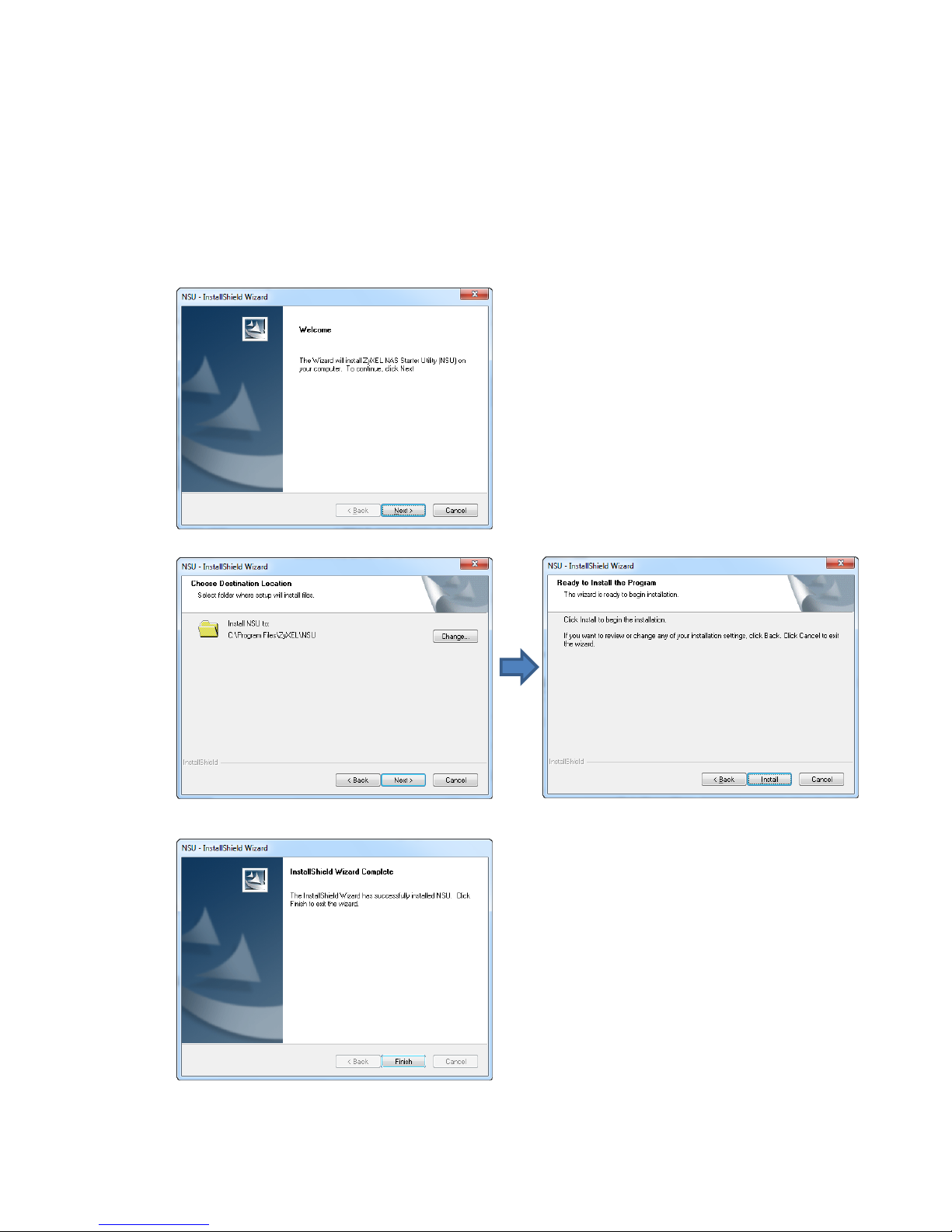
After you install a new hard drive on the NAS540, please use the NAS
Starter Utility to discover and access the NAS540 to assign an IP address
by the DHCP server or a static option. The steps are shown below:
Double-click setup.exe.
NSU_2.10_build_1061then click “Next” to
begin the installation
Select install folder
Finish Installation

5
1.2 NAS540 Initialization
After a successful installation, click on the NAS Starter Utility. The first
screen of the NSU will attempt to discover the NAS devices. Click on NAS
Seeker, and then choose the devices that you want to connect.
The default username is admin and the password is 1234.
Discover NAS devices
Select NAS540

6
1.3 Network Setting
After successful initialization, go back to the NSU main menu and click
Configuration > System Setting to start configuring. You can assign a new
hostname for this NAS540, set the TimeZone and PPPoE connection
information as well as an IP address.
Click System Setting
Setting Server Name,
TimeZone and network
7
1.4 DeskTop
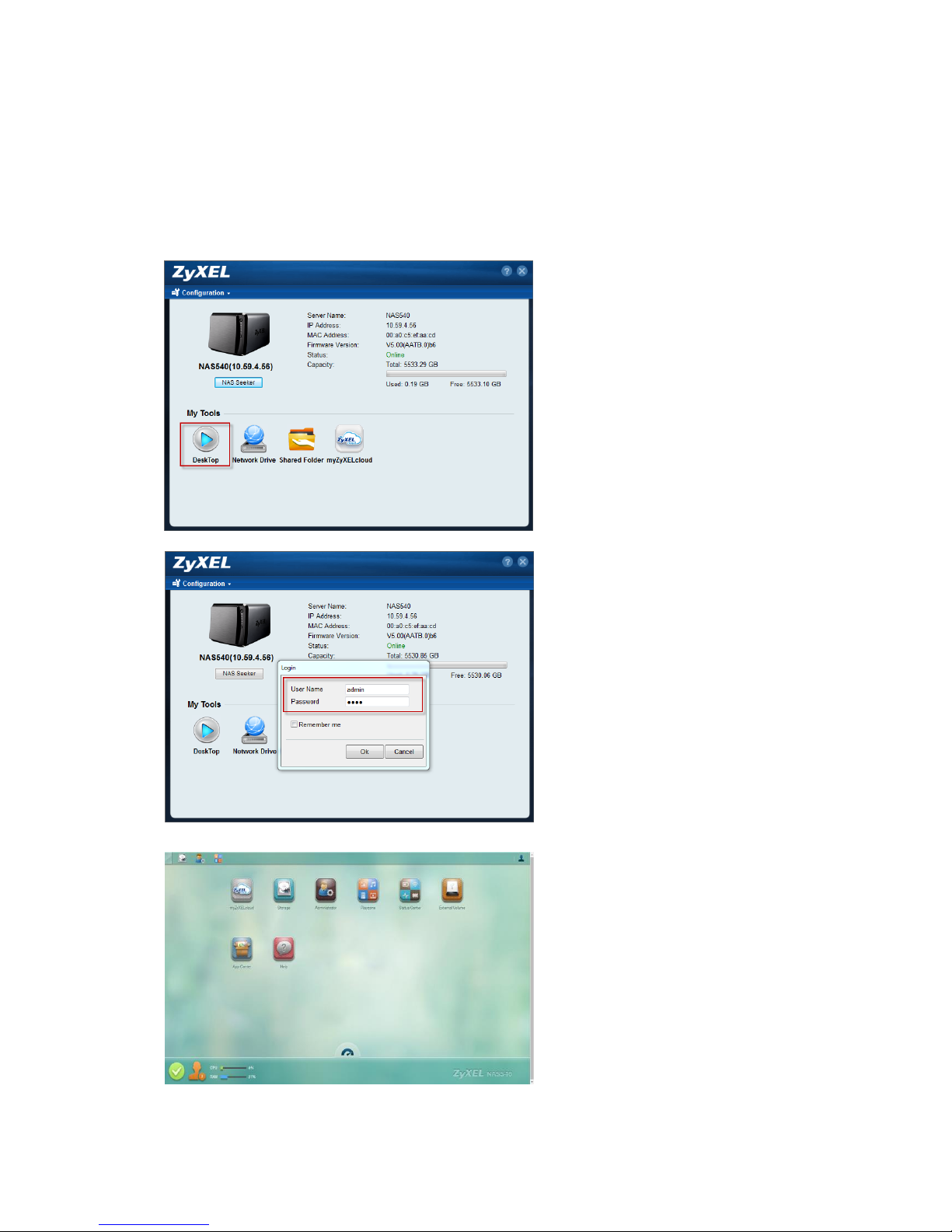
Click on DeskTop and enter the admin’s username and password to access
the NAS540’s GUI. Then the administrator can manage the device and
change the configurations.
Click DeskTop
Type User Name and Password
DeskTop screen

8
1.5 Network Drive
In the main NAS Starter Utility screen click Network Drive to add the NAS as
a network drive in your computer’s Windows Explorer.
Click Network Drive
Type user name and password
Select shared folder

9
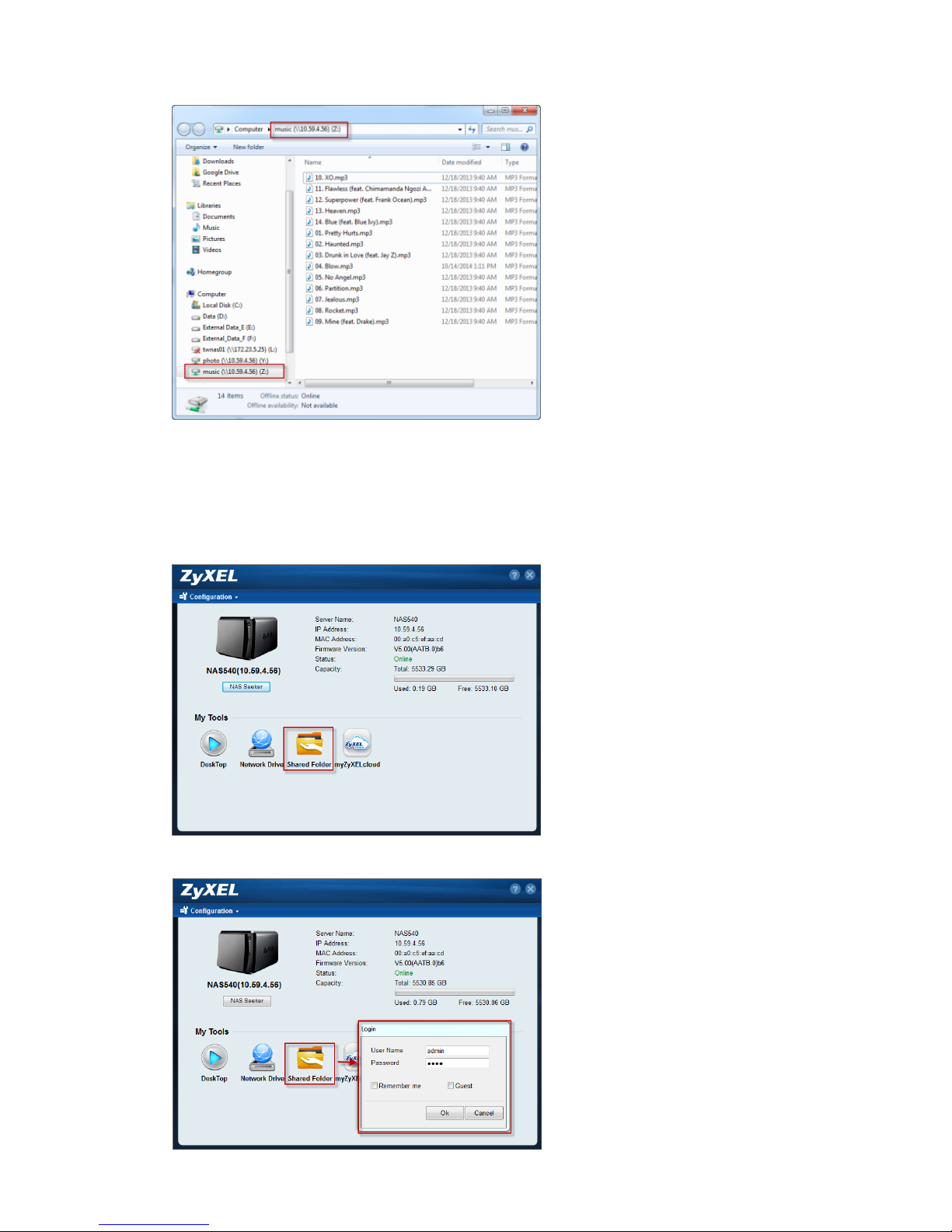
Check the Network map drive
Map the shared folder via Guest
Select shared folder
10
Check the Network map drive
1.6 Shared Folder
Click this to log into the NAS’s file directory in Windows Explorer.
Select the Shared Folder
Type user name and password
Altri manuali per NAS540
1
Indice
Altri manuali ZyXEL Communications Server di archiviazione di rete


Manuali Server di archiviazione di rete popolari di altre marche

HP
HP NetStorage 6000 Manuale utente

Seagate
Seagate U10 ST320423A Manuale utente

Synology
Synology RackStation RS816 Manuale

D-Link
D-Link ShareCenter Pro DNS-1200-05 Manuale utente

Avid Technology
Avid Technology VideoRAID ST Guida di sicurezza

Western Digital
Western Digital My Cloud Home Duo Manuale utente


