4
Using
the
50BMT
Terminal
Keyboard and Indicators
Configuring
the
Host
Port
The port
on
the
hostmust
be
configuredfor use with the 508MT. To configure the port •youuse a utility
routine calledSetTerminal Charact.eristics (1RM).
Use the following steps to configure the host port.
1. Log
on
to the ADP computing system using the 508MTyou
just
installed
You canlog
on
to the
system maintenance account, MAINT,
or
any
of
your application accounts.
2.
SelectUtility Function (UF) from the main menu.
3. Select SetTerminal Charact.eristics (TRM) from the utility functions menu.
4. Selectoption 1, Setup and Store Terminal Characteristics.
5.
At
the Terminal Type Options prompt, select 1 Video
Default
6. At the EnterTerminal Type Options prompt, selectthe option ADP508MT.
If
ADP 508MTis not
an
option, selectADP
SOSMT.
7. Enter the appropriate numberfor the type
of
slave printerattached to the terminal.
If
no slave printer
is used, selectthe option None.
8.
At the 80 Column Display (Y/N) prompt, press
Enter.
9. At the disable Type Ahead (YIN) prompt, press
Enter.
Adjusting
the
Contrast
and
Brightness
Use the two thumb knobs located
on
the lowerleft side
of
the monitorunitto adjust the screen contrast
(starsymbol) and brightness (moon symbol).
Adjusting
the
Tilt-Swivel
Base
The terminal can
be
adjusted to the viewing angle you prefer.
To
adjust the display angle, tiltthe terminal
forward
or
backward and rotate the terminal to the desired position. Once positioned the display remains
inthat position.
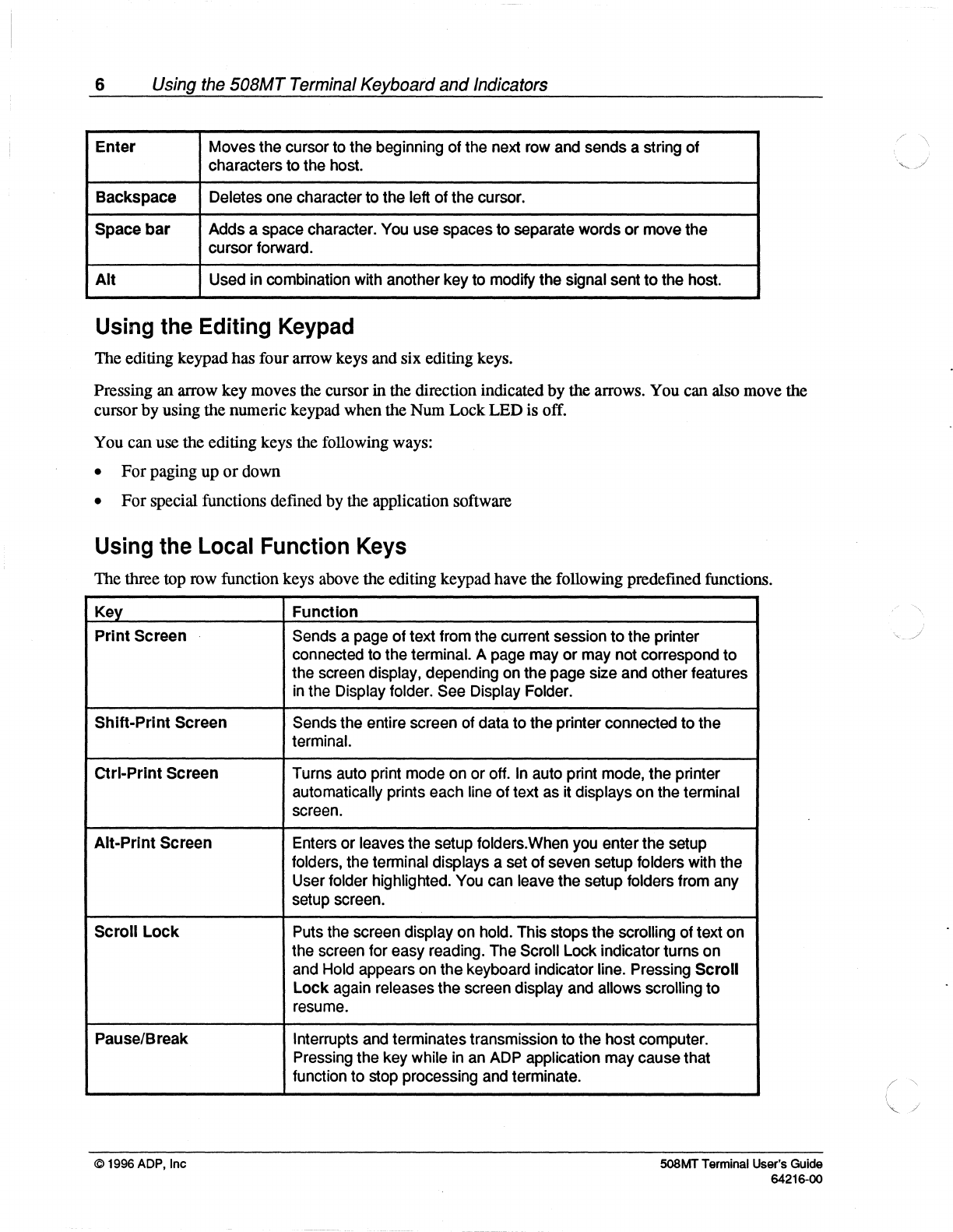
Using the 508MT Terminal Keyboard and Indicators
The 508MTuses a standard
PC
101-key keyboard that allows you to configure the terminal's operating
paramet.ers and communicate with an ADP host computer.
The keyboard has four groups
of
keys and three indicatorlights. These keys are grouped to help you enter
data accurately and easily. The keyboard also has two audible indicators, a keyclick and bell.
Some functions
may
vary, depending upon operating modes and software applications used.
The layout
of
the mainkeypad is similar to a typewriter keyboard, with alphanumeric characters,
punctuation marks, andShift keys. The main keypad also has a number
of
keys not found
on
a
typewriter, such as the
Ctrl
and Alt modifierkeys. Modifierkeys are pressed
in
combination with
anotherkey to modify the code sent by that key.
© 1996 ADP, Inc 508MTTerminal User's Guide
64216-00