
Advanced Bionics CI-5501 Manuale utente

M Zn-Air Battery Pak
CI-5501
instructions for use
English, Français, Español


1
SYMBOLS TABLE
Labeling symbols and their meanings
Date of Manufacture
Manufacturer
Model number
LOT number
Unique Device Identifier
Type of Protection: BF
Suitable temperature range for transport
and storage
See Instructions for Use
Fragile
Do not get wet
Suitable relative humidity range for transport
and storage
XXXX-XX-XX

2
Caution (refer to “Cautions & Warnings”
section for further information)
Dispose of in accordance with applicable
national and local regulations
MR Unsafe
Limitations and Contraindications
There are no known limitations or contraindications for the
M Zn-Air Battery Pak.
Precautions, Cautions, and Warnings
• This device should be used only by the individual for
whom it is prescribed.
• CHOKING HAZARD: Contains small parts that pose
a hazard of inhalation, choking, or ingestion. If any
parts are swallowed or inhaled, consult a physician or
hospital immediately.
• Do not leave children unattended with or allow children
to play with the M Zn-Air Battery Pak or battery cells.
• Do not allow children to place the M Zn-Air Battery Pak
or battery cells in the mouth or nose.
• Do not connect the M Zn-Air Battery Pak to the M
Battery Charger. The charger is to be used with the
rechargeable M Batteries only.
• Remove your sound processor and consult your cochlear
implant professional if uncomfortable sounds are heard
or in case of discomfort, pain or skin irritation.

3
• If a battery shows visible signs of leakage, dispose of
it in accordance with local regulations.
• Do not allow leaking battery fluid to come into contact
with skin, mouth, or eyes, as this fluid may cause a burn.
• High levels of static electricity may damage electronic
components of your sound processor or implant. Care
should be taken to avoid exposure of the system to
static electricity.
• In the event that you experience any issues with your
product, please contact your cochlear implant profes-
sional or the manufacturer. Do not attempt to service
or modify the Naída CI M, Sky CI M, or its accessories.
Doing so may compromise system performance and
will void the manufacturer’s warranty. Products should
be serviced only at Advanced Bionics and damaged
products should be returned to Advanced Bionics.
Undesireable Side Effects
Undesirable side eects of your Naída CI M or Sky CI M
system may include skin irritation and discomfort from pres-
sure on the ear, device overheating, or overly loud sounds.
Product Description
The M Zn-Air Battery Pak is a disposable power source for
the Naída™ CI M and Sky CI™ M Sound Processors. The
type of disposable battery to be used with the M Zn-Air
Battery Pak is a 675 power implant batteries (P675). Regular
675 hearing instrument batteries will not be powerful enough
for a cochlear implant. The suggested manufacturer and
battery is PowerOne P675 Implant Plus battery.

4
The M Zn-Air Battery Pak is available with non-tamperproof
and tamperproof cartridges.
Battery Cartridge Non-Tamperproof
Battery Door
Tamperproof
BatteryDoor
Intended Use
The M Zn-Air Battery Pak is intended to power the
Advanced Bionics Naída CI M and Sky CI M Sound
Processors.
The intended users of the M Zn-Air Battery Pak are users
of the Naída CI M or Sky CI M Sound Processors. The
intended use environments of the M Zn-Air Battery Pak are
healthcare and daily living environments
5
Compatibility
Naída CI M Zn-Air Battery Pak is compatible with Naída CI
M and Sky CI M Sound Processors from Advanced Bionics.
Operating Instructions
Inserting Zn-Air Disposable Battery Cells
(Non-Tamperproof Cartridge)
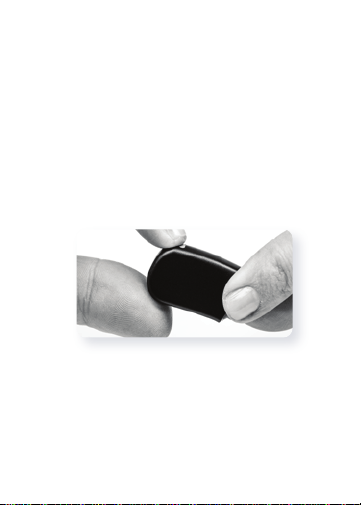
Holding the battery cartridge in one hand, gently but
firmly push down on the lever on the back of the battery
cartridge. This will cause the Zn-Air battery drawer to pop
out of the bottom of the cartridge. Pull the battery door out
of the cartridge with the other hand.
Remove the Zn-Air cells from their package, making sure
to remove the sticker from the flat positive (+) side of the
cell. Removing the sticker allows air to enter and activate
the battery, so be sure to use the battery immediately after
peeling o the sticker.
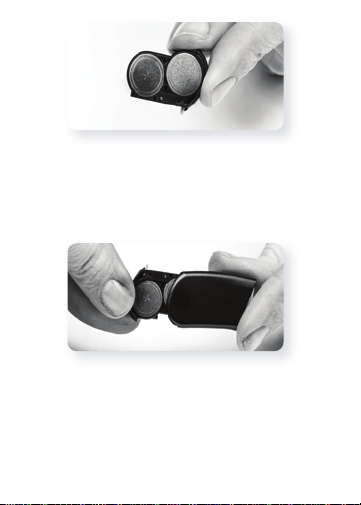
Place two Zn-Air cells, positive (flat) side up, in the two
openings in the battery drawer.
6
Once batteries are flush with the top of the battery drawer,
gently slide the battery drawer back into the battery
cartridge. If the cells are inserted incorrectly, the battery
drawer will not close.
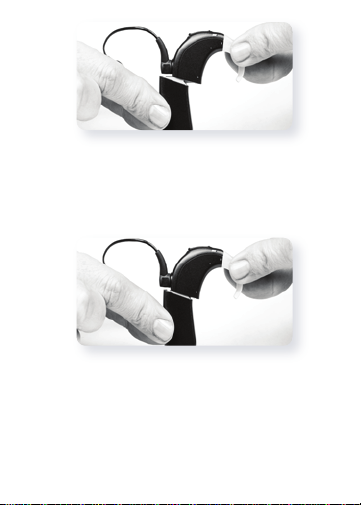
Then begin to attach the battery cartridge to the Naída CI
by holding the sound processor in one hand. Rotate RF
cable upward to avoid bumping it upon battery placement.
7
Align the battery cartridge connector with the processor
housing side of the connector.
Slide the battery onto the processor until you feel it click
into place.

8
Inserting Zn-Air Disposable Battery Cells
(Tamperproof Cartridge)
Using the same tool provided for the M T-Mic™ microphone
or M Earhook removal and replacement, insert the pointed
end of the tool into the small hole located on the spine of the
Zn-Air cartridge.
With the tool inserted in the hole, gently push in and
downward until you feel the Zn-Air drawer release and pop
out the button of the Zn-Air cartridge. If you do not have
the tool present, any thin, pointed device should work to
release the drawer.
Questo manuale è adatto per i seguenti modelli
11
Indice
Lingue:


