
Agilent Technologies VS G8600-60002 Manuale utente

Vacuum Products Division
Wireless
Remote Model
G8600-60002
for Agilent Technologies Helium
Leak etection (G8610, G8611, or
G8612)
or for VS Series Leak etector
Part Number 699909945
Rev. E
August 2017
Operation Manual
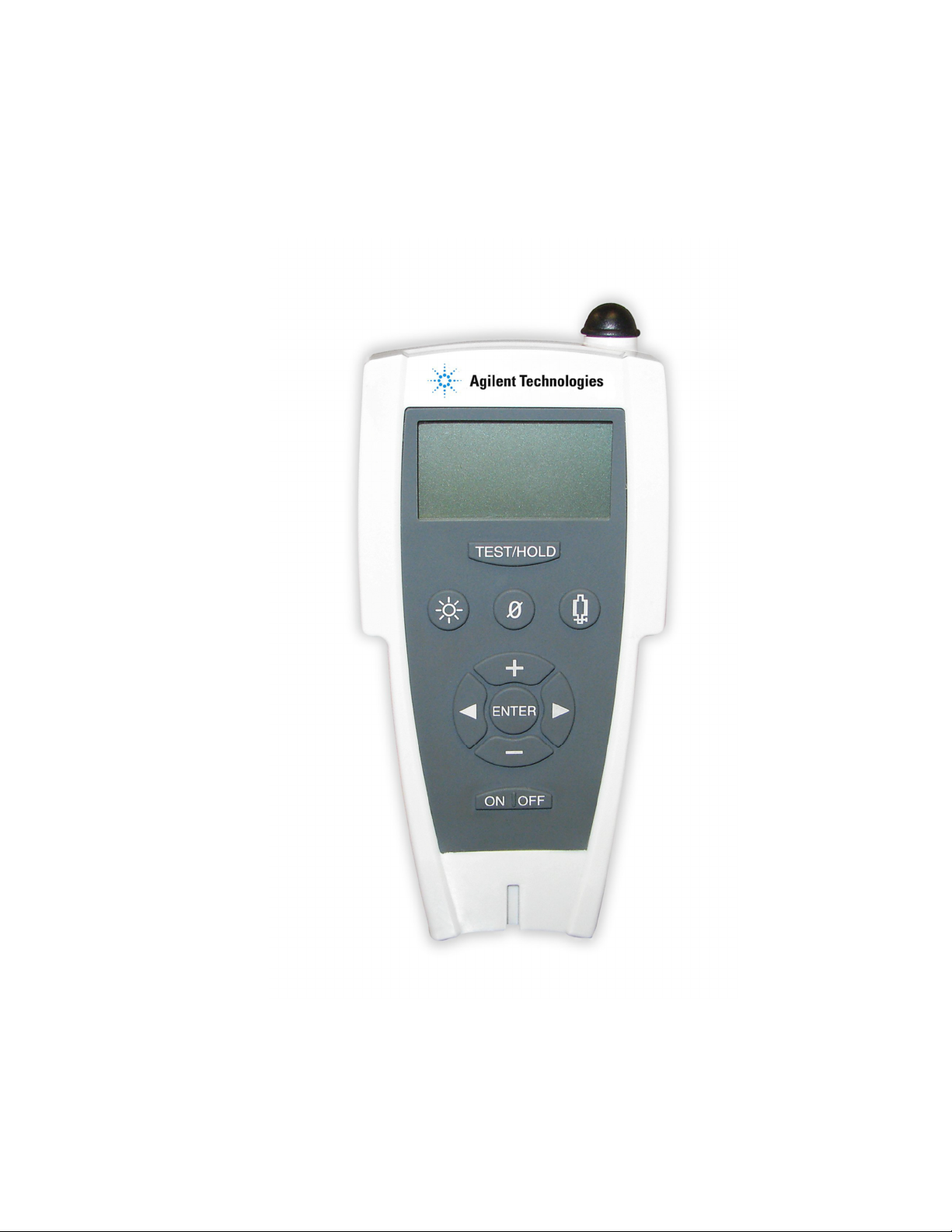
Wireless Remote for Agilent Helium Leak etector
ii
VS Series Leak Detector Wireless Remote
VS Series Leak Detector Wireless RemoteVS Series Leak Detector Wireless Remote
VS Series Leak Detector Wireless Remote
Model
Model Model
Model G8600
G8600G8600
G8600-
--
-6000
60006000
6000
Copyright 2014
Agilent, Inc

Wireless Remote for Agilent Helium Leak etector
iii
Warranty
WarrantyWarranty
Warranty
Products manufactured by Seller are warranted against defects in materials and workmanship for
twelve (12) months from date of shipment thereof to Customer, and Seller’s liability under valid
warranty claims is limited, at the option of Seller, to repair, to replace, or refund of an equitable
portion of the purchase price of the Product. Items expendable in normal use are not covered by
this warranty. All warranty replacement or repair of parts shall be limited to equipment
malfunctions which, in the sole opinion of Seller, are due or traceable to defects in original
materials or workmanship. All obligations of Seller under this warranty shall cease in the event of
abuse, accident, alteration, misuse, or neglect of the equipment. In-warranty repaired or replaced
parts are warranted only for the remaining unexpired portion of the original warranty period
applicable to the repaired or replaced parts. After expiration of the applicable warranty period,
Customer shall be charged at the then current prices for parts, labor, and transportation.
Reasonable care must be used to avoid hazards. Seller expressly disclaims responsibility for loss
or damage caused by use of its Products other than in accordance with proper operating
procedures. Except as stated herein, Seller makes no warranty, express or implied (either in fact or
by operation of law), statutory or otherwise; and, except as stated herein, Seller shall have no
liability under any warranty, express or implied (either in fact or by operation of law), statutory or
otherwise. Statements made by any person, including representatives of Seller, which are
inconsistent or in conflict with the terms of this warranty shall not be binding upon Seller unless
reduced to writing and approved by an officer of Seller.
Warranty Replacement and Adjustment
Warranty Replacement and AdjustmentWarranty Replacement and Adjustment
Warranty Replacement and Adjustment
All claims under warranty must be made promptly after occurrence of circumstances giving rise
thereto, and must be received within the applicable warranty period by Seller or its authorized
representative. Such claims should include the Product serial number, the date of shipment, and a
full description of the circumstances giving rise to the claim. Before any Products are returned for
repair and/or adjustment, written authorization from Seller or its authorized representative for the
return and instructions as to how and where these Products should be returned must be obtained.
Any Product returned to Seller for examination shall be prepaid via the means of transportation
indicated as acceptable by Seller. Seller reserves the right to reject any warranty claim not promptly
reported and any warranty claim on any item that has been altered or has been returned by non-
acceptable means of transportation. When any Product is returned for examination and inspection,
or for any other reason, Customer shall be responsible for all damage resulting from improper
packing or handling, and for loss in transit, notwithstanding any defect or non-conformity in the
Product. In all cases, Seller has the sole responsibility for determining the cause and nature of
failure, and Seller’s determination with regard thereto shall be final. If it is found that Seller’s
Product has been returned without cause and is still serviceable, Customer will be notified and the
Product returned at Customer’s expense; in addition, a charge for testing and examination may be
made on Products so returned.

Wireless Remote for Agilent Helium Leak etector
iv
This page intentionally left blank

Wireless Remote for Agilent Helium Leak etector
v
Table of Contents
Warranty ...............................................................................................................................................................................iii
Warranty Replacement and Adjustment ........................................................................................................................iii
Preface ................................................................................................................................................................................ ix
ocumentation Standards .......................................................................................................................................... ix
Symbols...................................................................................................................................................................... ix
Text ............................................................................................................................................................................. ix
Hazard and Safety Information ................................................................................................................................... x
Solvents ...................................................................................................................................................................... xi
Equipment, General .................................................................................................................................................. xi
Radio .......................................................................................................................................................................... xii
Power ............................................................................................................................................................................ xiii
External AC/ C Power ........................................................................................................................................... xiii
Battery Set Power ................................................................................................................................................... xiii
External Headphones ................................................................................................................................................. xvi
Radio Compliance ...................................................................................................................................................... xvii
Agilent Services ......................................................................................................................................................... xviii
Contacting Agilent .................................................................................................................................................... xviii
1
Introduction to the Wireless Remote ..................................................................................................................1-1
1.1
Wireless Remote .............................................................................................................................................1-1
1.1.1
Wireless Remote imensions and Connections ................................................................................1-2
1.1.2
Front Panel isplay and Controls ..........................................................................................................1-3
2
Enabling Leak etector for Wireless ...................................................................................................................2-1
2.1
Agilent Technologies Helium Leak etector (G8610, G8611, or G8612 Series Leak etector) .......2-1
2.2
VS Series Leak etector (Legacy) ................................................................................................................2-2
3
Operating the Wireless Remote ...........................................................................................................................3-4
3.1
Startup and Shutdown ...................................................................................................................................3-4
3.1.1
Startup ........................................................................................................................................................3-4
3.1.2
Shutdown ...................................................................................................................................................3-4
3.2
Screens .............................................................................................................................................................3-5
3.2.1
Basic Functions .........................................................................................................................................3-5
3.2.2
Home Screen .............................................................................................................................................3-7
3.2.3
Speaker Volume Setup Screen ............................................................................................................ 3-10
3.2.4
Backlight Screen .................................................................................................................................... 3-11
3.2.5
Communication Setup Screen ............................................................................................................ 3-13
3.2.6
Contrast Setup Screen .......................................................................................................................... 3-22
3.2.7
Sleep Timer Setup ................................................................................................................................. 3-24
3.2.8
Version Info ............................................................................................................................................. 3-27
Appendix A. Specifications ............................................................................................................................................... 1
A.1 Specifications .......................................................................................................................................................... 1

Wireless Remote for Agilent Helium Leak etector
vi
Table of Figures
Figure 1-1. Wireless Remote imensions, Connections, and Controls .................................................................1-2
Figure 1-2. Front Panel isplays and Controls ...........................................................................................................1-3
Figure 1-3. Screen Flow ..................................................................................................................................................1-6
Figure 2-1. Helium Leak etector settings screen ....................................................................................................2-1
Figure 2-2. VS Series home screen ..............................................................................................................................2-2
Figure 2-3. VS Series Menus..........................................................................................................................................2-2
Figure 2-4. VS Series set-up screen 1 ..........................................................................................................................2-3
Figure 2-5. VS Series set-up screen 2 ..........................................................................................................................2-3
Figure 2-6. VS Series wireless set-up ...........................................................................................................................2-3
Figure 3-1. Home Screen - Linear and Log Views .....................................................................................................3-7
Figure 3-2. Home Screen - Under and Over Indicators .............................................................................................3-8
Figure 3-3. Operating State Status Messages ...........................................................................................................3-9
Figure 3-4. Speaker Volume Setup Screen .............................................................................................................. 3-10
Figure 3-5. Speaker Volume Setup Configuration Screen ..................................................................................... 3-10
Figure 3-6. Speaker Volume Setup Screen .............................................................................................................. 3-11
Figure 3-7. Backlight Screen ....................................................................................................................................... 3-11
Figure 3-8. Backlight Setup Configuration Screen ................................................................................................. 3-12
Figure 3-9. Communications Setup - Initial ............................................................................................................. 3-13
Figure 3-10. Choose L Screen ................................................................................................................................. 3-14
Figure 3-11. Speaker Volume Setup Screen ............................................................................................................ 3-14
Figure 3-12. Backlight Screen..................................................................................................................................... 3-15
Figure 3-13. Setup Screen ........................................................................................................................................... 3-15
Figure 3-14. Select Screen .......................................................................................................................................... 3-15
Figure 3-15. Choose L Screen ................................................................................................................................. 3-16
Figure 3-16. Link Screen .............................................................................................................................................. 3-16
Figure 3-17. No Available L ...................................................................................................................................... 3-16
Figure 3-18. Speaker Volume Setup Screen ............................................................................................................ 3-17
Figure 3-19. Backlight Screen..................................................................................................................................... 3-17
Figure 3-20. Setup Screen ........................................................................................................................................... 3-17
Figure 3-21. Select Screen .......................................................................................................................................... 3-18
Figure 3-22. Search Screen ......................................................................................................................................... 3-18
Figure 3-23. Searching Screen ................................................................................................................................... 3-18
Figure 3-24. Choose L Screen ................................................................................................................................. 3-19
Figure 3-25. Link Screen .............................................................................................................................................. 3-19
Figure 3-26. Speaker Volume Setup Screen ............................................................................................................ 3-19
Figure 3-27. Backlight Screen..................................................................................................................................... 3-20
Figure 3-28. Backlight Screen..................................................................................................................................... 3-20
Figure 3-29. Select Screen .......................................................................................................................................... 3-20
Figure 3-30. Search Screen ......................................................................................................................................... 3-21
Figure 3-31. MAC Addresses Screen ........................................................................................................................ 3-21
Figure 3-32. Verify MAC Addresses Screen ............................................................................................................. 3-21
Figure 3-33. Speaker Volume Setup Screen ............................................................................................................ 3-22
Figure 3-34. Backlight Screen..................................................................................................................................... 3-22
Figure 3-35. Setup Screen ........................................................................................................................................... 3-22
Figure 3-36. Contrast - Initial Screen ......................................................................................................................... 3-23
Figure 3-37. Contrast - Configuration ....................................................................................................................... 3-23
Figure 3-38. Speaker Volume Setup Screen ............................................................................................................ 3-24
Figure 3-39. Backlight Screen..................................................................................................................................... 3-24
Figure 3-40. Setup Screen ........................................................................................................................................... 3-25
Figure 3-41. Contrast - Initial Screen ......................................................................................................................... 3-25
Figure 3-42. Sleep Timer Screen ................................................................................................................................ 3-25
Figure 3-43. Sleep Timer Configuration Screen ...................................................................................................... 3-26

Wireless Remote for Agilent Helium Leak etector
vii
Figure 3-44. Speaker Volume Setup Screen ............................................................................................................ 3-27
Figure 3-45. Backlight Screen..................................................................................................................................... 3-27
Figure 3-46. Setup Screen ........................................................................................................................................... 3-27
Figure 3-47. Contrast - Initial Screen ......................................................................................................................... 3-28
Figure 3-48. Sleep Timer Screen ................................................................................................................................ 3-28
Figure 3-49. Version - Initial Screen ........................................................................................................................... 3-28
Figure 3-50. Version - Information Screen ............................................................................................................... 3-29

Wireless Remote for Agilent Helium Leak etector
viii
List of Tables
Table 1. Wireless Remote: Recommended Cells and Service Life ......................................................................... xvi
Table 3-1. Screen Basic Functional Items ..................................................................................................................3-5
Table 3-2. Status Messages ..........................................................................................................................................3-6
Table A-1. Wireless Remote Specifications ............................................................................................................... A-1

Wireless Remote for Agilent Helium Leak etector
ix
reface
refacereface
reface
ocumentation Standards
Symbols
This manual uses the following documentation standards:
Note
Notes contain important information.
Caution
Cautions appear before instructions which if not followed
could cause damage to the equipment or data loss.
Warning
Warnings appear for a particular procedure or practice which if
not followed correctly could lead to serious injury or death.
Text
• Hard buttons are depicted in text in bold
boldbold
bold text.
• Italics is used for emphasis or to indicate screen text.
• Wireless Remote is used for leak detector Wireless Remote Control handheld (HH) unit.
Wireless Remote for Agilent Helium Leak etector
x
Hazard and Safety Information
Operators and service personnel must be aware of all hazards associated with this equipment.
They must know how to recognize hazardous and potentially hazardous conditions, and know how
to avoid them. The consequences of unskilled, improper, or careless operation of the equipment
can be serious. Every operator or service person must read and thoroughly understand
operation/maintenance manuals and any additional information provided by Agilent. All warning
and cautions must be read carefully and strictly observed. Consult local, state, and national
agencies regarding specific requirements and regulations. Address any safety, operation, and/or
maintenance questions to your nearest Agilent office.
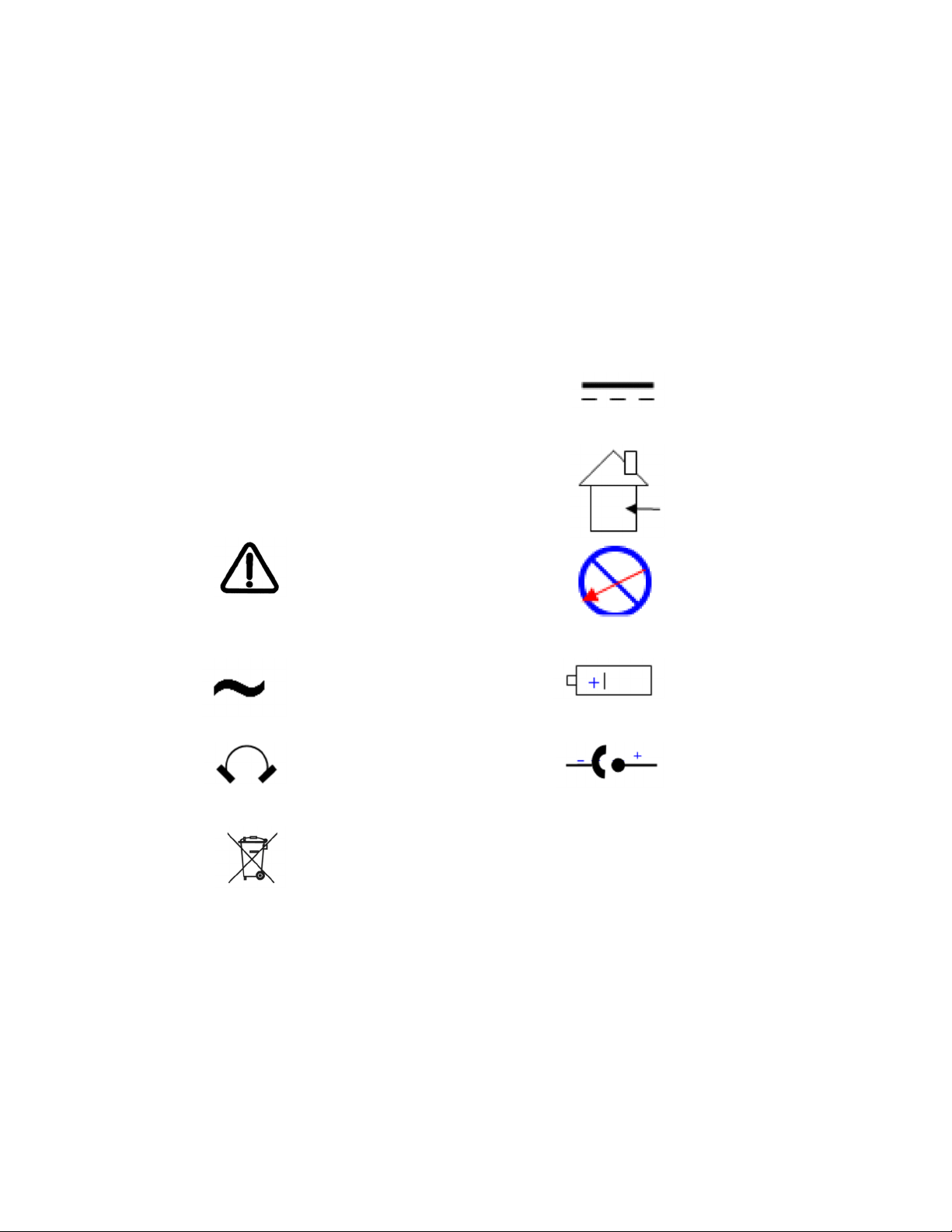
The common international symbols used in this manual and on the equipment are defined below:
OFF OFF Supply
(Power)
irect Current
ON ON Supply
(Power)
Indoor, ry
Location Use
Only
Warning, Risk of
danger
Refer to
documentation
No
Serviceable
Part Inside
Alternating
Current
Positioning
Cell (Battery)
Headphone C Input
o Not Place in
Trash
Questo manuale è adatto per i seguenti modelli
1
Indice
Altri manuali Agilent Technologies Telecomando


