
AirTies AP-301 Manuale utente
USER MANUAL
Wireless Access Point
Repeater
Bridge


Manual Overview
This manual guides you through the steps necessary for setting up and
configuring the AirTies AP-301 54Mbps 80 .11g Wireless Access
Point/Repeater/Bridge. Please read this manual carefully before beginning
the installation process.
The Warranty does not cover failure or damage as a result of not following
the instructions in the manual. AirTies will not be held responsible in such
circumstances.
The User Manual is an important resource you can refer to for safe and
proper use of your device. Please retain it for future reference.
Safety and Maintenance
In order to prevent damage to your device, be sure to keep
it in its original box during transportation.
The device must be used solely with its original power adapter.
Please note that the adapter is 0V only. Do not use with
110V AC.
Do not insert a PSTN (phone) plug into the LAN port.
If you encounter any problems, do not open or disassemble
the device. Instead, call AirTies Technical Support at +90 1
444 0 39.
In order to prevent electric shock, do not operate the device
in wet or damp areas. Do not use the phones connected to
the device during lightning storms.
In the event of a gas leak, do not use the device. Do not turn
the device on or off. Do not plug or unplug the power cord.
Avoid using the device in dusty environments. If dust buildup
should occur, use a dry cloth to remove the dust.
To clean the exterior of the device use a dry cloth. Do not
attempt to clean the interior. There are no user serviceable
components inside.
For information regarding the installation and configuration
of the device consult the remainder of this manual.

1.Introduction...............................................................................................1
1.1.Main Features........................................................................................2
1.2. Minimum System Requirements........................................................2
1.3. Package Contents...............................................................................2
1.4. Top iew...............................................................................................3
2. Connecting the Cables............................................................................3
3. Preparing For Installation....................................................................4
3.1. Assigning a local IP address to a computer that is running WindowsXP.....4
3.2. Assigning a local IP address to a computer that is running Windows98......5
3.3. Assigning a local IP address to a computer that is running Windows2000.....7
4.1. IP Settings...........................................................................................8
4.2. Wireless Network...............................................................................9
4.2.1. Wireless Settings...............................................................9
4.3. Setting the Operating Mode...............................................................10
4.3.1. Configuring the AP-301 as an Access Point...................................11
4.3.2. Configuring the AP-301 as a Repeater...........................................12
4.3.3. Configuring the AP-301 as a Bridge............................................14
4.4. Wireless Security Settings....................................................................15
4.1 WPA Security Settings...................................................................15
4.4.2 WPA2 Security Settings................................................................16
4.4.3 WEP Security Settings...........................................................................17
4.5. Access Control..................................................................................18
4.6. Management.......................................................................................19
4.7.Tools....................................................................................................20
4.8. Reset.................................................................................................20
5. Technical Specifications..........................................................................21
6. Physical Specifications............................................................................21
TABLE OF CONTENTS
1.
Introduction
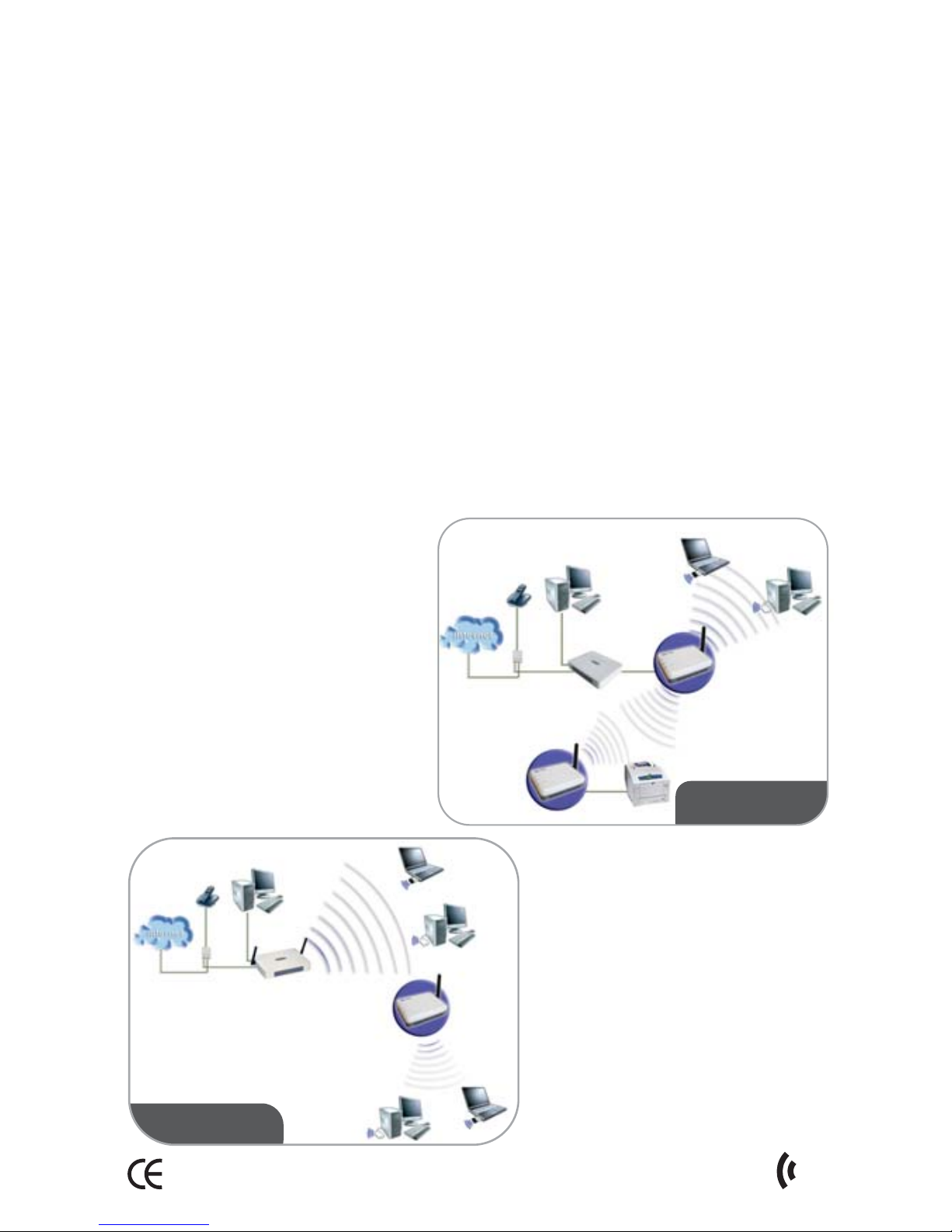
The AirTies AP-301 is an IEEE 80 .11b/g compliant, 54 Mbps wireless
communication device that can be used as a Wireless Access Point,
Repeater, or Bridge.
You can connect the AirTies AP-301 to a wired router through the Ethernet
port to setup a wireless local network and enable your wireless computers
to access the Internet.
As a repeater, the AP-301 enables you to extend the coverage area
of a wireless network. The AirTies Mesh Technology is what makes this
possible. The AirTies Mesh Technology resolves problems such as loss of
wireless signal or limited coverage area often encountered in multiple-
story or reinforced concrete buildings. Using the AP-301, the wireless
coverage area can be extended to the maximum without sacrificing
signal quality.
Computers on the network connect to the AP-301 with the strongest
signal, and reach the router or the wired network through the AirTies
Mesh Network.
The AP-301, used as a bridge, enables wired devices (with an Ethernet
interface) such as printers and desktop computers to be included in a
wireless network.
Access Point
and Bridge
1
AirTies AP-301 User Manual
Repeater
IEEE 80 .11b/g compatible, 54Mbps Wireless Access Point, Repeater,
Bridge
Backward compatible with 11Mbps 80 .11b wireless devices
AirTies Mesh Technology support to extend wireless coverage area
across very wide areas or concrete buildings where signal strength
problems are common
Used as a "Wireless Bridge", ability to include wired devices with an
Ethernet interface in the wireless network
Wireless operating ranges of up to 400 meters outdoors and 100
meters indoors
Advanced wireless security with support for WPA , WPA,WEP, and
80 .1x standards
High performance using the latest chip technologies
With "Auto MDI/MDIX", it automatically operates with both straight
and cross Ethernet cables
Easy to use Web-based user interface
Automatic local IP address assignment by the DHCP server
Firmware updates through the web interface
4x7 technical support by the highly trained AirTies Technical Support
team backed up by the AirTies R&D team
2AirTies AP-301 User Manual
1.1. Main Features
USER MANUAL
Wireless Access Point
Repeater
Bridge
1.2.
Mini u Syste Require ents
In order to configure the AirTies AP-301, a PC running any version of
Windows, Unix, Linux, or Mac operating systems is required. The AP-301
does not need to be connected to a PC during normal operation.
1.3.
Package Contents
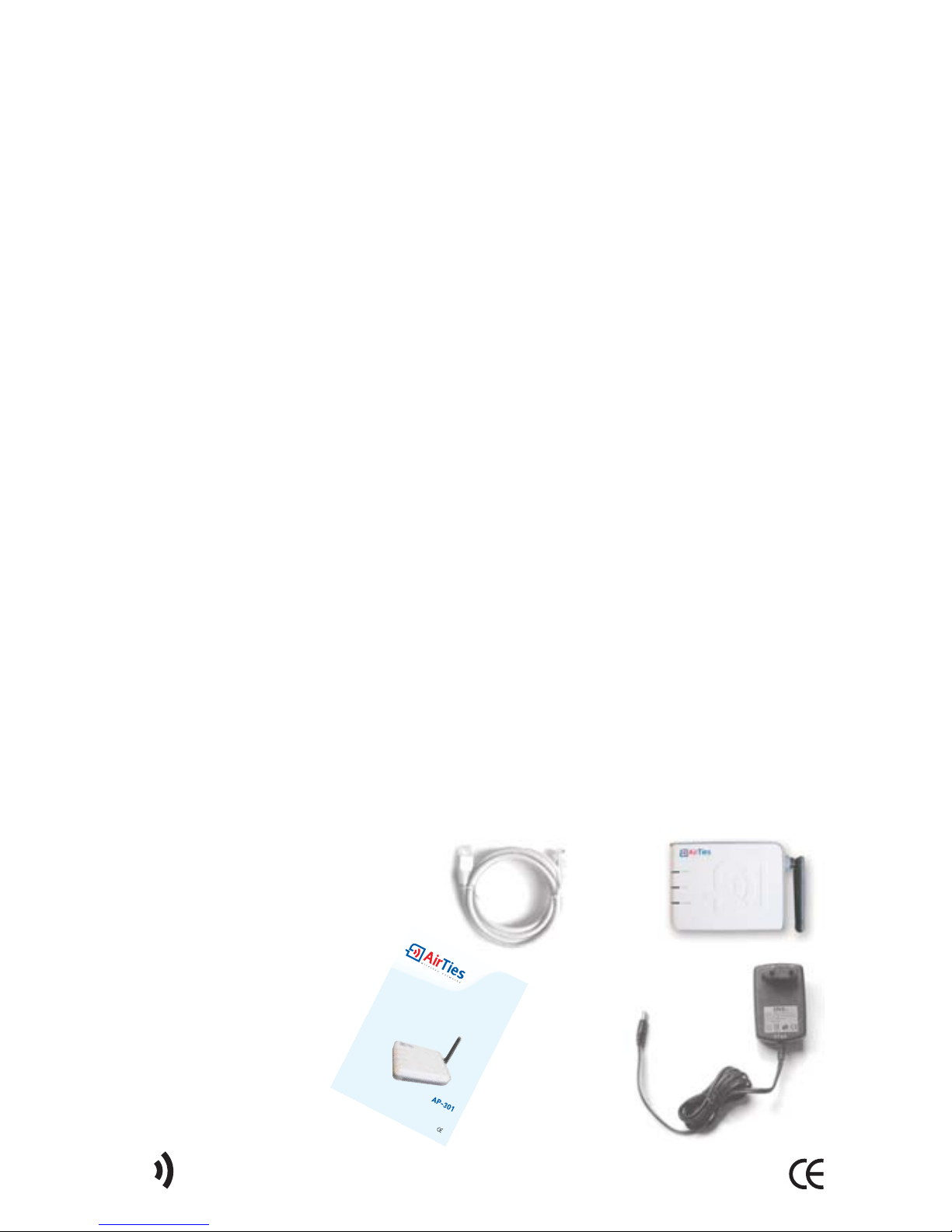
AP-301 54Mbps 80 .11g Wireless Access Point / Repeater / Bridge
Ethernet Cable
Power Adapter
User Manual
3
AirTies AP-301 User Manual
2.
Connecting the Cables
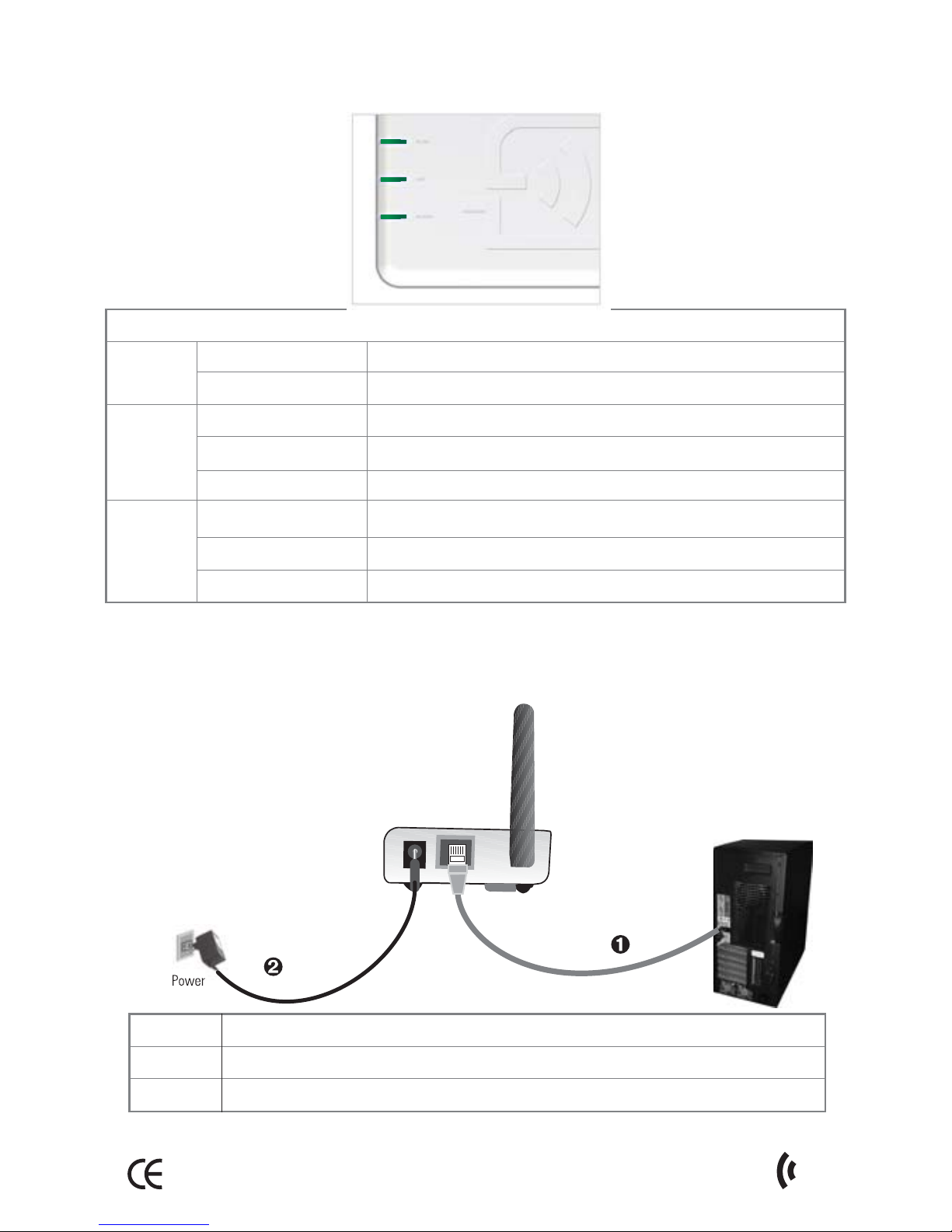
The correct way of connecting the AP-301 is shown in the figure below.
LAN
Power
10/100 Ethernet port (auto MDI/MDIX); connects to LAN
5V DC; to be connected to the power adapter
Port Interface
1.4 Top View
Power
WLAN
LAN
Green
Off
Green
Green flashing
Off
Green
Green flashing
Off
AP-301 is powered on.
AP-301 is off.
Wireless network is set up and active
Data exchange over the wireless LAN
Wireless network not active No Wireless network
There is a device connected to the LAN port
Data exchange over the LAN port
No connection on the LAN port
LED Light State
4AirTies AP-301 User Manual
3.
Preparing For Installation
3.1. Assigning a local IP address to a co puter that is
running WindowsXP
The installation settings of the AP-301 must be done from a PC that is
directly, not wirelessly, connected to it. However, the AirTies AP-301
cannot assign an IP address to the PC connected to it for doing the
installation settings since the DHCP feature is not enabled in the default
factory settings. Therefore, an IP address will need to be assigned
manually to the PC.
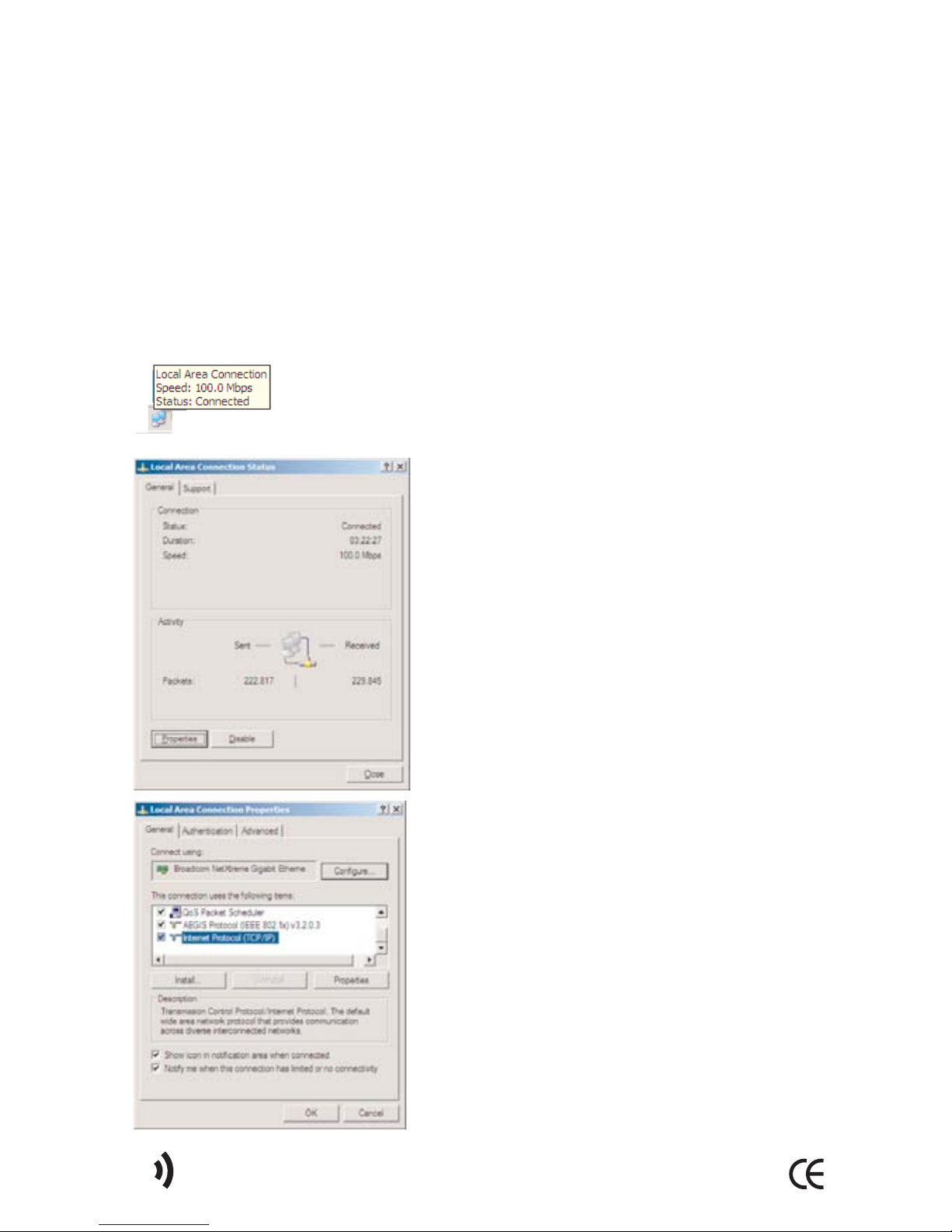
Double-click on the "Local Area Connection" icon on
the bottom right corner of the WindowsXP desktop. This
will bring up the "Local Area Connection Status" window.
Click "Properties" to go to the "Local Area
Connection Properties" window.
Select "Internet Protocol (TCP/IP)" and click
"Properties".
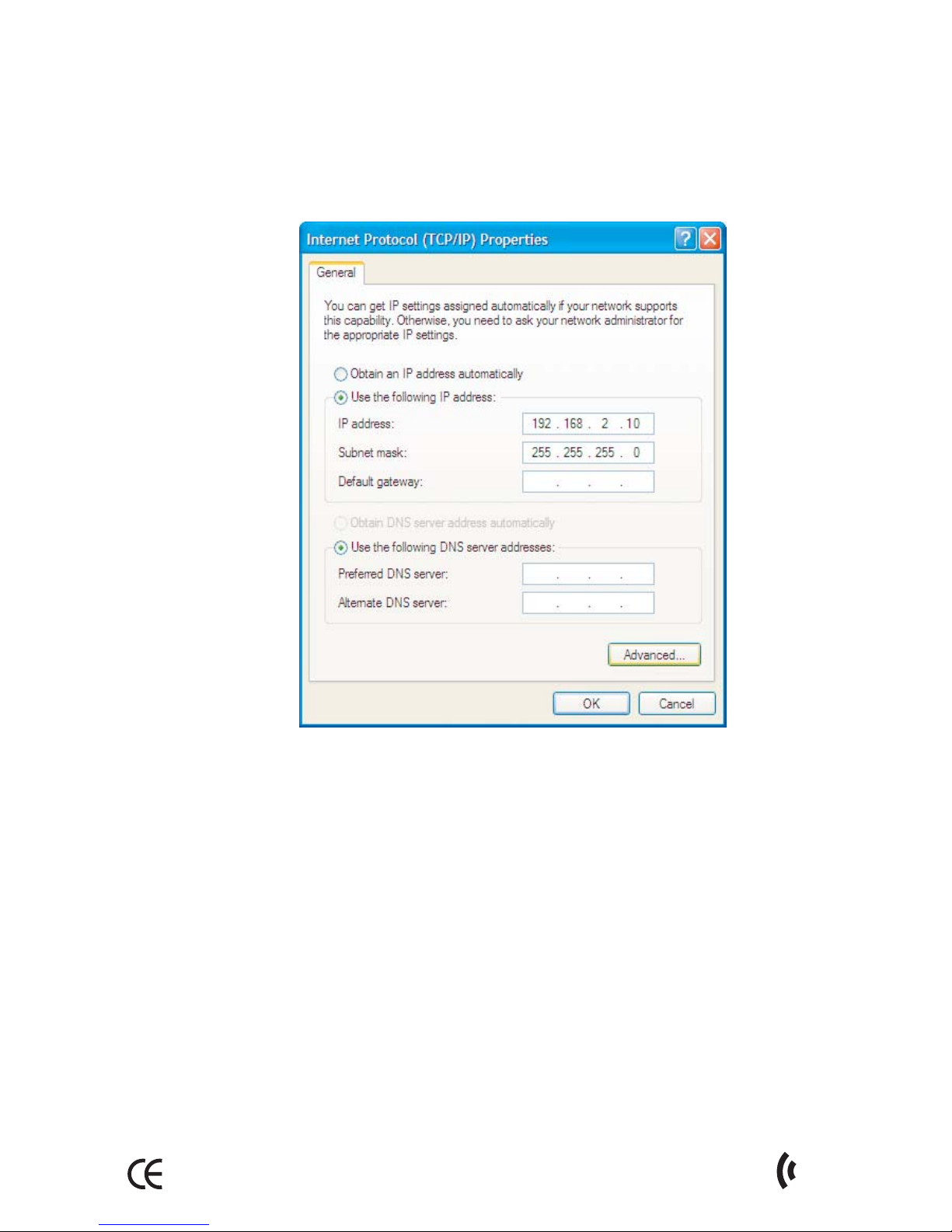
In the "Internet Protocol (TCP/IP) Properties" window, enter 19 .168. .10
in the "IP Address" field and 55. 55. 55.0 in the "Subnet Mask" field. The
IP address of the AP-301 is 19 .168. . 54. Therefore, the IP address of the
computer should be in the 19 .168. .x range.
Click "OK" to save the values you have entered.
Right click-on the "Network Neighborhood" icon on your desktop and
select "Properties".
This will take you to the "Network Connections" window. Select "TCP/IP"
and click "Properties".
5
AirTies AP-301 User Manual
3.2. Assigning a local IP address to a co puter
that is running Windows98
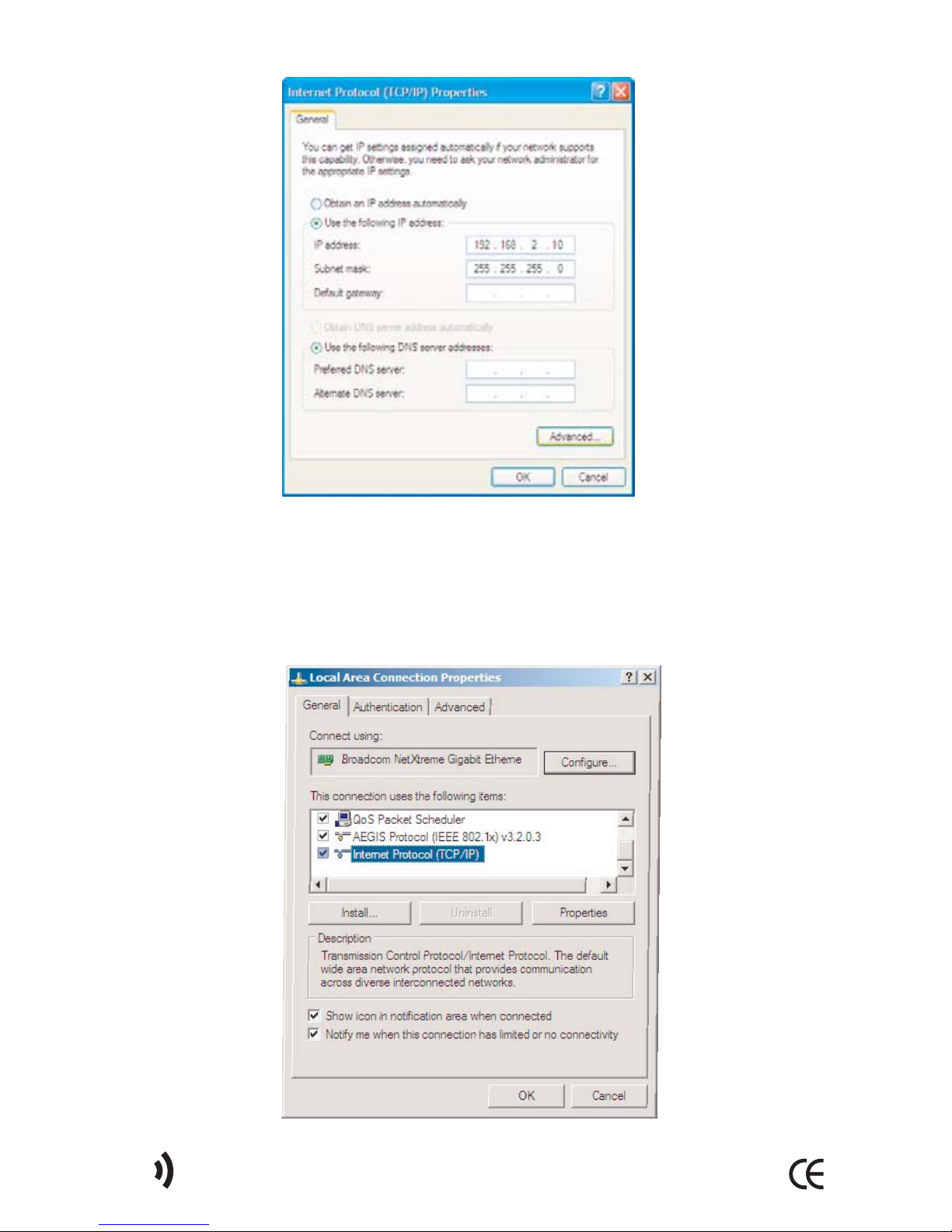
In the "Internet Protocol (TCP/IP) Properties" window, go to "IP Address"
tab. Enter 192.168.2.10 in the "IP Address" field and 55. 55. 55.0 in the
"Subnet Mask" field. The IP address of the AP-301 is 19 .168. . 54. Therefore,
the IP address of the computer should be in the 19 .168. .x range.
Click "OK" to save the values you have entered.
6AirTies AP-301 User Manual
Indice
Altri manuali AirTies Punto di accesso wireless


