
Airtraq A-360 Manuale utente

INSTRUCTIONS FOR USE
ENGLISH
A-360 Wi-Fi CAMERA
Rev 5.1./2016
CHECK FOR LATEST SOFTWARE VERSION AVAILABLE AT
www.airtraq.com

INDEX Page
1. Product code and Description................................................3
2. A-360 Basic information.......................................................3
3. A-360 Components..............................................................3
4. A-360 Switches, Indicators and Connectors ...........................4
5. A-360 Battery charge & charge status checking......................5
6. Mounting the A-360 onto the Airtraq.....................................7
7. Turn On/Off. Stand by.........................................................9
8. Touch Panel & Menus ...........................................................9
9. Help....................................................................................11
10. Initial Set Up........................................................................11
11. Screen.................................................................................12
12. Record & Auto - Record........................................................12
13. Play recorded videos ............................................................13
14. Download videos to a PC (Via USB cable or WiFi)..................14
15. Connecting Wi-Fi Live video and recording onto Tablet/Phone14
16. Connecting Wi-Fi Live video to a PC......................................15
17. Delete All Videos..................................................................16
18. View System Information.......................................................16
19. Troubleshooting ...................................................................16
20. Updating A-360 Internal Software .....................................17
21. Cleaning Instructions ............................................................17
22. Operating, Storage And Transport ........................................18
23. Technical Data ....................................................................18
24. Regulatory...........................................................................19
25. Disposal Instructions .............................................................21
26. Manufacturer’s Warranty .....................................................21
Important Safety Instructions
2

1. PRODUCT CODE and DESCRIPTION
Code: A-360
Description: Airtraq Wi-Fi Camera
2. A-360 BASIC INFORMATION
The A-360 has been specially designed to work only as an accessory
for the Airtraq Video Laryngoscope.
The A-360 provides colour and real-time images on its 2.8 inch
integrated touch screen.
The screen can be ipped and rotated to allow intubations from any
position. Image can be rotated upside down when necessary.
The A-360 can record and playback videos which are stored only on
its internal memory.
The A-360 can be connected via Wi-Fi to PC, Tablet and Phone
according to IEEE 802.11 Standard. A-360 does not use any existing
Wi-Fi network but creates a proprietary one. A password stored in
the A-360 must be introduced in any device to be Wi-Fi connected
to A-360. It guarantees that only authorized devices are allowed
to receive video signal (follow your institution procedures and
regulations if using these mobile devices).
It is powered by an internal rechargeable 3.7 V Li-Po battery and
does not work when connected to a battery charger.
3. A-360 COMPONENTS
3.1. A-360 Wi-Fi Camera
CMOS video camera with integrated touch screen, Wi-Fi emitter and
rechargeable Li-Po Battery.
3.2. Battery charger
Must be connected to mains supply to charge the 3.7 Volts, Li-Po
Battery.
It is supplied with a USB/ Micro USB cord that can also be used to
connect the A-360 to a PC.
3

Battery charger is supplied with different plugs. Install the appropriate
one.
Always use the battery charger provided with A-360.
3.3. Docking Station
Accessory to hold A-360 while not in use. It protects the lens of the
A-360 from dust.
The battery charger can be connected to the Docking Station.
4. A-360 SWITCHES, INDICATORS AND CONNECTORS
A. Mounting Lock System: To attach and remove A-360 from Airtraq
and from Docking Station. Slide button to place it in open or close
position.
B. Power Button: Push to turn On and Off.
A
B
4

C. Battery Charge and Power On Indicators: Turn green when on
charge. Left indicator turns orange when the A-360 batteries are
below 10% of its capacity.
D. Battery charge connector: Micro-USB Female connector to connect
to PC, battery charger or Docking Station.
5. A-360 BATTERY CHARGE & CHARGE STATUS CHECKING
THE A-360 DOES NOT WORK WHEN IT IS BEING CHARGED.
IT SHOULD BE CHARGED AT LEAST 1.8 M AWAY FROM THE
PATIENT.
The A-360 is supplied with its battery discharged. It is recommended
to perform a full charge/discharge cycle of the battery before starting
to use the A-360 for clinical purposes.
After a full charge, the A-360 can operate, under standard
conditions, for around 120 minutes. Recharging takes
approximately 150 minutes.
Without use, the battery will discharge at a rate of 1% per day.
If the A-360 can be turned on then a minimum of 10 minutes of
operating time is guaranteed.
C
D
5

When the A360 is turned off the user can check battery charge status
by a short time press of the On/Off switch. The screen will show
remaining minutes available.
When the A-360 is turned on, an icon and a gure will appear on
the header of the screen showing battery charge status.
To charge battery:
1. Connect the stand-alone battery charger to mains electrical
supply.
2. Insert the micro-USB connector directly into the A-360 or to
Docking Station and place A-360 onto it.
Upon starting to charge battery the A-360 will automatically turn Off.
When battery is being charged the user can check charge status:
1. By touching the screen which will show minutes of operating
time and a battery icon.
2. By the LEDs on the back of the screen.
LED´s lights and icon show battery charge status according to:
LED´s / Icon Operating Time
1 Blinking Orange < 10 min. Does not start
1 Steady Orange 10 to 40 min.
1 Steady Green 40 to 80 min.
2 Steady Green 80 to 120 min
3 Steady Green 120 min.
When the A-360 is turned on, an icon and a gure will appear on
the header of the screen showing battery charge status.
When in use, if the battery falls below 10% of its capacity the Battery
Charge Indicator on the header of the screen and the left charge
indicator will become blinking orange. The A-360 will continue
6

to operate for approximately 10 more minutes. The manufacturer
recommends recharging the battery of the A-360 frequently.
Service life for the rechargeable battery depends upon the number of
charge-discharge cycles performed. The A-360´s battery is a service
replaceable part, if its capacity falls below the acceptable levels
please contact your supplier. The A-360 should never be opened by
unauthorized personnel. Internal battery can only be replaced by the
manufacturer.
6. MOUNTING THE A-360 ONTO THE AIRTRAQ
To mount the A-360,
• Remove eyecup from Airtraq.
• Place A-360 lock system button in “Open” position.
• Slide A-360 onto Airtraq.
7
• A-360 will automatically turn on and start in Live Video mode
and Wi-Fi enabled.

• Image can be rotated upside down when necessary using the
Rotate Icon .
• Press
START
when using pediatric Airtraq. A message will appear
on the screen “Paediatrics Mode On”.
8
• Slide lock system button into “Closed” position.
To prepare the A-360 for intubation:
• Flip and rotate the screen as desired depending on how the
intubation will be performed. Screen rotates 180o on one axis,
plus 270oon the perpendicular axis.

To remove A-360 from the Airtraq once intubation is nished:
• Place lock system button in “Open” position.
• Pull A-360 away from Airtraq.
7. TURN ON/OFF. STAND-BY
A-360 can be started in 2 different ways, in both cases it will log on
to “Live Video” function:
• Automatically by sliding A-360 onto an Airtraq.
• Pressing for 2 seconds the orange On/Off button.
A-360 shows images after 15 seconds during which a progress bar
is shown on the screen. The full starting process to upload all icons
and functions takes around 30 seconds.
A-360 will Turn Off by pressing for 2 seconds the orange On/Off
button. The unit will automatically shut down in 5 seconds unless the
user cancels the action.
A-360 will enter into Stand-by status only when A-360 is not
assembled onto the Airtraq, and there is no action from the user for 5
minutes. To reset from Stand-by, press the On/Off button. A-360 will
turn off automatically after 5 minutes in Stand-by.
8. TOUCH PANEL & MENUS
Press the action icons on the screen to select an action (touch panel
also works when action icons are pressed using gloves).
Pressing the Back Icon will make A-360 to return to the previous
screen or menu.
9
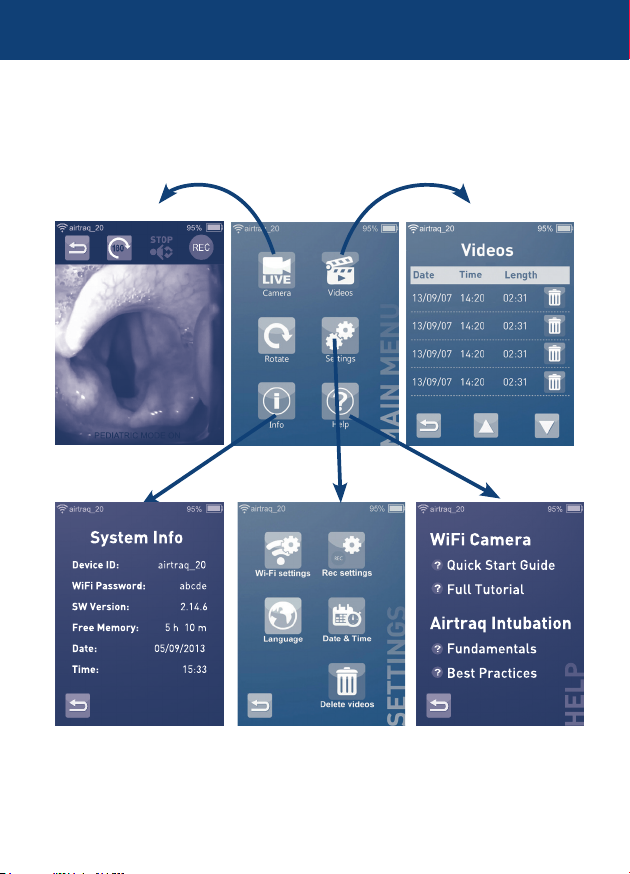
Navigation is shown below:
HELP
WiFi Camera
Quick Start Guide
Full Tutorial
Airtraq Intubation
Fundamentals
Best Practices
PEDIATRIC MODE ON
airtraq_20 95%
HELP
WiFi Camera
Quick Start Guide
Full Tutorial
Airtraq Intubation
Fundamentals
Best Practices
airtraq_20 95%
10
Device ID: airtraq_20
WiFi Password: abcde
SW Version: 2.14.6
Free Memory: 5 h 10 m
Date: 05/09/2013
Time: 15:33
System Info
airtraq_20 95%
Altri manuali per A-360
2
Indice
Lingue:
Altri manuali Airtraq Macchina fotografica digitale


