Altina GBT710 Manuale utente

B
Bl
lu
ue
et
to
oo
ot
th
h
G
GP
PS
S
U
Us
se
er
r
M
Ma
an
nu
ua
al
l
G
GP
PS
S
G
GB
BT
T7
71
10
0
Version 1.0.1 2006/8/1
INDEX
1. OVERVIEW...........................................................................................................................2
2. PRODUCT FEATURE.......................................................................................................2
3. SPECIFICATION.................................................................................................................3
3.1. BASIC SPECIFICATION..............................................................................................3
3.2. ACQUISITION TIME (AVERAGED)...........................................................................3
3.3. RECEIVER ACCURACY.............................................................................................3
3.4. USE LIMITATION.......................................................................................................3
3.5. POWER SUPPLY.........................................................................................................3
3.6. OUTPUT AND INTERFACE........................................................................................4
3.7. PHYSICAL...................................................................................................................4
3.8. OTHER FUNCTIONS...................................................................................................5
4. HARDWARE.........................................................................................................................6
4.1. DIMENSION................................................................................................................6
4.2. HARDWARE DESCRIPTION......................................................................................7
4.3. LED STATUS..............................................................................................................7
4.4. POWER SWITCH.........................................................................................................8
4.5. OPTIONAL ACCESSORIES, AND CONNECTOR DESCRIPTION...............................8
4.6. EXTERNAL ACTIVE ANTENNA CONNECTOR........................................................8
4.7. POWER JACK & DATA PORT..................................................................................9
5. SOFTWARE...........................................................................................................................9
5.1. SOFTWARE INSTALLATION.....................................................................................9
6. WARRANTY........................................................................................................................11
7. HOW TO USE......................................................................................................................12
7.1. CHARGE BATTERY.................................................................................................12
7.2. TURN ON POWER....................................................................................................12
8. TROUBLE SHOOTING.........................................................................................................13

2
1. OVERVIEW
Altina GBT710 Bluetooth wireless GPS Receiver is a total solution GPS receiver with
Bluetooth, UART interface and built-in rechargeable battery for high sensitivity to tracking
signal. GBT710 is a transmit satellite information through the PDA or Notebook with
Bluetooth interfaces.
GBT710 provide you various applications such as car navigation, mapping, surveying,
security, agriculture and so on. GBT710 communicates with other device through Bluetooth
wireless function, built-in rechargeable Lithium-ion battery offer you a convenient use in
drive.
With low power consumption, the GBT710 can track up to 20 satellites at a time, and
updates position data every second. Trickle-Power allows the unit operates a fraction of the
time and Push-to-Fix permits user to have a quick position fix even though the receiver
usually stays off.
2. PRODUCT FEATURE
ØBuilt in SiRF Star III Low power consumptionchipset
Ø20 parallel satellite-tracking channels for fast acquisition and reacquisition
ØHigh speed signal acquisition using2000,000 time/frequency search channels
ØBuilt-inWAAS/EGNOS Demodulator without any additional hardware
ØCompatible with Bluetooth Serial Port Profile (SPP)completely
ØBuilt-in rechargeable Lithium-ion battery without external power supply
ØProvide Continued mode and Power Saving mode for user’s requirement
ØProvide expand terminal contact to other system without Bluetooth device
ØBuilt-in rechargeable battery for memory and RTCbackup and for fast TimeTo
First Fix (TTFF)
ØSupport NMEA0183 v2.2 data protocoland SiRF binary code
Ø4colors LED toindicate the status of device
ØExtra active antenna connecting port for getting better satellites signal
ØFLASH based program memory. New software revisions upgradeable through
serial interface。
ØSmall, sleek, and lightweight design easily fits on your hand
ØEnhanced algorithms -SnapLock and SnapStart provide superior navigation,
performance in urban, canyon and foliage environments。
ØFor Car navigation, Marine navigation, Fleet management,AVL, Personal


3
navigation, Tracking System, and Mapping device application。
3. SPECIFICATION
3.1. Basic Specification
ØChipset:SiRF Star III chipset.
ØChannels:20 parallel satellite-tracking channels.
ØFrequency:1575.42 MHZ.
ØReceiver:L1, C/A code.
3.2. Acquisition Time (averaged)
ØCold start:< 50 seconds.
ØWarm start:< 40 seconds .
ØHot start:< 1.5 seconds
ØUpdate rate:1 second continuously
3.3. ReceiverAccuracy
ØNormal:5-25 meters CEPwithout SA
ØEnable EGNOS or WAAS:
nPosition < 2.2 meters, horizontal95% of time
nPosition < 5 meters, Vertical95% of time
ØVelocity:within 0.1 meters / second
ØTime:1 microsecond synchronized GPS time
3.4. Use Limitation
ØAltitude:< 18,000 meters (60,000 feet)
ØVelocity:< 736 meters / second (1000Knots)
ØAcceleration:4G
ØJerk:20 meters / second, max
3.5. Power Supply
ØExternal Voltage:5VDC +/-10%
Batteries:Built-in rechargeable Lithium-ion battery for system power and RTC
backup also
ØPower consumption
nNormal Mode:75 -100mA

4
nPower Saving Mode:30mA
ØWorking period (In Battery full power status):
nContinued Mode:10 hours
nPower Saving Mode:16 hours
【NOTE 1】GBT710 has built Li-battery inside, please avoid closing high temperature
environment or sun shine directly for a long time.
3.6. Output and Interface
ØOutput
I. Output protocol
uBaud Rate:4800/38400 bps Factorydefault 4800
uData bit:8
uParity:No
uStop bit:1
II. Format-NMEA0183 V2.2:
GPGGA (1time/1 sec), GPGSA (1 time/5sec.), GPGSV (1time /5 sec.), GPRMC
(1time /1 sec.), GPVTG(1 time/Isec), (GLL, or SiRF binary format for optional).
III. Datum:WGS84
ØInput/ Output Interface
I. Compatible Bluetooth Serial Port Profile (SPP), Version1.2 and class 2(up
to 10 meter range).
II. In/Out Port. GPS signal (Out)/Command(In) with CMOS/TTL Level。
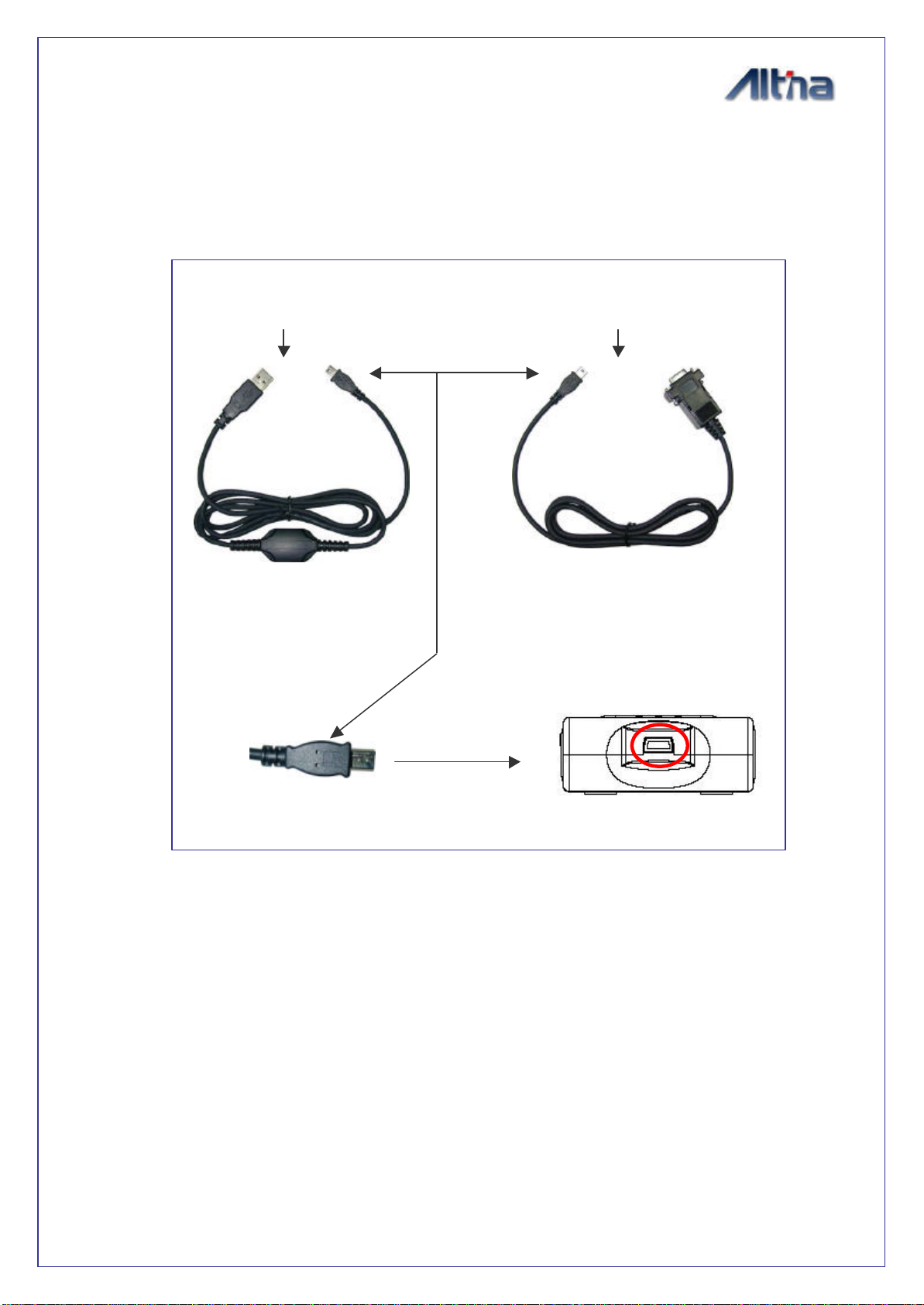
nMini USB Type B Connector and Cable option:
uGAC60R2 (RS232 data cable)
uGAC60U2 (USB data cable)
uGAC60UP2 (Mini USB port to PS2 port ).
ØExternal Antenna interface
3.0V input MMCX type active antenna connector
3.7. Physical
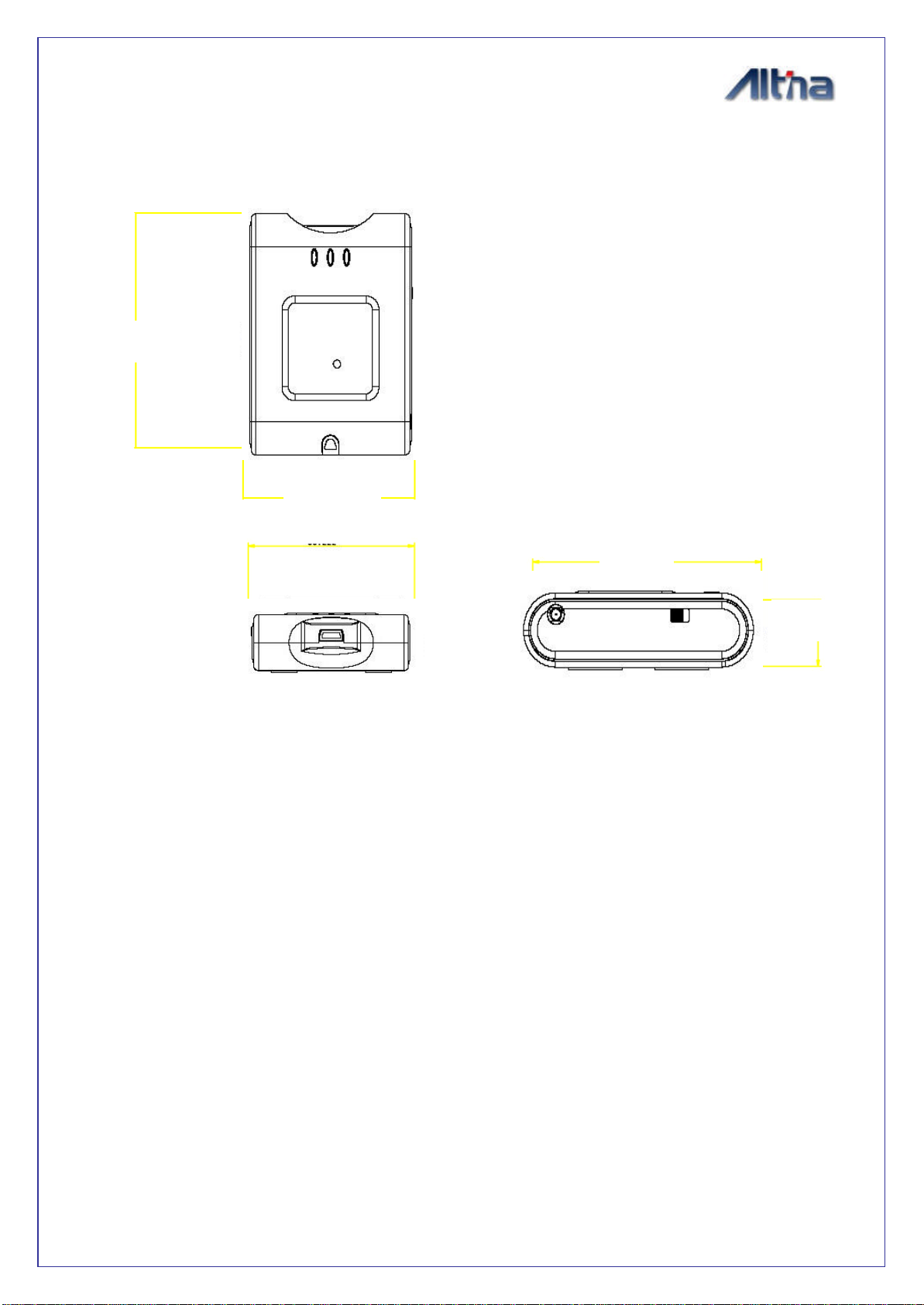
ØSize:69 ×50 ×19 mm。
ØWeight:70 g 。
ØOperating Temperature:-10 to + 60
ØStorage Temperature:-20 to + 85

5
ØOperating humidity:5% to 95% No condensing。
3.8. Other Functions
ØBluetooth frequency: 2.4 ~2.48GHZ
ØBluetooth Input Sensitivity: -80dbm
ØLow sensitivity of receiving satellitesignal:-150dBm
ØLED Functions:
nBluetoothh status
nGPS status
nBattery Status
nBattery charging status
This device complies with Part 15 of the FCC Rules. Operation is subject to the following two
conditions: (1) this device may not cause harmful interference, and (2) this device must accept any
interference received, including interference that may cause undesired operation.
Notice : The changes or modifications not expressly approved by the party responsible for
compliance could void the user’s authority to operate the equipment.
IMPORTANT NOTE: To comply with the FCC RF exposure compliance requirements, no change
to the antenna or the device is permitted. Any change to the antenna or the device could result in the
device exceeding the RF exposure requirements and void user’s authority to operate the device.

6
4. HARDWARE
4.1. Dimension
69.23
50.19
17.35
69.23

7
4.2. Hardware Description
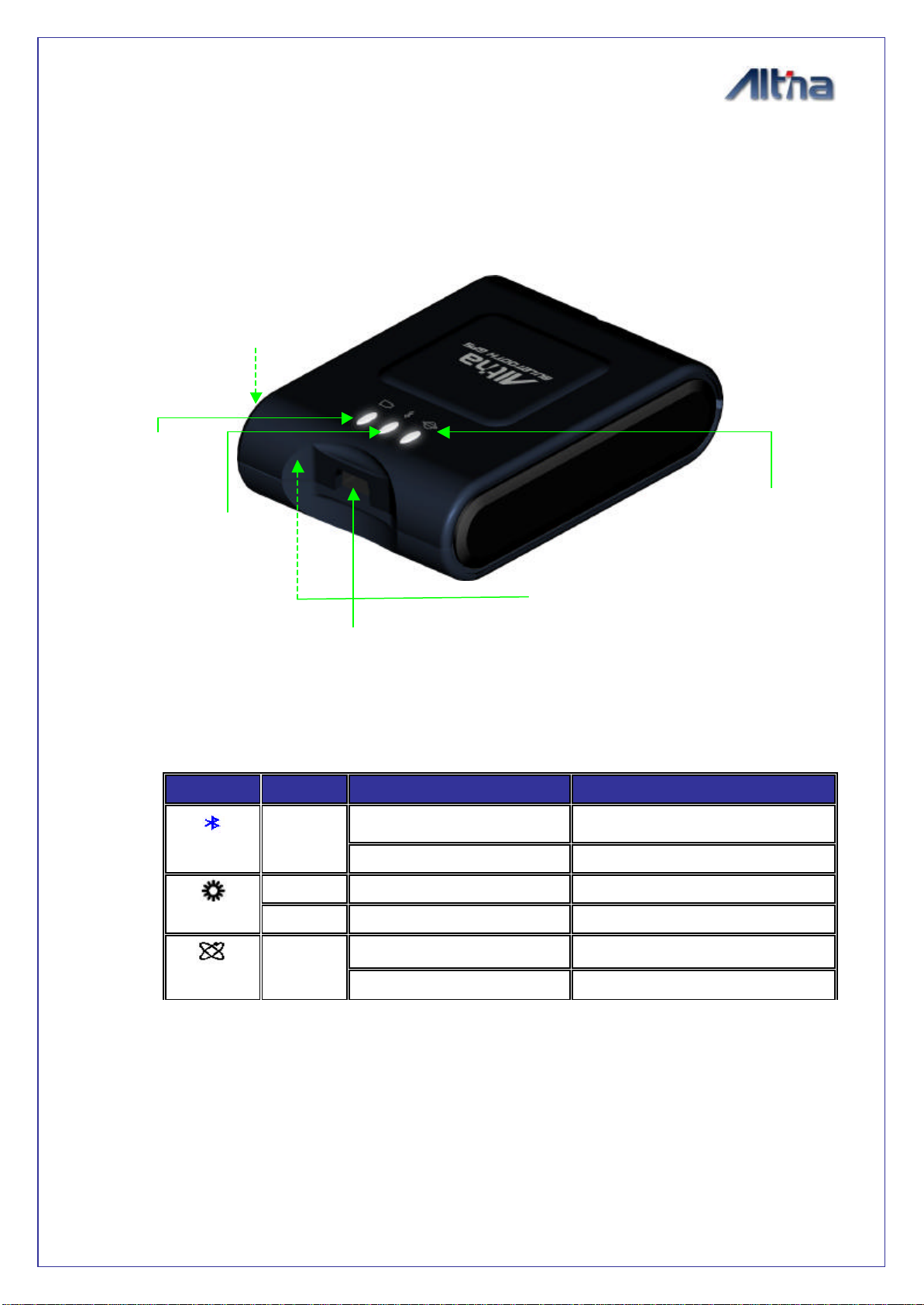
4.3. LED status
SYMBOL
COLOR
STATUS DESCRIPTION
Blinking Search Bluetooth Device
Bluetooth
Blue Light on Transferring Data
Red Light on Battery low
Battery Green Light on In charging
Blinking Acquiring Satellites
GPS ORANGE
Light on Position Fixed
LED of Battery
(Red / Green)
External Antenna Port
Power Switch
LED of GPS
(ORANGE)
LED of Bluetooth
(Blue)
Charge power Jack

8
4.4. Power Switch
ØSoft touch button : Continue pressing 3 sec to turn or turn off system power
4.5. Optional accessories, and connector description
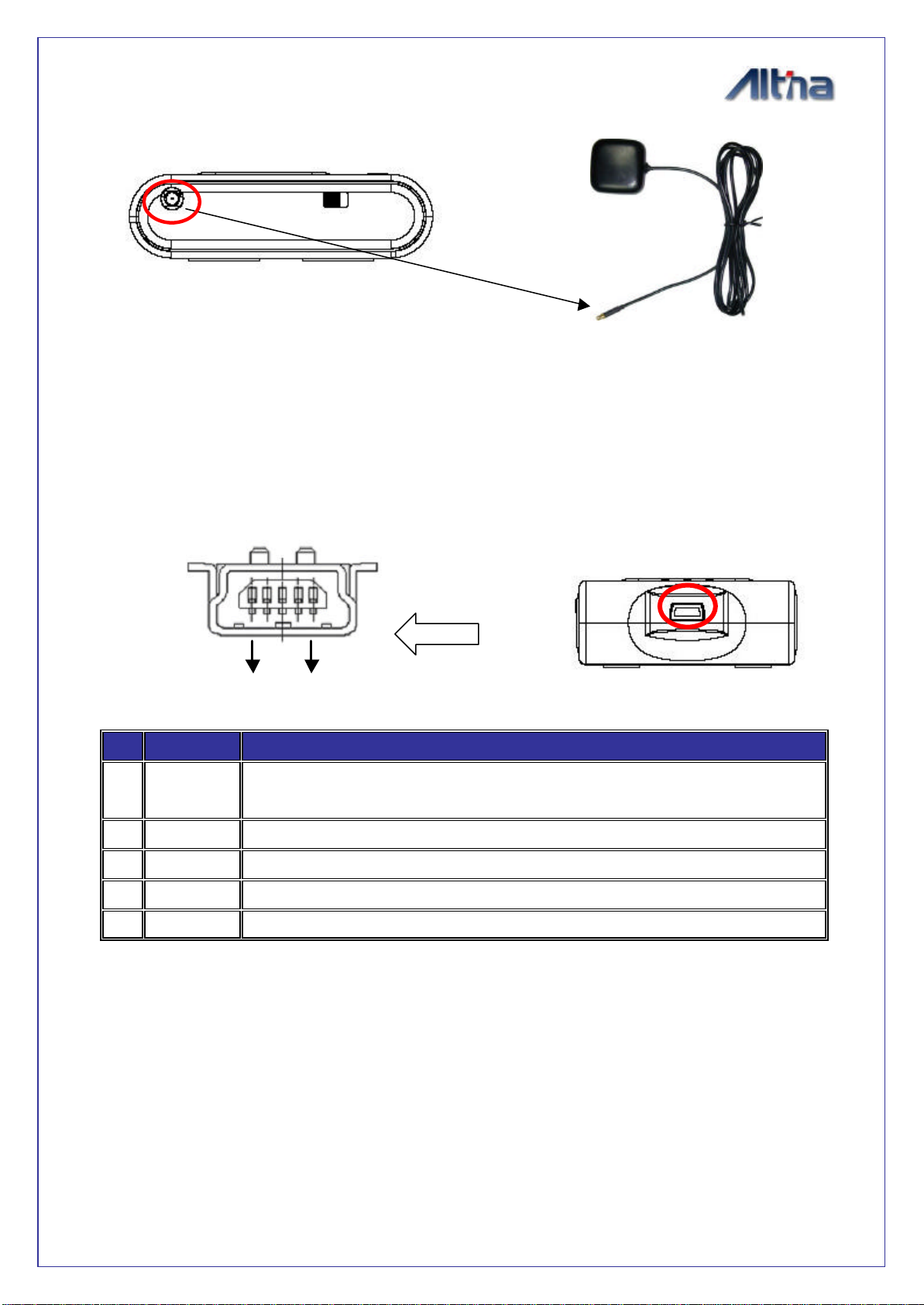
4.6. External ActiveAntenna connector
ØConnector type: MMCX, 180?
ØActive power voltage: 3.0V
ØLength: 5 meter
PC/Notebook
USB port
PC/Notebook
RS232 port
USB Cable
(GAC60U2)
RS232 Cable
(GAC60R2)
Mini USB

9
【Table 1】: Pin Definition
4.7. Power Jack & Data Port
ØJack type: Mating face of5 pin Mini USB Type B female
ØPin definitionplease see 【Table 1】
Pin
Pin Name
Signal and description
1VDC Positive terminal of DC ada
ptor that powers the internal charging circuit
of Li-Ion battery. The approvedpower supply is 5.0V +/-5%@1A.
2--
3--
4--
5GND Battery charging ground
SOFTWARE
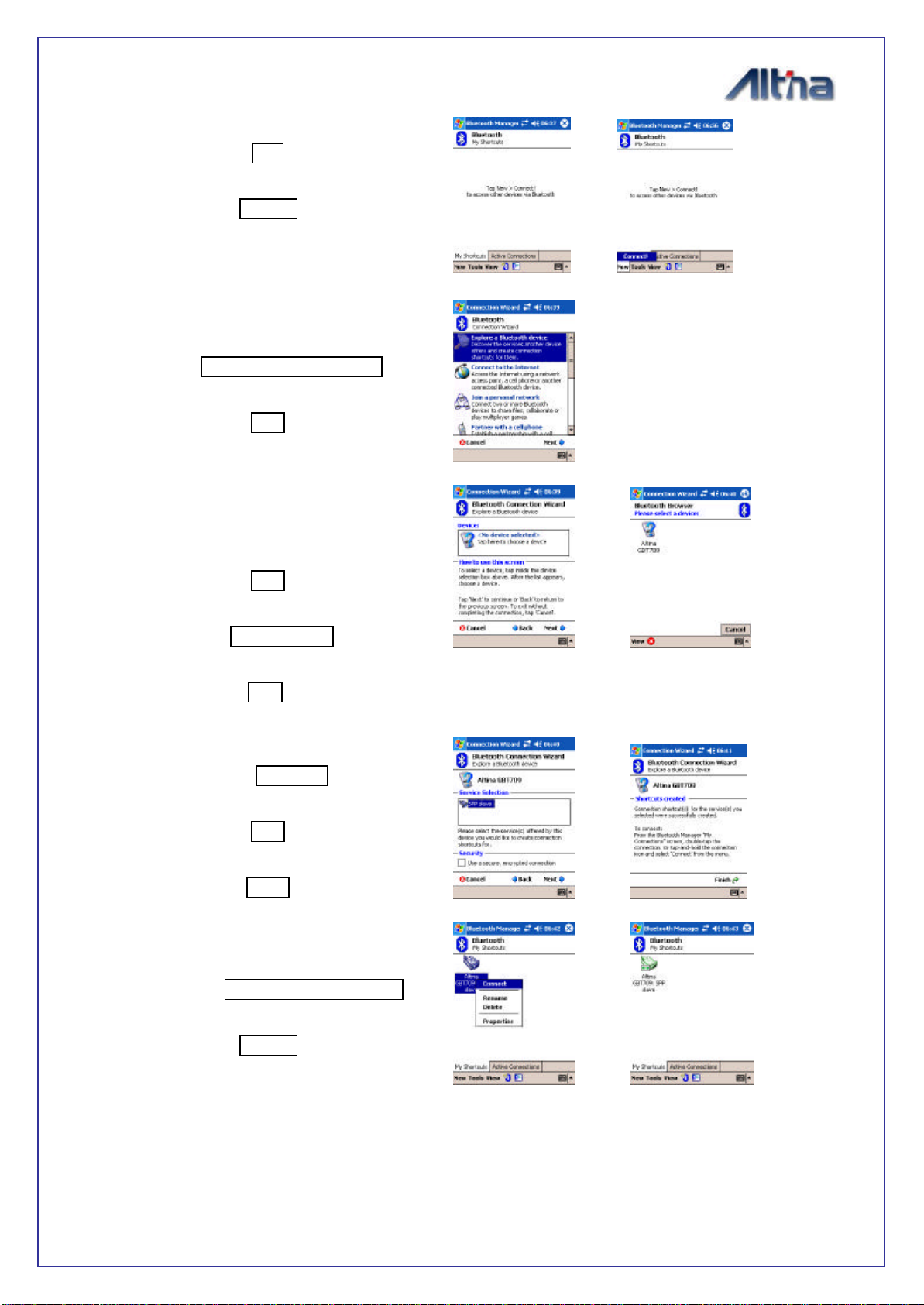
4.8. Software Installation
Following steps is software installation to setup on you PDA.For some other PDA,
steps may be a little different. ( Bluetooth Manger is one of popular program used for
Bluetooth device)
1 5

10
1. Click “Bluetooth Manager”on pocket pc.
New
↓
Connect
2. Search Bluetooth device“Altina GBT710”
Select Explore aBluetooth device
↓
Next
3. Find Altina Bluetooth device and enter
passkey
Next
↓
Tap Altina GBT-710
↓
Passkey 0000(If needed)
4. Connect to SPP Slave
Select SPP slave
↓
Next
↓
Finish
5. Connect to SPP Slave
Tap and Hold Altina GBT710: SPP slave
↓
Connect
↓
Finish Bluetooth setup (opposite arrow is displayed)
?
?
?
?
Indice