
Alvarion BreezeNET DS.11 Configuration Utility Manuale utente

BreezeNET DS.11 Series
Configuration Utility
User's
Guide
September, 2000
Cat No. 213097
Rev A
Front Matter
User’s Guide ii BreezeNET DS.11 Configuration Utility
© 2000 by BreezeCOM Ltd. All rights reserved.
No part of this publication may be reproduced in any material form without the written permission of the
copyright owner.
No part of this publication may be reproduced in any material form without the written permission of the
copyright owner.
Trade Names
BreezeNET, BreezeLINK, BreezeACCESS, BreezeVIEW, BreezeMANAGE and WIX are trade names of
BreezeCOM Ltd. Other brand and product names are registered trademarks or trademarks of their
respective companies.
Statement of Conditions
The information contained in this manual is subject to change without notice. BreezeCOM Ltd. shall not
be liable for errors contained herein or for incidental or consequential damages in connection with the
furnishing, performance, or use of this manual or equipment supplied with it.
Warranty
In the following warranty text, “the Company” shall mean:
- BreezeCOM Inc., for products located in the USA.
- BreezeCOM Ltd., for products located outside the USA.
This BreezeNET product is warranted against defects in material and workmanship for a period of one
year. During this warranty period the Company will, at its option, either repair or replace products that
prove to be defective.
For warranty service or repair, the product must be returned to a service facility designated by the
Company. Authorization to return products must be obtained prior to shipment. The buyer shall pay all
shipping charges to the Company and the Company shall pay shipping charges to return the product to the
buyer.
The Company warrants that the firmware designed by it for use with the unit will execute its programming
instructions when properly installed on the unit. The Company does not warrant that the operation of the
unit or firmware will be uninterrupted or error-free.
Limitation of Warranty
The foregoing warranty shall not apply to defects resulting from improper or inadequate maintenance by
the buyer, buyer supplied interfacing, unauthorized modification or misuse, operation outside of the
environmental specifications for the product, or improper site preparation or maintenance. No other
warranty is expressed or implied. The Company specifically disclaims the implied warranties of
merchantability and fitness for any particular purpose.

Front Matter
BreezeNET DS.11 Configuration Utility iii User's Guide
Electronic Emission Notices
This device complies with Part 15 of the FCC rules, ETSI 300-328, UL, UL/C, TUV/GS, and CE.
Operation is subject to the following two conditions:
1. This device may not cause harmful interference.
2. This device must accept any interference received, including interference that may cause undesired
operation.
FCC Radio Frequency Interference Statement
This equipment has been tested and found to comply with the limits for a Class B digital device, pursuant
to part 15 of the FCC Rules. These limits are designed to provide reasonable protection against harmful
interference in a residential installation. This equipment generates, uses and can radiate radio frequency
energy and, if not installed and used in accordance with the instructions, may cause harmful interference
to radio communications. However, there is no guarantee that interference will not occur in a particular
installation. If this equipment does cause harmful interference to radio or television reception, which can
be determined by turning the equipment off and on, the user is encouraged to try to correct the
interference by one or more of the following measures:
• Reorient or relocate the receiving antenna.
• Increase the separation between the equipment and receiver.
• Connect the equipment into an outlet on a circuit different from that to which the receiver is
connected.
• Consult the dealer or an experienced radio/TV technician for help
Changes or modifications to this equipment not expressly approved by the party responsible for
compliance could void the user’s authority to operate the equipment.
FCC Radiation Exposure Statement
This equipment complies with FCC radiation exposure limits set forth for an uncontrolled environment.
This equipment should be installed and operated with the minimum distance between your body and the
antenna, as shown in the table below:
Low gain indoor antennas (<6dBi) 20cm (8 inches)
High gain outdoor antennas (>6dBi) 30cm (12 inches)
Antenna Installation
WARNING: It is the responsibility of the installer to insure that when using the outdoor antenna kits
in the United States (or where FCC rules apply), only those antennas certified with the
product are used. The use of any antenna other than those certified with the product is
expressly forbidden in accordance to FCC rules CFR47 part 15.204.
The installer should configure the output power level of antennas, according to country regulations and
per antenna type.

Front Matter
User’s Guide iv BreezeNET DS.11 Configuration Utility
Note: The FCC 15.203 requirements prohibit the connection of external antennas with standard
N-type connectors. In order to meet this requirement, the external antenna connectors provided
on DS.11D models (with no integral antenna) are non-standard, featuring left-handed (counter-
clockwise) rotation.
Information to User
Any changes or modifications of equipment not expressly approved by the manufacturer could void the
user’s authority to operate the equipment and the company’s warranty.
Contacting BreezeCOM Technical Support
Should you need assistance beyond the scope of this guide, please contact your local BreezeCOM reseller
or distributor. If they cannot solve your problem, feel free to contact the BreezeCOM Technical Support
Department. The support representatives can assist you in solving any problems that cannot be solved by
your reseller.
When requesting support, please have the following items available:
• Configuration of the system, including models of the BreezeCOM equipment used.
• Antenna type and cable lengths.
• Site information such as possible radio path problems (like trees, machines, and buildings).
• Distance between devices.
• Configuration, statistic counters, and error messages as seen on the monitor.
• Description of problems encountered.
To contact BreezeCOM Technical Support, refer to the Technical Support page of the BreezeCOM web
site: www.breezecom.com
Table of Contents
BreezeNET DS.11 Configuration Utility v User's Guide
TABLE OF CONTENTS
1. GENERAL................................................................................................................................1
2. DS.11 CONFIGURATION UTILITY MAIN WINDOW....................................................2
2.1 Selecting Units.................................................................................................................3
2.2 Setting the SNMP Community Information ....................................................................4
2.3 Assigning and Editing IP Addresses Manually ...............................................................4
2.4 Application Control Buttons............................................................................................5
2.5 Configuration Utility Modes............................................................................................5
2.6 Firmware Upgrade...........................................................................................................6
2.7 Multiple Unit Configuration............................................................................................9
3. UTILITY CONFIGURATION WINDOWS.......................................................................10
3.1 Station Status Tab..........................................................................................................10
3.2 IP Parameters Tab..........................................................................................................11
3.3 SNMP Parameters Tab...................................................................................................12
3.4 WLAN Parameters Tab .................................................................................................13
3.5 Station Control Tab........................................................................................................17
3.6 Security Tab...................................................................................................................18
3.7 Advanced Tab................................................................................................................20
3.8 Counters Tab..................................................................................................................21
3.8.1 Resetting Counters..............................................................................................22
3.8.2 Link-Specific Counters.......................................................................................23
3.9 Trap Monitor Tab ..........................................................................................................23
3.10 Debug Info ...................................................................................................................24
Table of Contents
User's Guide vi BreezeNET DS.11 Configuration Utility
TABLE OF FIGURES
Figure 1. DS.11 Configuration Utility Main Window (Station Control Tab)......................3
Figure 2. The Set IP Dialog Box...........................................................................................4
Figure 3. Firmware Upgrade.................................................................................................6
Figure 4. Advanced TFTP Setup ..........................................................................................7
Figure 5. Firmware Upgrade Process....................................................................................8
Figure 6. Multiple Configuration..........................................................................................9
Figure 7. Station Status Tab................................................................................................10
Figure 8. IP Parameters Tab................................................................................................11
Figure 9. SNMP Parameters Tab........................................................................................12
Figure 10. WLAN Parameters Tab (BU Units)..................................................................13
Figure 11. WLAN Parameters Tab (RB Units) ..................................................................14
Figure 12. The Station Control Tab....................................................................................17
Figure 13. Security Tab ......................................................................................................18
Figure 14. Advanced Tab....................................................................................................20
Figure 15. Counters Tab (BU Units) ..................................................................................21
Figure 16. Counters Tab (RB Units)...................................................................................21
Figure 17. Trap Monitor Tab..............................................................................................23
General
BreezeNET DS.11 Configuration Utility 1 User’s Guide
1. GENERAL
The DS.11 Configuration utility is an SNMP-based (Simple Network Management
Protocol) utility that provides a consistent view of the wireless network.
The system administrator can use the DS.11 Configuration utility to control a large
number of DS.11 units from a single location. The configuration utility can be used
to manage BU-DS.11 and RB-DS.11 units:
Among the supported features:
• Assign radio channels for optimal cell operation
• Configure units with a specified IP address
• Set the SNMP Read/Write Community strings
• Verify the status of all units in the network
• Antenna selection and diversity setting
• Configuration of a wide range of operational parameters, including WLAN, IP
and Security parameters
• View Tx and Rx counters
• Obtain general information such as the Firmware version and system name

DS.11 Configuration Utility Main Window
User's Guide 2 BreezeNET DS.11 Configuration Utility
2. DS.11 CONFIGURATION UTILITY MAIN
WINDOW
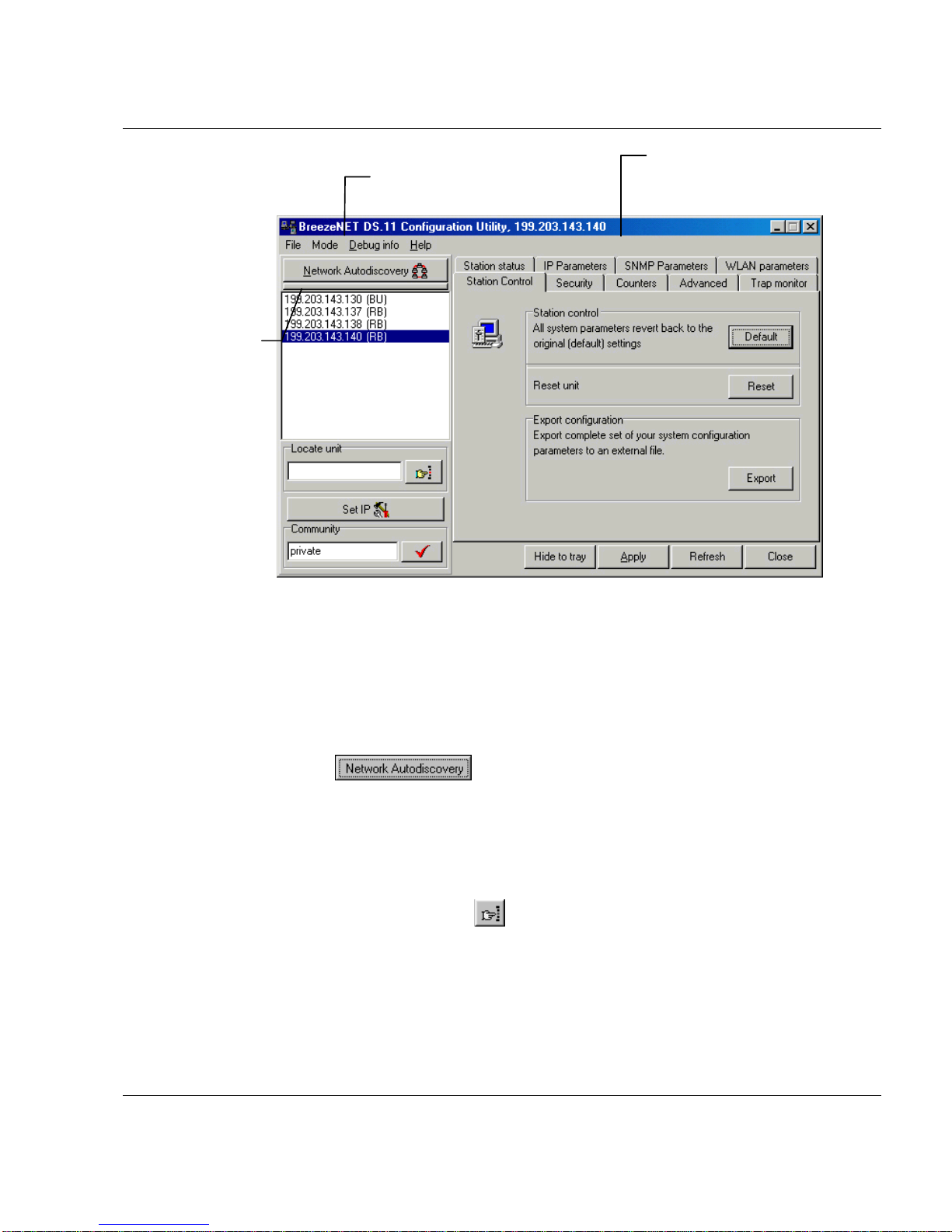
• The Control Window section - In this section, you can perform the following:
⇒ View the DS.11 units that have been discovered by their IP address
⇒ Select the IP address of the unit you wish to manage
⇒ Assign unit IP addresses
⇒ Set the Configuration utility access rights
⇒ Set the SNMP Community information
If there are many units in the managed network, you can enlarge the list box by
clicking on the horizontal line above the list; click again to toggle back the
default display state. The list box also displays the Location of each unit, as set
in the Station Status dialog box (see Section 3.1).
• The Tabs Section - This section consists of several tabs, each containing
parameters required for the management of the selected unit; the number of
tabs displayed varies between the type of managed unit. The different tabs are
described in the following sections. When you switch between the tabs, the IP
Selection section with the selected unit address remains displayed.
DS.11 Configuration Utility Main Window
BreezeNET DS.11 Configuration Utility 3 User’s Guide
Figure 1. DS.11 Configuration Utility Main Window (Station Control Tab)
2.1 Selecting Units
You can select a unit to manage in one of the following ways:
• Click the button. All the current units IP addresses (under
the selected community) are displayed in the list box underneath the button.
Click on an address to select the corresponding unit for viewing and
configuration.
• For stations, which are located behind a router, type the unit's address in the
Locate Unit field and click .
Control window containing
the IP address,
Community and Access
Rights selection area
Tabs area
Click here to
enlarge IP
display area
DS.11 Configuration Utility Main Window
User's Guide 4 BreezeNET DS.11 Configuration Utility
2.2 Setting the SNMP Community Information
Type the known Read/Write Community string in the Community field (the
default string is public for read and private for read/write) and click the
button to confirm.
2.3 Assigning and Editing IP Addresses Manually
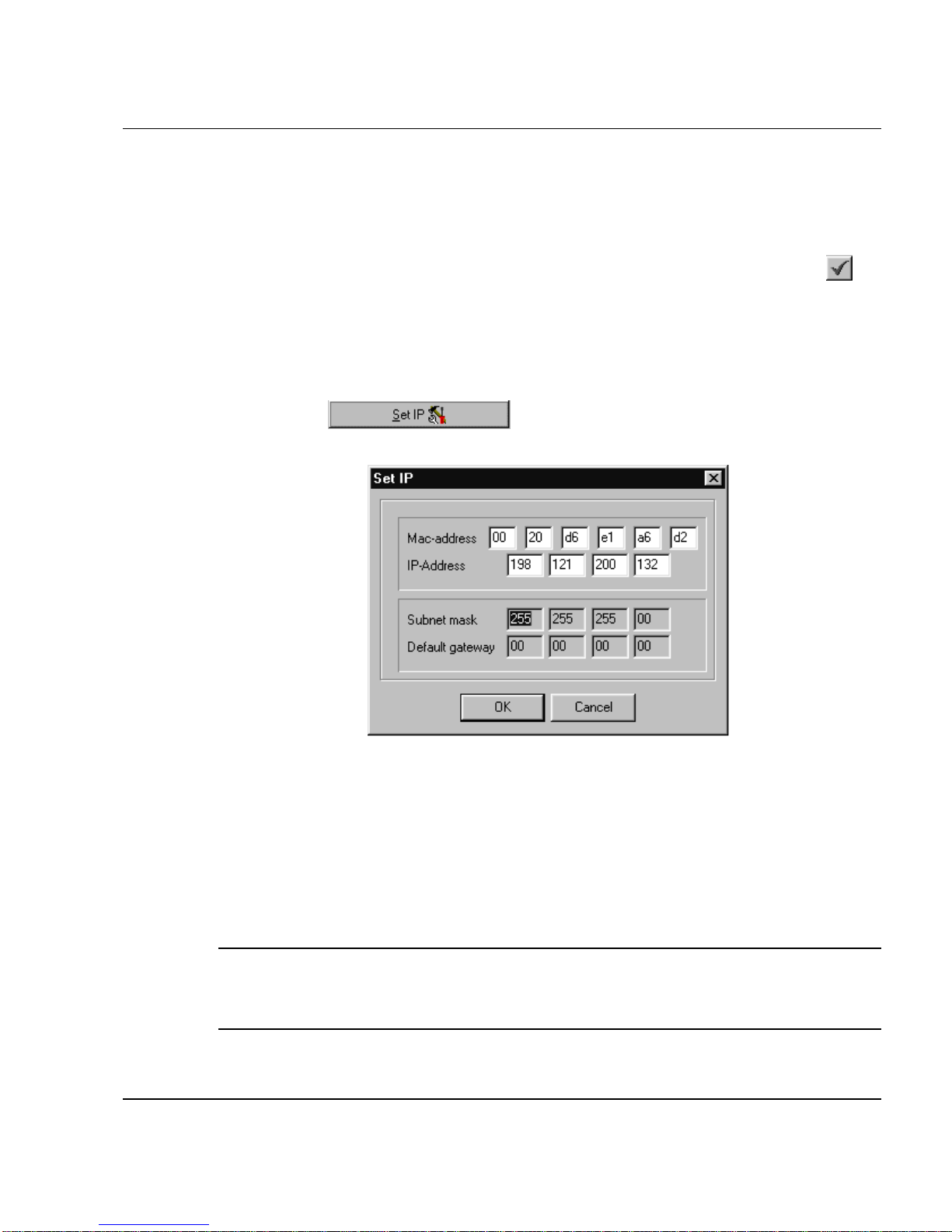
1. Click the button. The Set IP dialog box is displayed.
Figure 2. The Set IP Dialog Box
2. Type the parameters in the appropriate fields and click OK; the MAC address
is written underneath the unit. A message box is displayed notifying you when
the changes are to take affect. This feature can be used only if the DS.11
Configuration Utility is on the same Ethernet segment as the unit and not
behind the router.
Note: In order to see the unit after assigning the IP address, the PC with the
Configuration utility should be on the same IP subnet as the assigned IP
address.
Altri manuali per BreezeNET DS.11 Configuration Utility
3
Indice
Altri manuali Alvarion Software


Manuali Software popolari di altre marche


PS Audio
PS Audio PowerPlay Manuale del proprietario

Brady
Brady LOCKOUT PRO 3.0 Manuale di servizio

Avaya
Avaya Interaction Center Manuale utente

Texas Instruments
Texas Instruments TI-83 Plus Silver Edition Manuale

Novell
Novell GROUPWISE 8 - INTERNET AGENT Manuale utente

Oracle
Oracle Application 9i Manuale utente

Acer
Acer RDM Manuale utente

Canon
Canon Vixia HF21 Manuale utente

Canon
Canon ZR950 Manuale utente

Samsung
Samsung Auto Backup Manuale utente

Polycom
Polycom Vortex EF2201 Istruzioni per l'installazione e il funzionamento

Brocade Communications Systems
Brocade Communications Systems Brocade 8/12c Manuale utente