ALZA UGREEN Manuale utente

2-PORT HDMI KVM SWITCH
BOX
USER MANUAL

2
Dear customer,
Thank you for purchasing our product. Please read the following instructions carefully before
using for the first time and keep this user manual for future reference. Pay particular
attention to the safety instructions. If you have any questions or comments about the device,
please contact the customer line. Customer line, available 24 hours a day: +44 (0)203 514
4411, www.alza.co.uk.
Importer: Alza.cz a.s. Jankovcova 1522/53, Holešovice 170 00 Prague 7, www.alza.cz
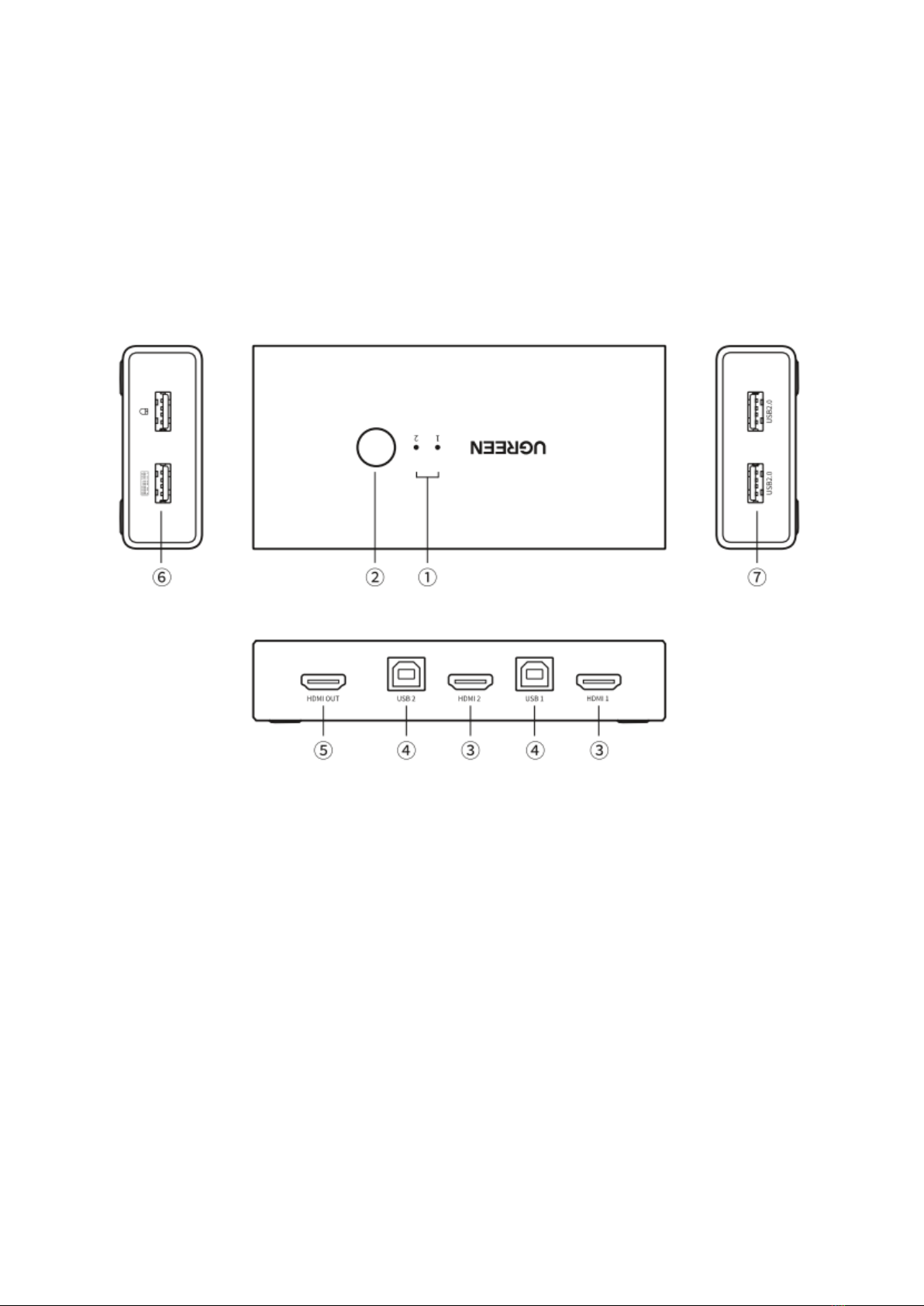
Product Details
1. LED Indicator: displays the working status (Blue light when working)
2. Switch Button: switch between two HDMI source devices
3. HDMI Inputs: connect HDMI source devices
4. USB 2.0 B Input: connect USB-A source devices
5. HDMI Output: connect HDMI display devices
6. USB 1.1 A Output: connect keyboards and mice
7. USB 2.0 A Output: connect flash drives or printers

3
How It Works
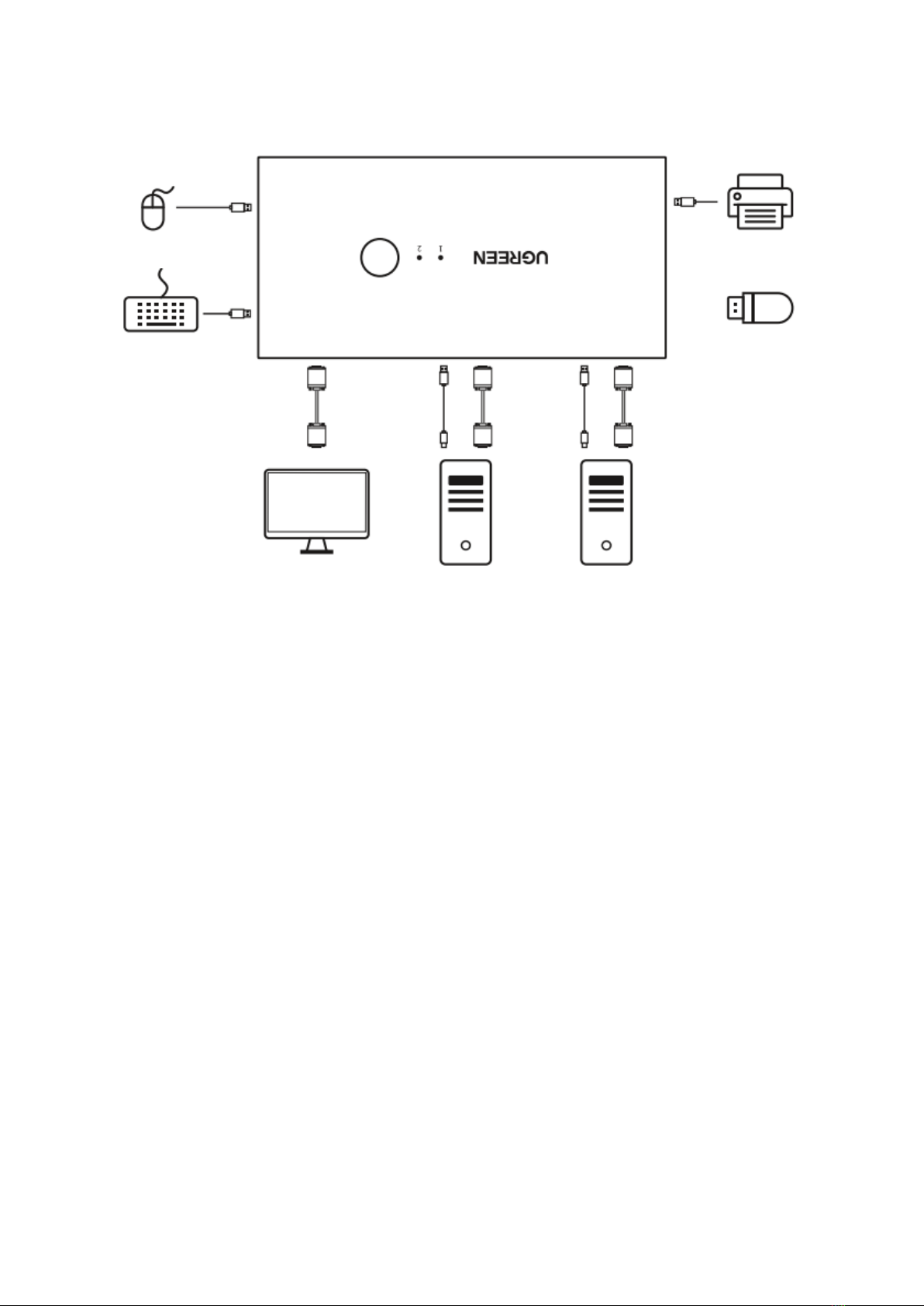
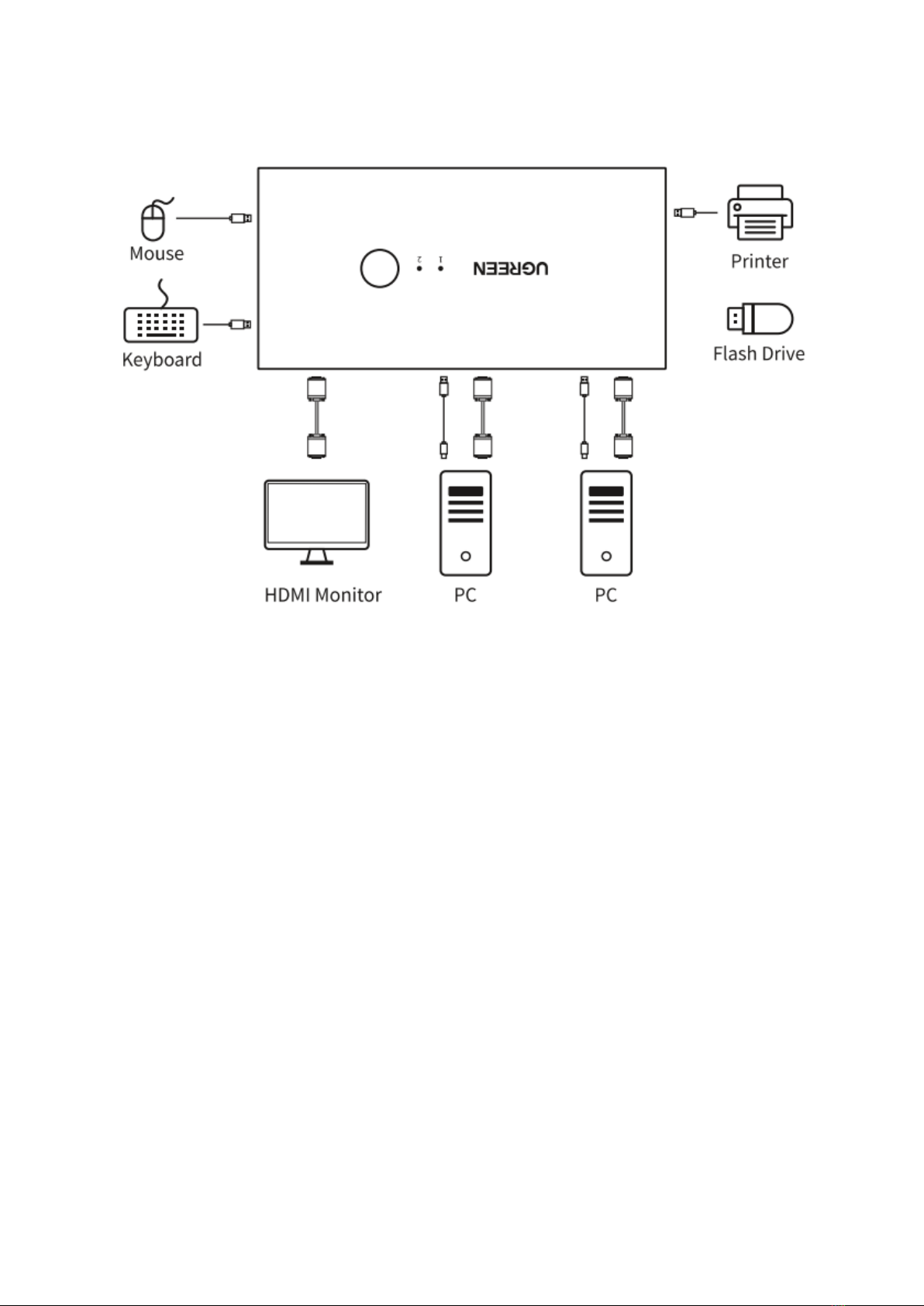
1. Connect two HDMI source devices to this product with HDMI
cables (not included).
2. Connect the 2-way source devices’ USB-A ports to the USB-B port of the switch via a USB
cable (included).
3. Connect a HDMI display device to this product with a HDMI cable (not included).
4. Connect mouse, keyboard to the USB 1.1 Type A ports and flash drive, printer to the USB
2.0 Type A ports.
Operation Guideline
1. Switch Button
Press the button on the product to switch the two signals.
2. Hotkey
Tips before using the Hotkey.
•To use Keyboard Hotkey Switching, the keyboard must be connected to the USB 1.1
Type A ports.
•The numbers “0”, “1”, “2” need to be typed on the Numeric Keypad.
•If the “Scroll Lock” key doesn’t work, you could try the “Ctrl” key instead.
•A hotkey command operation needs to be completed in 10 seconds. Every time a
hotkey command is input incorrectly, the switch emits a “drop” to indicate that the
input is successful. If the input does not emit a sound, the hotkey mode is exited.
Mouse
Keyboard
Printer
Flash Drive
HDMI Monitor
PC
PC

4
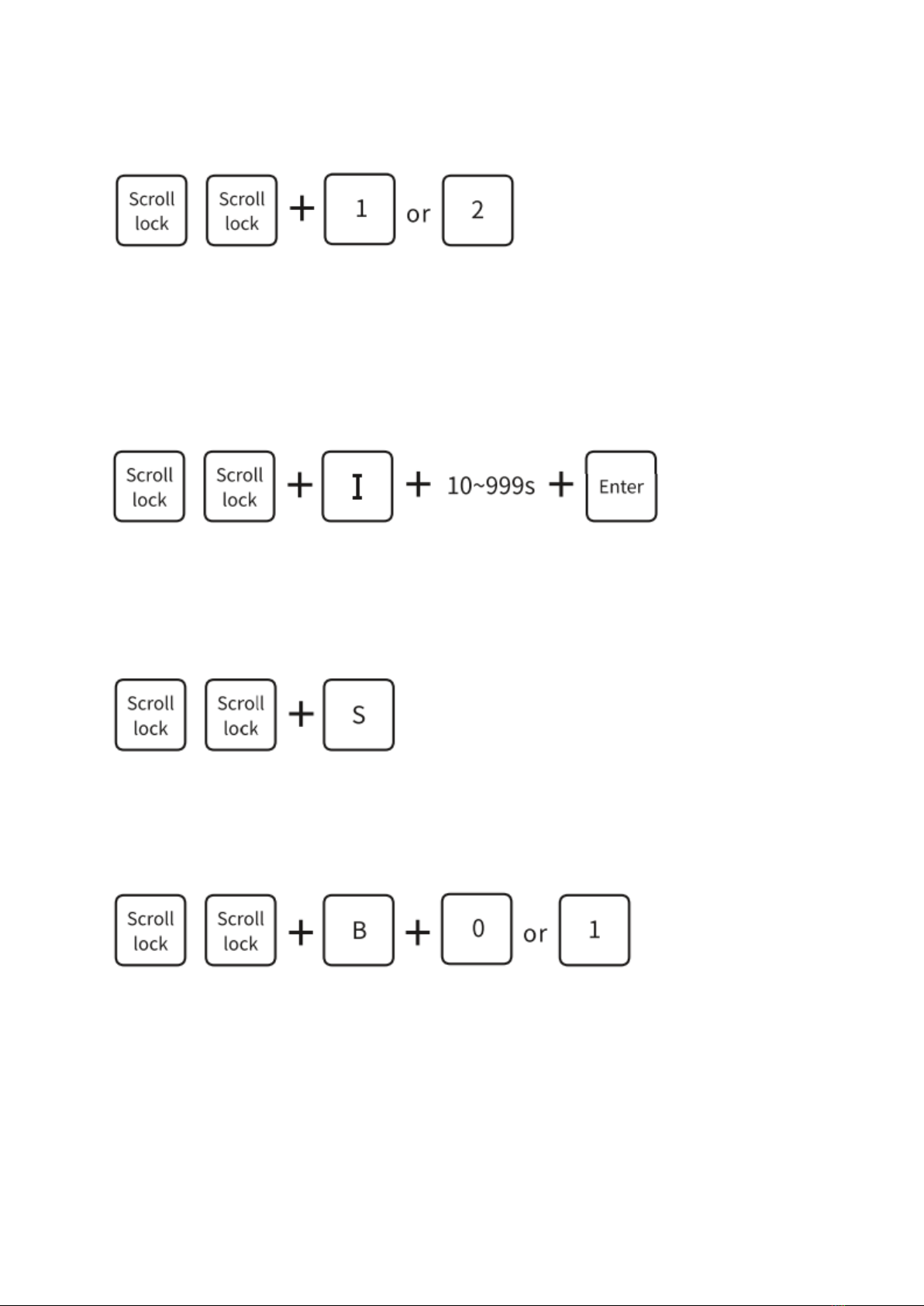
1) Hotkey Switching
Double-click “Scroll Lock” on the keyboard, and then click either number key 1 or 2.
Note: The Keypad button can be used for switching. The 1 or 2 number keys on the keypad
refer to the INPUT1 & INPUT2 respectively.
2) Searching Switching
a. Set the searching time.
Double-click the “Scroll Lock“ key on the keyboard, click the “I“ key, set scan time from 10
secs to 999 secs, and click “Enter“.
Note: The default searching time is 10 secs.
b. Auto-searching Switching
Double-click the “Scroll Lock” key on the keyboard, and then click the “S” key for auto-
searching switching.
Note: Exiting the mode of auto-searching switching by pressing any key on the keyboard.
3) Turning The Sound On Or Off
Double-click the “Scroll Lock” key on the keyboard, click the “B” letter key, and then click
either the 0 or 1 nuber key to turn the sound on or off.
Note: The keypad button can be used for switching. Press 0 to turn off and 1 to turn on.

5
Specification
•Input: 2×HDMI ports, 2×USB 2.0 ports
•Output: 1×HDMI port, 2×USB 2.0-A ports, 2×USB1.1-A ports
•Supports resolutions up to 4Kx2K@30Hz, backwards compatible with 1080P/1080i,
720P/720i, 576P/576i, 480P/480i
•Supports 3D content, CEC, and HDCP1.4
•USB 2.0 port supports data transfer rates up to 480Mbps and the USB 1.1 port supports
data transfer rates up to 12Mbps
•Supports transmission bandwidth of up to 340MHz, supports rates up to 10.2Gbps
•Supports Audio Format: DTS, DSD, Dolby AC3, 5.1 and 7.1 sound channel, supports audio
sample rates up to 192KHz 24bit
•Input Cable Length: ≤10m AWG24 HDMI cable
•Output Cable Length: ≤10m AWG24 HDMI cable
•Supports EDID and signal timing rectification
•Supports hot-swapping
•Supports switching by switch button, hotkey, and scan switch
•Two USB 2.0 Type B cables in 1.5m are included
•Supports MAC OS/Windows/Linux
•Dimensions: L134×W66×H26 (mm)
Notes
1. Power this product with the provided USB Type B cables before use.
2. HDMI cables are not included. In order to ensure signal stability, it is suggested to use
high-quality HDMI cables.
Package Contents
1× 2-Port HDMI KVM Switch Box
2× USB Type B Power Cable
1× User Manual

6
Warranty Conditions
A new product purchased in the Alza.cz sales network is guaranteed for 2 years. If you need
repair or other services during the warranty period, contact the product seller directly, you
must provide the original proof of purchase with the date of purchase..
The following are considered to be a conflict with the warranty conditions, for which
the claimed claim may not be recognized:
•Using the product for any purpose other than that for which the product is intended or
failing to follow the instructions for maintenance, operation and service of the product.
•Damage to the product by a natural disaster, the intervention of an unauthorized person
or mechanically through the fault of the buyer (eg during transport, cleaning by
inappropriate means, etc.).
•Natural wear and aging of consumables or components during use (such as batteries,
etc.).
•Exposure to adverse external influences, such as sunlight and other radiation or
electromagnetic fields, fluid intrusion, object intrusion, mains overvoltage, electrostatic
discharge voltage (including lightning), faulty supply or input voltage and inappropriate
polarity of this voltage, chemical processes such as used power supplies, etc.
•If anyone has made modifications, modifications, alterations to the design or adaptation
to change or extend the functions of the product compared to the purchased design or
use of non-original components.

7
This product has been tested in accordance with the standards used to demonstrate
compliance with the essential requirements set out in the relevant directives. You can find the
declaration of conformity on the alza.cz website.
WEEE
This product must not be disposed of as normal household waste in accordance with the EU
Directive on Waste Electrical and Electronic Equipment (WEEE - 2012/19 / EU). Instead it shall
be returned to the place of purchase or handed over to a public collection point for the
recyclable waste. By ensuring this product is disposed of correctly, you will help prevent
potential negative consequences for the environment and human health, which could
otherwise be caused by inappropriate waste handling of this product. Contact your local
authority or the nearest collection point for further details. Improper disposal of this type of
waste may result in fines in accordance with national regulations.
All rights reserved. © 2020 Alza.cz a.s.

8
2-PORTOVÝ HDMI KVM
PŘEPÍNAČ
UŽIVATELSKÁ PŘÍRUČKA

9
Vážený zákazníku,
děkujeme Vám za zakoupení našeho produktu. Prosíme, pečlivě si přečtěte následující
instrukce před prvním použitím a uživatelskou příručku si uschovejte pro pozdější užití.
Zejména dbejte na bezpečnostní pokyny. Pokud máte jakékoliv dotazy či připomínky ohledně
přístroje, prosíme, obraťte se na zákaznickou linku +420 255 340 111.
Dovozce: Alza.cz a.s. Jankovcova 1522/53, Holešovice 170 00 Prague 7, www.alza.cz
Popis produktu
1. LED Indikátor: zobrazuje pracovní stav (při aktivitě svítí modře)
2. Výběrové tlačítko: přepíná mezi dvěma zdrojovými zařízeními HDMI
3. HDMI Vstup: připojuje HDMI zdrojová zařízení
4. USB 2.0 B Vstup: připojuje USB-A zdrojová zařízení
5. HDMI Výstup: zobrazuje HDMI zobrazovací zařízení
6. USB 1.1 A Výstup: připojuje klávesnici a myš
7. USB 2.0 A Výstup: připojuje flash drive a tiskárnu

10
Popis funkce
1. Připojte k tomuto produktu dvě zdrojová zařízení HDMI pomocí kabelů HDMI (nejsou
součástí balení).
2. Připojte porty USB-A obousměrných zdrojových zařízení k portu USB-B přepínače pomocí
kabelu USB (je součástí balení).
3. Připojte zobrazovací zařízení HDMI k tomuto produktu pomocí kabelu HDMI (není
součástí balení).
4. Připojte myš, klávesnici k portům USB 1.1 typu A a jednotku flash, tiskárnu k portům USB
2.0 typu A.
Použití
1. Výběrové tlačítko
Stisknutím tlačítka na výrobku přepnete dva signály.
2. Klávesové zkratky
Tipy před použitím Klávesových zkratek.
●Chcete-li použít přepínání klávesových zkratek, musí být klávesnice připojena k
portům USB 1.1 typu A.
●Čísla „0“, „1“, „2“ je třeba zadat na numerické klávesnici.
●Pokud klávesa „Scroll Lock“ nefunguje, můžete zkusit klávesu „Ctrl“.
●Operace s klávesovými zkratkami musí být dokončena za 10 sekund. Pokaždé, když je
klávesová zkratka zadána nesprávně, přepínač vydá „drop“, což znamená, že zadání
bylo úspěšné. Pokud vstup nevydává zvuk, režim klávesových zkratek se ukončí.
Klávesnice
Tiskárna
Flash Drive
HDMI Monitor
PC
PC
Myš
Altri manuali per UGREEN
1
Indice
Lingue:
Altri manuali ALZA Interruttore