
Amano CP-3000 Manuale utente

CP-3000
Electronic Time Recorder
User’s Guide

Proprietary Notice
This document contains proprietary information and such information
may not be reproduced in whole or part without the written permission
from Amano Cincinnati, Inc. 140 Harrison Ave., Roseland, New Jersey
07068.
Amano Cincinnati, Inc. reserves the right to make equipment changes
and improvements, which may not be reflected in this document.
Portions of this document may have been updated to include the latest
hardware or firmware version, if applicable.
To ensure safe use of this time recorder/stamp, be sure to thoroughly
read this manual in its entirety before any attempt is made to operate the
equipment. After you have finished reading this manual, be sure to store
it and in a safe place for further reference.
Thank You….
For purchasing another fine product from
Amano Cincinnati, Inc.

CP-3000 User’s Guide i
Table of Contents
Chapter 1: Introduction .................................................. 1-1
Specifications..........................................................................1-1
Names and Functions of Parts................................................1-2
Features..................................................................................1-3
Front Panel Description...........................................................1-3
Chapter 2: Getting Started ............................................. 2-1
Top Cover ...............................................................................2-1
Front Cover.............................................................................2-2
Placement/Location.................................................................2-3
Desktop Installation.................................................................2-3
Wall Mounting .........................................................................2-4
External Signal Connections...................................................2-5
Connecting the Battery............................................................2-7
Initialization and Reset............................................................2-9
Initialization..............................................................................2-9
Reset (All Clear)....................................................................2-10
Power Connection.................................................................2-10
Chapter 3: Time Cards.................................................... 3-1
Making a Test Print.................................................................3-1
Card Dimensions.....................................................................3-2
Card Color...............................................................................3-3
Time Card Settings .................................................................3-3
Card Thickness Adjustment....................................................3-5
Card Width Adjustment...........................................................3-6
Chapter 4: Programming................................................ 4-1
Introduction .............................................................................4-1
General Programming Guidelines...........................................4-1
Entering Program Mode...........................................................4-1
Entering and Saving Values ....................................................4-2
Scrolling Through the Program Mode......................................4-2
Exiting Program Mode .............................................................4-2
Programming Guides...............................................................4-3
Basic Programming.................................................................4-7
Year, Month, and Date.............................................................4-7
Hours and Minutes...................................................................4-8

ii CP-3000 User’s Guide
Day Change Time ...................................................................4-9
Daylight Savings Time (DST)..................................................4-9
Automatic Adjustment............................................................4-10
By Week Number...................................................................4-10
By Month and Day.................................................................4-11
Manual Adjustment................................................................4-13
Hours Display and Imprint.....................................................4-13
Index No. Imprint (Model A056 only).....................................4-15
Signal Duration......................................................................4-15
Weekly Programming............................................................4-16
Creating a Weekly Program...................................................4-17
Obtaining a Printout of Programmed Data............................4-19
Editing Weekly Programs......................................................4-20
Adding Additional Weekly Programs.....................................4-21
Deleting a Weekly Program ..................................................4-21
Chapter 5: Maintenance.................................................. 5-1
Service....................................................................................5-1
Exterior....................................................................................5-1
Fuse Replacement..................................................................5-1
Ribbon Replacement...............................................................5-2
Chapter 6: Troubleshooting........................................... 6-1
Introduction .............................................................................6-1
General Problems...................................................................6-1
Signal 1....................................................................................6-1
Foreign Object or Material.......................................................6-2
Programming...........................................................................6-2
Key Failure...............................................................................6-2
Audible Beeps..........................................................................6-2
Error Messages.......................................................................6-3
Err 0 thru Err 5.........................................................................6-3
Leap Year Error................................................................6-3
Printing or Ribbon Error ...................................................6-3
Time Card Error ...............................................................6-4
Imprint/Card Size .............................................................6-4
Weekly Program...............................................................6-5
Overheat Protection.........................................................6-5
Err 6 thru Err 9.........................................................................6-5
Card Stuck .......................................................................6-5

CP-3000 User’s Guide iii
Insufficient Power.............................................................6-6
Blank Display ...................................................................6-6
EPROM............................................................................6-6
Display Related Problems.......................................................6-7
Low Battery..............................................................................6-7
Power Failure...........................................................................6-7
Inaccurate Clock......................................................................6-7
LED’s Not Functioning ............................................................6-7
Hour Change...........................................................................6-8
Slave Master...........................................................................6-8
Card Feed Problems...............................................................6-8
Card Refused...........................................................................6-8
Card Cannot Enter or Card Blocked........................................6-9
Card Refused, Date and Time in Display ................................6-9
Imprint Problems.....................................................................6-9
Overprint..................................................................................6-9
Imprint Position Wrong ..........................................................6-10
Wrong Color Printed..............................................................6-10
Weak or Light Printing ...........................................................6-11
Diagnostics............................................................................6-11
LED Test................................................................................6-12
Mode and Keys Test..............................................................6-12
LCD Test................................................................................6-13
EPROM Test..........................................................................6-14
Buzzer Test............................................................................6-14
Signal 1 Test..........................................................................6-15
Color Change Test.................................................................6-15
Model ID ................................................................................6-16
Chapter 7: Appendix....................................................... 7-1

iv CP-3000 User’s Guide
This page intentionally left blank.

CP-3000 User’s Guide 1-1
Chapter 1: Introduction
Before attempting to use the Amano CP-3000 time recorder/stamp,
please carefully review Chapter 1: “Introduction”, Chapter 2: “Getting
Started”, Chapter 3: “Time Cards”, and Chapter 4: “Programming”. This
chapter of the manual covers the specifications, accessories, names and
functions of parts, LCD Display, and description of controls.
Specifications
Power Requirements:
Power: 120 VAC 10%, 50/60 Hz
Power Consumption: 6 W Idle, 60W maximum
Ambient Temperature: 14°F to 113°F (-10°C to 45°C)
Ambient Humidity: 10% to 90% (non-condensing)
Dimensions: 5.9"(150 mm) Wide X 6.9” (175 mm) High X
6.0" (152 mm) Deep.
Weight: Approximately 4.85 lbs. (2.2 kg)
Environment: Indoor use only; dust-free environment. Keep
out of direct sunlight.
Time Card: Electronically configured for 3.375” (86 mm)
wide “Clipper” type, and set for a card thickness
of 0.0126” (0.32 mm).
The unit can be mechanically adjusted to
accept card widths of 2.6004” to 4.2158” (66
mm to 107 mm), and a card thickness of
0.0079” to 0.0197” (0.2 mm to 0.5 mm).

1-2 CP-3000 User’s Guide
Accessories
The following accessories are provided with the Amano CP-3000. After
unpacking, please ensure that all of the following items are provided:
CP-3000 (1 unit)
This User’s Guide (1
copy)
Keys (one pair, 2
keys)
Please note that specifications, appearance, and/or description are
subject to change without notice due to product enhancements.
This user’s guide has been carefully prepared, but Amano assumes
no liability for errors and/or omissions. If you should find any errors
or unclear information, please contact your Amano dealer.
Names and Functions of Parts
The following describes the names and functions of various parts of the
CP-3000.
External View
User’s
Guide

CP-3000 User’s Guide 1-3
Features
There are three (3) versions of the CP-3000 available. The model
numbers and features are listed in the following table.
Features A050 A051 A056
Single Color
Printing X
Two Color Printing X X
Signal Device X X
Full Power
Reserve X X X
Index No. Imprint X
Front Panel Description
The front panel displays the date, time, day of the week, and is used for
programming the unit. It is accessed by removing the top cover. (see
Chapter 2: “Getting Started” for more details).
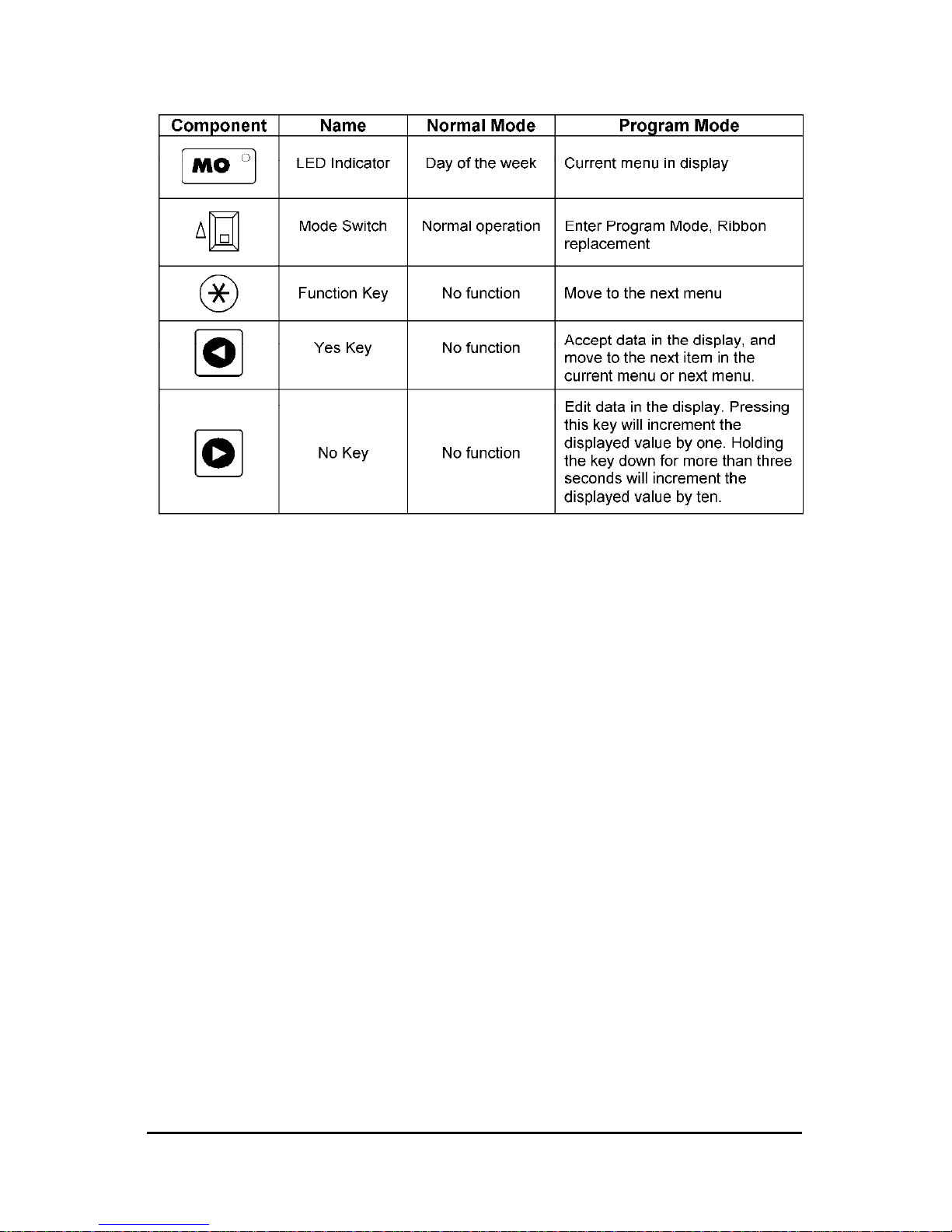
1-4 CP-3000 User’s Guide
Note: ESD (Electrostatic Discharge) precautions should be adhered to
before touching the Mode Switch.
Indice
Altri manuali Amano Orologio

Amano
Amano BX-1500 Manuale utente

Amano
Amano PIX-28 Manuale utente

Amano
Amano PIX-3000x Series Manuale utente

Amano
Amano PIX-10 Manuale utente

Amano
Amano PIX-25 Manuale utente

Amano
Amano Time Partner TCX-11 Manuale utente

Amano
Amano PIX-10 Manuale utente

Amano
Amano MJR-7000EZ Manuale utente

Amano
Amano PIX-55 Manuale utente

Amano
Amano PR600 Series Manuale utente

Amano
Amano PIX-75 Manuale utente

Amano
Amano PIX-75 Istruzioni operative

Amano
Amano PIX-15 Manuale utente

Amano
Amano PIX-200 Manuale utente

Amano
Amano PIX-55 Manuale utente

Amano
Amano BX 2000 Manuale utente

Amano
Amano NS 5000 Series Manuale utente

Amano
Amano TCX-22 Manuale utente

Amano
Amano MJR-8000 Series Istruzioni per il montaggio

Amano
Amano TS-3000i Manuale utente


