
Anderson DA2 Manuale utente

Anderson Instrument Co. Inc.
156 Auriesville Road
Fultonville, NY 12072
1-800-833-0081
Fax 518-922-8997
www.andinst.com
Instruction
Manual
Instrument Model Number _____________________________
Instrument Serial Number _________________________________
Form Number AIC2034
© June 2003 revised: 2/13
Model DA2 ELECTRODLESSModel DA2 ELECTRODLESS
Model DA2 ELECTRODLESSModel DA2 ELECTRODLESS
Model DA2 ELECTRODLESS
CONDUCTIVITY TRANSMITTERCONDUCTIVITY TRANSMITTER
CONDUCTIVITY TRANSMITTERCONDUCTIVITY TRANSMITTER
CONDUCTIVITY TRANSMITTER
(for conductivity, % concentration and TDS measurement)

PAGE 2
TT
TT
Table of Contentsable of Contents
able of Contentsable of Contents
able of Contents
Section 1 - General Information ...................................4
1.1 Capability Highlights ..................................................................................4
1.2 Transmitter Safety ......................................................................................4
1.3 Retained Configuration Values .................................................................5
1.4 Transmitter Serial Number ........................................................................5
1.5 EMC Conformance .....................................................................................5
Section 2 - Specifications ............................................6
2.1 Operational .................................................................................................6
2.2 Transmitter Performance (Electrical, Analog Outputs) ..........................8
2.3 Mechanical ..................................................................................................8
Section 3 - Physical Installation ..................................9
3.1 Location ......................................................................................................9
3.2 Panel Mounting (DA201A) .......................................................................10
3.3 Wall and Pipe Mounting (DA202A) ..........................................................11
3.4 Integral Sensor Mounting (DA202A with HC1012000 only) ..................12
Section 4 - Electrical Connections ............................13
4.1 HC1 Series Electrodless Conductivity Sensor Wiring ..........................14
4.2 Two-Wire Hookup .....................................................................................15
4.3 Three-Wire Hookup ..................................................................................16
4.4 Four-Wire Hookup ....................................................................................17
Section 5 - Operation ..................................................18
5.1 Display ......................................................................................................18
5.2 Keypad ......................................................................................................18
5.3 MEASURE Screen (normal display mode) .............................................20
Section 6 - Menu Structure ........................................ 21
6.1 Displaying Main Branch Selection Screens............................................21
6.2 Displaying Top-Level Menu Screens ......................................................22
6.3 Displaying Submenu Screens .................................................................23
6.4 Adjusting Edit / Selection Screen Values ..............................................23
6.5 Entering (Storing) Edit/Selection Screen Values/Choices ....................23

PAGE 3
Section 7 - Transmitter Configuration ......................24
7.1 Selecting Language to Operate Transmitter ..........................................24
7.2 Configuring Sensor Characteristics .......................................................24
7.3 Set °C OR °F (temperature display format) ............................................34
7.4 Configuring Analog Output .....................................................................34
7.5 SET Passcode (feature enabled or disabled) ........................................36
7.6 Configuration Setting Summary .............................................................38
Section 8 - Transmitter Calibration ...........................40
8.1 Important Information ..............................................................................40
8.2 Zero Procedure (first-time sensor calibration only) ..............................41
8.3 Conductivity Calibration ..........................................................................41
8.4 % Concentration Calibration ...................................................................45
8.4 TDS Calibration ........................................................................................47
8.6 Analog Output Calibration .......................................................................49
Section 9 - Testing & Maintenance ............................50
9.1 STATUS Check (transmitter and sensor) ...............................................50
9.2 HOLD OUTPUT .........................................................................................51
9.3 OUTPUT Test Signal ................................................................................51
9.4 Firmware (EPROM VERSION) Check ......................................................51
9.5 SELECT SIM Measurment ........................................................................52
9.6 SIM SENSOR Setting ................................................................................52
9.7 RESET CONFIGURE Values to Factory Defaults ...................................53
9.8 RESET CALIBRATE Values to Factory Defaults ....................................53
Section 10 - Troubleshooting ....................................54
10.1 Keeping the Transmitter Calibrated .....................................................54
10.2 Avoiding Electrical Interference ...........................................................54
10.3 Checking Electrical Connections .........................................................54
10.4 Verifying Sensor Operation ...................................................................54
10.5 Verifying Transmitter Operation ...........................................................54
10.6 Verifying Interconnect Cable Integrity .................................................55
Section 11 - Ordering Matrix ......................................55
Section 12 - Warranty and Return Statement ...........56

PAGE 4
Section 1 - General InformationSection 1 - General Information
Section 1 - General InformationSection 1 - General Information
Section 1 - General Information
1.1 Capability Highlights1.1 Capability Highlights
1.1 Capability Highlights1.1 Capability Highlights
1.1 Capability Highlights
Sensor Input
The transmitter can be used with the Model HC1-Series electrodeless conductivity sensor.
These sensors have a built-in Pt 1000 RTD temperature compensator element.
MEASURE Screen
The measure screen (normal display mode) can provide different readouts of measured data.
With the MEASURE screen displayed, press ÕÕ
ÕÕ
Õor ÖÖ
ÖÖ
Ö to show:
•Measured conductivity, % concentration or TDS
•Measured temperature (°C or °F)
•Measured conductivity, % concentration or TDS and temperature
•Measured analog output value (mA)
• Uncompensated conductivity corresponding to concentration readout (only shown
when transmitter is set to measure concentration)
Password-Protected Access
For security, you can enable a passcode feature to restrict access to configuration and
calibration settings to authorized personnel only. See Section 7.5 for details.
Calibration Methods
Because each sensor has a unique zero point and span, always zero the sensor in air when
calibrating it for the first time (Section 8.2). Depending on the configured measurement
(conductivity, % concentration or TDS), different methods are available for calibrating sensor
span (see Section 8.3, 8.4 or 8.5 respectively). The analog output loop can also be calibrated
(Section 8.6).
Analog Output
The transmitter’s isolated 4-20 mA analog output can be assigned to represent one of these:
•Measured conductivity, % concentration or TDS
•Measured temperature.
Parameter values can be entered to define the endpoints at which the 4 mA and 20 mA analog
output values are desired (range expand). For analog output setup details, see Section 7.4.
NOTE: During calibration, the analog output is automatically held at the last measured value
and, upon completion, returned to its active state.
1.2 T1.2 T
1.2 T1.2 T
1.2 Transmitter Safetyransmitter Safety
ransmitter Safetyransmitter Safety
ransmitter Safety
The transmitter is completely safe to handle. Only low DC voltage is present.
PAGE 5
1.3 R1.3 R
1.3 R1.3 R
1.3 Retained Configuration Vetained Configuration V
etained Configuration Vetained Configuration V
etained Configuration Valuesalues
aluesalues
alues
All user-entered configuration values are retained indefinitely, even if power is lost or turned off.
The non-volatile transmitter memory does not require battery backup.
1.4 T1.4 T
1.4 T1.4 T
1.4 Transmitter Serial Numberransmitter Serial Number
ransmitter Serial Numberransmitter Serial Number
ransmitter Serial Number
A label with the transmitter model number, serial number, and build date is located between the
terminal blocks.
1.5 EMC Conformance1.5 EMC Conformance
1.5 EMC Conformance1.5 EMC Conformance
1.5 EMC Conformance
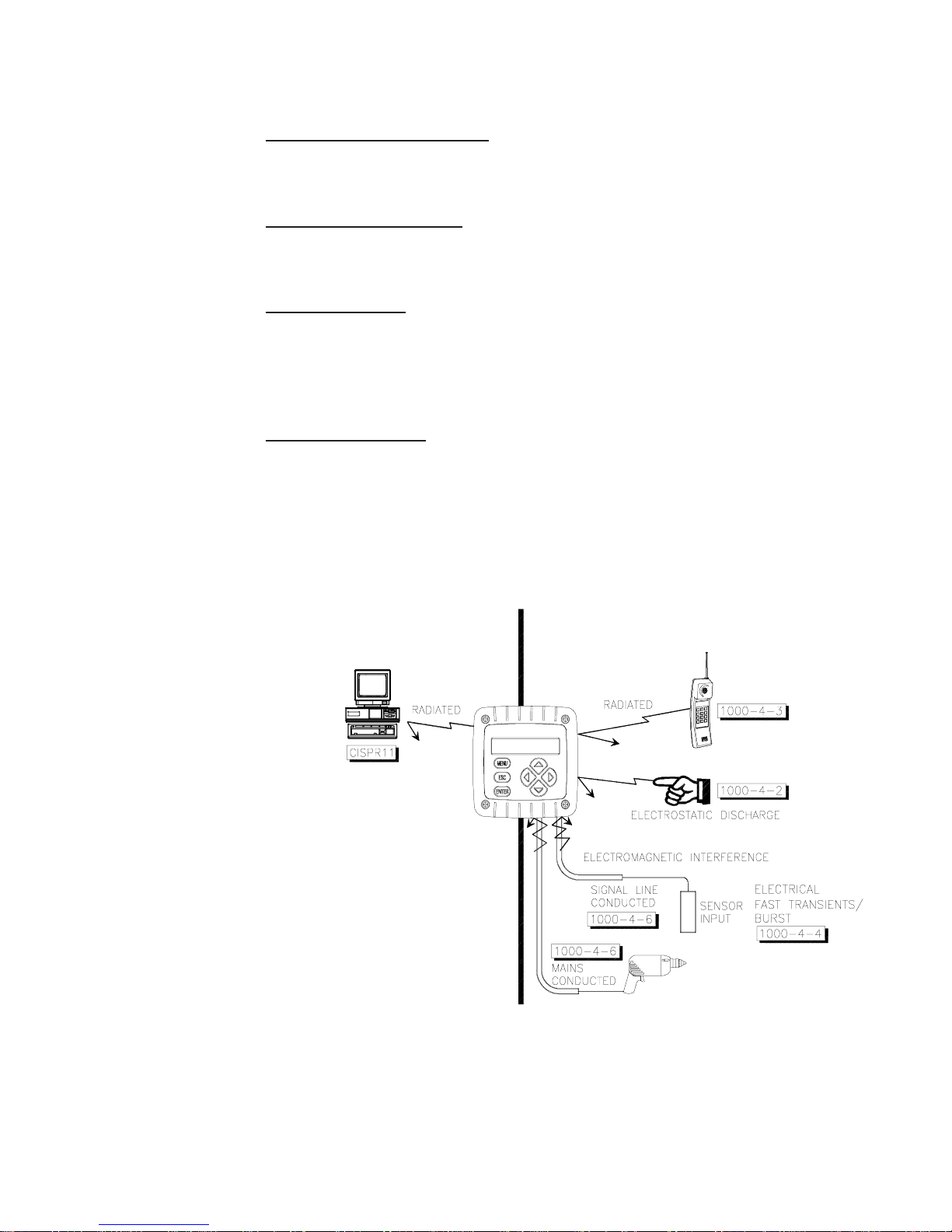
The transmitter is designed to provide protection from most normally encountered
electromagnetic interference. This protection exceeds U.S. standards and meets European IEC
1000 (EN 61000) series testing for electromagnetic and radio frequency emissions and
immunity. Refer to Figure 1-1 and the specifications in Section 2.1 for more information.
Figure 1-1 EMC Diagram
EMISSIONS IMMUNITY

PAGE 6
Section 2 - SpecificationsSection 2 - Specifications
Section 2 - SpecificationsSection 2 - Specifications
Section 2 - Specifications
2.1 Operational2.1 Operational
2.1 Operational2.1 Operational
2.1 Operational
Display Two-line by 16 character LCD
NOTE: The measured value (conductivity, % concentration or TDS) and temperature can be
displayed separately or shown together on a single screen. The corresponding 4-20
mA analog output value can also be shown. (When measuring concentration, the
transmitter can also show a corresponding readout of uncompensated conductivity.)
Measurement Ranges
Conductivity µS/cm: 0-200.0 or 0-2000
mS/cm: 0-2.000, 0-20.00, 0-200.0 or 0-2000
S/cm: 0-2.000
% Concentration 0-99.99% or 0-200.0%
TDS 0-9999 ppm
Temperature -4.0 to 347.0°F or -20.0 to +175.0°C
Analog Output 4.00-20.00 mA
Ambient Conditions:
Operation -4 to +140°F (-20 to +60°C); 0-95% relative humidity, non-
condensing
Storage -22 to +158°F (-30 to +70°C); 0-95% relative humidity, non-
condensing
Temperature Compensation Automatic from 14.0 to 347.0°F (-10.0 to +175.0°C) with
selection for Pt 1000 ohm RTD temperature element, or
manually fixed at a user-set temperature
NOTE: The selected measurement (conductivity, % conc. or TDS) determines which of the
following temperature compensation methods are available:
Linear % per °C slope, built-in natural water temperature properties table, user-
entered temperature table, or no compensation
Sensor-to-Transmitter Distance Maximum cable length is a function of the measuring range
and allowable non-linearity. The following schedule is
recommended:
Full-scale Range Max. Length
200 to 2000 µS/cm 200 ft. (61 m)
2000 to 2,000,000 µS/cm 300 ft. (91 m)
NOTE: When measuring % concentration, convert the transmitter full-scale value to
conductivity to determine the maximum distance.

PAGE 7
Power Requirements (Class 2 Power Supply):
Two-wire Hookup 16-30 VDC
Three-wire Hookup 14-30 VDC
Four-wire Hookup 12-30 VDC
Calibration Methods:
Sensor Zero With the dry sensor in air, press keys to initiate
(all measurements) automatic system zeroing
Conductivity Measurement:
COND CAL Enter compensation reference temperature, and reference
solution’s known linear % per °C slope and value
SAMPLE CAL Enter one sample value (determined by laboratory analysis
or a comparison reading)
ELECTRONIC CAL This method requires that the sensor be removed from the
process and utilizes a decade resistance box to simulate
conductivity rather than an actual solution.
Concentration Measurement:
CONC CAL Enter one sample value (determined by laboratory analysis
or a comparison reading)
COND CAL Enter compensation reference temperature, and reference
solution’s known linear % per °C slope and value
TDS Measurement:
TDS CAL Enter one sample value (determined by laboratory analysis
or a comparison reading)
Analog Output Isolated 4-20 mA output with 0.004 mA (12-bit) resolution
NOTE: The output can be assigned to represent the measured value (conductivity, %
concentration or TDS) or measured temperature. Parameter values can be entered to
define the endpoints at which the 4 mA and 20 mA output values are desired (range
expand). During calibration, the output is automatically held at the last measured
value and, upon completion, returned to its active state.
Maximum Loop Load Dependent on power supply voltage, transmitter hookup
arrangement, and wire resistance (see load resistance
charts for respective hookup diagrams in Section 4.2, 4.3 or
4 .4)
Memory (non-volatile) All user settings are retained indefinitely without battery
backup
Electrical Certifications UL, C-UL Pending

PAGE 8
2.2 T2.2 T
2.2 T2.2 T
2.2 Transmitter Pransmitter P
ransmitter Pransmitter P
ransmitter Performance (Electrical, Analog Outputs)erformance (Electrical, Analog Outputs)
erformance (Electrical, Analog Outputs)erformance (Electrical, Analog Outputs)
erformance (Electrical, Analog Outputs)
Accuracy* ± 0.1% of span
Sensitivity* ± 0.05% of span
Repeatability* ± 0.05% of span
Temperature Drift* Zero and Span: ± 0.02% of span per °C
Response Time 1-60 seconds to 90% of value upon step change (with
sensor filter setting of zero)
*These typical performance specifications are:
1. Based on 25°C with conductivity of 500 µS/cm and higher. Consult factory for applications in
which conductivities are less than 500 µS/cm.
2. Derated above 100°C to the maximum displayed temperature of 200°C. Consult factory for details.
2.3 Mechanical2.3 Mechanical
2.3 Mechanical2.3 Mechanical
2.3 Mechanical
Enclosure Polycarbonate; NEMA 4X general purpose; choice of
included mounting hardware
Mounting Configurations Panel, wall, pipe or integral sensor mounting
Dimensions With Back Cover:
3.75 in. W x 3.75 in. H x 2.32 in. D
(95 mm W x 95 mm H x 60 mm D)
Without Back Cover for Panel Mount:
3.75 in. W x 3.75 in. H x 0.75 in. D
(95 mm W x 95 mm H x 19 mm D)
Net Weight 10 oz. (280 g) approximately

PAGE 9
Section 3 - Physical InstallationSection 3 - Physical Installation
Section 3 - Physical InstallationSection 3 - Physical Installation
Section 3 - Physical Installation
Unpack and examine the equipment even if you do not use it immediately. If there is evidence of
damage, notify the transit carrier immediately.
Recommendation: Save the shipping carton and packing materials in case the instrument must
be stored or re-shipped.
3.1 Location3.1 Location
3.1 Location3.1 Location
3.1 Location
1. It is recommended to locate the transmitter as close as possible to the installed sensor.
The maximum allowable distance between an installed sensor and the transmitter
depends upon the full-scale value you set for the transmitter measuring range:
200-2000 µS/cm
Full-scale Value
2000-2,000,000 µS/cm
Full-scale Value
200 feet (61 m) max. 300 feet (91 m) max.
NOTE: When measuring % concentration, convert the transmitter full-scale value to
conductivity to determine the maximum distance.
2. Mount the transmitter in a location that is:
• Clean and dry where there is little or no vibration.
• Protected from corrosive fluids.
• Within ambient temperature limits (-4 to +140°F or -20 to +60°C).
CAUTION:
EXPOSING THE TRANSMITTER TO DIRECT SUNLIGHT MAY INCREASE
THE OPERATING TEMPERATURE ABOVE ITS SPECIFIED LIMIT, AND
DECREASE DISPLAY VISIBILITY.

PAGE 10
3.2 P3.2 P
3.2 P3.2 P
3.2 Panel Mounting (DA201A)anel Mounting (DA201A)
anel Mounting (DA201A)anel Mounting (DA201A)
anel Mounting (DA201A)
Figure 3-1 illustrates how to panel mount the transmitter using the supplied panel mount
hardware kit.
1. Cut a 3.30-inch (84 mm) square cutout hole in panel.
2. Position panel-mount gasket over cutout in front of panel, and place retainer plate
behind panel with its four threaded inserts facing away from back of panel.
3. Attach transmitter to retainer plate using its four captive screws.
NOTE: If panel is too thick, remove captive screws from transmitter, and use longer screws
provided in hardware kit.
FIGURE 3-1 Panel Mounting Details (DA201A)
Indice
Altri manuali Anderson Trasmettitore


