
Angekis Saber AT Manuale utente
Saber AT
User Manual V1.0 EN
Please refer this document before using
Autotracking PTZ Camera

Content
1
1
Content......................................................................................................1
Safety Guides............................................................................................2
Use Check.................................................................................................4
Camera Spec............................................................................................6
Interface Description.................................................................................9
Camera Dimension...................................................................................10
IR Remote Controller................................................................................11
VISCA In(RS232 Port).........................................................................13
VISCA Protocol.........................................................................................15
PELCO-D Protocol...................................................................................30
PELCO-P Protocol...................................................................................31
OSD Menu...............................................................................................32
UVC Control.............................................................................................36
Web Setting..............................................................................................37
View RTSP Video Via VLC.......................................................................42
VISCA Over IP..........................................................................................43
Safety Guides
2
● Before operation, please fully read and follow all instructions in the
manual. For your safety, always keep this manual with the camera.
● The camera power voltage is 12V DC, rated current is 2A. We suggest you
use it with the original power supply adapter supplied by the factory.
● Please keep the power cable, video cable and control cable in a safe place.
Protect all cables - especially the connectors.
● Operational environment: -10℃~50℃, humidity less than 80%.
● To avoid any danger, please keep the camera away from corrosive liquids.
● Avoid stress, vibration and dampness during transportation, storage and
installation.
● Do not remove the camera housing and cover. For any service, please
contact authorized technicians.
● Video cable and control cable should be individually shielded, and cannot
be substituted with other cables. Do not direct the camera lens towards strong
light, such as the sun or intensive light.
● Use a dry and soft cloth to clean the camera housing. When cleaning is
needed, apply with a neutral clean. To avoid damage to the camera lens, never
use strong or abrasive cleaning agents on the camera housing.
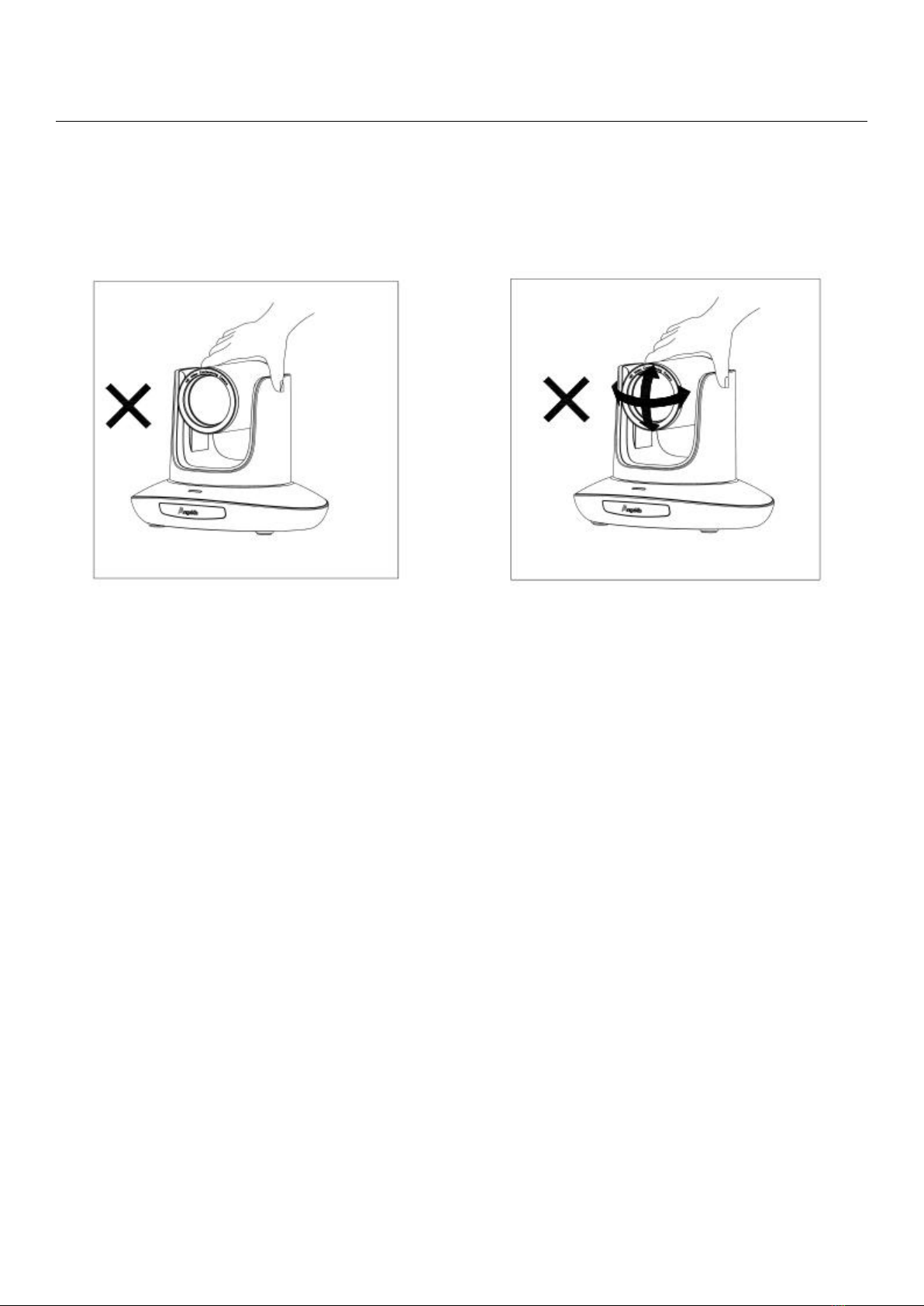
● Do not move the camera by holding the camera head. To avoid
mechanical trouble, do not rotate the camera head by hand.
● Put the camera on a fixed and smooth desk or platform, avoid lopsided
installation.
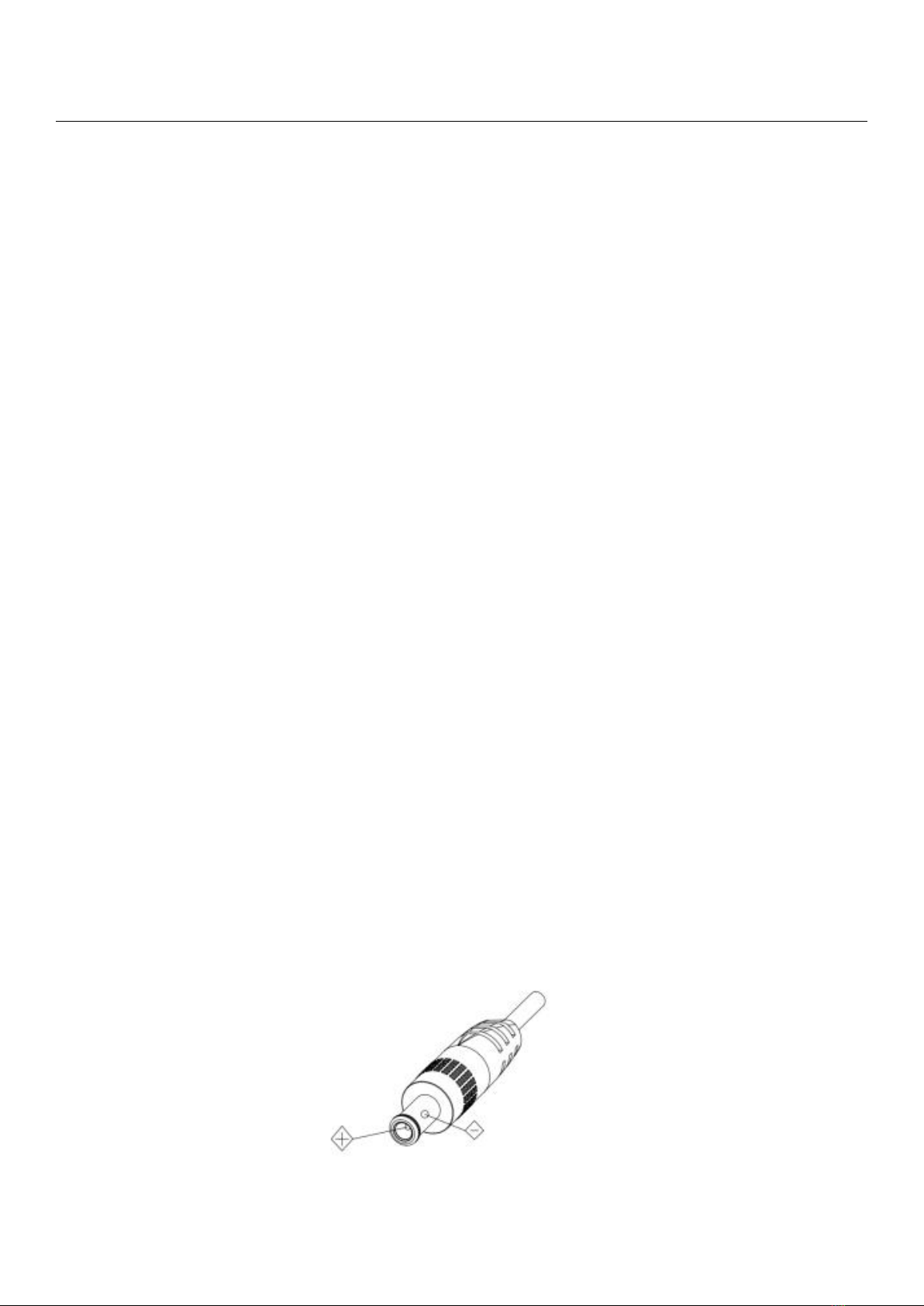
● Power Supply Polarity:
Safety Guides
3
Attention!
▲ The video quality may be affected by the specific frequencies of the
electromagnetic field.
▲ Never grasp the head of the camera, and never move the camera by
hand when it is working, otherwise, the mechanism maybe damaged.
Declarations:
█ Instruction Manual is for reference only. Please refer to the actual
product.
█ Please contact Customer Service staff for the latest programs and
supplementary documentations.
█ In case there are any inconsistencies in the manual, the final
interpretation of the company shall prevail
Use Check
4
PACKING LIST
Check all below items when open the package
Camera-------------------------1PCS
Power Adapter-----------------1PCS
Power Cable--------------------1PCS
Remote Controller---------------1PCS
USB Type-C Cable--------------1PCS
RS232 Cable--------------------1PCS
User Manual--------------------1PCS
Quick Start
Use Check
5
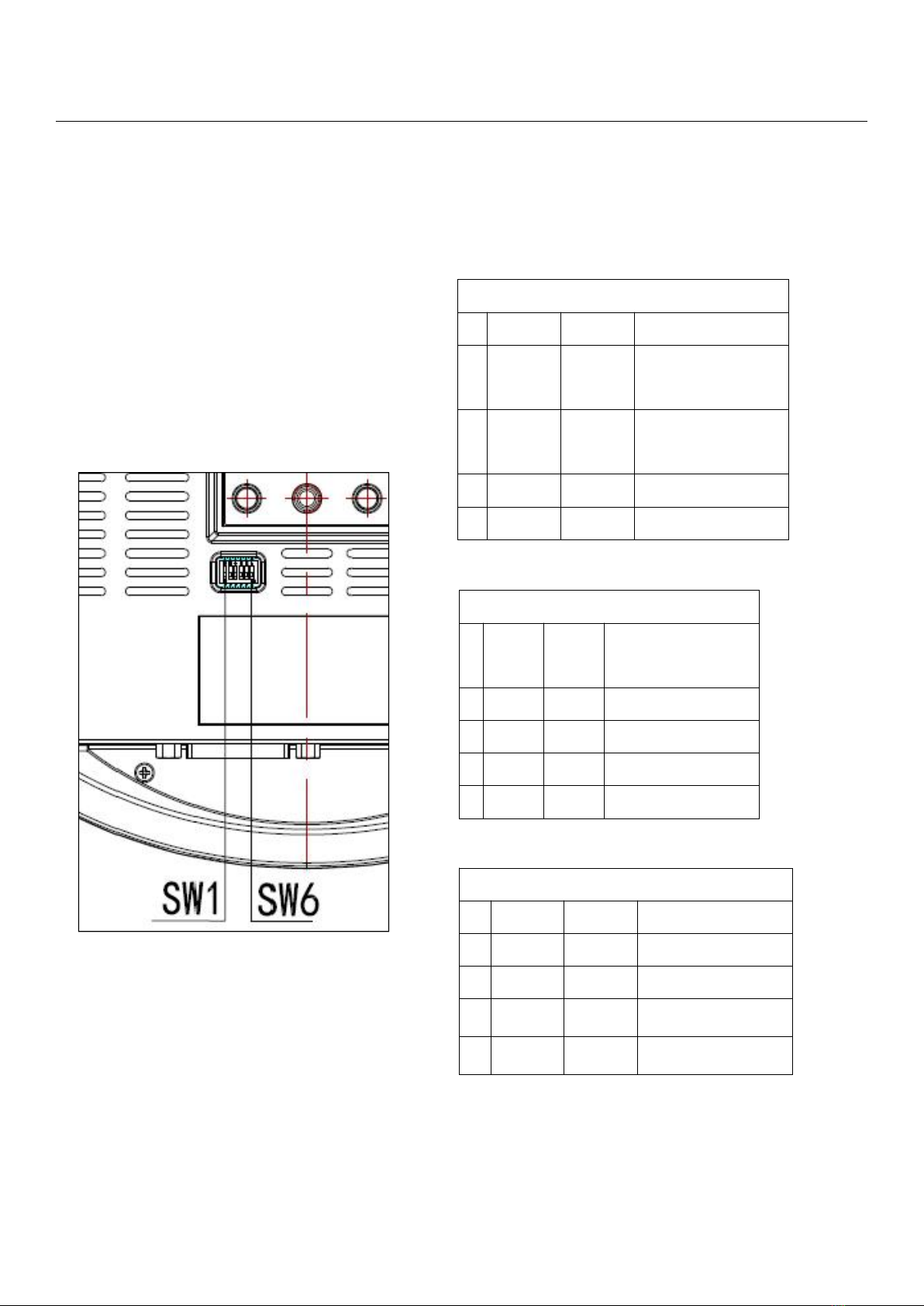
Dial Switch Setting (at the bottom of the camera)
Dial Switch (ARM)
SW-1
SW-2
Instruction
1
OFF
OFF
Upgrading
mode
2
ON
OFF
Debugging
mode
3
OFF
ON
Undefined
4
ON
ON
Working mode
Dial Switch
SW-
3
SW-
4
Instruction
1
OFF
OFF
Reserved
2
ON
OFF
Reserved
3
OFF
ON
Reserved
4
ON
ON
Reserved
Dial Switch
SW-5
SW-6
Instruction
1
OFF
OFF
Undefined
2
ON
OFF
Working mode
3
OFF
ON
Undefined
4
ON
ON
Undefined

Camera Spec
6
★ Adopts an advanced image processing DSP and 1/2.8 inch 2.4MP image
sensor.
★ High-Definition Optical Lens: 20x optical zoom, with 60-degree field of
view.
★FHD 1080P60 video output from Ethernet, while supporting H.264, H.265
encoding.
★ Supports POE+: one single Ethernet cable to get video, control, and
power supply.
★ Fast video format switch.
★ Special Focusing Algorithm: fast and precise focusing performance when
zooming or moving.
★ Unique camera design with patent.
★ Smooth PTZ mechanical design, accurate pan tilt motor control.
★ Supports field upgrade-able, one-click software upgrade through WebUI.
★ Supports Line in input.
★ Supports HDMI, & SDI high-quality audio output.
★ HDMI, SDI, USB Type-C video outputs, fit for different scenarios.
★ Standard VISCA, PELCO-D, PELCO-D control protocols, quickly set up
through OSD menu.
★ Supports auto-tracking: locks on to the first person captured by the
camera.
★ Supplied with multi-function IR remote control, can set IP address via OSD
menu.
★ Standard Sony VISCA over IP protocol, supports network video and
control transmission simultaneously.
★ Supports SRT protocol for secure transmission of high-quality,
low-latency video over WANs.
★ Supports RTMP protocol for directly streaming to Youtube Live, Facebook
Live and other platforms.
★ Multi language menu: supports Chinese, English and Russian.

Camera Spec
7
ANG2-20FHD-AT
Sensor
1/2.8” inch high quality, 2.4 MP CMOS Sensor
Video Format
HDMI
1920*1080P60/59.94/50/30/29.97/25/24/23.98
1920*1080I60/59.94/50
1280*720P60/59.94/50/30/29.97/25
SDI
1920*1080P60/59.94/50/30/29.97/25/24/23.98
1920*1080I60/59.94/50
1280*720P60/59.94/50/30/29.97/25
USB
MJPG, H.264, HEVC: 1920*1080P60; 1280*720P60;
1024*576P60; 800*448P60
NV12, YUY2: 1920*1080P5; 1280*720P15;
1024*576P25; 800*448P30
IP
1920*1080P15~60; 1280*720P15~60;
1024*576P15~60; 640*360P30
Video Interface
HDMI, SDI, RJ45, USB Type-C
Audio Interface
3.5mm Line in
Focal Length
4.9mm~98mm
Lens
magnification
20X optical zoom + 4X digital zoom
Aperture
F1.5~3
View Angle
60°(Wide)~3.2°(Tele)
Rotation Angle
Pan: ±170°; Tilt: -30°~+90°;
Rotation Speed
Pan: 0.1°~120°/s; Tilt: 0.1°~80°/s
Preset
Remote controller: 10; RS232: 128; Accuracy: 0.1°
Control Port
RS232 IN, RJ45
Network Speed
1000M
Video encode
H.264 / H.265
Bit Rate Control
Variable Bit Rate, Constant Bit Rate

Camera Spec
8
Video Bit Rate
1024~61440kbps
Protocol
HTTP, RTSP, RTMP, ONVIF, Visca TCP, Visca UDP, Visca over IP, Visca
Serial, Pelco-P, Pelco-D
POE+
Supported
Daisy Chain
Support RS232 serial daisy chain
Minimum Lux
0.01 lux
White Balance
Auto / Manual / ATW / Push / Indoor / Outdoor / Color Temperature
Exposure
Auto / Manual / Iris / Bright
Focus
Auto / Manual
Iris
Auto / Manual
Shutter
Auto / Manual
Gamma select
Supported
BLC
Supported
2D Noise
Reduction
Supported
3D Noise
Reduction
Supported
Anti-flicker
OFF, 50Hz, 60Hz
Pan Tilt Flip
Supported
Mirroring
Supported
Input Voltage
DC12V/POE+(IEEE802.3at)
Dimension
220mm×190mm×173mm
Net Weight
1.47kg
Working
Temperature
-10℃~50℃
Working
Humidity
≤80%
Interface Description
9
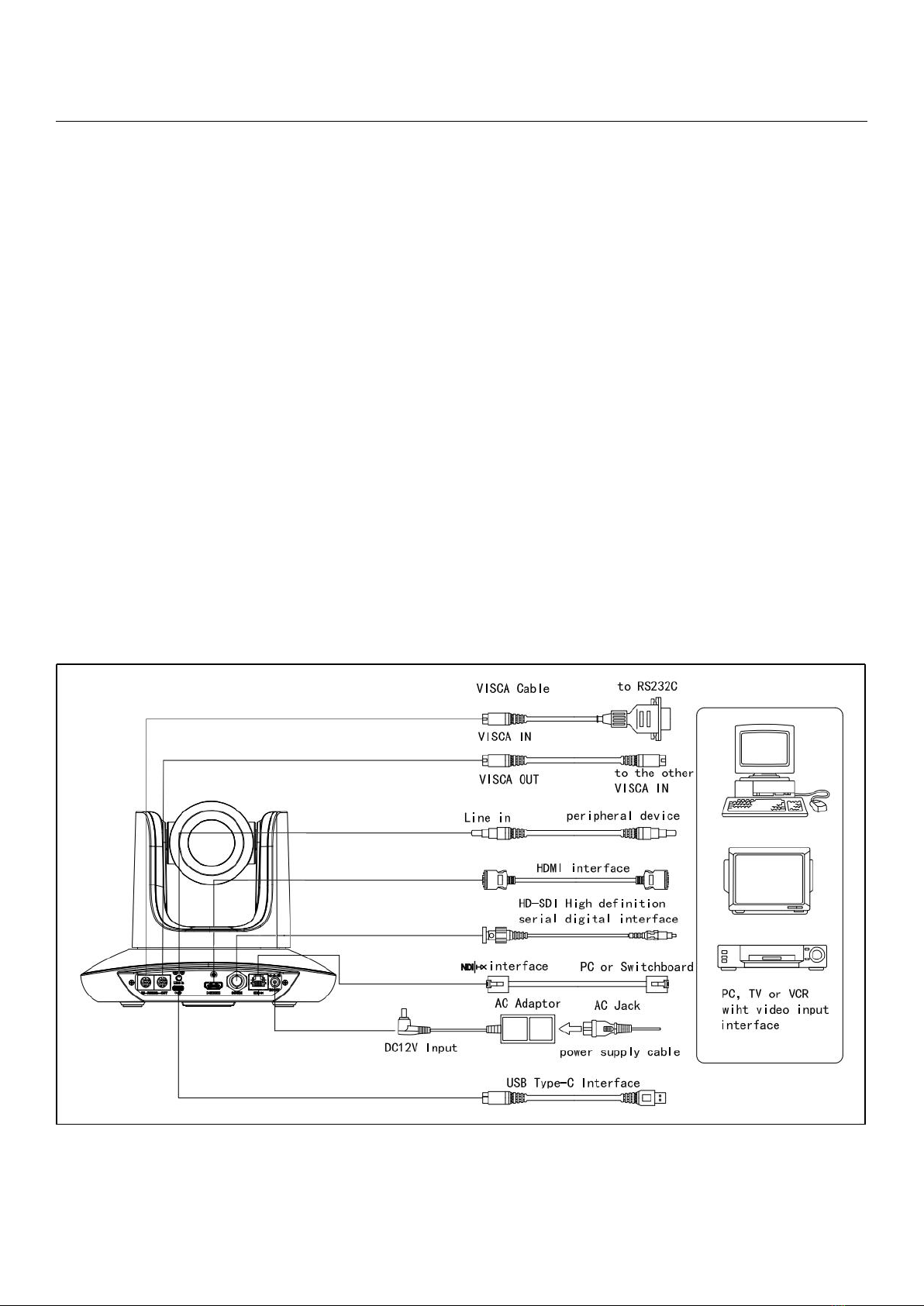
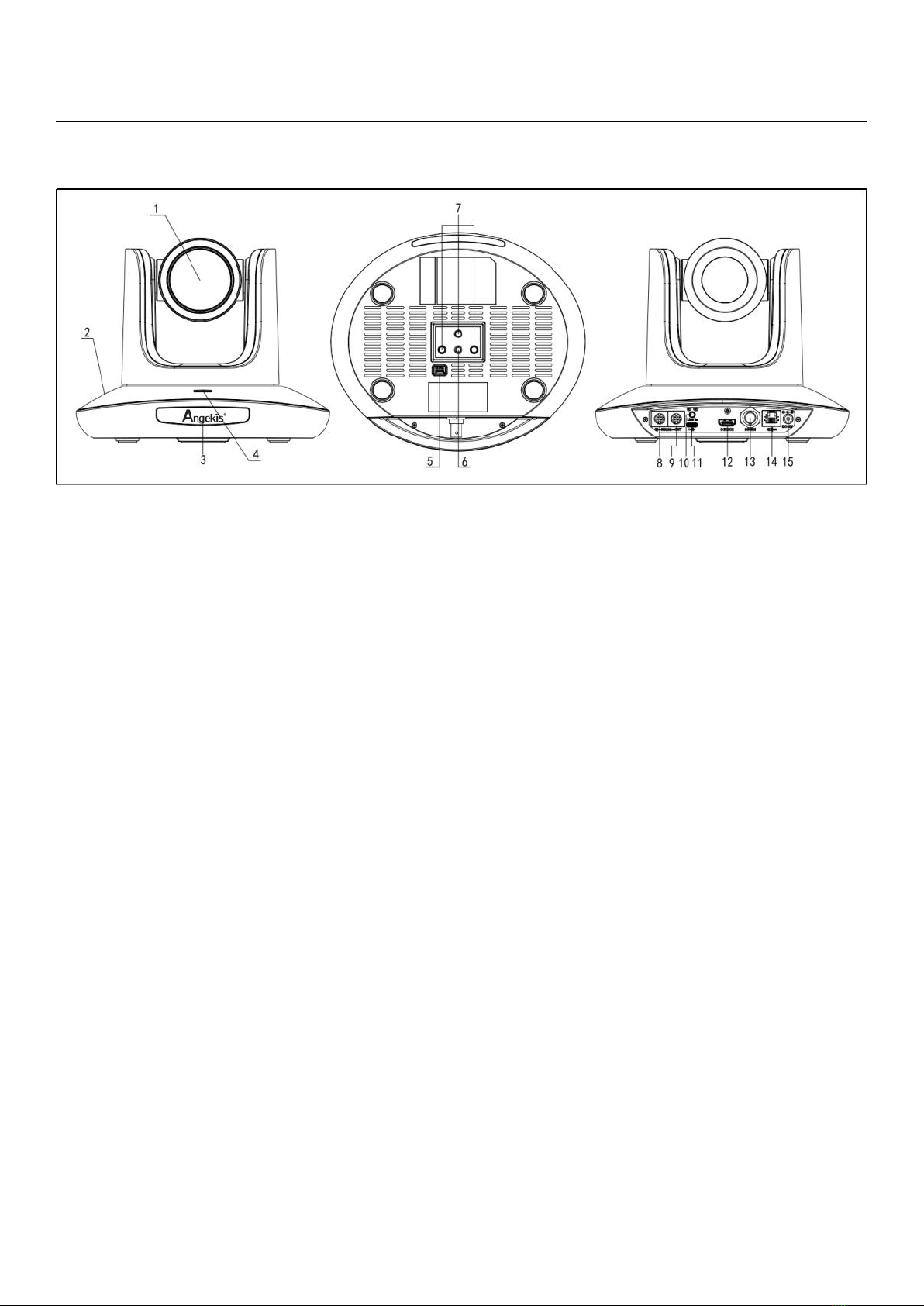
1. Camera Lens
6. Tripod Screw Hole
11. USB Type-C port
2. Camera Base
7. Installation Hole
12. HDMI port
3. IR Receiver Panel
8. RS232 ((IN) port
13. 3G-SDI port
4. Power Indicator Light
9. RS232 (OUT) port
14. RJ45 port
5. Dial Switch
10. Line in port
15. DC 12V plug
Indice
Altri manuali Angekis Telecamera di sicurezza

Angekis
Angekis Saber IP20X Manuale utente

Angekis
Angekis Saber Light Manuale utente

Angekis
Angekis Saber 4K NDI Manuale utente

Angekis
Angekis Blade Manuale utente

Angekis
Angekis BLADE 4K Manuale utente

Angekis
Angekis Saber IP20X NDI Manuale utente

Angekis
Angekis Blade VS+ Manuale utente

Angekis
Angekis Saber 20x Manuale utente


