
APPLIED ACOUSTICS 1082 Manuale utente

DC IN RESET
Connections
-+
ICONS
SELECTION
OPTIONS
Standing by
Fast ID Beacon
Operation
Packing List
1082 Smart Switch.
30VDC PSU (100-250VAC mains input).
# SB-301A2F-11
Mains lead (IEC).
UK / USA / EUR / Other
Beacon Connection Cable
# CHA-1082-4000
Manual
# CHA-1082-8000
Acoustic Support Disc
# BCN-1010-8002
Quick Start Guide
1082 Smart Switch
Channel Configuration
Connect 1082 Smart Switch to 1000 / 1100
series beacon using pigtail supplied.
Switch Beacon to ON.
Press to wake up 1082 Smart Switch if
asleep.
Press to cycle thru menus, locate - Fast
ID Beacon, press to identify beacon.
Display will indicate Beacon Model and
Channel Set.
Select Beacon Config to change beacon
parameters.
Fast Charging
Connect 1082 Smart Switch to 1000 / 1100
series beacon using pigtail supplied.
Switch Beacon to CHAR.
Connect external Power Supply to 1082.
Press to wake up 1082 Smart Switch if
asleep.
Press to cycle thru menus, locate - Fast
Charge, press to select.
Unit will prompt for external power if not
connected.
Else press to begin charge.
WARNING: - The sealed beacon must be vented to
atmosphere before and after a charge cycle by
manually operating the pressure relief valve (PRV).
Refer to 1000 series beacon manual.
Cabling
Smart Switch DC Input Cable
Beacon Connection Cable
9-Way
‘D’
MCIL5F
Pigtail
Function
2
1,5
RS232 TXD / Responder
3
3
RS232 RXD / Fast Charge
5
2
0V
9
4
Fast Charge Status / Trickle Charge
Beacon Model and Configuration Messages
An identified beacon model and configuration is
displayed as a scrolling message to the user. This
message is composed from the following: -
“MDL=1019D” Beacon model
“OPT=1,3” Enabled options
“CFG=AAE” AAE “channel” configuration
“CFG=SIGMA2” AAE Sigma2™configuration
“CFG=IXB” iXBlue compatible
configuration
“CFG=SWB” Sonardyne Wideband™
compatible configuration
Message is completed as follows: -
AAE “Channel” configuration
“CH=01” AAE “channel”
AAE Sigma2™configuration
“QS=1” “Quickset” configuration
“WUT=0” Wake-Up Tone
“IC=00” Interrogate Code
“RC=00” Reply Code
“TATX=0100ms” Turn-Around-Time Extension
iXBlue compatible configuration
“IF=19.5kHz” Interrogate Frequency
“RC=00” Reply Code
“TAT=020ms” Turn-Around-Time
Sonardyne Wideband™ compatible configuration
“QS=A1” “Quickset” configuration
“IC=CIF” Interrogate Channel
“ACA=0101” Acoustic Command Address
“TAT=062.5ms” Turn-Around-Time
Example
“MDL=1019D CFG=AAE CH=01”
Applied Acoustic Engineering Ltd has made every
effort to ensure that the information contained in this
guide is correct at time of print. However our policy of
continual product improvement means that we cannot
assume liability for any errors which may occur.
DC INPUT
SOCKET
RESET
BUTTON
9-WAY ‘D’
SOCKET
INNER
OUTER
5432 1
9 8 76
9-WAY ‘D’
PLUG
FACE
VIEW
1
2
3
5
4
MCIL5F PIGTAIL
FACE VIEW
Attempting serial communication with beacon
NEXT
SELECT
Smart Switch internal battery charge
Serial communication inactive
Serial communication active with beacon
Trickle charge or fast charge active
UP
SHIFT
INFORMATION /
INSTRUCTION
NAVIGATION
OPTIONS
MENU ITEM /
INSTRUCTION
The Smart Switch does not include a power switch; the unit is ‘always on’. After two minutes of no user activity,
i.e. no key presses, the Smart Switch will revert to very low power standby with a blank display. In standby,
pressing any selection key will ‘wake’ the Smart Switch to its state prior to standby.
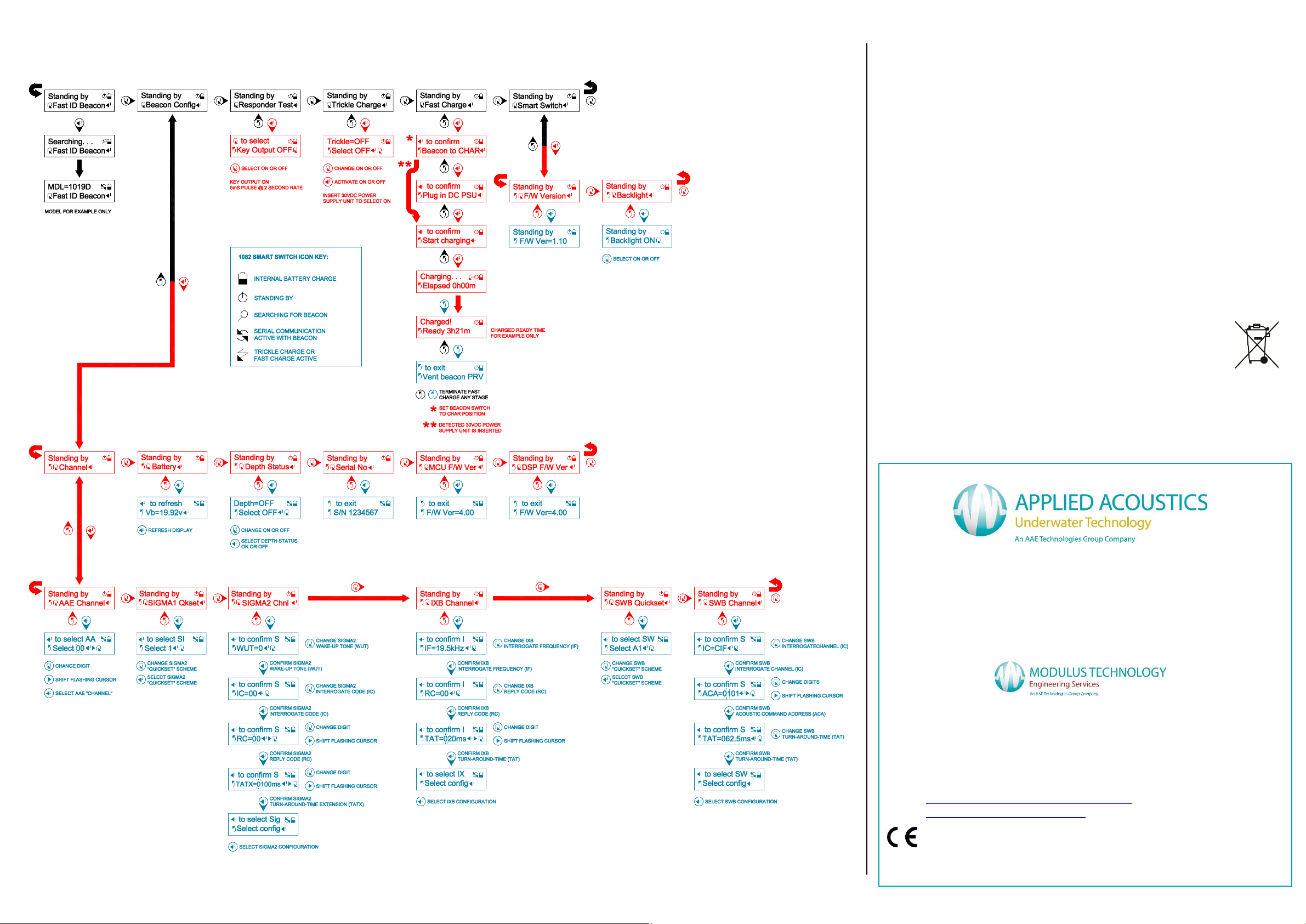
Menu Guide
Troubleshooting
Did the Smart Switch ever work?
If the answer is yes, either the battery is not charged or the Smart Switch is
faulty. Look for mechanical damage and also check if the connectors are
damaged.
Try resetting the Smart Switch by depressing the reset button.
If there are no signs of mechanical damage, try charging the Smart Switch.
Check the 30VDC power supply unit is operational.
Check the Beacon Connection Cable for damage. Damage could affect all
Smart Switch functionality with a connected compatible AAE beacon.
If cannot establish communication with a connected beacon, turn beacon off
and leave for minimum of 1 minute, then turn beacon back on and retry
communication.
End of Life Recycling / Disposal
Within the EU all electronic components and batteries must be taken
for separate collection at the end of their working life under EU WEEE
directives. Applied Acoustics as a manufacturer within the EU will
responsibly dispose of any returned end of life Applied Acoustics
components / batteries through a registered WEEE scheme. In order to prevent
uncontrolled waste disposal and promote re-cycling please return any end of life
Applied Acoustic components shipping paid by sender to our UK head office.
There may be a charge for this service. Please contact Tech Support for a RMA
number prior to shipping.
Quick Start Guide
1082 Smart Switch
Thank you for choosing AAE Technologies Ltd as one of your equipment
suppliers. We hope you experience many years of reliable operational
use from our products.
Modulus Technology Ltd carries out all technical support, servicing and
repairs for all companies in the AAE Technologies Group. If you have
any technical issues with our products please contact the Modulus
Technology team:
Tel: +44 (0)1493 416452
Email: techsupport@modulustechnology.com
Web: www.modulustechnology.com
CHA-1082-8002/5
Altri manuali per 1082
1
Altri manuali APPLIED ACOUSTICS Interruttore


