
araknis 210 Series Manuale utente

210/310 SERIES MANAGED NETWORK SWITCH
PRODUCT MANUAL
Models:
AN-210-SW-C/F/R-8-POE
AN-210-SW-F/R-16-POE
AN-210-SW-F/R-24-POE
AN-210-SW-F-48-POE
AN-310-SW-F/R-8
AN-310-SW-F/R-16
AN-310-SW-F/R-24
AN-310-SW-F-48
AN-310-SW-F/R-8-POE
AN-310-SW-F/R-16-POE
AN-310-SW-F/R-24-POE

© 2020 Araknis Networks®
2
Araknis Networks AN-210/310-SW-F/R Manual
Product Manual
Table of Contents
About this Manual
This manual was created to provide a reference for installers and end users of Araknis Networks™ products.
It provides all known information regarding the installation, setup, use, and maintenance of the product. The
symbols below are used to identify important information:
Pro Tip – Pro tips are included in sections of the manual to add information that provides extra
value, utility, or ease-of-use for the installer or end user of the product. These items are not
required, but have been added for your convenience.
Note – Notes emphasize information important to the installation, setup, or use of the product
that is not essential to follow for safety of the equipment or user. These items contain essential
information that, if missed, would cause the installer or end user extra work to overcome.
Caution – The caution symbol is used to indicate information vital to the safety of the equipment
in use with the product, or the product itself. Not following a caution will almost always result in
permanent damage to equipment that is not covered by warranty.
Warning – Warnings indicate information vital to the safety of the installer or end user of the
product. Not following a warning may result in permanent damage to equipment and serious injury
or death of the installer or end user.

© 2020 Araknis Networks®
3
Araknis Networks AN-210/310-SW-F/R Manual
Product Manual
Table of Contents
Table of Contents
1 - Welcome to Araknis Networks™ 8
2 - Package Contents 8
3 - Series Overview 8
4 - Device Layout 9
Rear Facing Models 10
Front Facing Models 10
Compact Models 10
48 Port Models 10
5 - Hardware Installation 11
Mounting 11
Rack Mount 11
Wall Mount 11
Shelf Mount 11
Rack Mounting Guidelines 12
Connections 13
Input Power Requirements 13
Network Cable Requirements 13
SFP Ports 13
Switch 13
PoE Budget Calculation Example 14
6 - OvrC Setup 15
7 - Interface Access 16
OvrC Web Connect Access 16
Direct Access Using LAN IP Address (DHCP) 17
Default IP Address Access 18
8 - Interface Overview 21
Page Layout 21
Applying or Canceling Changes 21
9 - Switch Status Pages 22
System Status Page 22
System Information 22
Port Status 22
Events Log 23
Port Status Page 24
10 - System Settings 25
System Information 25
IP Address Settings 26
IPv4 IP Settings 26
IPv6 IP Settings 26
Date and Time Settings 27
UPnP Setting 27
11 - Recommended Setup – System Settings 28
12 - Port Configuration Settings 29
Jumbo Frame Setting 29
Basic Port Settings 29

© 2020 Araknis Networks®
4
Araknis Networks AN-210/310-SW-F/R Manual
Product Manual
Table of Contents
Advanced Port Settings 30
13 - PoE Settings 31
PoE Setup and Troubleshooting 32
Checking Status of PoE Devices 32
Configuring PoE Ports 32
Troubleshooting PoE Issues 32
14 - VLAN Settings (Basic Port-Based) 33
Access and Trunk Port Selection 33
Creating a New VLAN 34
15 - Link Aggregation Settings 35
Creating a New Link Aggregation Rule 36
16 - Access Management Settings 37
User Management 37
HTTP/Telnet/SSH 37
17 - Maintenance Menus 38
Ping Test 38
Running a Ping Test 38
Understanding Ping Test Results 39
Troubleshooting Using Ping Test Results 39
Trace Route Test 40
Running a Trace Route Test 40
Understanding Trace Route Test Results 41
File Management Settings 42
Configuration File 42
Firmware 42
Dual Image 43
Firmware Update Instructions 43
Restart 44
Log Out 44
18 - Advanced Menus 45
19 - Advanced Port Statistics 46
20 - Neighbors – MAC Address Table 48
Static and Dynamic MAC Address 48
21 - Neighbors – LLDP 49
Information Table 49
Settings 50
Remote Device Table 50
22 - Multicast – IGMP Snooping 51
Settings 51
VLAN Settings 51
Querier Settings 52
Group List 53
Router Settings 53

© 2020 Araknis Networks®
5
Araknis Networks AN-210/310-SW-F/R Manual
Product Manual
Table of Contents
URC Settings 53
23 - Multicast – MLD Snooping 54
Settings 54
VLAN Settings 54
Group List 54
Router Settings 55
24 - STP – Overview 56
STP – Global Settings 56
Settings 56
Root Bridge Information 57
Basic Setting 58
25 - STP (Spanning Tree Protocol) Overview 59
STP – CIST Settings 59
Port Settings 59
STP – MST Settings 61
Instance Settings 61
Port Settings 62
26 - Advanced VLANs – Overview 63
Advanced VLANs – 802.1Q VLANs 63
VLAN Settings 63
PVID Settings 63
Advanced VLANs – Private VLANs 64
Advanced VLANs – Voice VLANs 65
General Settings 65
OUI Settings 66
Port Settings 66
27 - Security – Port Mirroring 67
28 - Security – 802.1x 67
802.1x Global Setting 67
Port Settings 68
Authenticated Host 69
29 - Security – Radius Server 70
30 - Security – DOS 71
Global Settings 71
Global DOS Security Settings, Continued 72
Port Settings 72
31 - Security – Port Security 73
32 - Security – MAC Address Filter 73
33 - RMON Overview 74
RMON – Event List 74
RMON – Event Log Table 74
RMON – Alarm List 75
RMON – History List 76

© 2020 Araknis Networks®
6
Araknis Networks AN-210/310-SW-F/R Manual
Product Manual
Table of Contents
RMON – History Log Table 76
34 - QoS – Overview 77
QoS – Global Settings 77
QoS – COS Mapping 77
QoS – DSCP Mapping 78
QoS – Port Settings 78
QoS – Bandwidth Control 78
QoS – Storm Control 79
35 - ACL – Overview 80
ACL – MAC ACL 80
MAC ACL List 80
MAC ACE List 80
MAC ACE List Editor 81
ACL – IPV4 ACL 82
IPv4 ACL List 82
IPv4 ACE List 82
IPv4 ACE List Editor 83
ACL – IPV6 ACL 84
IPv6 ACL List 84
IPv6 ACE List 84
IPv6 ACE List Editor 85
ACL – ACL Binding 86
36 - SNMP – Overview 87
SNMP – Global Settings 87
Settings 87
Trap Settings 88
Remote Engine ID List 88
SNMP – Lists 89
Group Lists 89
View List 89
SNMP Community List 90
User List 90
37 - Advanced LACP 91
Settings 91
LACP Timeout 91
38 - Advanced Log 92
Settings 92
Local Logging 92
Remote Logging 92
39 - AN-210-SW-POE Hardware Specifications 96
40 - AN-310-SW (Non-PoE) Hardware Specifications 97
41 - AN-310-SW-POE Hardware Specifications 98

© 2020 Araknis Networks®
7
Araknis Networks AN-210/310-SW-F/R Manual
Product Manual
Table of Contents
42 - General Specifications (All 210/310 Models) 99
43 - Appendix – Safety and Regulatory Information 101
FCC Warning 101
CE Warning 101
UL Statement 101
44 - Warranty 102
2 Year Limited Warranty 102
Contact Information 102
© 2020 Araknis Networks®
8
Araknis Networks AN-210/310-SW-F/R Manual
Product Manual
Table of Contents
1 - Welcome to Araknis Networks™
Thank you for purchasing an Araknis 210/310 series network switch. This manual details the installation and
setup of the hardware and the managed interface.
2 - Package Contents
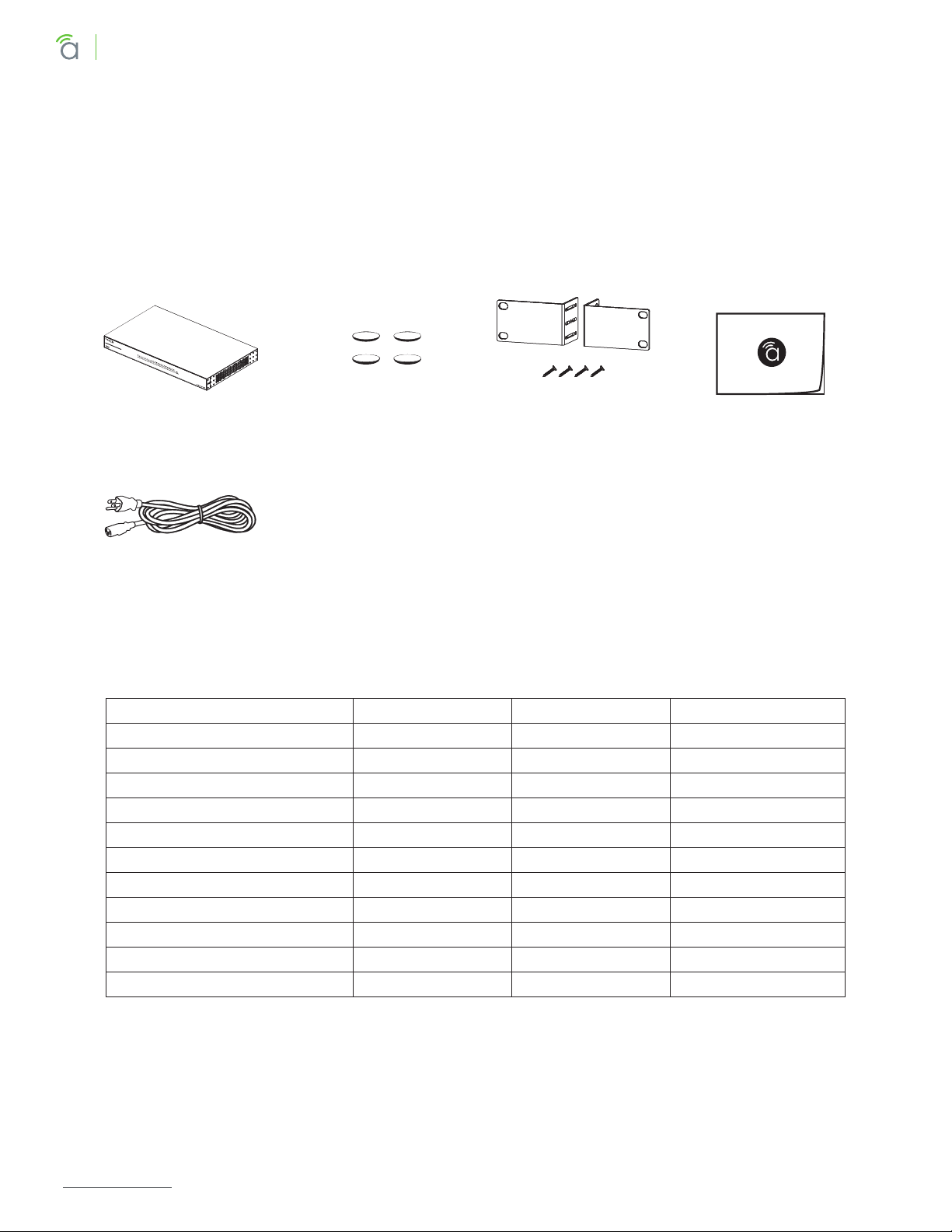
For unique package contents of the AN-210-SW-C-8-POE refer to its Quick Start Guide.
Figure 1. Package Contents
Switch (1) Quick Start Guide
Rubber Feet for Flat
Surfaces (4)
Rack-Mount Kit:
Ears (2), Screws (8)
AC Power Cord
3 - Series Overview
Model Ethernet Ports SFP Ports PoE Budget (Watts)
AN-210-SW-C/F/R-8-POE 8 2 65W
AN-210-SW-F/R-16-POE 16 2 130W
AN-210-SW-F/R-24-POE 24 2 190W
AN-210-SW-F-48-POE 48 4 375W
AN-310-SW-F/R-8 8 2 -
AN-310-SW-F/R-16 16 2 -
AN-310-SW-F/R-24 24 2 -
AN-310-SW-F-48 48 4 -
AN-310-SW-F/R-8-POE 8 2 130W
AN-310-SW-F/R-16-POE 16 2 250W
AN-310-SW-F/R-24-POE 24 2375W
© 2020 Araknis Networks®
9
Araknis Networks AN-210/310-SW-F/R Manual
Product Manual
Table of Contents
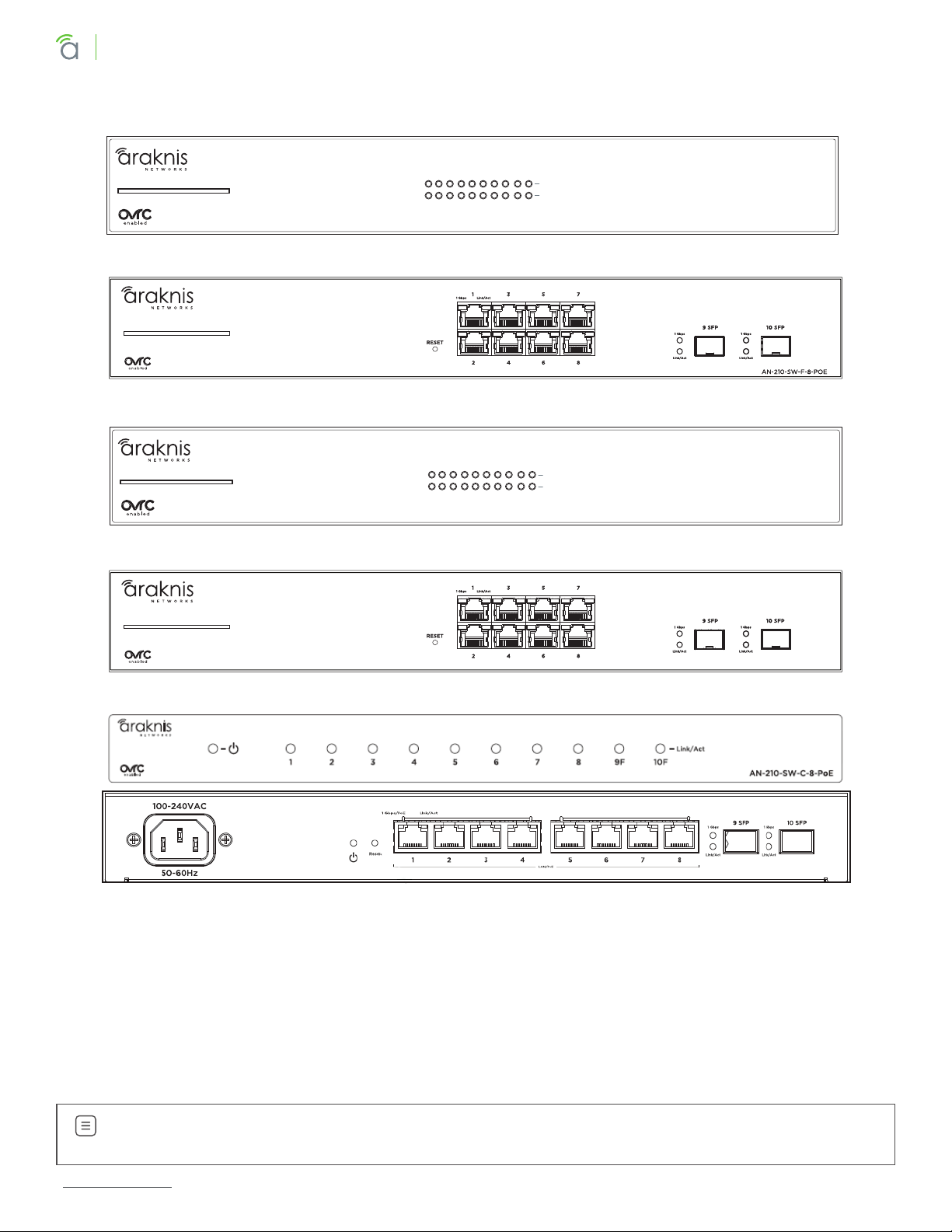
4 - Device Layout
1 Gbps
Link/Act
AN-210-SW-R-8-POE
1 2 3 4 5 6 7 8 9F 10F
AN-210-SW-R-8-POE
AN-210-SW-F-8-POE
1 Gbps
Link/Act
AN-310-SW-R-8-POE
1 2 3 4 5 6 7 8 9F 10F
AN-310-SW-F-8-POE
AN-310-SW-R-8-POE
AN-310-SW-F-8-POE
1. Power LED – On: system is up.
O: system is down.
2. 1Gbps LED – On: port connected at 1000Mbps speed.
O: port is connected at 10/100Mbps speed.
3. Link/Act LED – On: port is connected to another device.
Blinking: packets are running through the port.
O: port is not connected to a device.
AN-210-SW-C-8-POE
Note – The 1Gbps LED behavior may be configured to indicate other information. See instructions
in section “10 - System Settings” on page <?>.

© 2020 Araknis Networks®
10
Araknis Networks AN-210/310-SW-F/R Manual
Product Manual
Table of Contents
Factory Reset
Reboot or default the switch configuration settings.
Rear Facing Models
RESET
1 3 5 7
2 4 6 8
Link/Act1 Gbps
9 SFP 10 SFP
Link/Act
1 Gbps
Front Facing Models
AN-310-SW-F-8-POE
Compact Switch
48 Port Models
1 Gbps/PoE
1. Reboot – Press and hold the RESET button on the back of the switch for 5 seconds, then release. The
switch will power cycle and the front status lights will flash.
2. Factory Reset – Press and hold the RESET button for 10-15 seconds until the status LEDs flash once. The
switch will power cycle and be reset to factory default settings.
Questo manuale è adatto per i seguenti modelli
22
Indice
Altri manuali araknis Interruttore

araknis
araknis AN-100-SW-R-5 Manuale utente

araknis
araknis AN-620-SW Manuale utente

araknis
araknis AN-110-SW-C-5P Manuale utente

araknis
araknis AN-100-SW-R-5 Manuale utente

araknis
araknis 300 - SERIES Manuale utente

araknis
araknis AN-210-SW-R-8-POE Manuale utente

araknis
araknis AN-210-SW-F/R-8-POE Manuale utente

araknis
araknis AN-300-SW-F/R-8 Manuale utente

araknis
araknis 310 Series Manuale utente


