
Arrowhead KP600F/KP600L Manuale utente

KP600F/L
LED/LCD KEYPADS
Owner's Manual
Use with
AV6500 & SP850 Control panels
P/N 64812823 A PDF 10/23/97
IT IS IMPORTANT FOR YOUR SAFETY TO TEST YOUR
SYSTEM AND IT'S COMPONENTS REGULARLY.

2
Table of Contents
Introduction 3
System Configuration 3
Keypad Description 4
Disarming And Silencing Your System 7
Arming Your System 7
Zone Bypass 8
Bypassing a Group of Zones 8
Instant/Delay Mode 9
Arming/Disarming Reports By User 9
Testing the Communicator 9
Testing Your System 10
Smoke Detector Reset 10
Setting Chime Mode 11
Fault Condition 11
Duress (Ambush) 12
Emergency Alarm Key Pairs 13
Changing User Code(s) From The Keypad 14
Deleting Secondary User Codes 14
Remote Telephone Access 15
Evacuation Plan 16
Warranty and Liability Limitations and Disclaimer 17

3
Introduction
Your installer has selected one of the finest alarm systems available
for your installation and has custom programmed the system features
to meet your specific requirements. Arrowhead Control Panels are
designed for high reliability, excellent security and simplicity of
operation. These features make it easy for you to get the most out of
your system and prevent false alarms. The system is capable of
reporting alarm and fault information via the telephone to a central
monitoring station.
Some of the functions that your installer might have programmed are:
fire, burglary, entry/exit delays, silent alarm, duress, power failure,
communication failure, fire trouble and others. Consult with your
installer and make sure you understand which ones are programmed
and how they are used. The material in this publication is for
information purposes only and is subject to change without notice.
SENTROL, INC., assumes no responsibility for any error which may
appear in this publication.
System Configuration
The items below should be marked by your installer at the time of
installation defining the options that have been programmed.
Options Programmed
KEYPAIR ALARMS KEYPAD DURESS
KEYPAD FIRE RESET [1&3] EXIT TONE ENABLE
CHIME ZONES _______ GROUP BYPASS ZONES _____
OPENING AND CLOSING BY USER
ARM WITH DELAY ZONES VIOLATED "Defeat Lockout"
USER 7 CODE USED AS DURESS CODE
REMOTE TELEPHONE ACCESS

4
Keypad Description
The KP600L "LCD" and KP600F "LED" Keypads are digital arming/
disarming stations that provide full system control and display full
system status from one or more convenient locations. A brief
description of the functions of the lights on both styles of keypads are
shown on the following pages. Additionally, built into each of the
keypads is a miniature sounding device which, when active, indicates
various conditions such as a Pre-Alarm Warning, Fault Condition or
Chime Mode.
Your keypad has the added convenience of additional user codes.
These secondary codes are designed to provide access to other users
or service persons for whom you want to grant entry. Obviously, they
can also be used in any other way that you desire. These codes can
only be changed using the primary user code.
Arming, disarming, bypassing zones, etc., can be accomplished
using any of the codes. In order to change codes from the keypad,
use of the primary user code is required. User codes can be changed
from any of the keypads and must be 4 digits in length.
IT IS IMPORTANT FOR YOUR SAFETY THAT YOU TEST
YOUR SYSTEM REGULARLY.
KeyPair Alarms
The chart below is duplicated on page 12 but included here for your
installer to complete, reflecting the programming of the panel.
Keypad Symbol Assigned Function
●
Circle Not Used _____________
■
Square Not Used _____________
◆
Diamond Not Used _____________
▲
Triangle Not Used _____________

5
AB
C
KP600L "LCD" Keypad
- Red ARMED Light -
ON STEADY - Indicates system is armed or on
FLASHING - Indicates "Alarm Memory"
- Green READY Light -
ON STEADY - Indicates system is ready to be armed,
FLASHING - Indicates system "Trouble" or Fault Condition exists
- The "LCD DISPLAY" indicates system status in English, with
READY, ARMED, BYPASSED, VIOLATED, TROUBLE and ALARM
conditions all being displayed. System information such as AC OFF,
LOW BATTERY, TROUBLE, and COMM FAIL, along with ZONE
IDENTIFIERS will be displayed along with the other system status
messages as needed to clearly show the current condition of the
system.
A
B
C

6
KP600F "LED" Keypad
- Yellow "STATUS Light" -
ON STEADY - Indicates system "Armed"
OFF - Indicates system "Disarmed"
FLASHING - Indicates system "Trouble" or Fault Condition exists.
- Red "ZONE Lights" - These lights indicate different conditions
depending on the status of the system. When the system is
"Disarmed", lights that are ON indicate violated zones. When the
system is "Armed", lights that are ON indicate active zones, and lights
that are flashing indicate zones that have caused an alarm.
D
E
E
D

7
Disarming And Silencing Your System
(when ARMED light is on)
To Disarm your system, enter your User Code and the (#) key.
If you disarm your system on the LCD keypad, the armed light (RED)
is off and the LCD display will show READY if all zones are secure, or
VIOLATED if one or more zones are not secure.
(On the LED Keypad, the status light will turn "Off" when the system
is disarmed. All zone lights will be "Off" when ready to arm. If a zone
is violated, the corresponding light will be "On".)
RECOMMENDATION: If, when arriving home, the burglar alarm is
sounding, contact police from a nearby location.
DO NOT ENTER YOUR RESIDENCE.
Arming Your System
If the READY light is lit on the LCD keypad (or all zone lights OFF on
the LED), all zones may be armed by entering your User Code, using
the key sequence below. When the READY light is not lit, the LCD
display will show VIOLATED and scroll through the zone descriptions
of the zones that are not secure. Zone lights on the LED keypad will
be lit to show which zones are not secure.
Your system is now armed. The LCD ARMED light is on and the display
shows ARMED. The LED STATUS and all secured zone lights are lit.
NOTE: If your installer has enabled the "Defeat Lockout" feature,
an exit door or motion detector may be violated when arming. This
zone will be part of the system at the end of the Exit Delay Time.
If the zone is left open after the exit time an alarm condition will
result.

8
Zone Bypass
When the READY light is unlit on the LCD keypad (display will show
VIOLATED and the identifier of that zone will scroll through the display)
or zone light(s) are lit on the LED keypad. This zone is not secure,
such as zone 3 "FRONT BEDROOM" window, entering the User Code
will not arm the system. If a zone is intentionally left open and the rest
of the zones are to be armed, the open zone must be BYPASSED. To
bypass a zone, enter your user code, then enter the number of the
zone to be bypassed (in this case 3), then the (#) key.
All the other burglary zones except zone 3 will ARM and the LCD
display will scroll through ARMED, BYPASSED and ZONE 3. The LED
keypad's Status light and all active zone lights will be lit. Zone 3 is now
deactivated. If the window is closed and opened again, an alarm
condition will not result, as this burglary zone will be bypassed until
the system is disarmed. When the system is disarmed the bypass is
removed. Additional zones may be bypassed in the same manner, by
adding their zone numbers before pressing the (#) key.
If your installer has programmed your system to allow bypass-
ing of 24hr zones, the bypass must be removed by arming and
disarming the system.
NOTE: For safety concerns, Fire zones can not be bypassed
Bypassing a Group of Zones
The system may have been configured to allow bypassing all interior
zones easily with a simple command. The sequence for Group Bypass
is as follows:
Group Bypassing is normally used to turn the alarm system
"On" while remaining in the protected area.

9
Instant/Delay Mode
Your system will normally arm in the Delay Mode when leaving the
premise. This will delay arming, allowing time to exit. When entering,
the alarm will be delayed allowing time to disarm the system. The
audible warning device will sound during the entrance delay remind-
ing you to disarm the system. The Instant Mode is primarily used in
residences. If this is desired, the key sequence is as follows:
If a zone(s) are to be bypassed in conjunction with entering the Instant
mode or the group bypassing is desired simply enter the zone
number(s) or the [* 1] prior to the [*] key in the sequence above.
Arming/Disarming Reports By User
The Arming and Disarming by user code identifies the user who
disarms and arms the system. This is accomplished by assigning an
individual user code to each of the eight possible users. The primary
user code is always reported as user one. Seven additional secondary
user codes report as user 1-7. Select secondary codes as shown in
Changing Code(s) From the Keypad Section.
Testing the Communicator
Your installer should instruct you on how to test , and how often to test
the communicator portion of your system. Various central monitoring
stations have different procedures for testing the communicator. Your
installer is familiar with this procedure.
10
Testing Your System
The system should be tested weekly. The local system can be tested
to verify that the system components are functioning by using the
following sequence.
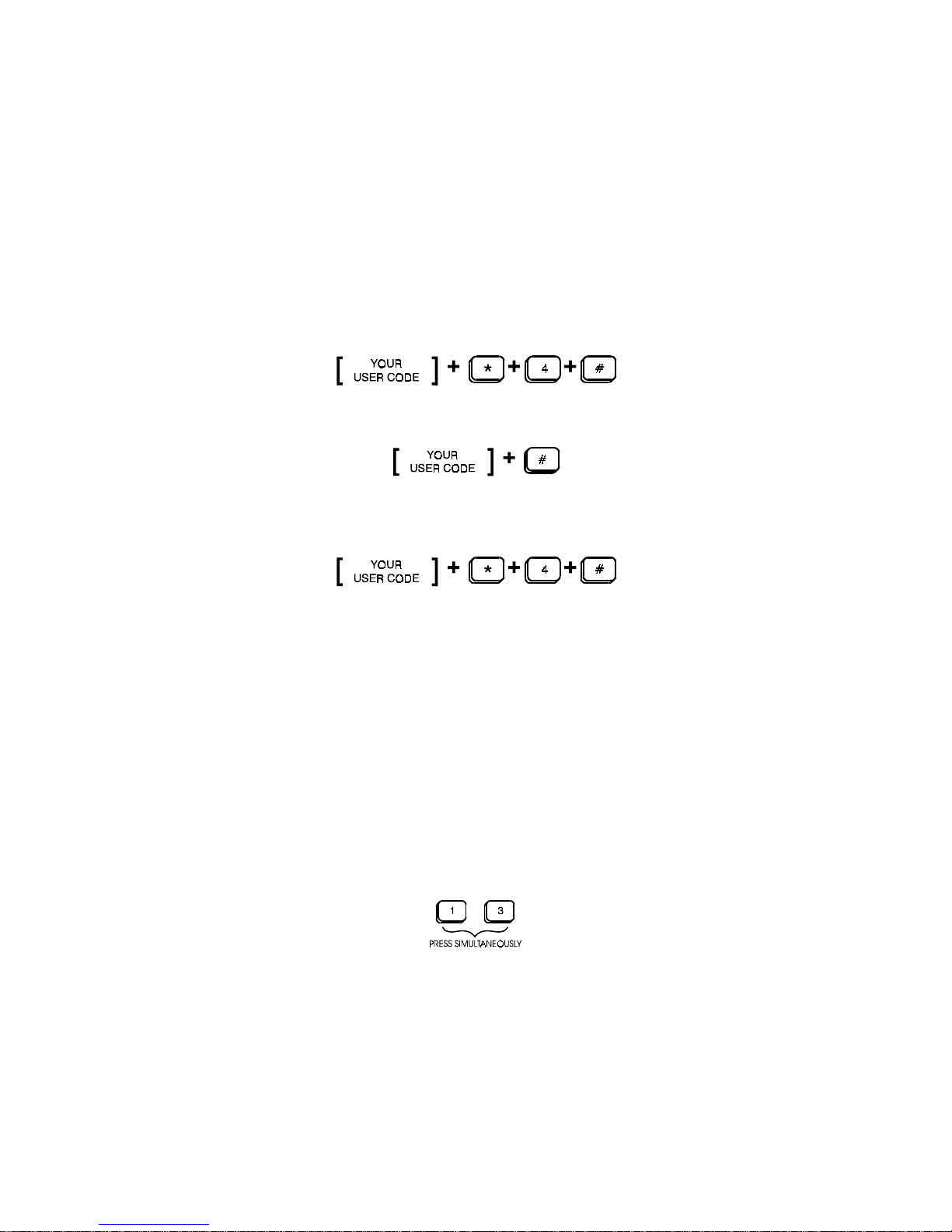
Starts the Test mode
Arms the system and tests the alarm output. This sequence gives a
short bell blast and activates Alarm Memory.
This final sequence must be entered to return to Normal
During the test each door contact, motion detector, etc. should be
violated which will cause a short blast from the siren output. The Entry/
Exit delays are shortened to 4 seconds during the test.
The test is terminated by reentering the same sequence.
Smoke Detector Reset
Professional quality smoke detectors are designed to latch into alarm
condition and must be manually reset. Your control panel can be
programmed to reset this device following an alarm condition by
simultaneously pressing the "1" KEY + "3" KEY on the keypad.
Questo manuale è adatto per i seguenti modelli
2
Indice
Altri manuali Arrowhead Tastiera


