ASL INTERCOM BT Pro LCD Manuale utente

BT Pro LCD
Multi-Function
Frequency Generator
By
Altered States Ltd
alteredstates.net

2
Congratulations and Thank You!
You have purchased one of the finest Frequency Generators available in
the world today. This BT Pro LCD unit is designed to give you many years
of reliable service.
Please read this instruction manual carefully before use
This unit is very easy to use and the various settings and sub-programs
are easily found. For your added convenience a FAQ (Frequently Asked
Questions) section is found on page .
Also, for further study and information, a Bibliography of recommended
reading is found at the back of this manual.
There is a lot of electro-medical information freely available today from
many varied sources. Medical science in this field has certainly advanced
tremendously within the last 100 years since it was first proposed.
Currently, there is an enormous worldwide, market driven interest in this
whole subject.
We trust that this BT Pro LCD unit will help in your research as you explore
the wonderful and exciting world of frequency generation….ENJOY!
The Team at Altered States

3
INDEX
Introduction ……………………………………………………………………………………… … 2
Index ……………………………………………………………………………………………………. 3
Disclaimer ……………………………………………………………………………………………….4
Diagram ………………………………………………………………………………………………….5
Technical Specifications ……………………………………………………………………………..6
Description. ……………………………………………………………………………………………. 7
Battery Charging ……………………………………………………………………………………... 8
Internal power connection and system reset …………………………………………………...8
Entering Option Code………………………………………………………………………………….9
Intensity Adjustment ………………………………………………………………………………...10
FAQ Frequently Asked Questions……………………………………………………………… . .26
Bibliography……………………………………………………………………………………………27
SECTION 1 BT PRO LCD BASIC UNIT
BT+ ……………………………………………………………………………………………………. 11
Biofeedback ………………………………………………………………………….……………….13
SECTION 2 ADDITIONAL PROGRAMS (Add-On Programs)
BTAV…………………………………………………………………………………………………... 14
Magnastim …………………………………………………………………………………………… 15
Chakra Balance ………………………………………………………………………………………17
SleepMate ……………………………………………………………………………………………..18
BB Zapper ……………………………………………………………………………………………. 19
Colloidal Silver ………………………………………………………………………………………..21
Super Sweep Frequency Zapper …………………………………………………………………. 22
T.E.N.S.………………………………………………………………………………………………….24
Sacred Harmony …………………………………………………………………………………….. 25

4
DISCLAIMER
Please Note that our legal advisors have instructed us to issue the
following disclaimer so as to comply with international trading agreements
regarding this electronic frequency generating device.
Altered States products are sold for learning, self-improvement and
simple relaxation. No statement contained in this publication, and no
information provided by any Altered States employee, should be construed
as a claim or representation that these products are intended for use in the
diagnosis, cure, mitigation, treatment or prevention of disease or any other
medical condition. The information contained in this publication is deemed
to be based on reliable and authoritative report. However, certain persons
considered experts may disagree with one or more of the statements
contained here. Altered States assumes no liability or risk involved in the
use of the products described here. We make no warranty, expressed or
implied, other than that the material conforms to applicable standard
specifications. The publisher does not accept any responsibility for the
accuracy of the information or the consequences arising from the
application, use, or misuse of any of the information contained herein,
including any injury and/or damage to any person or property as a matter of
product liability, negligence, or otherwise. No warranty, expressed or
implied, is made in regard to the contents of this material. No claims or
endorsements are made for any drugs or compounds currently marketed or
in investigative use. This material is not intended as a guide to
self-medication. The reader is advised to discuss the information
provided with an authorized healthcare practitioner and to check product
information (including package inserts) regarding dosage, precautions,
warnings, interactions and contraindications before administering any drug,
herb, electronic tool or supplement discussed herein.

5
8765
1
2
3
4
9
10
11
DIAGRAM
1, 2: Signal input/output socket
3: DC 5volt Charge input socket
4: Electrode output socket
5: SELECT switch
6: DOWN switch
7: UP switch
8: POWER ON/OFF switch
9, 10: Biofeedback sensor pads
11: LCD display

6
TECHNICAL SPECIFICATIONS:
Power Supply: Internal 1.2V1200mAh AA Rechargeable NM
Batteries
Power Off Current: 6 mA
Charger Connector: DC socket with Ø3.6 mm Outside -, Ø1.3 mm Pin +
Charger Power: 5V DC 300mA +
Output Voltage: 3.5Vp-p ~ 50Vp-p bi-polar or 27Vmax single
polar on battery fully charged
Output Short Current: >= 5 mA @ battery fully charged
Bio-Feedback Measure Accuracy: < 10%
Input/output Connector: 3.5mm Stereo
Timer: Manual set 5 ~ 60 minutes @ 5 min. / step
Display: LCD 47mm wide x 14mm high
Case Size (maximum): 60mm width X 107mm high X 20mm depth
Weight: 85g

7
DESCRIPTION
The BT Pro LCD (LCD – liquid crystal display) is a multi-functional high
output frequency generator which combines many previous machine func-
tions into just one unit. This compact size and its powerful integrated per-
formance enhances the high precision of the output frequencies.
Every time a button is pressed, the LCD background light will be illuminat-
ed (fig.3) and it will turn off after approximately 10 seconds. If no button is
pressed within one minute, the unit will turn itself off. A beeping sound will
be heard each time a button is pressed.
When the program is finished, two beep sounds will be heard to indicate
that the process has ended and the screen will turn off. Pressing the
‘POWER’ (8) key will instantly terminate any program at any time during
processing.
Please note: For extra safety and to avoid any possibility of electrical
shock, the BT Pro LCD unit will automatically disable all functions while
the internal batteries are being charged.

8
Battery Charging:
The battery condition icon is at top left of the LCD screen (Fig 6). Full 3
blocks means battery is full, less number of blocks means less battery pow-
er. If no block is illuminated this means that battery level is very low and
must be charged. When battery is being charged, battery block will flash
from left to right. If battery is fully charged then 3 blocks will flash together.
Fig 6
Please note:
*While the battery is being charged, no programs will operate.
*The battery can be charged at anytime, no matter if it’s high or low.
*It is best to charge the battery after each use.
*Charge the battery with 5V DC adaptor only or PC USB port power.
*IMPORTANT*
Please ensure the correct adaptor is used for charging. 5 volts ONLY!
Using the incorrect charging transformer will void all warranty.
Internal power connection and system reset:
Disconnect the jumper if machine is not going to used for at least a month or during shipping.
To reset the system, pull out the jumper and wait for 5 seconds or more, then reconnect.
The battery jumper can be located at bottom of the circuit board (Fig 8). To get to the jumper,
carefully remove 4 screws at back and back cover. The cover can now be removed. After the
system reset has been completed, carefully replace the back cover and gently tighten the
screws into position.
Baery
jumper
Fig. 8
Baery icon

9
Enter option code:
The basic BT Pro LCD comes with software containing BT+ and Biofeed-
back, all other functions are optional and can be activated by purchasing
a key code. Every optional function has their unique code and associated
with its serial numbers.
To activate optional functions, press and hold UP (7) key then press
POWER (8) key, after beep release buttons then LCD displays four dash-
es (Fig 4) and first on the left will be flashing. Press UP (7) or DOWN (6)
to select code number / letter. After correct number/letter is shown then
press SELECT (5) to select next digit to enter, repeat until all 4 digits are
entered. Press SELECT (5) for confirm. If the code was matched then a
beep will sound and option name will be displayed, otherwise re-enter
code again. If nothing matched screen will be returned to the beginning.
When finished press POWER (8). This will turn off machine and matched
option code will be permanently saved into memory.
Fig 4
Check serial numbers:
Each serial number is unique and is saved into the memory of each
individual machine. It can be displayed anytime.
Press and hold DOWN (7) key then press POWER (8) key, after beep re-
lease buttons, the LCD will display a 4 digits serial number (Fig 5). This
number will be the same as the last 4 numbers on back of the machine and
top of the packing box.
Fig 5

10
Intensity adjustment:
FOR SAFETY REASONS,
ALL PROGRAMS BEGIN WITH THE INTENSITY FULLY OFF
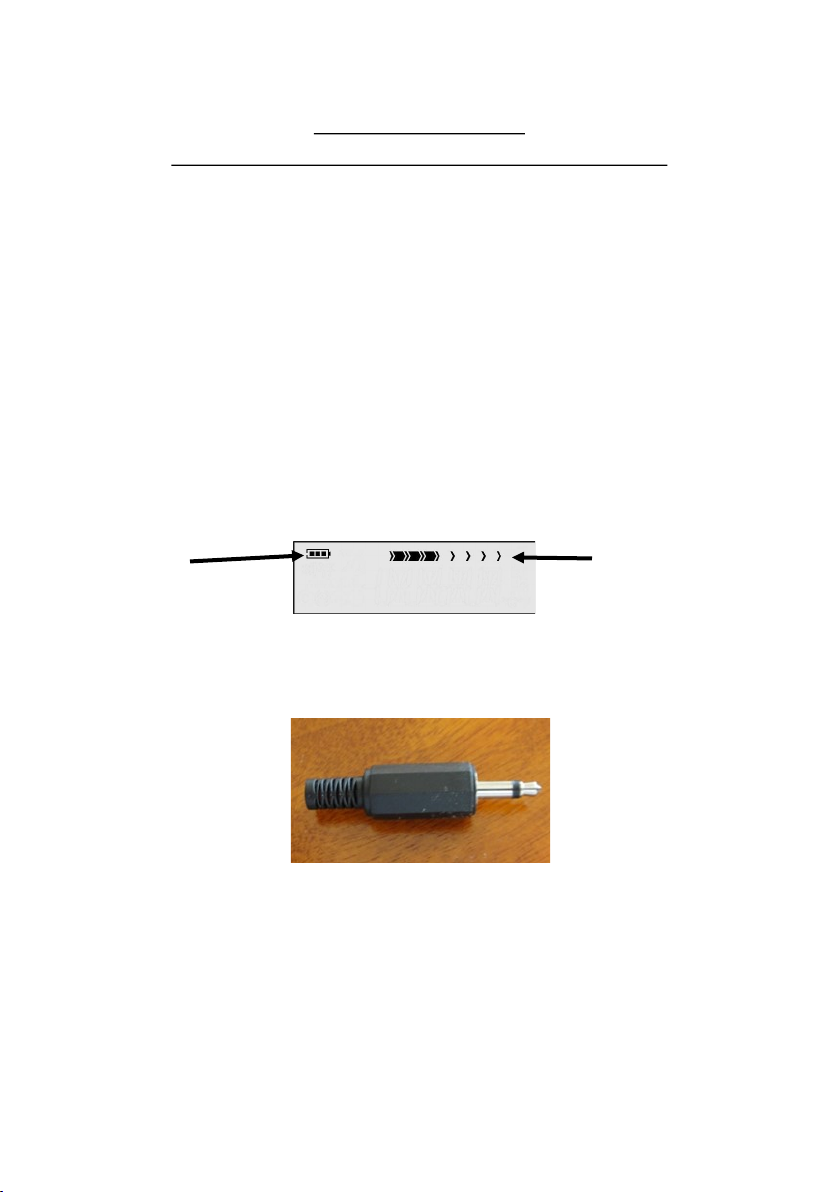
While any program is running, press UP (7) key or increase output voltage
and DOWN (6) key to decrease output voltage. Output intensity level
correspondents to LCD intensity bar (Fig 7). More segments means higher
output level. Intensity cannot be adjusted for some of the functions like
Colloidal Silver etc.
Please note: each press of the UP (7) button will increase the intensity.
Press the UP button until you can feel a gentle ‘tingle’ or sensation from the
electrodes. Please be aware you may not feel this feeling every time, you
may need to gradually turn the intensity up as the program continues. All
programs will begin with the intensity FULLY OFF as a safety feature.
You can test the output signal by inserting the Test Plug supplied. Insert this
into the electrode OUTPUT (4) and while a program is running the red LED
will flash at the same frequency rate. This will confirm that a signal is present
at the output of this device.
Fig 7
Intensity LevelBaery icon
Output Current Test plug
Indice