
Asus ABTU016 Manuale utente

Zenpower Pro PD
User Manual
Model: ABTU016
Q14102
Revised Edition
May 2018
Q14102_ABTU016_Power_Bank_UM_V2.indb 1 5/11/2018 5:09:34 PM
2
Table of Contents
English....................................................................................................................................3
Čeština....................................................................................................................................7
Čeština....................................................................................................................................11
Français ..................................................................................................................................15
Deutsch..................................................................................................................................19
Magyar ...................................................................................................................................23
Italiano ...................................................................................................................................27
Bahasa Indonesia................................................................................................................31
Português..............................................................................................................................35
Polski.......................................................................................................................................39
Pycc..................................................................................................................................43
Română..................................................................................................................................47
Español...................................................................................................................................51
Slovenčina.............................................................................................................................55
ไทย..........................................................................................................................................59
............................................................................................................................63
Ting Vit...............................................................................................................................67
日本語 ....................................................................................................................................74
ةيبرعلا
Q14102_ABTU016_Power_Bank_UM_V2.indb 2 5/11/2018 5:09:34 PM

3
Product Feature
•
Fast charging: Two-way Compatible with Power Delivery 3.0.
•
Slim size: 110mm x 78.4mm x 22mm.
•
Artwork: comes in various colored options, made from aluminum.
•
Safety: comes with ASUS PowerSafe to ensure personal safety while
charging.
•
Long lasting: adjusts the charging current automatically based on
the ambient temperature to extend the Power Bank’s life span.
•
Highly durable: passed the high standard USB connector durability
test for 5,000 times.
• Dual port design: Supports discharging mobile devices at the same
time.
Getting to know your Power Bank
USB Type C (input /
output) port
USB Type A
(output) port
LED indicators Power button LED Color status
On
Blinking
Rapid blinking
O
LED ashlight
Q14102_ABTU016_Power_Bank_UM_V2.indb 3 5/11/2018 5:09:34 PM

4
Charging the Power Bank
LED indications
* When the Power Bank is charged, the LED indicators will blink.
** To stop the Power Bank from blinking when an error is detected, replug the cable from
the Power Bank.
Charging devices using
the Power Bank
Charge
status LED 1 LED 2 LED 3 LED 4
0 - 25% *
26% - 50% *
51% - 75% *
76% - 99% *
Finished
Error
detected**
Discharge
status LED 1 LED 2 LED 3 LED 4
86% - 100%
56% - 85%
26% - 55%
6% - 25%
< 6%
0%
Error
detected**
NOTES:
•
Press and hold the power button for 2 seconds to turn on or turn o the LED ashlight.
•
When you press the power button of the Power Bank without charging a device on it,
the LED indicators light up for 5 seconds to display its power status.
•
Press the power button to charge your devices.
Q14102_ABTU016_Power_Bank_UM_V2.indb 4 5/11/2018 5:09:34 PM

5
Specications
Cell type
Rechargeable lithium-ion cell
Cell capacity
DC 14.4 V / 13600 mAh
Rate capacity
Type C: 5V/8200 mAh, 9V/4700mAh,
15V/2600mAh, 20V/1900 mAh
Type A: 5V/7900mAh
Charging temperature
0C - 35C
Size
110mm x 78.4mm x 22mm
Weight
315 ± 5g
Charging time
< 4.5 hrs with DC 20V 1.5A standard
cable
< 6 hrs with DC 9V 2A standard cable
< 8 hrs with DC 5V 2A standard cable
Input
5V 3A / 9V~15V 2A / 20V 1.5A (Max)
Type C Output
(Compatible with
Power Delivery 3.0)
5V 3A
9V 3A
15V 3A
20V 2.25A
Type A Output
5V 2.4A
Output 1+2
45W (MAX)
NOTES:
• Fast charging performance applies to the device which is compatible with USB Power
Delivery
.
•
When charging a device that doesn’t comply Power Delivery, the output voltage
will be 5V (typ).
Q14102_ABTU016_Power_Bank_UM_V2.indb 5 5/11/2018 5:09:35 PM

6
Safety Notices
1. Fully charge the Power Bank before using it for the rst time.
2. Use the bundled cable when charging the Power Bank or when using the product to
charge your device.
3. Disconnect your device from the Power Bank once it becomes fully charged.
4. Never attempt to disassemble and reassemble the Power Bank.
5. Do not operate the Power Bank beyond 60ºC (140ºF) environment, nor subject it to
water or re, or any attempt to break the casing.
Rechargeable Battery Recycling Service in North America
For US and Canada customers, you can call 1-800-822-8837 (toll-free) for recycling
information of your ASUS products’rechargeable batteries.
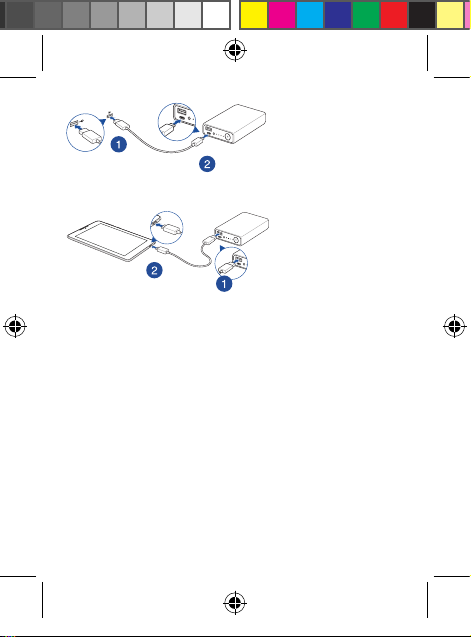
Charging the Power
Bank
Using the Power
Bank
Q14102_ABTU016_Power_Bank_UM_V2.indb 6 5/11/2018 5:09:35 PM

7
.3.0
x 22x 78.4110
ASUS PowerSafe
USB
5.000
:
USB
C
LED
LED
USB
A
Q14102_ABTU016_Power_Bank_UM_V2.indb 7 5/11/2018 5:09:35 PM

8
4 3 2 1
*
25% - 0%
*
50% - 26%
*
75% - 51%
*
99% - 76%
LED
LED2
5LED
4
3
2
1
100% - 86%
85% - 56%
55% - 26%
25% - 6%
6% <
0%
.LED
Q14102_ABTU016_Power_Bank_UM_V2.indb 8 5/11/2018 5:09:36 PM

9
1360014.4
470098200 :Type C
190020260015
7900 :Type A
35º0º
x 22x 78.4110
5 ± 315
1.5
204.5 <
2
96 <
2
58 <
1.5
202
159 3
5
3
5
3
9
3
15
2.25
20
)3.0
2
5
45 1+2
5
.USB
5Power Delivery
5
Q14102_ABTU016_Power_Bank_UM_V2.indb 9 5/11/2018 5:09:36 PM
10
1
2
3
4
140º60º 5
Q14102_ABTU016_Power_Bank_UM_V2.indb 10 5/11/2018 5:09:36 PM
Indice
Lingue:
Altri manuali Asus Accessori

Asus
Asus ZenPower PD 10000 Manuale utente

Asus
Asus ABTU001 Manuale utente

Asus
Asus Xtion Manuale utente

Asus
Asus Xtion Manuale utente

Asus
Asus MS101 Manuale utente

Asus
Asus ROG RYUO III ARGB Series Manuale utente

Asus
Asus WS101 Manuale utente

Asus
Asus Pen 2.0 Manuale utente

Asus
Asus ZenPower PD 10000 Manuale utente

Asus
Asus ABTU012 Manuale utente


