
Atlantic iceBar Manuale utente
InstructionManual
E F
Introduction
Thank you for purchasing the iceBar .This product fits the iPod nano 1st
Gen & 2nd Gen 1GB/2GB/4GB/8GB.
Designed to enhance your iPod experience, the
iceBar gives you uninterrupted music in any
environment.Its design will protect your iPod from
sand, water and dust during usage. A tough
polycarbonate body with rubber bumpers ensures
shockproof protection. If used properly, the iceBar
will provide you with many hours of iPod enjoyment.
Copyright
Apple and iPod are trademarks of Apple Computer, Inc. Registered in the
U.S. and other countries.
R
P. 1 1
P. 5
P. 2 1
P. 2 5
P. 3 9
Warranty
P. 4 7
Specifications
P. 4 8
Copyright
Quick Start
Operation Guide
Troubleshooting
Care and Maintenance
R
TM
TM
P. 3 7
Repair
E F
43

Parts List
Hand Strap with buoy floating device
iceBar
3 x AAA Alkaline Batteries
Earphone Output Jack
iPod Nano Compartment
Click Wheel Membrane
Audio Switch
Power On / Off Switch
iPod Compartment Latch
Battery Compartment
Red LED Status Indicator
Blue LED Power Indicator
O-Ring
Folding Stand
E F
65

Safety Instructions
Please read and follow all safety and operating instructions before using this
product. Retain this manual for future reference.
Please observe all warnings on the product and in the operating instructions.
Do not take product apart for any reason.There are no user serviceable parts
inside, and any attempt at modifying or repairing your unit will void the
warranty. (See Warranty & Return Policy on page 39).
Do not apply excessive force to the controls, or put heavy objects on top of
the speaker. Keep sharp objects away from speakers.
Protect from direct sunlight and excessive heat. Avoid using the product for
long periods of time in hot temperatures. High temperature may damage
contents or shorten the life of sealing components. Do not store in closed
cars, etc.
Make sure unit is dry before opening and removing or accessing iPod.
Although the product is waterproof, it is not designed for use underwater. Do
not submerge underwater.
If water enters the iceBar to due to improper usage:
- Open the iPod nano compartment and remove batteries
- Drain water
- Dry interior with cloth
- Let the iceBar dry until mist and water droplets disappear.
Note: Failure to follow all safety instructions may void your warranty.
EF
8
7

E
Safety Instructions (continued)
Avoid hearing damage - Permanent hearing loss may occur if earphones
are used at a high volume.Set the volume to a safe level.You can adapt
over time to a higher volume of sound that may sound normal but can be
damaging to your hearing. If you experience ringing in your ears or muffled
speech, stop listening and have your hearing checked.The louder the
volume,the less time is required before your hearing could be affected.
Experts suggest the following to protect one’s hearing:
- Limit the amount of time you use earphones at high volume.
- Avoid turning up the volume to block out noisy surroundings.
- Turn the volume down if you can’t hear people speaking near you.
For information about how to set a maximum volume limit on your iPod,
see the features guide for your iPod.
Safety Instructions (continued)
Using Earphones safely - Use of earphones while operating a vehicle is
not recommended and is illegal in some areas.Be careful while driving.
Cease from using iPod if you find it disruptive while operating any type
of vehicle or performing any other activity that requires your full
attention.
F
10
9
E
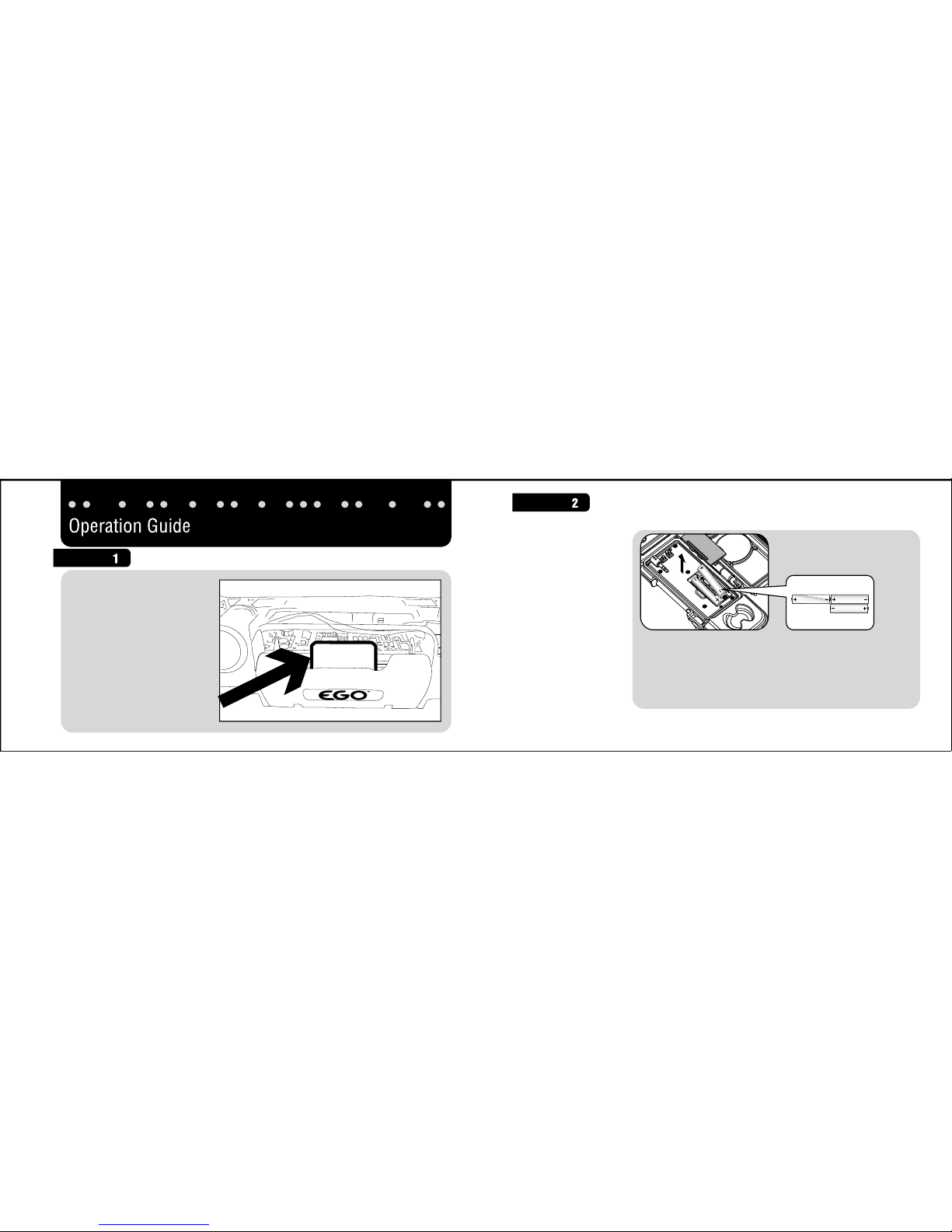
* New Alkaline batteries are recommended
* Do not mix alkaline, standard (carbon-zinc) or
rechargeable (nickel-cadmium) batteries
* Do not mix charged and partially charged batteries
* See battery safety rules on page 31.
Install Batteries
Remove before using
Enlevez avant utilisation
Quite antes de usar
Before use, please REMOVE
SHIPPING RETAINER.
This piece must first be
removed before the iceBar
can be closed properly.
Failure to remove retainer
will result in water entering
inside of the iceBar and
possibly damaging
your iPod.
Remove
F
1211
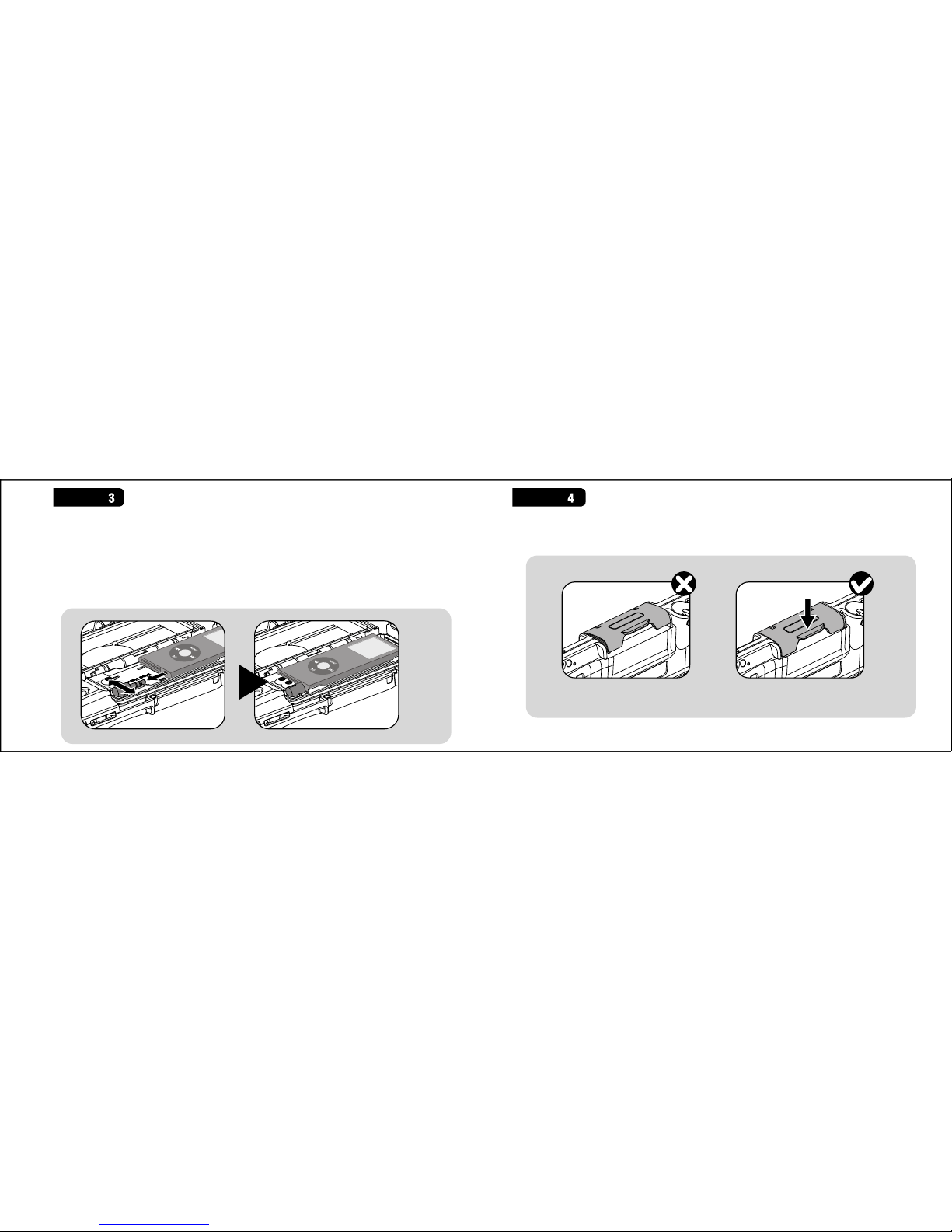
1. Align the audio port in your nano with the stereo jack in the iceBar housing.
2. Gently snap the nano into the audio jack. VERIFY the nano is COMPLETELY
plugged into the audio jack.
* The iceBar is specially designed for iPod nano 1st/2nd Generation.Forcing a
different player into the compartment will cause damage and void the
warranty.
E
Close the iPod compartment latch completely .
F
14
13
E
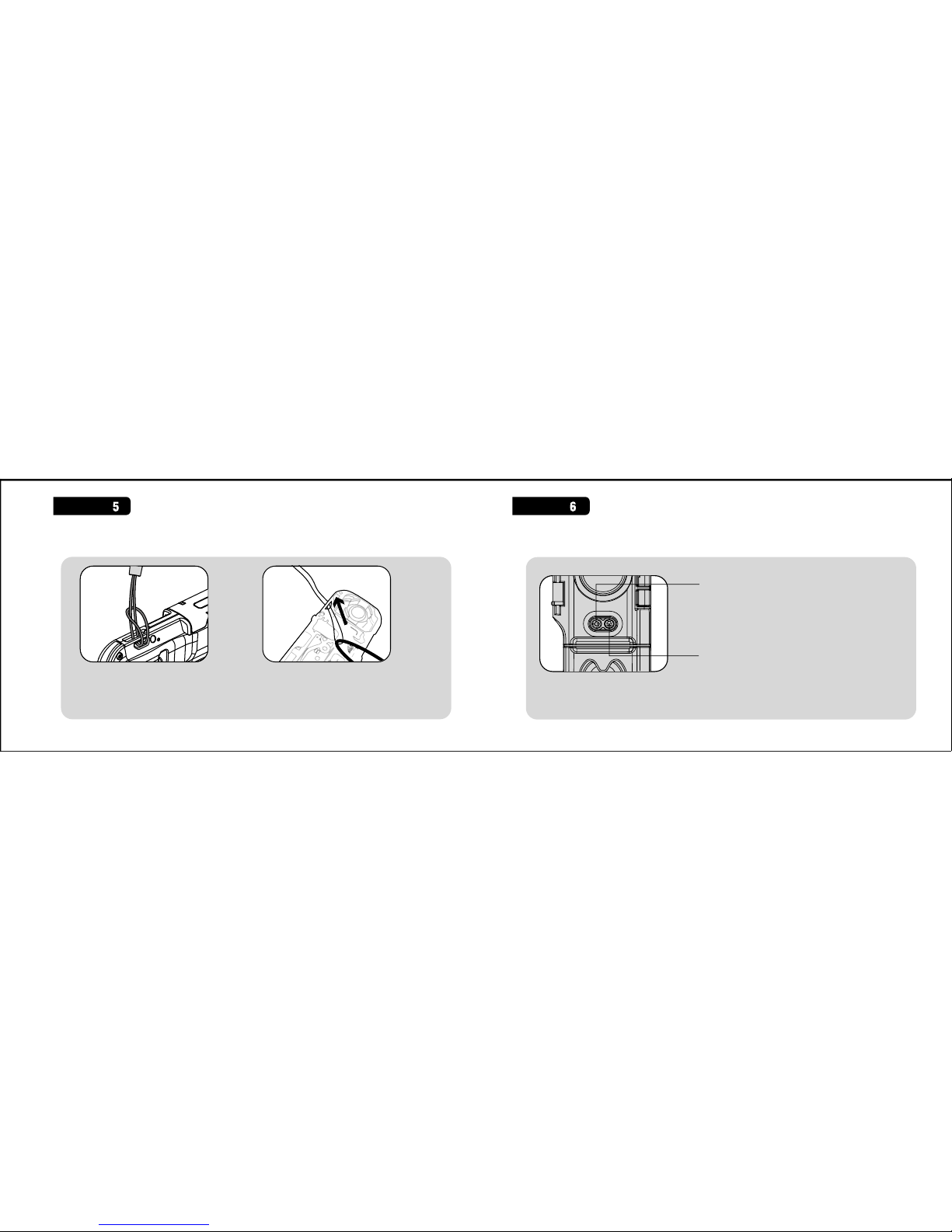
Attach the hand strap with buoy floating device to your iceBar. Controlling your iceBar
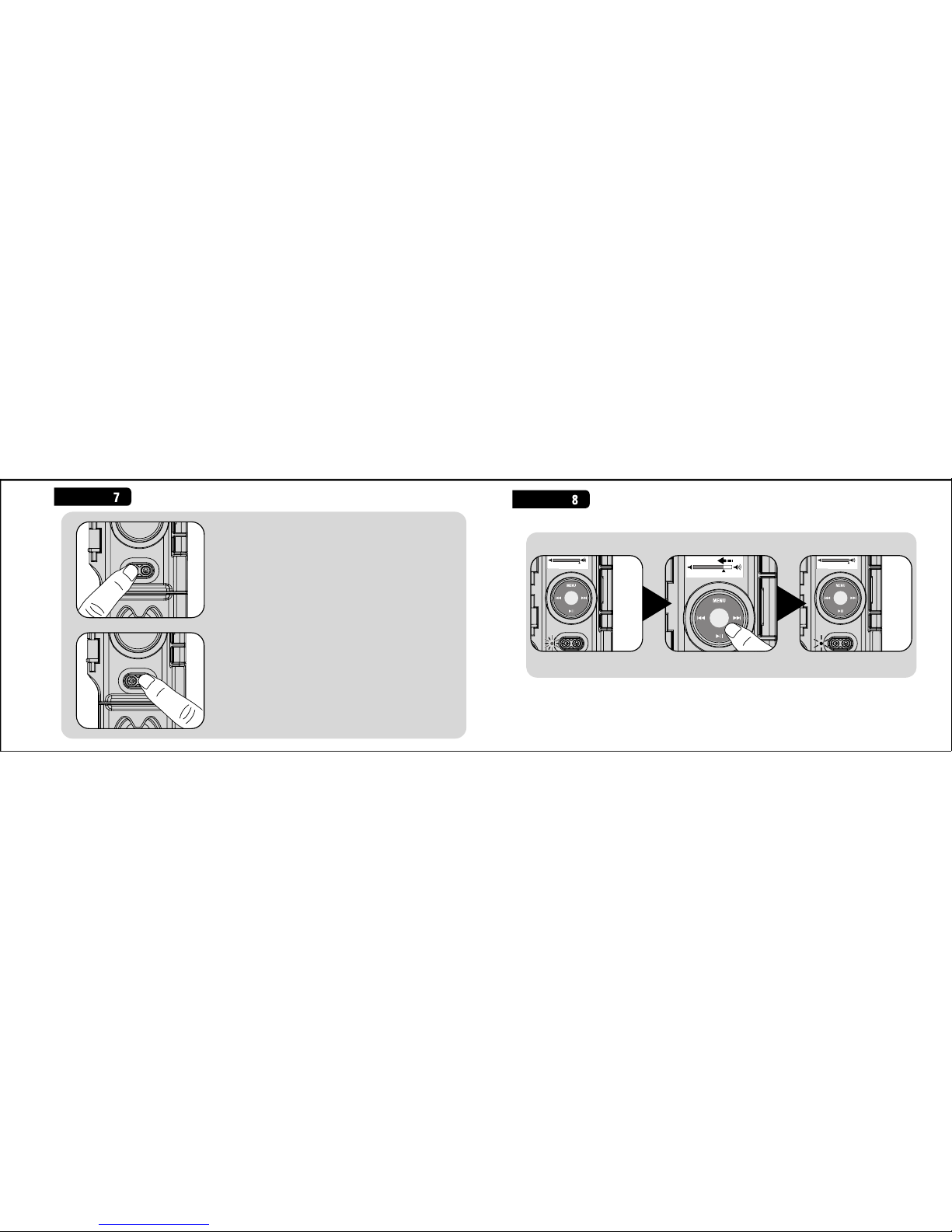
Power On / Off Switch
Audio Switch
Attach the hand strap with buoy floating device to your iceBar. If it is difficult
to get the buoy strap through strap hole in the iceBar, we suggest using a piece
of dental floss or other thin string to help with this step. Use the thin string to
wrap around buoy strap and pull through strap hole, as shown above right.
F
15 16
Due to variance in the audio files and iPods, sound distortion (clipping)
may occur at high volume settings.When this occurs the LED status
indicator flashes red. Reduce iPod volume accordingly to a safer level.
To use EARPHONES with your iceBar, plug
earphones into the earphone jack, then press
the Audio switch. Audio will then swap to
earphone.
Press the power On / Off switch. When the
blue LED lights up this will signify that the
soundcase is ready for use.Press the power
on/off switch again and the soundcase will
turn off.
Press the Audio On / Off switch and
speaker output will shut down; press it
again and speaker output will recover.
E
Controlling your iPod
F
1817
9
E
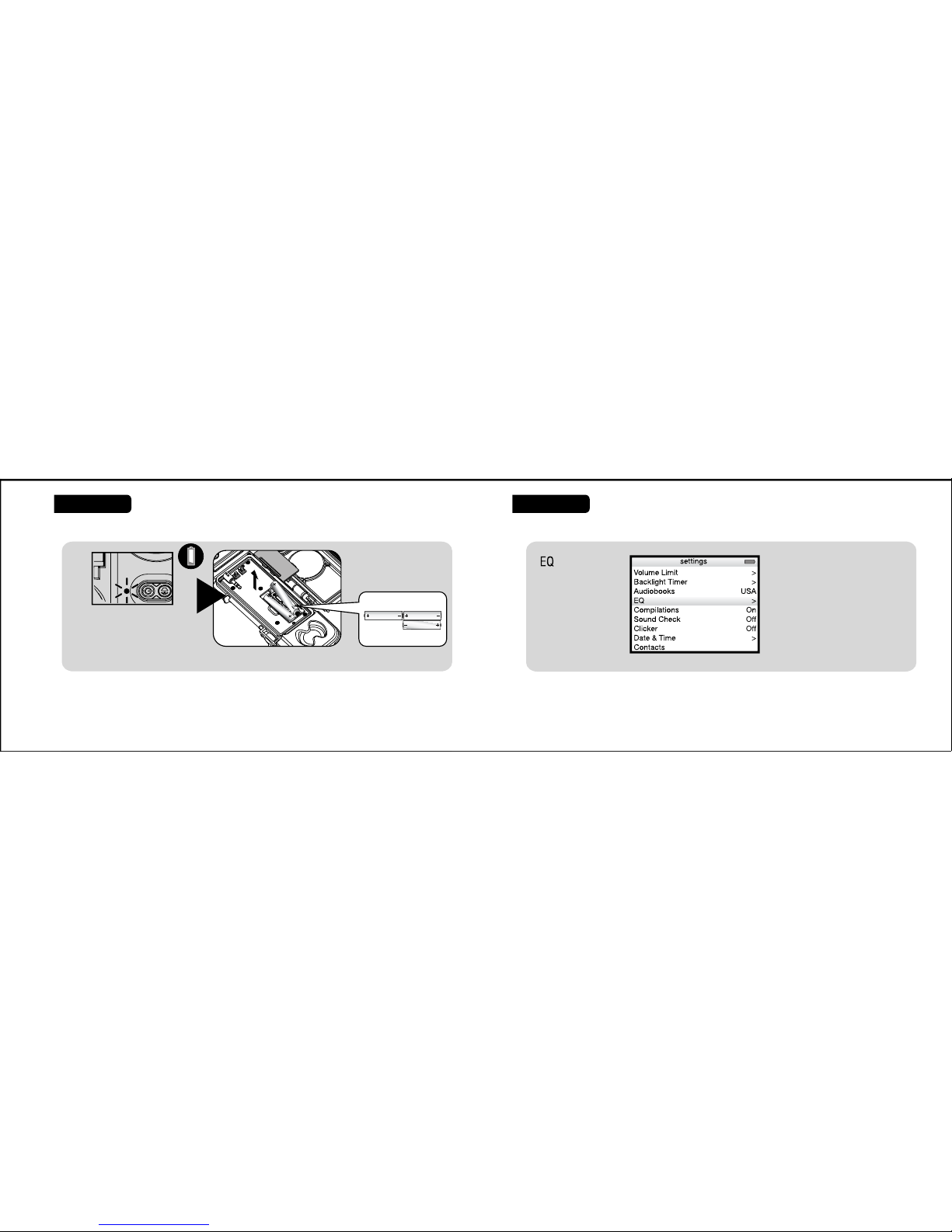
For better treble (e.g. vocals), select ‘Acoustic’ or ‘Treble Booster.’
For better bass,select ‘Bass Booster,’‘Dance,’or ‘Hip Hop.’
Note: At high volume levels,sound quality from this unit might not be
fully optimized unless this setting is selected on your iPod unit.
If the LED status indicator flashes red color or power indicator dims
increasingly often, reduce the iPod volume or change the batteries.
Alkaline batteries are recommended.
Replacing Batteries
F
10
20
19
Indice


