
ATOMICX P100B Manuale utente

-1- -2- -3- -4-
-5- -6- -7- -8- -9-
Model: P100B
Pico Projector
USER GUIDE

-1- -2- -3- -4-
-5- -6- -7- -8- -9-

-1- -2- -3- -4-
-5- -6- -7- -8- -9-
Table of Contents
Customer Support ........................................................................................................ 1
1 Introduction ............................................................................................................... 2
1.1 Features ......................................................................................................2
1.2 What's in the Box ...................................................................................... 3
1.3 Product Overview ..................................................................................... 4
1.4 Infrared Remote Control ......................................................................... 5
2 Getting started ........................................................................................................... 5
2.1 Using the Remote Control .......................................................................5
2.2 Turning the Projector On/Off ................................................................. 6
2.3 Adjusting the Focus ................................................................................. 6
2.4 Charging the Projector ............................................................................. 7
3 Home Screen Overview .......................................................................................... 7
4 General Settings ......................................................................................................... 8
4.1 Adjust the Brightness ............................................................................... 9
4.2 Adjust Projection Mode ........................................................................... 9
4.3 Bluetooth Control Pairing ....................................................................... 9
4.4 Connecting to Wi-Fi .................................................................................. 10
4.5 Keystone Correction ................................................................................ 10
5 All Apps ......................................................................................................................... 11
5.1 Youtube ....................................................................................................... 12
6 Google Play .................................................................................................................. 12
7 Files …………………………….....................................……........................................………. 12
8 Projection Sharing …………………………………................................................………. 12
8.1 Airplay – iPhone ........................................................................................ 13
8.2 Airplay – Mac .............................................................................................. 13
8.3 Miracast – Android device ....................................................................... 14
8.4 Wired Connection U Disk ........................................................................ 14
9 Specifications ……………………………………….................................………….………….. 15
FCC Statement ……………………………………….................................………..…..………….. 16

-1- -2- -3- -4-
-5- -6- -7- -8- -9-
Customer Support
For any support or comments concerning our products, please send an email
Toll-Free NO: +1-866-886-6878
Friendly Tips
Congratulations on choosing to buy an Atomicx Pico projector. All products brought to
you by Atomicx are manufactured to the highest standards of performance and safety.
As part of our philosophy of customer service and satisfaction, products are backed by
our 1 Year Warranty. We hope you will enjoy using your purchase for many years to
come.
-1- -2- -3- -4-
-5- -6- -7- -8- -9-
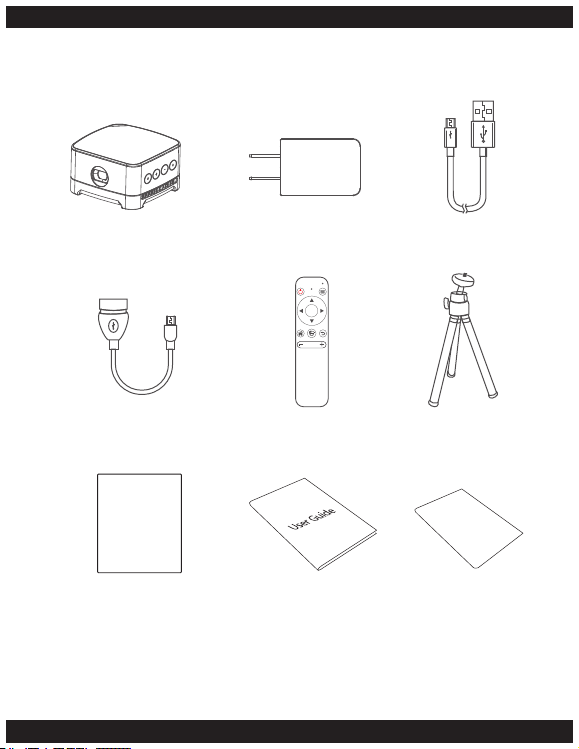
1.2 What's in the Box
Adapter USB CableProjector
OK
Remote Control TripodOTG Cable
Flannelette Bag User Guide Warranty Card

-1- -2- -3- -4-
-5- -6- -7- -8- -9-
1.3 Product Overview
1
2 3
5
4
6
7
12
13
14
15
16
17
8
9
11
10
1. Battery Power Indicator 2. Lens 3. Reset Key
4. Micro SD Slot 5. USB Charge Interface 6. IR Receiver
7. Audio Out 8. Power Key 9. + Key
10. Return Key 11. – Key 12. Focusing Gear
13. Air Outlet 14. Air Inlet 15. Tripod Mount
16. Speaker 17. Anti-slip Mat
-1- -2- -3- -4-
-5- -6- -7- -8- -9-
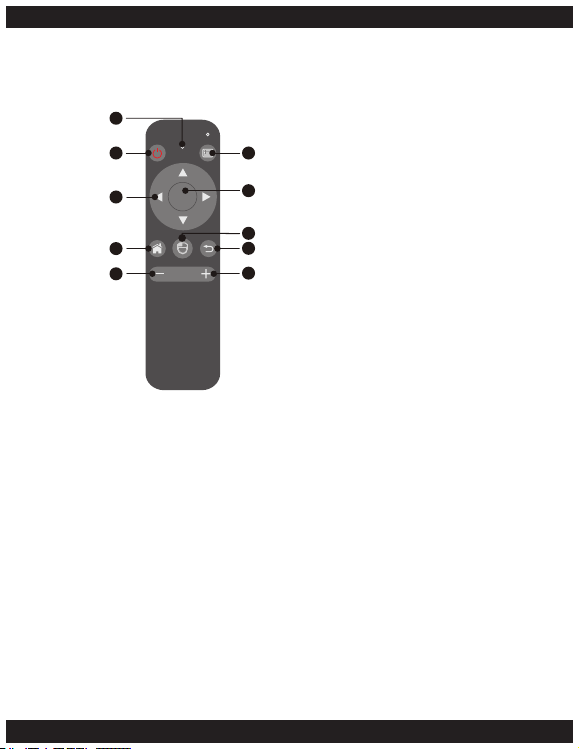
1.4 Infrared Remote Control
2. Getting started
2.1 Using the Remote Control
Power Key: Press and hold the power key for 3 seconds to turn on the projector,
Press the power key for 3 seconds to turn off the projector.
Menu Key: Press the Menu key to open the menu options in supported apps and
settings menus.
Navigation Key: The Navigation keys on the remote control let you select between the
apps or menu options available.
OK Key: Press the OK key to select an option.
Home Key: Press the Home key to return to the Home Screen.
OK
1. Indicator Light
2. Power Key
3. Navigation Keys
4. Homepage Key
5. - Volume Key
6. Menu Key
7. OK Key
8. Mouse
9. Return Key
10. + Volume Key
1
2
3
4
5
6
7
8
9
10

-1- -2- -3- -4-
-5- -6- -7- -8- -9-
Mouse Key: Press the mouse key to enable the air mouse, a point will be displayed on
the projected screen, by tilting the remote control you can move the mouse pointer.
Press the mouse key when the pointer is over an option you want to select.
Press the navigation key to turn off the air mouse.
Return Key: Press the return key to go to the previous page or menu.
+ / - Key: Use the + and – keys to adjust the volume.
2.2 Turning the Projector On/Off
• Power On
Press and hold the power key on the projector
for 3 seconds to power on the Atomicx P100B
Pico Projector.
• Power Off
Press and hold the power key on the projector
for 3 seconds to power off the Atomicx P100B
Pico Projector.
Alternatively, you can use the power key on the
remote control to power on/off the Atomicx
P100B Pico Projector.
2.3 Adjusting the Focus
Rotate the manual focus gear (12) to adjust the
focus of the projector.

-1- -2- -3- -4-
-5- -6- -7- -8- -9-
2.4 Charging the Projector
Plug the micro USB end of the USB cable into the
micro USB port on the projector.
Plug the other end into the AC adapter;
plug the AC adapter into an AC plug socket.
When charging the Battery Power Indicator
light will light up red.
When fully charged the light will turn blue.
3. Home Screen Overview

-1- -2- -3- -4-
-5- -6- -7- -8- -9-
4 General Settings
Language
Language settings can be adjusted from the general settings menu.
Use the navigation keys on the remote control to choose the language then confirm
the choice by pressing the ok key on the remote.
Home Screen > Settings > General Settings > Language
Date & Time
Date and Time can be set from the general settings menu.
Use the navigation keys on the remote control to choose the date and time settings
then use the ok key to confirm.
Home Screen > Settings > General Settings > Date & Time
Storage Management
The storage management option under the general settings lets you see the internal
storage. Home Screen > Settings > General Settings > Storage management
Application Management
You can access all the applications from the application management menu. Use the
navigation keys on the remote control to choose the application then press the OK Key
to launch the application.
Home Screen > Settings > General Settings > Storage management
Online Upgrade
To check for a later version of the Atomicx projector’s software open the online
upgrade potion from the general settings menu.
Home Screen > Settings > General Settings > Online Upgrade
Factory Setting
To restore the Atomicx projector to the factor defaults open the Factory setting option
from the general settings menu.
A pop up will ask you display. “Do you want to restore Factory Settings” Using the
Navigation keys select Confirm and press ok to restore factory settings, To cancel the
Indice


