
AVGear MHD44 Manuale utente

HDMI Matrix Switchers System
User Manual
Please read this manual carefully before using this product.
ii
Notes:
::
:
This HDMI Matrix Switchers User Manual takes example of the Matrix model
MHD44.

iii
!
Safety O
p
eration Guide
In order to guarantee the reliable operation of the equipments and safety of the staff
,
please
abide by the following proceeding in installation, using and maintenance:
⑴
⑴⑴
⑴
The system must be earthed properly. Please do not use two blades plugs and ensure the alternating
power supply ranged from 100v to 240v and from 50Hz to 60Hz.
⑵
⑵⑵
⑵
Do not put the switcher in a place of too hot or too cold.
⑶
⑶⑶
⑶
As the power generating heat when running, the working environment should be maintained
fine ventilation, in case of damage caused by overheat.
⑷
⑷⑷
⑷
Please cut off the general power switch in humid weather or left unused for long time.
⑸
⑸⑸
⑸
Before following operation, ensure that the alternating current wire is pull out of the power
supply
:
A
.
Take off or reship any components of the equipment.
B
.
Take off or rejoin any pin or other link of the equipment.
⑹
⑹⑹
⑹
As to non-professional or without permission, please DO NOT try to open the casing of the
equipment, DO NOT repair it on your own, in case of accident or increasing the damage of the
equipment.
⑺
⑺⑺
⑺
DO NOT splash any chemistry substance or liquid in the equipment or around.

iv
Contents
1.
Introduction ............................................................................................................................. 1
1.1
About HDMI Matrix Switcher System ......................................................................................... 1
2.
MHD Packing of the Product............................................................................................... 1
3.
MHD Installation ..................................................................................................................... 2
4.
Front View and Rear View of the Product........................................................................ 2
4.1
Front view of MHD44 ..................................................................................................................... 2
4.2
Rear view of MHD44 ...................................................................................................................... 2
5.
External Connection.............................................................................................................. 2
5.1
Introduction of the Input and Output Connectors ...................................................................... 2
5.2
Connection of RS-232 Communication Port ................................................................................ 2
5.2.1
Connection with Control System .........................................................................................................2
5.2.2
Connection with Computer...................................................................................................................3
5.3
How to Connect with the Input and Output Terminals............................................................... 3
6.
Operation of the EDID management ................................................................................. 5
6.1 Auto-EDID management ....................................................................... Error! Bookmark not defined.
6.2 Manual EDID switching ................................................................... Error! Bookmark not defined.
6.3 Restore the default EDID .................................................................. Error! Bookmark not defined.
7.
Operation of the Control Panel........................................................................................... 9
7.1 Front Panel Description ....................................................................................................................... 9
7.2 Command Format of the Switching Operation ................................................................................. 9
7.3
Examples of Operation ................................................................................................................... 9
8. Usage of the Remote Controller ......................................................................................... 10
9.
Communication Protocol and Command Codes..........................................................11
11.
Troubleshooting & Maintenance .................................................................................. 14

1
1. Introduction
1.1 About HDMI Matrix Switcher System
MHD series Matrix switcher is a high-performance digital signal switcher that can be used for
cross switching of multi computer and audio signal. Independent HDMI component and I/O
terminals make each component signal transmit and switch separately; this design can reduce
attenuation of signal transmission to minimum and output the image and audio signal in
high-fidelity quality.
AVG series switcher mostly apply in broadcasting TV engineering, multi-media meeting room, big
screen display engineering, television education, command control center or other fields.A/V
timing or separating switching function. With RS232 interface, it can be worked with PC, remote
control system and any other far-end control system devices. The user manual takes MHD44 as
the example, other models can take reference from it too.
1-1 MDH44 front view
2. MHD Packing of the Product
HDMI Matrix Switcher
IR remote
RS-232 Communication Cord
Power Supply Cord
CD

2
3. MHD Installation
MHD matrix switchers adopt metal shell and can be stacked with other device. Moreover, they are
rack-mountable enclosure and can be installed in the standard 19 inches case.
4. Front View and Rear View of the Product
4.1 Front view of HD44
4.2 Rear view of HD44
5. External Connection
5.1 Introduction of the Input and Output Connectors
According to different type of matrix, computer signal I/O interface are made up of 4-channel
HDMI ports and DVI-D female ports respectively (digital audio included). Please refer to shell
silk-screen figure about other types of interface.
5.2 Connection of RS-232 Communication Port
Except the front control panel, the HDMI matrix switcher can be control by far-end control system
through the Ethernet control via the RS-232 communication port.
5.2.1 Connection with Control System
With the RS-232 port, the HDMI matrix switchers can be control by several kinds of control
systems.

3
This RS-232 communication port is a female 9-pin D connector. The
definition of its pins is as the table below.
No.
Pin Function
1 N/u Unused
2 Tx Transmit
3 Rx Receive
4 N/u Unused
5 Gnd Ground
6 N/u Unused
7 N/u Unused
8 N/u Unused
9 N/u Unused
F 5-1 9HDF
5.2.2 Connection with Computer
When the switcher connects to the COM1 or COM2 of the computer with control software, users
can control it by that computer.
To control the switcher, users may use the public COM software. Please refer the details in
Communication Protocol and Command Codes
F 5-2 MHD connecting to computer
5.3 How to Connect with the Input and Output Terminals
The HDMI matrix switchers may take DVD players, computers, graphic workstations and digital
showing platform as their input signal source, and projectors, video recorders, displayers and
amplifiers as their output signal destinations according to different situation.
F5
—
——
—
3 HDMI connector

4
HDMI pin function
Pin
Number
Signal Name
Pin
Number
Signal Name
1
TMDS Data 2+
20
SHELL
2
TMDS Data 2 Shield
19
Hot Plug Detect
3
TMDS Data 2-
18
+5V Power
4
TMDS Data 1+
17
Ground
5
TMDS Data 1 Shield
16
DDC Data
6
TMDS Data 1-
15
DDC Clock
7
TMDS Data 0+
14
No Connect
8
TMDS Data 0 Shield
13
CEC
9
TMDS Data 0-
12
TMDS Clock-
10
TMDS Clock+
11
TMDS Clock Shield
System Diagram
:
::
:
F5-4 HDMI matrix system connection

5
6. Operation of the EDID management
(For AVG HDMI/DVI matrix switcher, NOT including the 4x4 model)
EDID communication introduction
MHD/MDV matrix switcher are built in the EDID data inside, which can recognize most of the displays
and video source. When the display or video source are connected, the EDID communication will start
automatically.
But, the in-built EDID database can’t recognize all the devices. In this case, we need to manage the
EDID manually.
There are three solutions to manage the EDID:
1) Auto EDID Management.
The DV/MHD matrix will copy the EDID data from the most priority display, and using the new EDID
data as to be the standard. ( Check the term 6.1 )
2) Manually EDID switching.
The user can switch the EDID data manually, from a certain output to a certain input. It is the similar
operation to AV signal switching. ( Check the term 6.2 )
3) Factory default management. (Default).
It uses the default in-built EDID database to manage the EDID data. It is useful enough for most of
the cases. (Check the term 6.3)
6
Every time, you change the EDID data, all the displays will be blank for 3 seconds. The RS232
port will send out the feedback code.
No. EDID management
Solution
RS232 command
(ASCII, 9600bps. 8N1) The Operation of Front Panel Buttons
1 Factory Default
Management Setting
EDIDMInit. Press the buttons:
“←”
+
“
AV
”
+
“
INPUT1
”
+
“
UNDO
”
2 Auto EDID Manage EDIDMAuto. Press the buttons:
“←”
+
“
AV
”
+
“
INPUT2
”
+
“
UNDO
”
3 Manually EDID Switching EDIDM[X]B[Y]. Null
NOTICE: there is a “.” behind the command, which is easy to miss.
6.1. Auto EDID Management
When you are running the auto-EDID management by RS232 command or front panel operation, it will
copy the EDID data from the most priority display.
The priority principle:
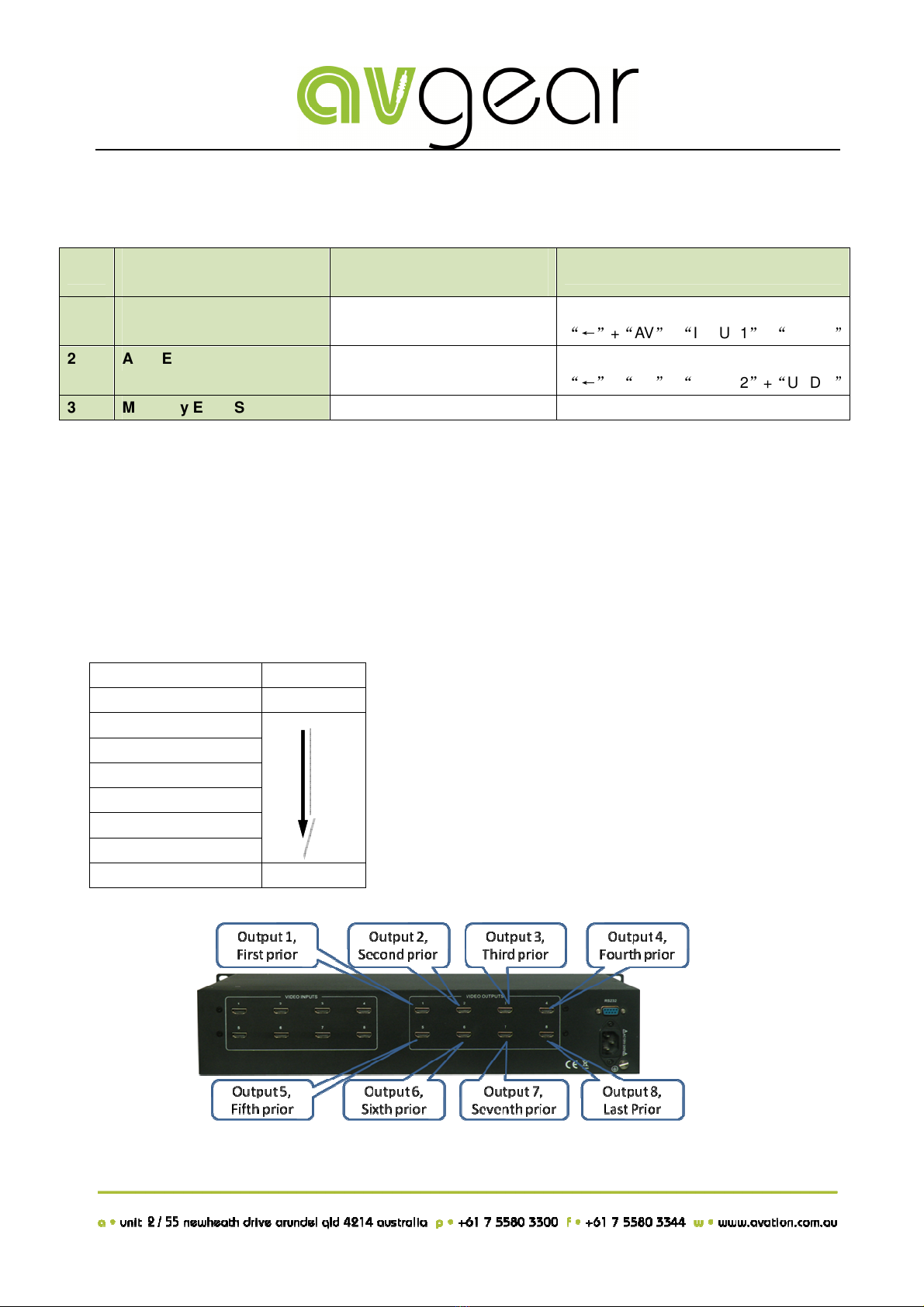
HDMI/DVI OUTPUTS
Priority
1 High priority
2
3
4
5
6
7
8 Low priority
The most priority port is output 1.
Indice
Altri manuali AVGear Interruttore

AVGear
AVGear AVG-CSK-HD44 Manuale utente

AVGear
AVGear AVG-UHC41A Manuale utente

AVGear
AVGear AVG-SCU41-MV Manuale utente

AVGear
AVGear AVG-SC121D-TN Manuale utente

AVGear
AVGear AVG-SC91T Manuale utente

AVGear
AVGear AVG-UHS24 Manuale utente

AVGear
AVGear AVG-SM-2.0 Manuale utente

AVGear
AVGear AVG-HDE2 Manuale utente

AVGear
AVGear avg-uhs41-v2 Manuale utente

AVGear
AVGear AVG-DMM1616 Manuale utente

AVGear
AVGear AVG-MS88-HDBT Manuale utente

AVGear
AVGear AVG-UHS41 DA Manuale utente

AVGear
AVGear AVG-SC42T Manuale utente

AVGear
AVGear AVG-SC51D Manuale utente

AVGear
AVGear AVG-DSS61 Manuale utente

AVGear
AVGear AVG-SC51T Manuale utente

AVGear
AVGear AVG-UHS41 DA Manuale utente

AVGear
AVGear AVG-UDA24-HD70 Manuale utente


