Aviosys 9000A Plus Manuale utente

IP Kamera 9000A Plus
User Guide

IP KAMERA 9000A PLUS USER MANUAL
User Guide
IP Kamera 9000A
Manual version: 2.32
Date: SEP 20, 2004
VER. 2.32,
- 1 -

Caution: Any changes or modifications not approved by the party
responsible for compliance could void the user’s authority to operate the
equipment.
Note: This equipment has been tested and found to comply with the limits
for FCC and CE. These limits are designed to provide reasonable
protection against harmful interference when the equipment is operated in
commercial environment.
Important Notice
1. IP Kamera 9000A is for indoor use. Note that the CMOS lens can be
damaged permanently if the camera lense is exposed directly to
sunlight. (We will not hold any responsibility if CMOS lens is damaged
by sunlight)
2. IP Kamera 9000A us not water proof. Therefore we will not hold
any damage responsibility if the camera is used under raining
condition.
3. Be sure to use the DC adapter that is provided by your dealer. We will
not hold any responsibly if wrong DC adapter is in use.
4. Be caution in handling IP Kamera 9000A for physical shocks may
occur serious damage.
5. If IP Kamera 9000A does not operate properly, please contact your
local dealer for after sale service. In all cases, you are prohibited to
disassemble the product. If so, We does not hold any responsibility
for mal-function nor service warranty
- 2 -

IP KAMERA 9000A PLUS USER MANUAL
Table of Contents
1. PRODUCT OVERVIEW............................................................................................... 4
FEATURES ......................................................................................................
2. PHYSICAL DESCRIPTION ......................................................................................... 5
SPECIFICATION ..................................................................................................................
SYSTEM MINIMUM REQUIRNMENT .......................................................................................
3. PANEL DESCRIPTION…………………………………………………………………6
FRONT PANEL………………………………………………………………………………
BACK PANEL………………………………………………………………………………..
4. INSTALLATION…………………………………………………………………………7
PREPERATION....................................................................................................................
HARDWARE INSTALLATION .................................................................................................
SOFTWARE INSTALLATION ..................................................................................................
5. NETWORK SET UP.................................................................................................. 13
LAN SET UP........................................................................................................................
INTERNET SET UP...............................................................................................................
6. FUNCTION…………………………………………………………………………….15
SIMPLE FUNCTION .............................................................................................................
VIDEO ADJUSTMENT………………………………………………………………………..
SECURITY SETTING ............................................................................................................
MOTION DETECTION FUNCTION...........................................................................................
7. OTHER FUNCTIONS………………………………………………………………….24
8.AUTHORIZATION……………………… ………………………………………….…24
ADMINISTRATOR ................................................................................................................
NORMAL USER ...................................................................................................................
9. CAUTION................................................................................................................... 26
ADDITIONAL INFORMATION A: FAQ...................................................................................
VER. 2.32,
- 3 -

1. Product Overview
IP Kamera 9000A is an IP camera that has a digital web server in camera. This camera
can put up live image on-line and make remote locations immediately accessible
through standard web browsers.
IP Kamera 9000A is equipped with cutting edge technology, includes a digital camera,
web server, and optimized hardware for image compression, and physical Ethernet
connection. Therefore it does not need to plug in front of computer, users can simply
just plug into an internet line and start oberserving from any where in the world.
FEATURES
IP Kamera 9000A features:
1. Embedded Web Server - No need PC for camera.
2. Pass image to Displays - TV, PDP, HDTV. LCD TV
3. Support MSN & YAHOO Messenger
4. Multiple Cameras Supported
5. Multi - video from different area.
6. Layout 1x1, 2x2, 3x3, 4x4
7. Resolution - True 640x480, 352x288, 320x240, 176x144,
8. Video Quality - Low, High
9. Color adjustment: Brightness, Contrast, Hue, and Saturation
10. Motion Detection - Three-Sensitivity Level.
11.E-mail the Detected Images to preset e-Mail address.
12. FTP the Detected Images to preset FTP server.
13. Support Network - Fixed IP, DHCP, PPPoE & DDNS.
14. Default HTTP Port supported-
15. Changed to fit different network.
16. Browser by Internet - IE (internet Explore) , NETSCAPE,
Mozilla Firefox ( LINUX ).
17. Support Java Applet support and Active X control.
18. A Linux based server
•10/100BT LAN supported
•Built in JPEG Decoder
•Motion detection
•User able to monitor any place if select this Web Cam by using
any of Internet Browser.
•User may setup his email address in the system, let the system
notice the user when an event occur
•Provide some GPIOs for different application
19. Support GlobalSign – no need to lower security level.
20. Work with MSN& Yahoo Messenger, AMCAP, and WMCAP &
VIDCAP program
- 4 -

IP KAMERA 9000A PLUS USER MANUAL
2.Physical Description
BOX CONTENT
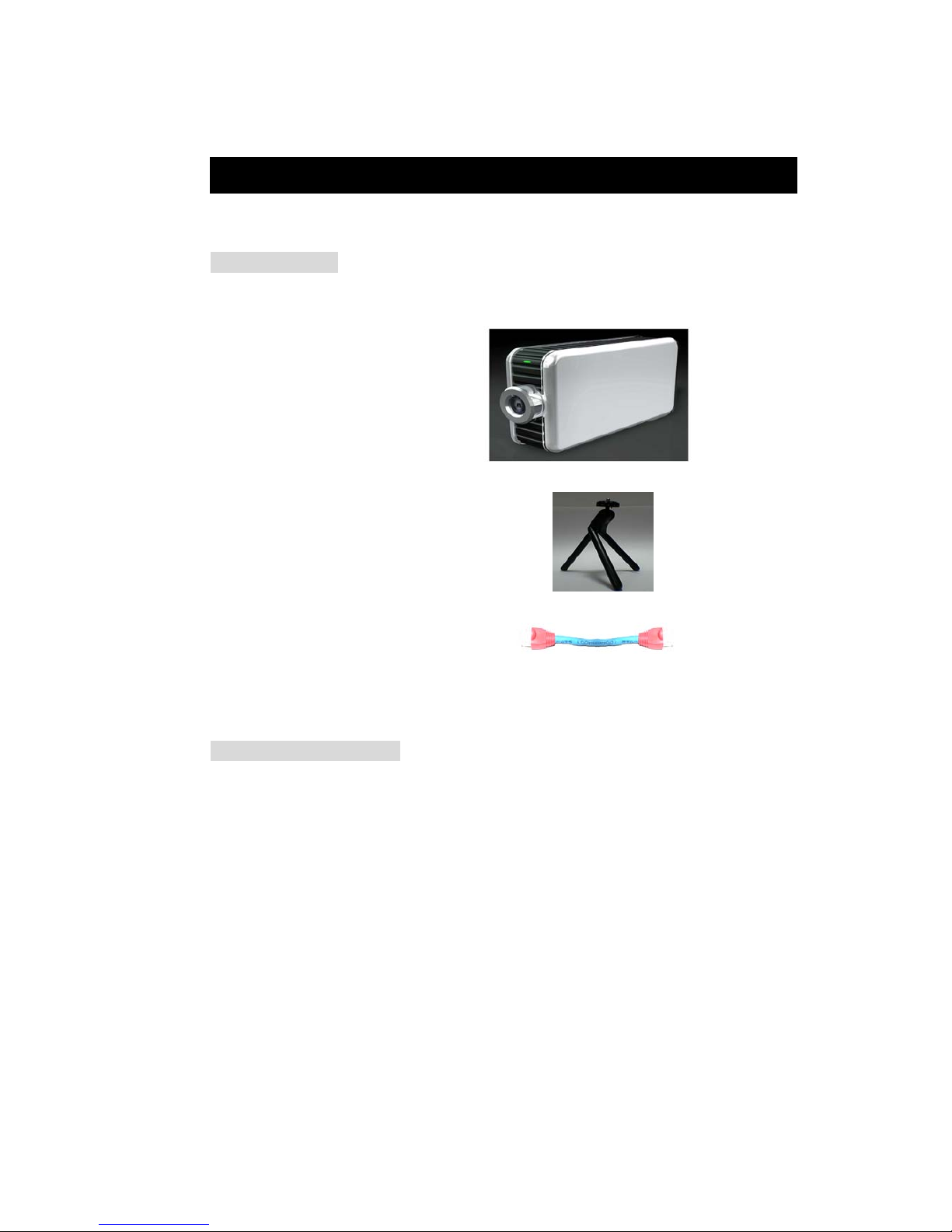
IP Kamera package content:
! 1 x IP Kamera 9000A
! 1 x Tripot
! 1 x RJ 45 internet line
! 1 x DC Power adopter 5V, 110 ~ 240.
! 1 x CD (a. IP KAMVID program b. User Manual book)
! 1 x Quick Installation Guide
Minimum Requirement
≥300MHz Intel Pentium II and above
Windows 98 / SE / 2000 / ME / XP, or LINUX, MAC system
≥64MB memory
VGA Card:support Hi - Colors and above and direct draw
Internet card - RJ 45 (CAT 5)
Internet Hub
Internet : one set of IP provided by your ISP
EX: xxx.xxx.xxx.xxx
VER. 2.32,
- 5 -

3. Panel Description
Front Panel:
1. Power indicator (blue LED)
2. Lens (CMOS)
Back Panel: from left to right:
1. Reset Button
2. DC Power - 5V
3. On / Off
4. RJ 45
5. Microphone In
Note: The Microphone Input support only audio from microphone. If input audio from
other audio device, the audio volume would be noise or over volume.
- 6 -

IP KAMERA 9000A PLUS USER MANUAL
4. Installation
Before using IP Kamera 9000A, follow bellow:
Before installation:
Reconfirm your package content
A Hub
Electricity 110 ~ 240 V
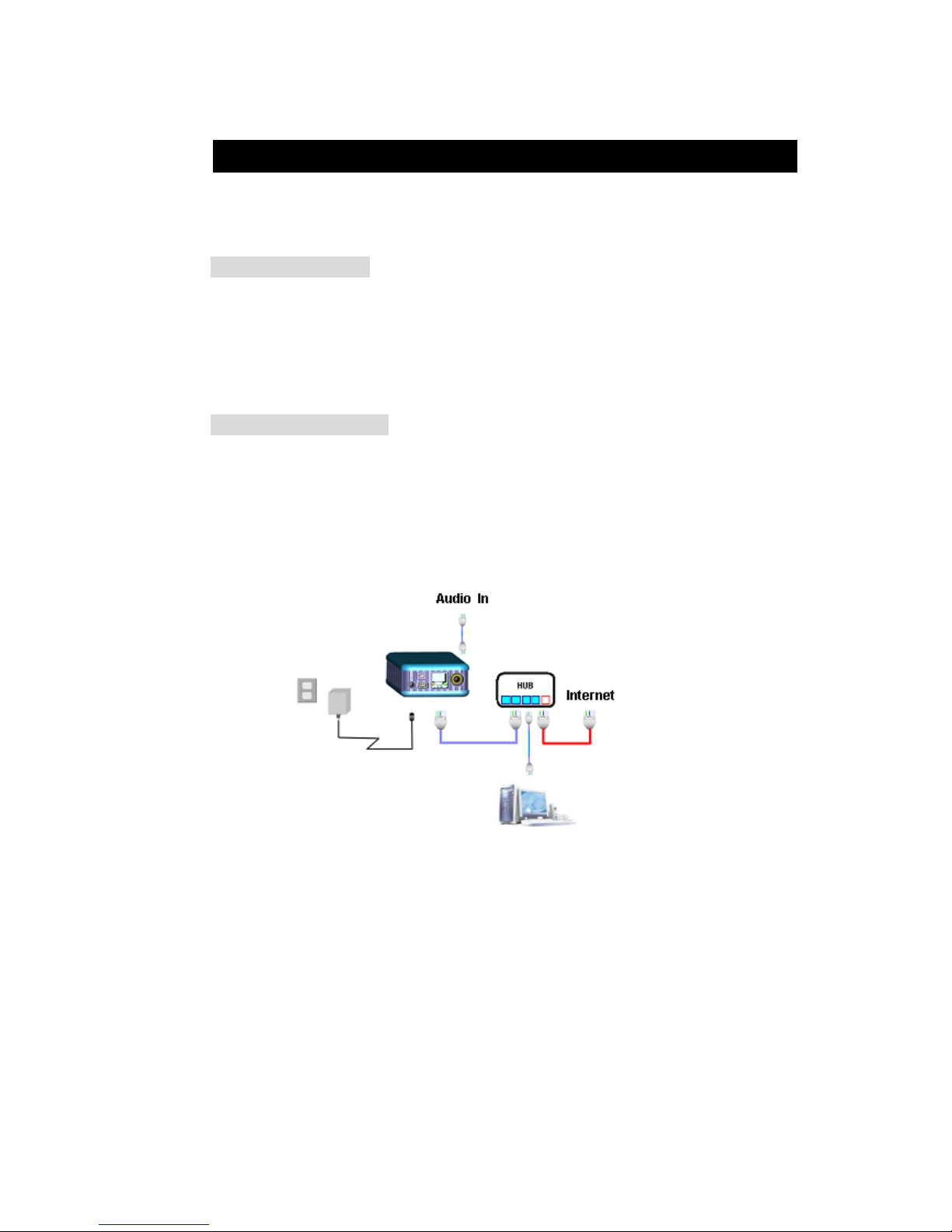
Hardware installation
1. Plug in IP Kamera 9000A (Power) 2. Plug in RJ 45 line to a HUB
3. Connect the other way to the computer
4. Connect your Hub into your modem 5. Turn you computer on
VER. 2.32,
- 7 -

SOFTWARE INSTALLER
1. IP_ KAM VID_ 1070
After connecting the power and RJ 45 line, following the steps below to install the
software.
Step 1: Install IP KAM by executes Setup.exe in the CD; choose setup language and
the install shield Wizard will help finish the program.
- 8 -

IP KAMERA 9000A PLUS USER MANUAL
Step 2: Then you can see shortcut icon “IP KamVid 1070 “on desktop, click this icon.
Note: Be sure that the power is turn on and the RJ45 line is properly connected.
Step 3: The KIPEDIT program will detect all the active IP9000s or IP9100s in the same
local Ethernet, and display the findings in the window.
VER. 2.32,
- 9 -
Altri manuali per 9000A Plus
1
Indice
Altri manuali Aviosys Telecamera IP

Aviosys
Aviosys 9070-Lite Manuale utente

Aviosys
Aviosys 9070-IRW Manuale utente

Aviosys
Aviosys 9077SPD-I Manuale utente

Aviosys
Aviosys 9070-CSW Manuale utente

Aviosys
Aviosys IP Kamera 9070-IR Manuale utente

Aviosys
Aviosys 9070CS-PoE Manuale utente

Aviosys
Aviosys 9000A Plus Manuale utente

Aviosys
Aviosys IP Kamera 9070 Manuale utente

Aviosys
Aviosys IP Kamera 9070-IR Manuale utente