
Azoth Systems O'Dive ODYSSEY Manuale utente

ODYSSEY dive computer
-
Simplified user manual
Updated on 04/01/2023

04/01/2023 2
ODYSSEY - v 1.0.20G
SUPPORT-CONTACT
We are looking forward to hearing from you regarding the quality, functionalities or use of this product.
We are committed to reply to you without delay: cont[email protected]
You can download the updated complete user’s manual on our website: https://o-dive.com/
DANGER
The Odyssey dive computer has been designed to monitor your dive profile and to calculate decompression stop(s)
requirements based on its internal model and the parameters you provide. These calculations are, at best, an estimate
of actual physiological desaturation requirements and do not guarantee a safe ascent profile. Decompression sickness
(DCS) is intrinsically linked to the gas load dissolved in the diver's body as a result of diving and to be off-gassed by the
body during the ascent and after surfacing. In scuba diving, there is no such thing as zero risk.
THE ONLY WAY NOT TO EXPOSE YOURSELF TO A PROBABILITY OF DCS IS NOT TO DIVE.
WARNING
Although we make a continuous effort to ensure that your computer is functioning properly, it is certain that your
computer's firmware contains undetected bugs. Your computer may fail at any time without warning, before or
during a dive,due to software or hardware failure.
Never risk your life on a single source of information. Plan all dives carefully, use a second computer or tables and
be prepared to execute your backup plan at any time.
You are risking your life by scuba diving and no dive computer can eliminate this risk. The dive computer is not a
substitute for the proper training, knowledge, or skills necessary to dive.

04/01/2023 3
ODYSSEY - v 1.0.20G
Weight < 200 g
Dimensions 90mm x 76mm x 36mm
Display TFT 2.4"
240 x 320 px
Endurance 20 hours in dive mode
Battery User-replaceable AA battery
Wireless connectivity Bluetooth Low Energy
Maximal depth 225 m
Operation temperature range 0 °C –40 °C
Storage temperature range -30 °C –65 °C
Conformity CE –UKCA –FCC –ISED/ISDE
EN13319
Rinse the unit with fresh water after use.
Improper use of the system may cause shock or injury and may damage your unit.
TECHNICAL SPECIFICATIONS

04/01/2023 4
ODYSSEY - v 1.0.20G
BATTERY REPLACEMENT
•Your Odyssey operates on a standard user-replaceable AA battery. Any AA battery with a
voltage rating between 1.2V and 4.5V is compatible.
•The battery compartment is sealed with a cap on the right side of the unit. This cap can be
unscrewed (counterclockwise) with a coin.
•The new battery must be inserted with the positive
terminal first (see diagram on the case).
•The appearance of the cap seal should be checked and greased if necessary. The cap should be screwed on until it stops.
•The minimum operating time of the unit is approximately 15 hours of diving at maximum screen intensity. This time may vary depending on
the type of battery, water temperature and the length of time the Bluetooth is used.

04/01/2023 5
ODYSSEY - v 1.0.20G
STARTING YOUR ODYSSEY
•Your Odyssey will automatically start when submerged. This feature may not function
correctly.
We recommend that you always start your computer manually and check the settings
carefully before diving.
•Your Odyssey starts with a simultaneous press of the two piezo buttons located on the
right and left side of the computer.
TURNING OFF YOUR ODYSSEY
•When not in the water, your Odyssey automatically shuts off after 15 minutes of
inactivity.
•When out of the water, your Odyssey shuts off manually by pressing the 2 side buttons
simultaneously.
Start and stop with simultaneous pressing
of the left and right buttons

04/01/2023 6
ODYSSEY - v 1.0.20G
PRESENTATION OF THE BUTTONS
•Your Odyssey is equipped with three piezoelectric buttons.
•The side buttons allow you to navigate through the elements of a page:
oLeft button: navigation to the left / up
oRight button: navigation to the right / down
•The central button is used to:
oValidate / Enter a menu
oModify a value / Scroll a field
Left / up Right /
down
Enter

04/01/2023 7
ODYSSEY - v 1.0.20G
SURFACE HOMEPAGE
•The homepage shows:
oSurface interval since last dive
oDive mode and current gas
oCurrent conservatism
oBattery power level
•Four pages are accessible from the homepage:
oSystem
oSettings
oTransfer
oDive
•To enter the desired menu:
oScroll the highlight on the icons using the left
/ right buttons
oPress the central button to open the desired
page.
surface interval
dive mode & gaz
conservatism
battery indicator

04/01/2023 8
ODYSSEY - v 1.0.20G
“SYSTEM” PAGE
•The “System” page contains three tabs: System,Personal and Logs
“SYSTEM” TAB
•The “System” tab allows you to:
oCheck and update the clock and date
oCheck and update the battery type
oDisplay the installed firmware
oAccess to the “Bootloader” mode to update the firmware
Move up / down with the left and right buttons
Select / open with the central button
back to homepage

04/01/2023 9
ODYSSEY - v 1.0.20G
“SYSTEM” PAGE
“PERSONAL” TAB
•The “Personal” tab allows you to:
oSet the language and the unit system
oSet the colours
oCheck and modify the pP, Gas, Ascent Rate and Gas Density
alerts
Move up / down with the left and right buttons
Select / open with the central button
back to homepage
04/01/2023 10
ODYSSEY - v 1.0.20G
Move up / down with the left and right buttons
Select / open with the central button
back to homepage
“SYSTEM” PAGE
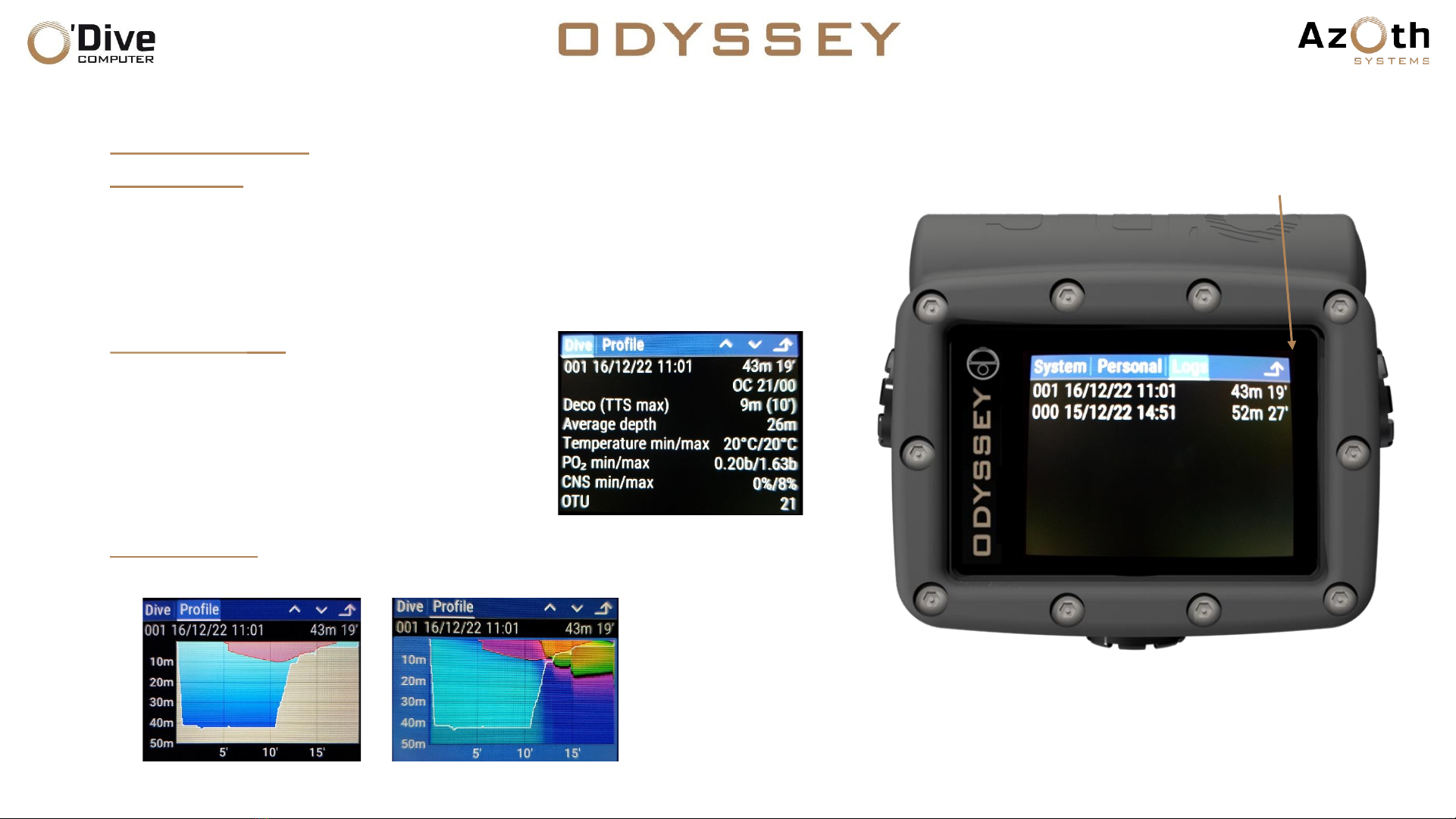
“LOGS” TAB
•The “Logs” tab contains the list of dives recorded in the logbook
•To view the details of a dive, select and activate the item from the list:
oThis opens a new page with two tabs
“OVERVIEW” TAB
•The “Overview” tab allows you to view
information associated with the dive,
including:
oDeepest stop
oMaximum TTS reached
oTemperature
“PROFILE” TAB
•The “Profile” tab allows you to view the profile of the dive.
Dive profile display modes
Indice
Altri manuali Azoth Systems Strumento subacqueo


