
BAFANG M500 Manuale utente

1
CONSUMER MANUAL – DP C18.CAN
CONTENT
CONTENT
M500 DISPLAY MANUAL
1 Important Notice
2 Introduction 3
3 Product Description 4
3.1 Performance 4
3.2 Functions Overview 4
4 Indication Area 5
5 Button Definition 5
6 Normal Operation 6
6.1 Power ON/OFF 6
6.2 Power assistance level selection 6
6.3 Mileage mode and Speed mode 6
6.4 Headlight /backlight 7
6.5 Walk assistance mode 8
6.6 “SERVICE” indication 8
7 User Setting 9
7.1 “SETTING” interface 9
7.2 “Display setting” interface 9
7.3 “Information” interface 13
8 Error Code Definition 15
9 Maintenance 18
FiSHAW 2020

2CONSUMER MANUAL – DP C18.CAN
1 IMPORTANT NOTICE
All user must be sure to aware of the
following:
• If the fault information cannot be eliminated
according to the instructions, must give up
to proceed with the operation, please con-
tact the local dealer or professional.
• Do not to let water soak the wiring ports
and buttons.
• Although this product is designed to be
completely waterproof for riding in rainy
days, do not let this product soak in water or
use in water.
• Do not clean the Pedelec with a steam jet,
high-pressure cleaner or water hose. Water
may seep into the electrics or drive and
destroy the equipment.
• Please use this product with care and wit-
hout strong impact.
• Do not use thinner or other solvents to
clean any of the HMI. Such substances may
damage the surfaces.
• Contact your local distributor if your product
needs to upgrade.
• Be not guaranteed to wear out due to nor-
mal use and aging.
FiSHAW 2020
3
INTRODUCTION
CONSUMER MANUAL – DP C18.CAN
2 INTRODUCTION
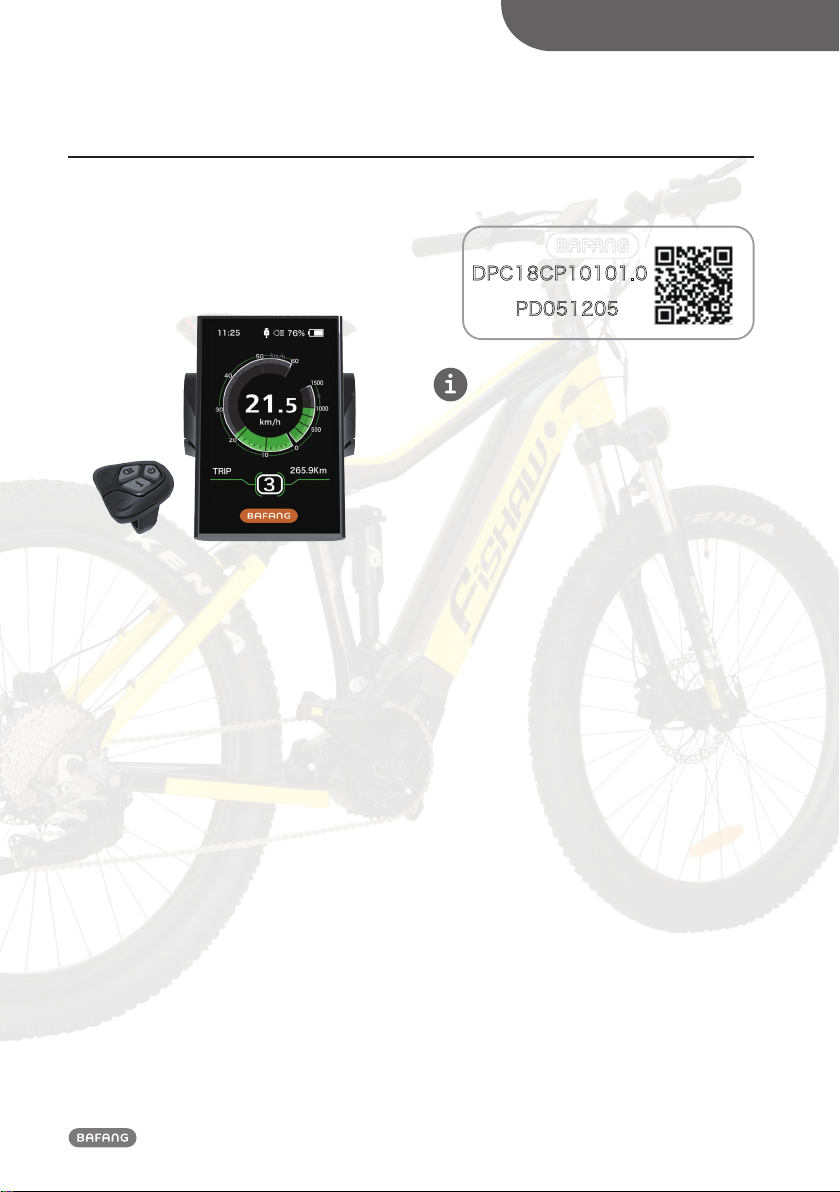
• Name: smart display and controller (HMI)
• Model: DP C18.CAN
• The housing material is PC, the window is
high hardness glass, as following:
• Cable label identification is as following:
P CP 0
P
Note: Contents in Label part are important
information of this product. Please keep them
properly for updating of software or providing
after-sales service.
FiSHAW 2020

4CONSUMER MANUAL – DP C18.CAN
3 PRODUCT DESCRIPTION
3.1 Performance
• Operating temperature: -20℃~45℃
• Storage temperature: -20℃~50℃
• Water-proof grade: IP65
• Storage humidity: 30%-70% RH
3.2 Functions Overview
• Speed indication (including maximum speed
and average speed, unit switching between
km and mile).
• Battery capacity indication.
• Control and indication for the headlight
(light sensation).
• Brightness adjustment for backlight.
• Indication of power assistance level.
• Motor output power and output current
indication.
• Time indication for single riding.
• Trip indication (including single-trip distance,
total distance and remaining distance).
• Walk assistance model.
• Support level setting.
• Indication for consumption of energy CALO-
RIES (Note: If the display has this function).
• Indication for the remaining distance. (Note:
it needs the display supports this function).
• Power-on password setting.
FiSHAW 2020

5
INDICATION AREA
CONSUMER MANUAL – DP C18.CAN
4 INDICATION AREA
1
2
3
4
5
12
SERVICE
1Time indication
2USB charge indication: When external device
connect into the display, it display the
symbol
3Headlight indication
4Speed scale display
5Mode selection: single-trip distance (TRIP)
→total distance ODO →maximum speed
(MAX) →average speed (AVG) →remaining
distance (RANGE) →energy consumption
(CALORIES) →time (TIME). (Note: same
function needs the Controller supports)
6Indication for the current remaining capacity
of battery.
7Voltage indication/percentage indication.
8Speed digital indication.
9Power indication/current indication (with
scale).
10 Power assistance level indication/Walk
assistance, Note: symbol means Walk
assistance model.
11 Data indication: displays current data corres-
ponding to the mode.
12 “Service”indication.
5 BUTTON DEFINITION
ON/OFF
Up
Down
Mode
Headlight
FiSHAW 2020

6CONSUMER MANUAL – DP C18.CAN
6 NORMAL OPERATION
6.1 Power ON/OFF
Press and hold (>2S) to power on the display, the display begin to operate. Press and hold
(>2S) again to power off the display.
If the "automatic shutdown" time is set to 5 minutes (it can be set in function "Auto Off"), the HMI
will be automatically turned off within this set time, When it is not operated. If password function is
turned on, than must input correct password to enter into the normal display interface.
6.2 Power assistance level selection
When HMI power on, briefly press or (<0.5S) to switch the assistance level (the number of
assistance level needs to be adapted to controller), The lowest level is Level 0, the highest Level is 5.
On the default is Level 1,“0”means no power assistance. The interface is as following:
6.3 Mileage mode and Speed mode
Briefly press (0.5s) to view the mileage and speed information.
1. System with torque sensor, circularly show the trip distance (TRIP)→total distance (ODO) →max-
imum speed (MAX) →average speed (AVG) →remaining distance (RANGE) →energy consumption
(CALORIES) →time (TIME).
2. If system with a speed sensor, circularly show the trip distance (TRIP)→total distance (ODO) →
maximum speed (MAX) →average speed (AVG) →remaining distance (RANGE) →time (TIME).
FiSHAW 2020

7
NORMAL OPERATION
CONSUMER MANUAL – DP C18.CAN
6.4 Headlight /backlight
Press and hold (>2S) to turn on the backlight as well as headlight.
Press and hold (>2S) again to turn off the backlight and the headlight. The brightness of back-
light can be set in function“Brightness”. (If the display is turned on in a dark environment, the display
backlight/ headlight will be turned on automatically. If the display backlight/headlight are turned off
manually, they also need to be turned on manually afterwards)
FiSHAW 2020

8CONSUMER MANUAL – DP C18.CAN
6.5 Walk assistance mode
When your Pedelec is motionless, press button until the Walk assistance indicator is dis-
played. At this point, long press button, the Pedelec enters the walk assistance mode, the indica-
tor If release the button will stop this,if no any operations within 5s will automatically return to 0
level. That is stopped from the Walk assistance mode.(as following)
6.6 “SERVICE” indication
HMI will prompt for maintenance according to the mileage and battery charger times. When mileage
exceeds 5000km and the "Service" function is enabled, the "SERVICE" indication will be displayed
every time. This function can be set in the interface. For the operation is detailed in the following
text.
FiSHAW 2020

9
USER SETTING
CONSUMER MANUAL – DP C18.CAN
7 USER SETTING
7.1 “SETTING” interface
After the HMI powered on, briefly
press(<0.5S) for two times to enter into
the “SETTING”. Briefly press (<0.5S) or
to select and then briefly press (<0.5S) to
confirm and enter into the option.
Select “EXIT” and briefly press(<0.5S) to
exit, or briefly press (<0.5S) for two times
in any interface to exit, then the set dates
are saved.
If there is no any operation within 20s, the
set interface will be exited and no any dates
are saved (as following).
7.2 “Display setting” interface
In “SETTING” interface, briefly press (<0.5S)
or to select “Display setting” and then
briefly press (<0.5S) to confirm and enter
into “Display setting”. There are thirteen
options in this interface.
7.2.1 “Unit” --- set unit for km/mile
Briefly press (<0.5S) or to select
“Unit”, and then briefly press (<0.5S)
to enter into the interface. Select “Metric”/
“Imperial”, and then briefly press (<0.5S)
to save and exit back to “Unit” interface,
then briefly press (<0.5S) for two times to
exit or you can also select “BACK” → “EXIT”
to exit back to the main interface.
FiSHAW 2020
10 CONSUMER MANUAL – DP C18.CAN
7.2.2 “Service Tip” --- turn on/off the
Service indication
Briefly press (<0.5S) or to select
“SERVICE”, and then briefly press (<0.5S)
to enter into the interface. Select “ON/YES”,
and then briefly press (<0.5S) to save
and exit back to “Service Tip” interface, then
briefly press (<0.5S) for two times to exit
or you can also select “BACK” → “EXIT” to
exit back to the main interface.
7.2.3 “Brightness” --- set backlight
brightness
Briefly press (<0.5S) or to select
“Brightness”, and then briefly press (<0.5S)
to enter into the interface. Select the per-
centage as “100%”/ “75%”/ “50%”/ “30%”/
“10%”. 100% means the highest brightness,
10% is lowest brightness. And then briefly
press (<0.5S) to save and exit back to
“Brightness” interface, then briefly press
(<0.5S) for two times to exit or you can
also select “BACK” → “EXIT” to exit back to
the main interface.
7.2.4 “Auto Off” --- set automatic Off
time
Briefly press (<0.5S) or to select “Auto
Off”, and then briefly press (<0.5S) to
enter into the interface. Select the automatic
Off time as “OFF”/“9”/ “8”/“7” /“6”/“5”/“4”
/“3”/“2”/“1”, OFF means don't turn off.
The unit is in minute. And then briefly press
(<0.5S) to save and exit back to “Auto
Off” interface, then briefly press (<0.5S)
for two times to exit or you can also select
“BACK” → “EXIT” to exit back to the main
interface.
7.2.5 “MAX PAS” --- set riding mode
Briefly press (<0.5S) or to select “MAX
PAS”, and then briefly press (<0.5S)
to enter into the interface. Select support
mode: 3/5/9. And then briefly press (<0.5S)
to save and exit back to “MAX PAS” in-
terface, then briefly press (<0.5S) for two
times to exit or you can also select “BACK”
→ “EXIT” to exit back to the main interface.
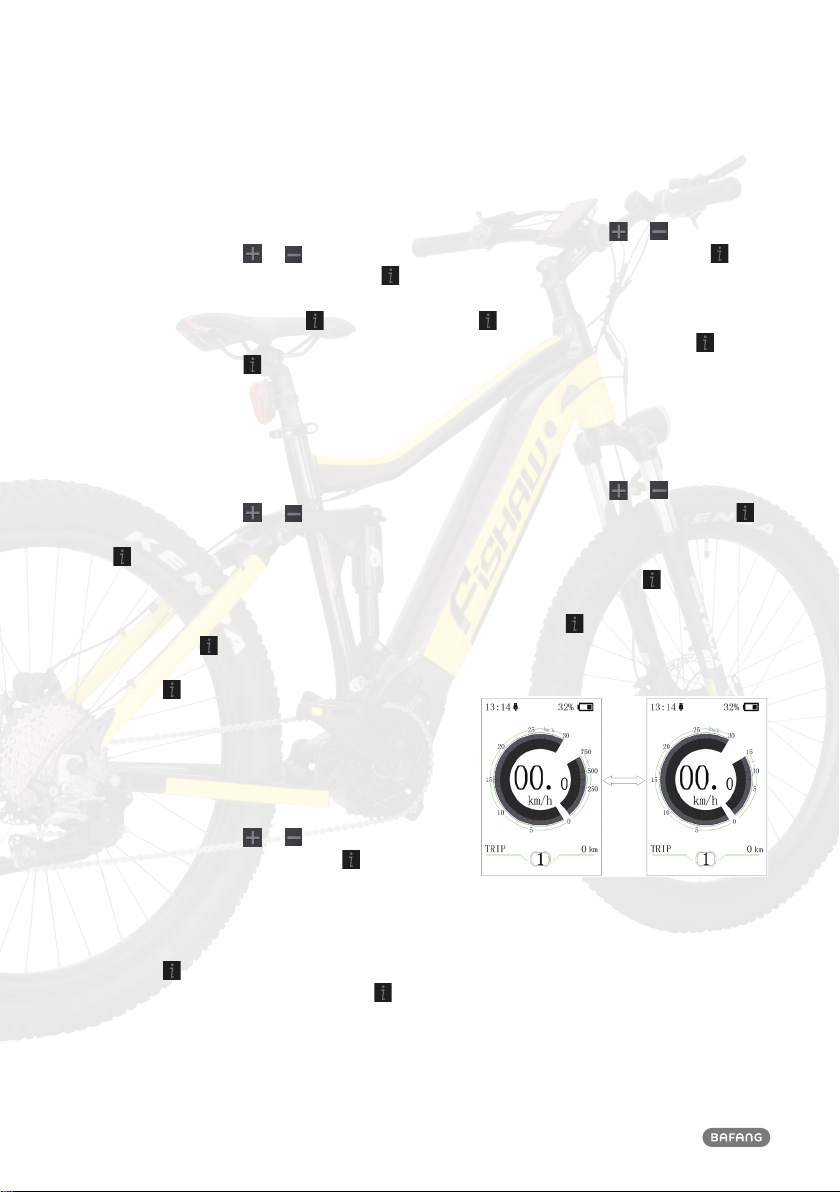
7.2.6 “Power View” --- set output display
mode
Briefly press (<0.5S) or to select “Pow-
er View”, and then briefly press (<0.5S)
to enter into the interface. Select the output
display mode as “Power” / “Current”. And
then briefly press (<0.5S) to save and exit
back to “Power View” interface, then briefly
press (<0.5S) for two times to exit or
you can also select “BACK” → “EXIT” to exit
back to the main interface. As following:
FiSHAW 2020
Questo manuale è adatto per i seguenti modelli
1
Indice
Altri manuali BAFANG Monitor

BAFANG
BAFANG DP C230.CAN Manuale utente

BAFANG
BAFANG DP C010.CB Manuale utente

BAFANG
BAFANG UB400 Manuale utente

BAFANG
BAFANG M300 Manuale utente

BAFANG
BAFANG C961 Manuale utente

BAFANG
BAFANG DP C11.UART Manuale utente

BAFANG
BAFANG DP C230.CAN Manuale utente

BAFANG
BAFANG DP C01.UART Manuale utente

BAFANG
BAFANG Luna X-1 Manuale utente

BAFANG
BAFANG DP E12.UART Manuale utente


