
BandLuxe E5812P Series Manuale utente

User
Manual
BandLuxe
E5812P Series
LTE Outdoor CPE
P/N: 65021100021 Rev.A


1
Table of Contents
Features..................................................................................................................3
Package Contents...................................................................................................3
Hardware Overview.................................................................................................4
Notice before installation.........................................................................................5
Important Installation Considerations ......................................................................6
Install the SIM card .................................................................................................8
Mounting and Installation ........................................................................................9
Mount Assembly package ...................................................................................... 9
Wall-mount Assembly........................................................................................... 10
Pole-mount Assembly .......................................................................................... 11
Insert the Ethernet Cable ......................................................................................13
Assemble the Optional Water-Proof RJ-45 Jack ...................................................14
Ground the CPE....................................................................................................15
Connect to Computers ..........................................................................................15
Adjust the CPE position ........................................................................................16
Horizontal angle adjustment ................................................................................. 17
Vertical angle adjustment ..................................................................................... 17
Status ....................................................................................................................19
System Log .......................................................................................................... 20
Traffic Monitor ...................................................................................................... 21
Mobile Network .................................................................................................... 22
System ..................................................................................................................24
System ................................................................................................................. 24
General Settings .......................................................................................................... 24
Language and Style ..................................................................................................... 25
Administration ...................................................................................................... 26
Signal LED ........................................................................................................... 27
Backup / Flash Firmware...................................................................................... 28
Download backup ........................................................................................................ 28
Reset to defaults.......................................................................................................... 29
Restore backup............................................................................................................ 29
Reboot ................................................................................................................. 30
Services ................................................................................................................31
Dynamic DNS....................................................................................................... 31
Network.................................................................................................................32
Interfaces ............................................................................................................. 32
Mobile Internet ..................................................................................................... 33
Network Settings.......................................................................................................... 34
Auto APN Information .................................................................................................. 34
APN Profile Settings .................................................................................................... 34
Reset Modem .............................................................................................................. 34
Scenario 1: No mobile internet service........................................................................ 35
Scenario 2: Mobile internet service pending ............................................................... 35
Scenario 3: Mobile internet service enabled ............................................................... 36
SIM Management ........................................................................................................ 38
Scenario 1: SIM lock absent ........................................................................................ 38
Scenario 2: SIM lock present....................................................................................... 38
Router .................................................................................................................. 39

2
Router IP ...................................................................................................................... 39
DHCP Service .............................................................................................................. 40
Active DHCP Leases.................................................................................................... 41
Static Leases................................................................................................................ 41
Static Routing ............................................................................................................... 42
Routing and Redirection Service ................................................................................. 43
VPN Passthrough......................................................................................................... 43
Firewall................................................................................................................. 44
Single Port Forward ..................................................................................................... 44
Port Trigger .................................................................................................................. 46
Firewall......................................................................................................................... 49
Internet Filter ................................................................................................................ 49
Web Filters ................................................................................................................... 49
Network Filter ............................................................................................................... 51
Port Range Forward..................................................................................................... 53
UPNP ................................................................................................................... 55
Help ...................................................................................................................... 55
Logout .................................................................................................................. 56
Europe –EU Declaration of Conformity................................................................ 62
Federal Communication Commission Interference Statement.............................. 63

Product Overview
3
Product Overview
Congratulations on your purchase of this LTE outdoor CPE. With this LTE
(Long Term Evolution) CPE (which is also known as 4G CPE), you can
share high speed mobile broadband connectivity in a wide range of
computing environment. Before you begin using the LTE outdoor CPE,
read this chapter to familiarize yourself with the device.
Features
Embedded high gain directional antenna
IP66 protection against dust and water
Easy configuration based on Web Interface
Provide 10 –30dB more coverage gain compared to indoor CPE
Support Passive Power over Ethernet.
Easy installation and use
Package Contents
The following items come with your package. If any of them is damaged or missing,
please contact your retailer.
LTE Outdoor CPE
Mounting bracket
Optional:
Plug head water
resistant kits (RJ-45)
Passive PoE adapter
(12V, E5812A series)
Passive PoE adapter
(48V, E5812P series)
Note:
The pictures are for reference only, actual items may slightly differ.

Product Overview
4
Hardware Overview
1
Power
Power LED will remain lit while power is applied.
2
Signal strength
Indicate receive signal strength. The Signal
Strength LEDs are only used at the power on to
assist the installation.
The CPE will turn off all the Signal Strength LEDs after a timer
expires from power on. Such design is to prevent the outdoor CPE
becoming a potential target particularly at night. The default time is
60 minutes however, is user settable in the web GUI.
3
Mount base
Attach the mount bracket.
4
Earth ground
terminal
Use a spring washer and an M4x8L screw to
ground and protect CPE from lightning. See
“Ground the CPE” on page 16 for more details.
5
Ethernet port
Connect to a computer/ Passive PoE using an
Ethernet cable.
6
Reset button
Short press to restart the device.
Long press for 10 seconds to reset the
settings to the factory default settings.
7
SIM card slot
Insert the SIM card.
8
USB port
For use by technicians use only.

Installation
5
Installation
Notice before installation
Choose a solid and safe place (Wall or Pole) for CPE installation
1. Choose the best location of the house and the orientation of the CPE
to get the strongest signal reception from base station.
2. The ambient temperature for E5812A and E5812P series must be
within:
E5812A series: -10°C to 55°C
E5812P series: -40°C to 55°C
NOTE
For lightning protection ground the CPE via Earth Ground Terminal and optimum
reception, there are a few things you should consider before installation. Please see
“Important Installation Considerations” on page 7 for more details.
Prepare two Ethernet cables
Be sure that one of the cables used is an outdoor grade CAT 5e (or above)
Ethernet cable type and the length of the cables are adequate to reach
the location of the CPE and indoor PPoE are.
Prepare wrenches
Prepare two adjustable wrenches or four combination wrenches. (size:
13mm x 2, 8mm x 1, and 19mm x 1)
Warning:
Do NOT start any traffic test (ex: throughput test and internet browsing)
before the installer returns to the ground.

Installation
6
Important Installation Considerations
Before installing the outdoor CPE, consider the appropriate location,
clearance, and device orientation.
Location and Cable wiring
1. Consult your Service Provider to find the best location and angle for getting the
strongest signal from the base station.
2. Do a walking test around the house to find the best spot with the strongest signal
if you don’t obtain related information from Service Provider.
3. Mount the CPE at the highest possible location with a clear view of the base
station signal source. Buildings or other obstructions will affect the quality of the
signal you receive.
4. Keep the best distance as possible from other devices that may cause
interference.
5. Check if you can route the cable through the available ventilation holes to avoid
unnecessary drilling and waterproofing the wall.
6. Disconnect the power cord first before mounting the CPE. Otherwise this may
result in personal injury due to electric shock.

Installation
7
Mounting
1. Choose a solid wall/ground to mount the CPE.
2. Mount on a wall/pole that can sustain the CPE dimensions and weight.
3. Mount upright on a vertical surface.
Position Adjustment
1. The CPE must be directed towards the nearest base station. By pointing the CPE
in the proper direction ensures that you receive the strongest signal.
2. Fine tune the signal by adjusting the orientation horizontally or vertically to
increase the CPE signal strength.
3. To verify the signal strength level:
Check the LEDs on the front panel - more lighted LEDs indicates stronger
signal.
Access the web management and go to Basic Mode > Status > Mobile
Internet > Signal Quality to view the Rx signal strength.
Warning:
To receive stronger signal and to avoid possible RF radiation, please
do NOT place your head or body in front of the CPE while you are
positioning the CPE or checking the signal strength LEDs on the front
panel.
Installation
8
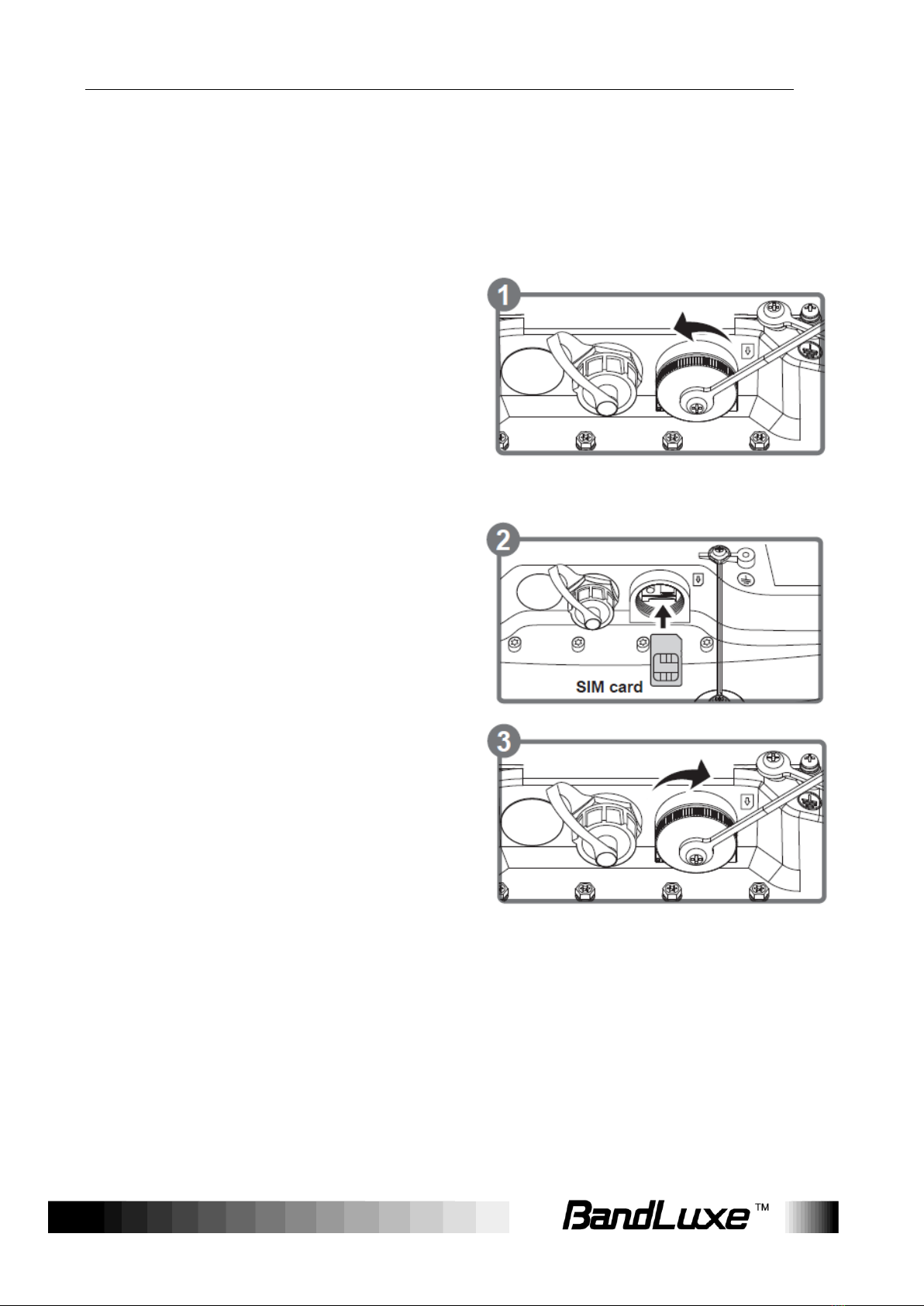
Install the SIM card
This CPE is specially designed for the 4G LTE network.
NOTE
Check the availability of service and plan rates of data connections with
your network service provider.
1. Unscrew the SIM card slot.
2. Insert a valid SIM card into the SIM card slot.
Push it fully until it clicks into place.
3. Screw the cap back on tightly.
Remove the SIM card
Push to eject the SIM card from the
slot.
NOTE
Once the SIM is reinserted, you must restart the CPE to read the SIM
card properly.
Indice
Altri manuali BandLuxe Punto di accesso wireless


