
Barco B3245315DK Manuale utente

Internal fans
Installation manual
B3245315DK
R59770234/00
18/02/2008

Barco nv Media & Entertaiment Division
Noordlaan 5, B-8520 Kuurne
Phone: +32 56.36.89.70
Fax: +32 56.36.883.86
E-mail: [email protected]
Visit us at the web: www.barco.com
Printed in Belgium

1. General information
1. GENERAL INFORMATION
1.1 Content of the kit
Overview
The kit contains 4 different fans all internally mounted in the projector:
Order number Description Quantity in kit Quantity used in projector
B32455791D Radial fan mounted next to the light processor 11
B3245315D Axial fan mounted on the front panel, left side 1 2
B32466391D Axial fan mounted on the front panel, right side 12
B32460791D Radial fan mounded on top of the optical assembly 11
Image 1-1
B32455791D
Image 1-2
B3245315D
Image 1-3
B32466391D
Image 1-4
B32460791D
R59770234 INTERNAL FANS 18/02/2008 1

1. General information
2R59770234 INTERNAL FANS 18/02/2008

2. Preparations
2. PREPARATIONS
Removal of the front cover and lamp door.
To remove the front cover and the lamp door, consult the user guide of the projector, chapter “Projector covers, removal and instal-
lation”.
Overview
• Removal of the back cover
• Removal of the top cover
• Removal of the side cover
• Removal of the side cover on the input side
2.1 Removal of the back cover
Necessary tools
Flat screwdriver
How to remove the back cover
1. Release the 3 captive screws in the back cover.
Image 2-1
Release captive screws
2. Pull off the back cover.
Image 2-2
Remove back cover
R59770234 INTERNAL FANS 18/02/2008 3

2. Preparations
2.2 Removal of the top cover
To remove the top cover, first remove the front and back cover and the lamp door.
Necessary tools
Flat screwdriver
How to remove the top cover
1. Release the captive screw in the middle of the top cover.
Image 2-3
Remove top cover
2. Pull the cover out of its locks and take it off.
2.3 Removal of the side cover
To remove the side cover, first remove the front, back and top cover.
Necessary tools
Flat screwdriver
How to remove the side cover
1. Loosen both screws.
Image 2-4
Loosen screws
2. Lift up the side cover and pull them forward to take off.
4R59770234 INTERNAL FANS 18/02/2008

2. Preparations
Image 2-5
Side cover removal
2.4 Removal of the side cover on the input side
To remove the side cover, first remove the front, back and top cover.
Necessary tools
Allen wrench 3 mm
How to remove the side cover
1. Loosen both screws at the side of the cover.
Image 2-6
Release the fixation
2. Lift up the side cover and pull them forward to take off.
R59770234 INTERNAL FANS 18/02/2008 5

2. Preparations
Image 2-7
Removethesidecover
6R59770234 INTERNAL FANS 18/02/2008

3. Installation procedures
3. INSTALLATION PROCEDURES
Preparations
Remove the lamp door, back and front cover, top cover and the side cover on the Input and Communication input side.
3.1 Removal of the fan
How to remove the fan
1. Disconnect the fan. If necessary cut the wire tie.
Image 3-1
2. Cut the wire tie.
3. Turn out both fixation screws.
Image 3-2
R59770234 INTERNAL FANS 18/02/2008 7
3. Installation procedures
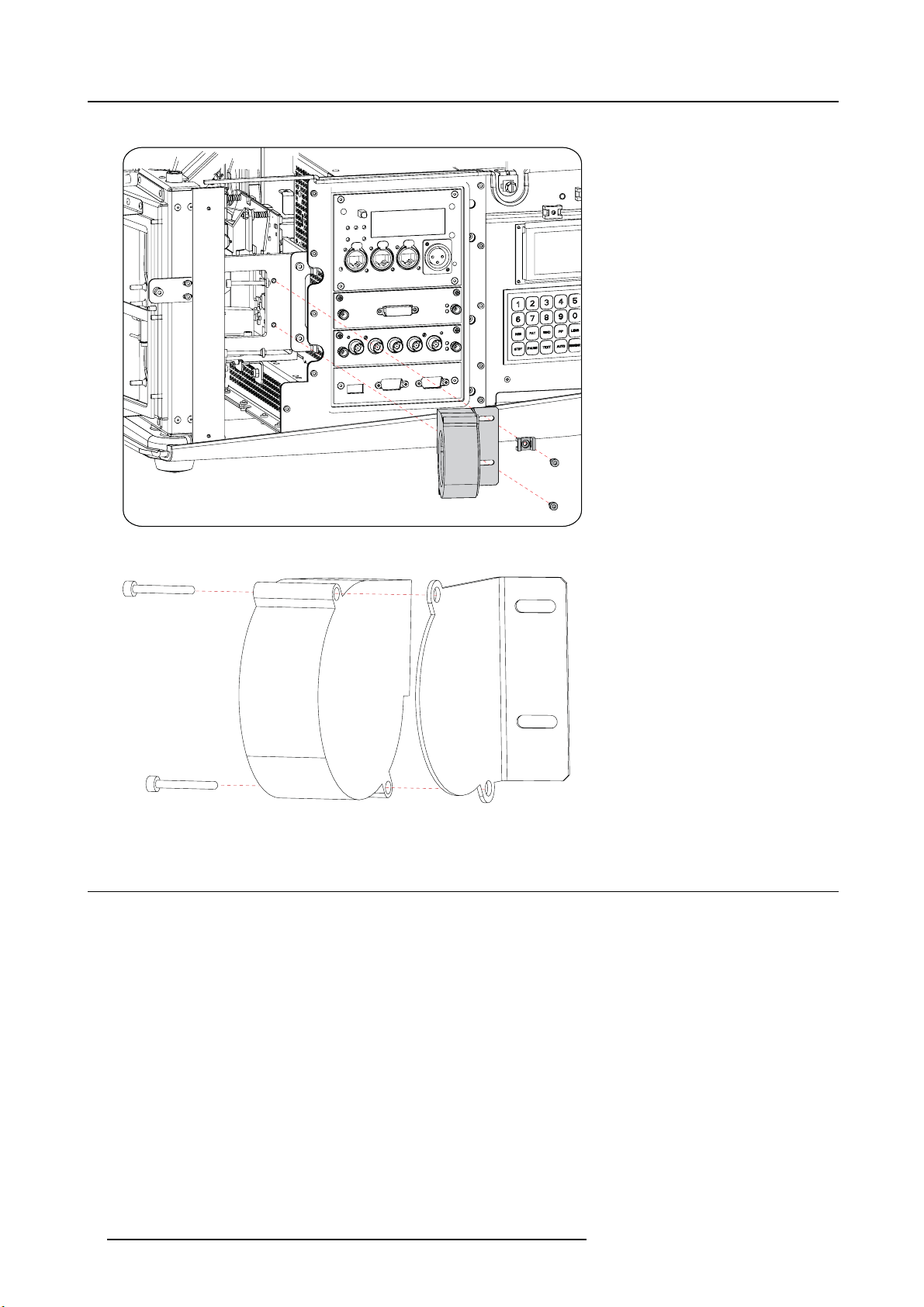
The fan assembly is removed for the projector.
Image 3-3
4. Turn out both screws fixating the fan to the fan holder.
Image 3-4
3.2 Mounting the fan
Necessary parts
B32455791D
How to mount
1. Place the new fan on the fan holder with its outlet towards the flange of the holder. Text on the on the fan must be away from the
holder.
8R59770234 INTERNAL FANS 18/02/2008
Questo manuale è adatto per i seguenti modelli
4
Indice
Altri manuali Barco Fan


