BCP SKY3865 Manuale utente

SKY3865
Ver. 2
INSTRUCTION
MANUAL
Double Blade Pedestal Fan

Thank you for choosing us! Since 2002, Best
Choice Products has been bringing customers
high-quality products at the absolute lowest
price. With everything ranging from instruments
and toys to furniture and outdoor, we’ve got
your everyday living essentials covered. We’re
centered around a customer-first philosophy –
with free shipping, exceptional customer
service, and a catalog sourced with you in mind.

Pg. 3
WARNING
Please retain these instructions for future reference.
NOTICE
•The product is intended exclusively for non-commercial operation as a mobile fan.
•The product must be placed on an even, horizontal surface with clearance on all sides.
•The product is intended for indoor use only.
•Exercise caution and only use when in good condition. Do not use this device if you are tired, ill, if you
have ingested alcohol, medication or illegal drugs.
•This product is not intended to be used by persons (including children) or who are limited in their
physical, sensory or mental capacities or who lack experience and/or knowledge of the product
unless they are supervised, or have been instructed on how to use the product, by a person
responsible for their safety.
•If any parts are missing, broken, damaged, or worn, stop using this item until repairs are made and/or
factory replacement parts are installed.
•Do not use this item in a way inconsistent with the manufacturer’s instructions as this could void the
product warranty.
• Never put objects through the wire fan guard and into the product.
•Do not use fan with the wire fan guard removed.
•Objects that can be pulled (e.g. curtains, plants), must not be in the immediate vicinity.
•Never expose the product to water or other liquids.
•The product must not be operated in rooms with bathtubs, showers, or swimming pools, or near
to wash basins or water connections.
•Never use the device in a room where there is a danger of explosion or in the vicinity of flammable
liquids or gases.
•Ensure that a device which has been switched o cannot be restarted unintentionally.
•Do not use if the on/o switch that does not function correctly.
•Do not let children play with this device.
•Keep the device away from children and other unauthorized persons.
•Do not overload the device. Do not use the device for purposes for which it is not intended.
•The device may only be connected to a socket that is correctly installed and grounded.
•Do not route power cord under carpet or cover cord with rugs or similar cloth. Arrange cord so it
will not be tripped over.
•Do not touch the mains plug with wet hands.
•Always pull out the mains plug at the plug and not by the cable.
•Do not bend, crush, pull or drive over the power cable. Protect the cable from sharp edges, oil,
and heat.
•Do not lift the device using the cable or use the cable for purposes other than intended.
•Check the plug and cable before each use.
•If the power cable is damaged, immediately disconnect the plug. Never use the device if the
power cable is damaged.
•Make sure that the device is switched o before plugging or unplugging the main cable.
•Pull the plug out if the device is not in use, during relocation, or cleaning.

1 PC
POLE
1 PC 1 PC
BASE
1 PC
FRONT GUARD
D
1 PC
REAR GUARD/
LARGE BLADES
PARTS
AB
F
1 PC
REMOTE
G
E
1 PC
SMALL BLADES
MOTOR HOUSING/
CONTROLS
C
TOOLS REQUIRED
APPROXIMATELY
20 MIN.
ASSEMBLY
1 PERSON
ASSEMBLY
PHILLIPS
SCREWDRIVER
Pg. 4

PRODUCT ASSEMBLY
2
1
BACK
Remove the bolt/washer from the
part A pole. Replace the bolt/washer
to attach the pole to the part B base.
Slide the part C motor housing/controls onto the pole
and secure it by tightening the knob on the back.
NOTE:
Twist the pole to adjust height.
Pg. 5
B
A
C
A

PRODUCT ASSEMBLY
3
4
Remove the spacer and fastener.
NOTE: Twist fastener RIGHT to loosen and LEFT to tighten.
Squeeze clip to remove large blades from part D rear guard.
Pg. 6
D
C

PRODUCT ASSEMBLY
5
6
BACK OF BLADE
Slide rear guard onto motor housing
and secure it by replacing the spacer.
NOTE: Align the nubs on the motor
housing to the corresponding holes
on the rear guard.
Slide on the large blades.
Pg. 7
D
D
C

PRODUCT ASSEMBLY
7
8
Slide on the part E small blades and
secure it by replacing the fastener.
NOTE: Insert nub on back of small
blades to hole on large blades.
Attach the part F front guard.
Tighten the screw on the bottom
to secure it to the rear guard.
Pg. 8
E
F

ON/OFF
FAN MODES TIMER
SPEED
OSCILLATE
CONTROL PANEL FUNCTIONS
REMOTE FUNCTIONS
NOTE: Up to four of the time
indicator lights may be on at
the same time to display the
total time (e.g. if the 4h and
2h lights are on, it indicates
a total time of 6 hours).
• On/O: Turn fan on and o.
• Speed: Cycle between the low, medium,
and high fan settings.
• Fan Modes: Cycle between steady, wind,
and sleep modes.
• Timer: Set a timer ranging from 0.5 hours
to 7.5 hours.
• Oscillate: Turn oscillation on and o.
•Power/Speed: Cycle between power on/o, low, medium, and high fan settings.
–Alternate Power O: Press and hold power/speed button.
Sleep Mode: Gives the impression of a light breeze suitable for sleeping.
Wind Mode: Mimics a soft wind that grows into a gust.
Steady Mode: Gives consistent airflow.
SLEEP MODE
WIND MODE
STEADY MODE
TIME INDICATOR LIGHTS
SPEED
POWER/SPEED
TIMER
FAN MODES
OSCILLATE
Pg. 9

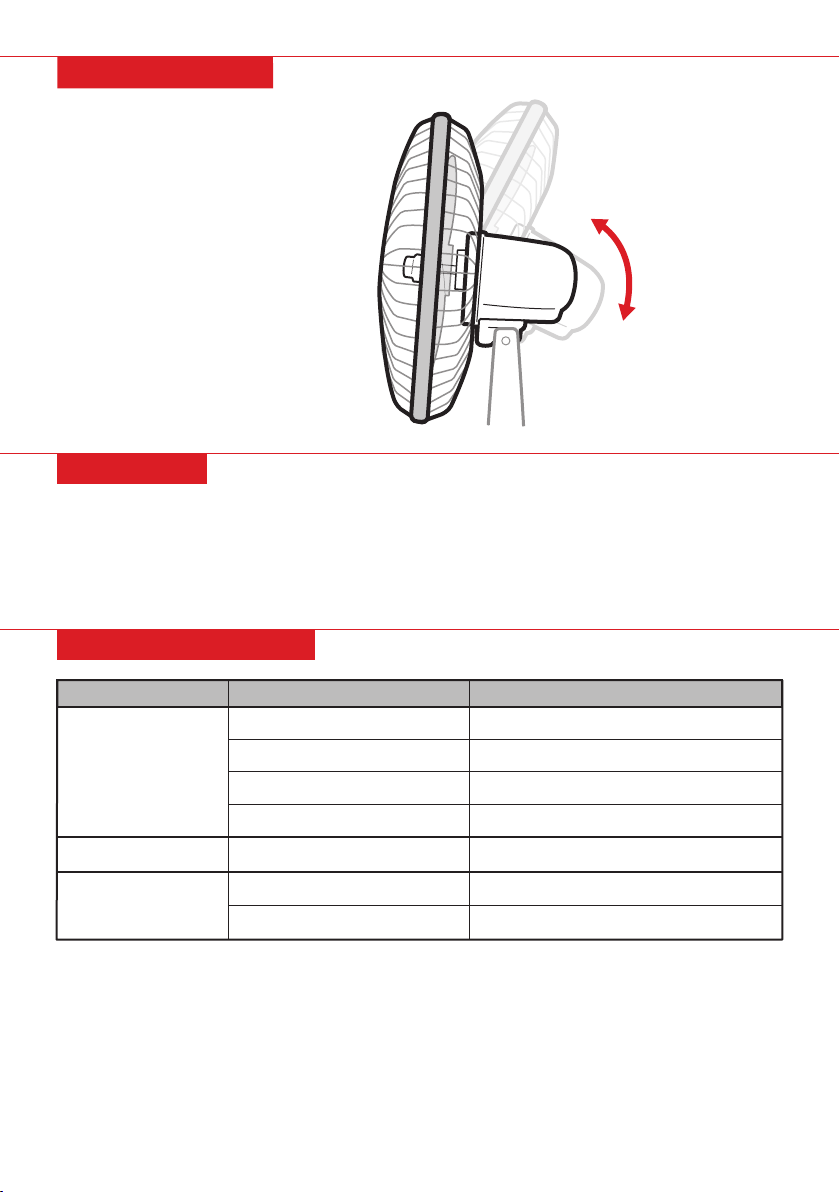
ADJUSTING TILT
•Push fan guard up and down to adjust tilt.
TROUBLESHOOTING
Reason
Cord unplugged
Overheating
Dirty fan blades
Problem
Fan vibrates
Fan excessively noisy
Fan not working
Solution
Plug in
Clear obstructions and wait for motor to cool
Low voltage
Blown fuse/circuit breaker tripped Replace fuse, or reset breaker
Ensure there is proper voltage in outlet
Clean fan blades
Loose fan blades Tighten fan blades
Uneven surface Place on level surface
CLEANING
1. Pull the power cord from the outlet.
2. Remove front guard.
3. Wipe down blades with a soft cloth and mild detergent.
4. Wipe down front/rear guards with a soft brush and mild detergent.
Do not clean with gasoline, benzene or thinner, or other hazardous liquids/abrasives.
Pg. 10
Indice
Altri manuali BCP Fan