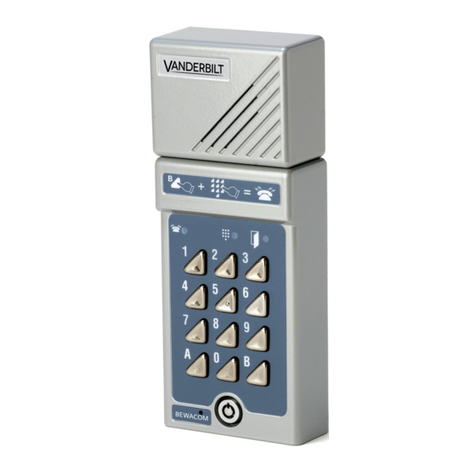
Bewator Bewacom BM3 Manuale utente

Bewacom
Technical manual
GB

Copyright © January 2001 Bewator AB, Solna, Sweden.
Material from the Bewacom Technical manual may only be copied with
the consent in writing of Bewator. Bewator reserves the right to alter
both the content of the manual and the design of the product without
notice.
Document no: 80642-2
Bewator AB are parts of Bewator Group, which develops and markets
a complete security product range that includes, access control and
alarm. Sales, installation and servicing are handled by a national dealer
network.
Actions (such as unauthorised manipulation, copying etc.), must not be
taken with the software contained in the products and systems. Such
actions are regarded as copyright violation and may result in
imprisonment or fines and may likewise lead to an obligation to pay
damages and compensation for using the software.

Bewacom Technical manual 3
Contents
WHAT IS BEWACOM?........................... 5
How Bewacom works ...................... 5
Points to remember ......................... 6
Time control of the access codes..... 6
Monitoring camera.......................... 6
Limitations ....................................... 7
Requirements for connecting
Bewacom to a telephone system ..... 7
INSTALLING BEWACOM....................... 8
INSTALLATION .................................... 10
THE KEYPAD ....................................... 12
PROGRAMMING .................................. 13
Internal sounder and LEDs .......... 13
Setting a password......................... 14
Setting Bewacom to programming
mode................................................ 14
Programming access codes (first
time) ................................................ 15
Changing entrance codes .............. 16
Erasing access codes...................... 17
Changing the door unlock time .... 18
Extending the opening time 10 times18
Changing the calling time ............. 19

4 Bewacom Technical manual
Extending the calling time 10 times19
Time control of the telephone
opening function ............................ 20
Background lighting...................... 21
Internal sounder ............................ 22
Possibility to call the Bewacom .... 23
”Hotline” ........................................ 24
Erasing the memory ...................... 25
PROGRAMMING OVERVIEW .............. 26
THIS IS HOW THE NEW DOOR
TELEPHONE WORKS.......................... 28
CALLING BEWACOM .......................... 29
TROUBLESHOOTING .......................... 30
TECHNICAL DATA............................... 32
NOTES .................................................. 33

Bewacom Technical manual 5
What is Bewacom?
Bewacom is a door telephone which can be
directly connected, like an extension, to an
internal telephone system (PABX).
Using the Bewacom, visitors may call any
telephone connected to the telephone system.
The person answering the telephone can talk to
the visitor and open the door from the
extension telephone.
Bewacom includes a built-in codelock to allow
access for staff.
How Bewacom works
To make a call from the Bewacom, the visitor
presses B + the desired extension on the
keypad. Available extensions should be
displayed on a name plate next to the door.
At the other end, the telephone rings as usual.
It is possible to speak with the visitor for 30
seconds (extendable).
To open the door, the person called presses 5
on the telephone keypad and hangs up. To not
open, press 0 and hang up.

6 Bewacom Technical manual
Points to remember
Bewacom only allows communication in one
direction at a time. Each person must speak in
turn for satisfactory communication.
Time control of the access codes
The access codes can be time controlled from
external time clock(s) connected to the
Bewacom. For example, the cleaning staff
code could only be valid certain times, while
other codes should operate 24 hours a day.
By connecting two time clocks, three time
zones can be used: one controlled by time
clock 1, one by time clock 2 and one that is
valid 24 hours a day, i.e. no time control.
The access codes can be programmed to the
required time control group.
Monitoring camera
If desired, a CCTV camera can be controlled
from an output of the Bewacom. The camera
will be automatically activated when the
visitor presses the B button and remain active
during the calling time plus the door open
time.

Bewacom Technical manual 7
Limitations
Bewacom cannot normally call extensions
beginning with 0 or extensions consisting of
more than 4 digits. If the installation requires
alterations in these limits, contact Bewator.
Requirements for connecting
Bewacom to a telephone system
An analogue extension (two wires) must be
used for the connection of Bewacom. The
telephones to be called by Bewacom must be
able to send a standard tone signal to
Bewacom for the door release function to
work.
How to test whether the telephone system
meets the requirements or not:
1 Connect an ordinary push button
telephone to the Bewacom extension, and
dial any of the other extensions on the
telephone system.
2 Ask the person answering at the other
end to press the 5 key on the telephone
keypad. If a tone is heard, Bewacom
should work correctly.

8 Bewacom Technical manual
Installing Bewacom
Install the Bewacom at a height of 120–140
cm (from the floor to the bottom edge of the
Bewacom). To cater for disabled persons, a
suitable height is approximately 95 cm.
1 Open the Bewacom with the key
supplied. The lock is located on the front.
2 Fasten the back plate against the wall,
using three screws as shown in the
illustration below. Seal the screw and
cable holes with sealant if the unit is
externally mounted.

Bewacom Technical manual 9
3 Unless the unit is already mounted on a
metallic earthed surface, earth the back
plate. Use a separate cable to the earthing
point. Make sure the front and back plate
are connected with the internal strap.
4 Fit the front and check that the Bewacom
is securely fastened.

10 Bewacom Technical manual
Installation
SW1
9
8
7
6
CAMERA
TAMPER
0V
EXIT
TELE
2
1
12-24V
LOCK
13
12
11
10
15
14
1
2
3
4
5
2
+
4
1
5
6
7
8
3
9
10
12V
24V 11
Altri manuali per Bewacom BM3
1
Indice
Altri manuali Bewator Sistema di interfono