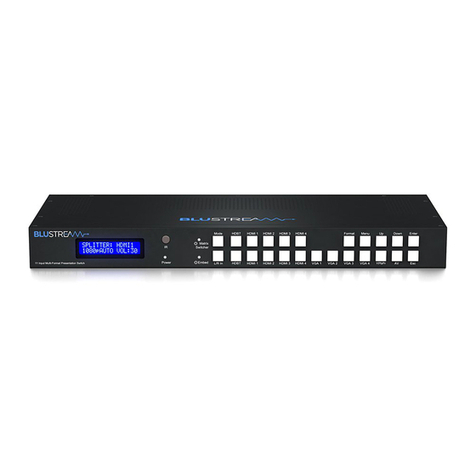
1LCD display - Shows the status of
input-output selection, EDID info etc.
2IR receiver window.
3Matrix Switcher LED indicator
- When the LED is lit, Matrix
Switcher mode is active and
both HDMI outputs switch
independently. When the LED is
not lit the Matrix switcher is in
Splitter mode and both HDMI
outputs will display the same
selected video input.
4Mode button - Press to switch between
Matrix Switcher and Splitter modes.
5HDMI input selection buttons for
HDMI output 1 when in Matrix
Switcher mode.
6 Format set button - Press to set the
output resolution.
7Menu button - Press to enter EDID
set mode, volume setting or F/W
information.
8Up selection button - Press to
change segment’s value.
9Enter button - Press to confirm the
settings.
qPower LED indicator - Indicates the
status of power.
wEmbed LED indicator - When the
LED is lit, Audio embed mode
is active. When active the L/R
Analogue input will be embedded
onto the HDMI outputs. In
Splitter mode analogue audio is
embedded to both of the HDMI
outputs with the ability to adjust
the volume. In Matrix Switcher
mode Analogue audio will only be
embedded onto HDMI output 2.
eL/R in selection button - Press to
embed the Analogue L/R audio
input to the HDMI outputs (as
above).
rHDMI input selection buttons 1 to
4 - Press to select the HDMI input
switched to output 2 in Matrix
Switcher mode, or both HDMI
outputs in Splitter mode.
tVGA input selection button - Press
to select the VGA input with
associated Analogue L/R audio.
yYPbPr (Component video) input
selection button - Press to select
the YPbPr input with associated
Analogue L/R audio input.
uAV input selection button - Press to
select the AV input with associated
Analogue L/R audio input.
iDown selection button - Press to
change segment’s value.
oESC-Press to exit the menu.
Notes:
• Volume can be changed using IR, RS-232 control or from the front panel UP
and DOWN buttons when in the volume menu.
• During F/W mode, pressing the Enter button will show the current F/W
information.
10 11 12 13 14 15 16 17 18
Front Panel
123 4 5 6 7 8 9
7 input Multi-format Presentation Switch
Matrix
Switching