BOSSCO BV8962 Manuale utente


1.WELCOME
WARNING
2.
1. Please keep the disc slot clean, wipe it off when there is some dirt on it. You should
wipe off any dirt on the disc before you place it into the unit. If the disc is dirty and you
place it inside the unit, it will cause the unit to go into an error and will not play the
disc. Please ask professional to clean the laser.
2. Playing the radio at higher volumes for a long period of time may cause hearing
issues. You should play this unit at a moderate listen level.
3. This unit is set up by precision parts. If you open up this unit, you will void any and
all of your warranty.
4. Please do not touch LCD display with any hard object so that you prevent it from
getting scratched or damaged.
5. To avoid an accident caused by watching the LCD screen. This unit has a vehicle
lock out wire so that you will not be allowed to watch a video while driving down the
road.
6. This unit is meant for a 12V power and negative ground system from a vehicle.
NOTE:
We keep improving this product all the time. There may be some changes in it that are
not in this manual.
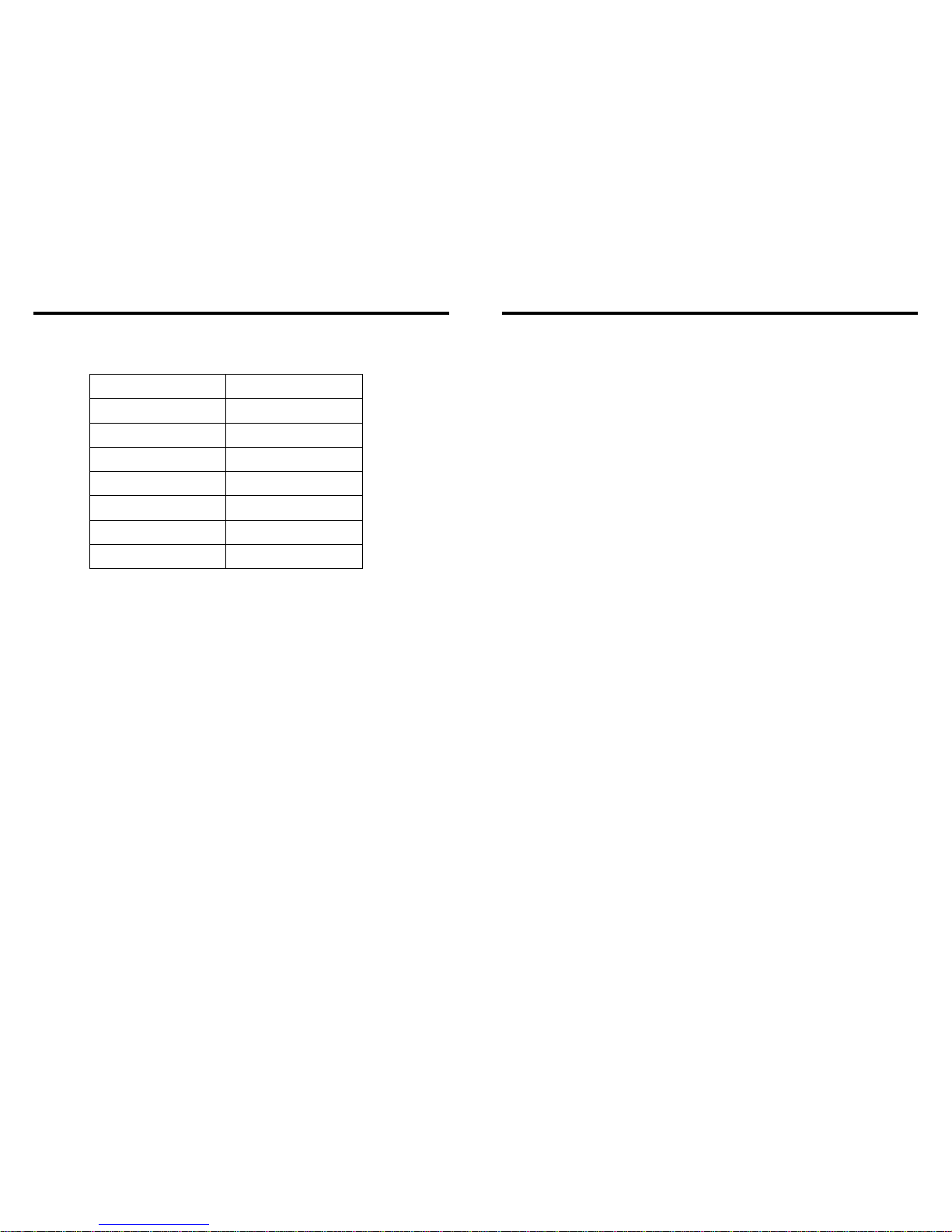
25.ACCESSORY
Accessory Quantity
User Manual 1PC
Wire
USB Cable
Keys
Install metal bar
Remote controller
Warranty card
2PCS
1PC
1PC
1PC
1PC
2PCS
INSTRUCTIONS INSTRUCTIONS
03
42
Thank you for enjoying our serirs of digital car A/V product.
To properly use this product, please go through this instruction manual for installation
and operation, put it in a safe place for future use!

3.NOTE
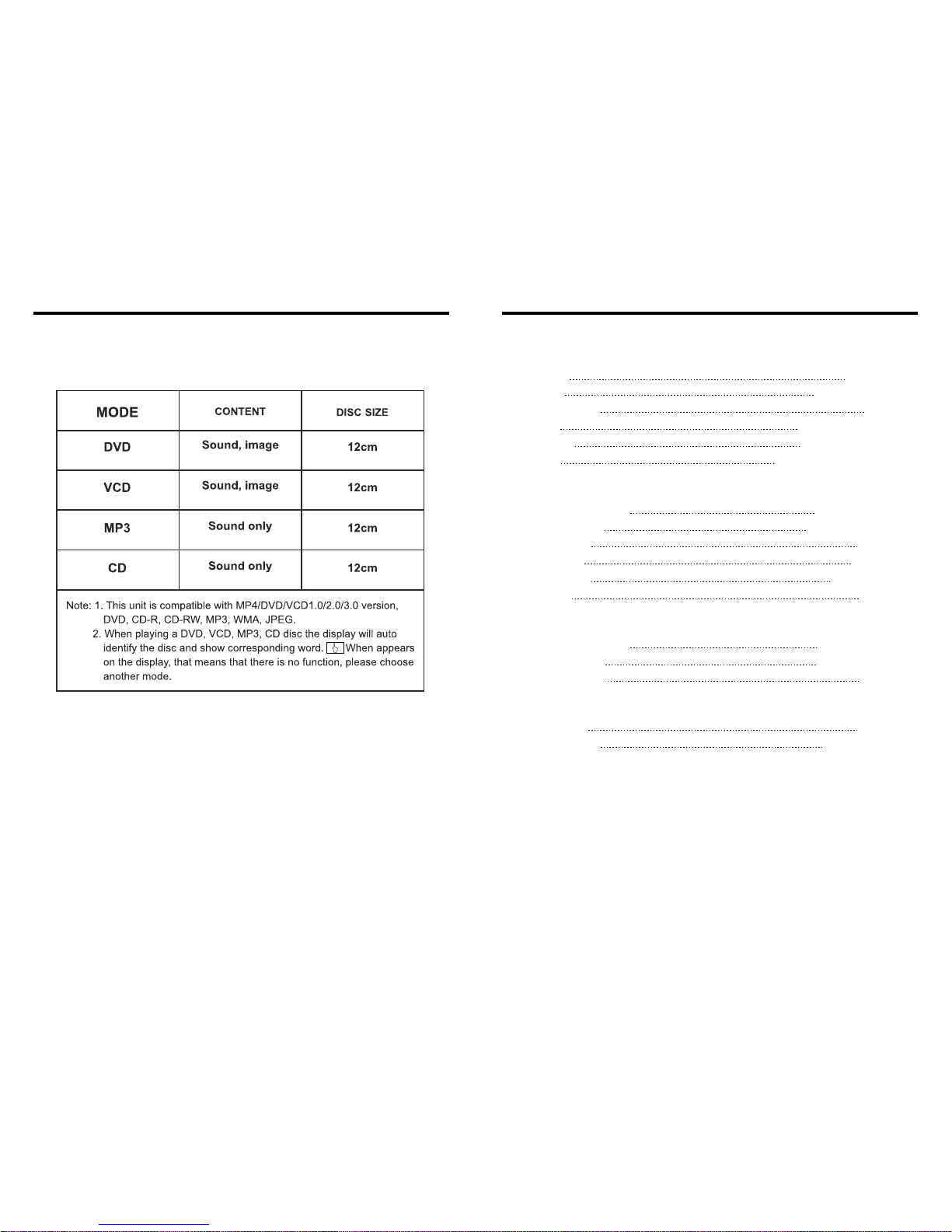
● This unit can play the following disc
24.SPECIFICATIONS:
DVD PLAYER
Signal/Noise ratio
Frequency response
70dB
20Hz-20KHz
FM tuner
European frequency range
Signal/Noisse ratio
Stereo separation
Search station volt
Distortion rate
87.5-108MHz
55dB
30dB
20-30dBuv
1.5%
USA frequency range 87.5-107.9MHz
AM tuner
Limit noise sensitivity
522-1620KHz
32dB
European frequency range
USA frequency range 530-1710KHz
Power supply
Power range
Max operate current
Dimensions
Ground system
DC 12V
10.8-16.0V DC
10A
155X182X53MM
Negative ground
Amp Rating 80 Watts x 4 Channels
INSTRUCTIONS INSTRUCTIONS
04 41

4.FEATURES
INSTRUCTIONS INSTRUCTIONS
DVD PLAYER
1. MPEG-4 Decoder Technology
2. Compatible with MP4 (AVI/5.X), DVD (DVD-R/DVD-RW), VCD,
SVCD, CD-RW, WMA, MP3, JPG
3. Supporting Multiple Subtitles, Angles, Languages
4. Child lock function
5. 4-Channel Audio Output
6. Pause, Play, Up/Down, Stop, Zoom, PBC Function
RADIO
1. AM/FM Radio Tuner
2. 30 Radio Preset Stations (18FM, 12AM)
LCD DISPLAY
1. 7” - 16:9 TFT LCD Display
2. Touchscreen
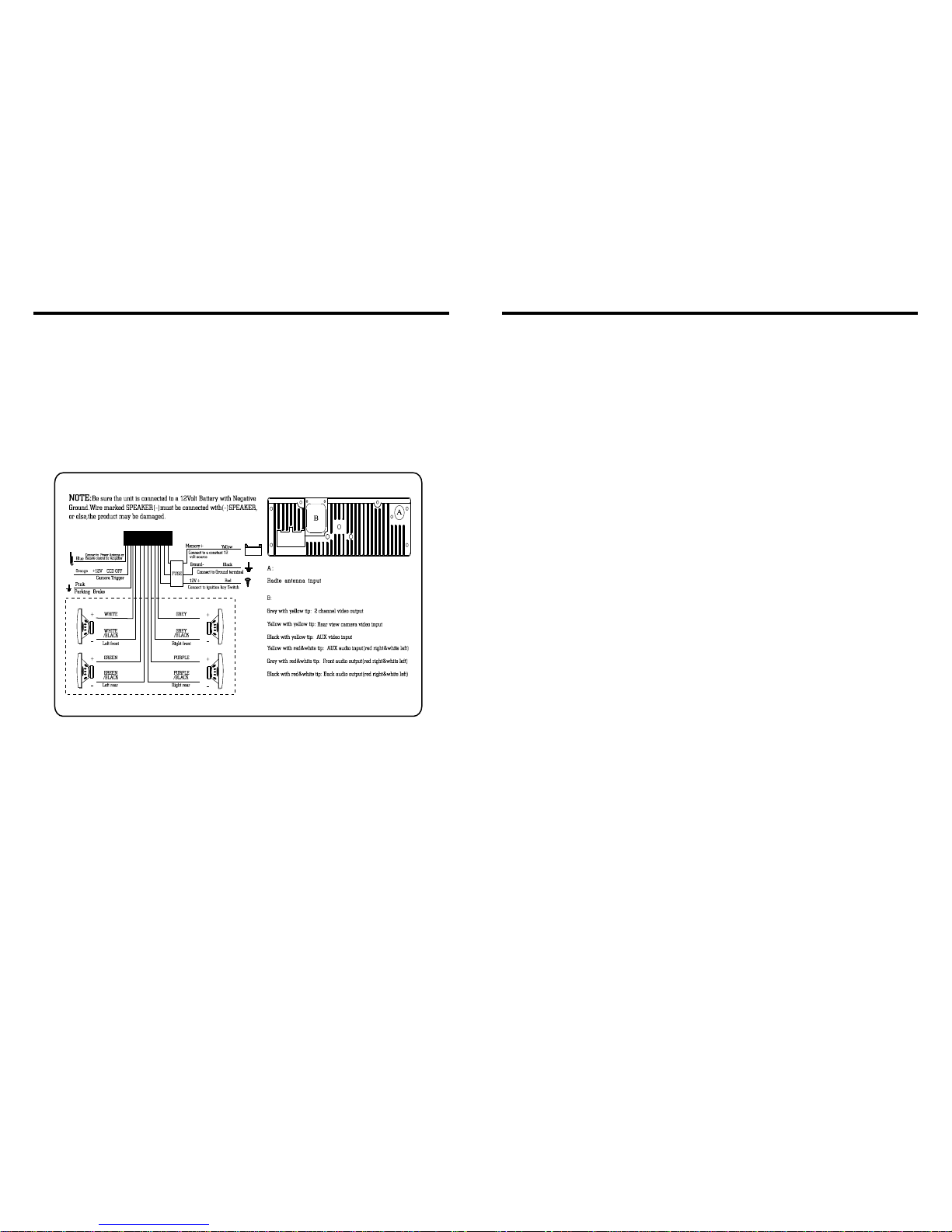
23.WIRING DIAGRAM
This player is equipped with ISO standard connector, please follow below instruction:
● Yellow – 12 V Constant
● Black – Ground wire
● Blue - Power Antenna / Remote Amp Turn On
● Orange – Back-Up Camera Trigger (+) ● Pink – Parking Brake (-)
● White/White black - Left front speaker (+-)
● Purple/Purple black - Right rear speaker (+/-)
● Green/Green black - Left rear speaker (+/-)
● Red - ACC ON (+12V) ● Grey/Grey black - Right front speaker (+/-)
Note:
The “PARKING BRAKE” wire must be connected to the parking brake system
of your car. When the parking brake is engages, the LCD will be allowed to view
your video. If not, the screen will produce an image saying, “PARKING BRAKE”.
This is a safety feature designed for the driver not to watch a video while driving.
The video output on this unit will not be affected by this.
05 40

5.BASIC OPERATION
1. SOURCE ON/OFF
Press SRC button on panel or SOURCE button on remote control quickly to power on.
Press SRC button on panel or SOURCE button on remote control longer to power off.
2. PLAYING SOURCE CHOOSE
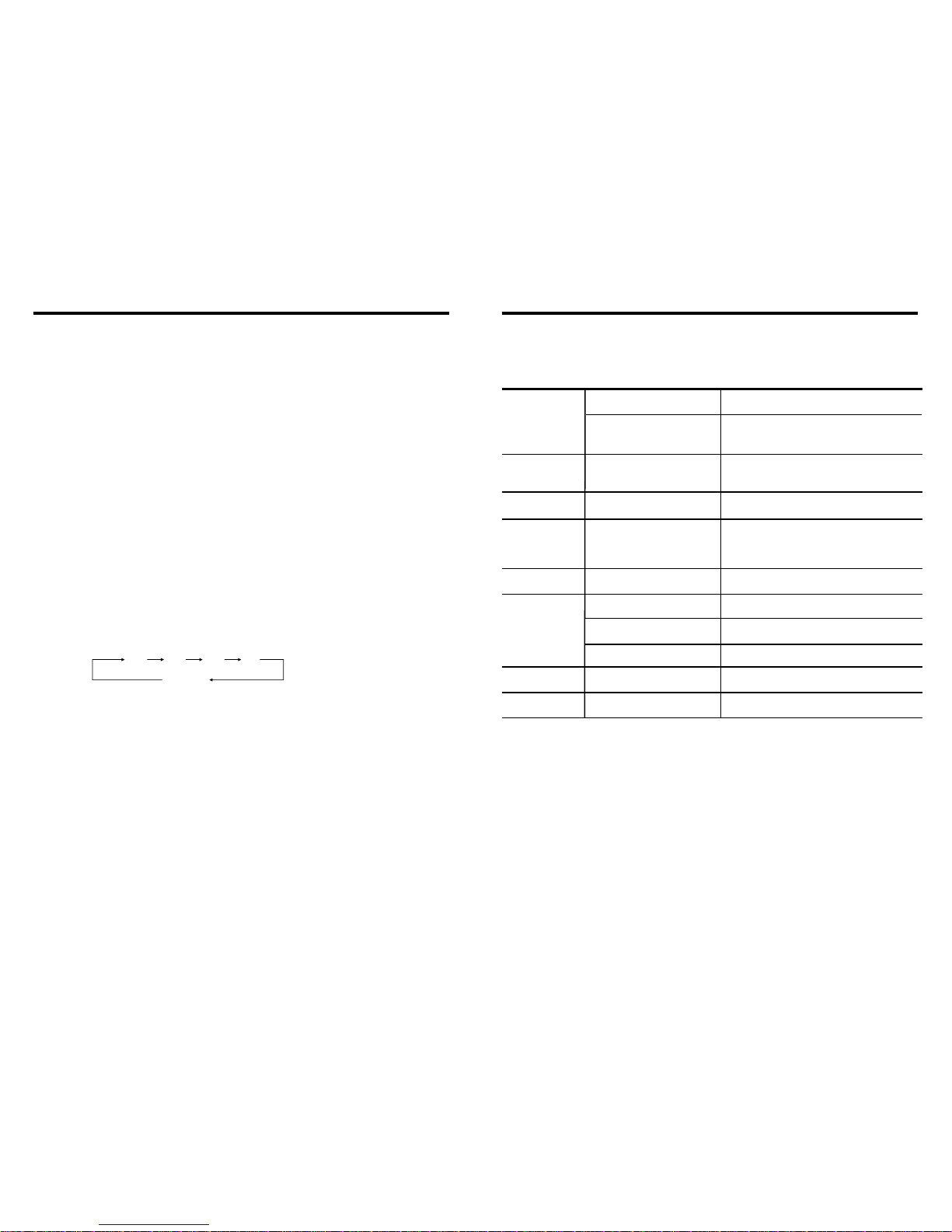
Press SOURCE button on remote control, unit will switch sources in the following
sequence: RADIO → DVD → AUX
3. MUTE CONTROL
Press MUTE button on panel or MUTE button on remote control shortly to turn off
sound output, press again to back to sound output.
4. VOLUME ADJUSTMENT
1) Press VOL+/VOL- button on panel, VOL+/VOL- button on remote control or touch
button on display to adjust volume level.
2) The volume setting on this unit is 0 - 39.
BASS, TREBLE, BALANCE & FADER ADJUSTING (SELECT)
Press SEL button on remote control to choose your desired Bass, Treble, Balance &
Fader level:
NOTE:
1) DVD playing mode, MBP & User will be automatically activated.
2) After 5 seconds you choose desired mode, do not adjust volume button. The mode will
automatically take you back to status before adjustment.
5. RESET
1) If unit is not working correctly, you should press the RES button. This will reset the
radio and should start working correctly afterwards.
2) After reset, all settings will resume back to the factory default settings.
VOL BAS TRE L/R
F/R
INSTRUCTIONS INSTRUCTIONS
22.TROUBLE SHOOTING
After ignition
switch off, setting
information all lose
Remote control no
function
Poor performance
of radio station
Can not load disc
Can not play disc
Can not switch
language/subtitle
No image
PROBLEM
Can not power on
CAUSE
Check whether power fuse
blew or not
Some factor cause MPU wrong
operation
No enough power supply
from battery
Disc is scratched
Put wrong side of disc into unit
Lens has dirty
There is only one language/
subtitle in disc
Video line between unit and
TV is not properly connected
SOLUTION
Change fuse same as the old one
Press RESET button on the panel by pen
point, then, power on
Check whether antenna is connected or not,
or poor connection
Change new disc
Slot in the disc with sign side up
Clean lens by lens clean disc
If disc is not with multi-language/subtitle, it
cannot switch language/subtitle
Reconnect lines
Improper length of antenna,
poor connection of antenna
grounding
The disc will not go in all
the way
Change the wiring around
Change battery in remote control
Remove the 2 screws on top of the radio
Wrong connection between
ignition line ACC and
Constant 12 Volt wire
06 39

INSTRUCTIONS INSTRUCTIONS
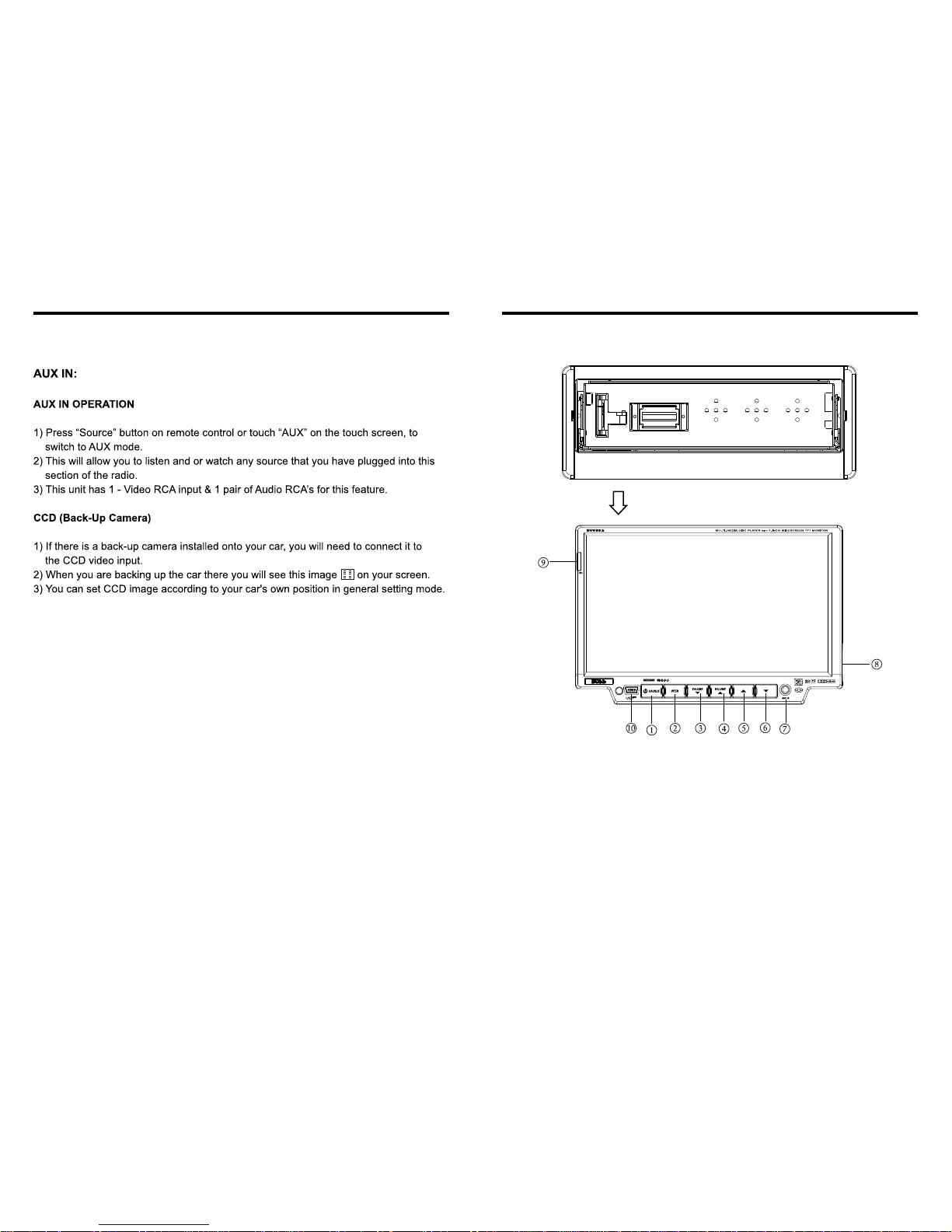
6.PANEL ARRANGEMENT
1. SOURCE Button
2. OPEN Button
3. VOLUME - Button
4. VOLUME + Button
5. UP Button
6. DN Button
7.
8. SD Input
9. RELEASE Button
10. MINI USB PORT
AUX IN
Detachable front panel
Press RELEASE button to take off the panel.
21.OTHER PLAY MODE
07
38

INSTRUCTIONS INSTRUCTIONS
7.BASIC FUNCTION
1. SOURCE Button
Press this button to power on. Press it shortly to switch audio source mode.
At AUX IN mode, press it longer to power off.
2. OPEN Button
Press this button can eject the disc.
3. VOLUME - Button
Press this button shortly increase volume level one step by one step. Press this button
longer increase volume level continuously.
4. VOLUME + Button
Press this button shortly decrease volume level one step by one step. Press this button
longer decrease volume level continuously.
5. UP Button
Press this button to make the LCD monitor up.
6. DN Button
Press this button to make the LCD monitor down.
7. AUX IN
External connected audio input.
8. SD Input
Connect the SD memory card to this socket, and the unit can play MP3 music.
9.
Press this button to release the panel.
RELEASE Button
10. MINI USB PORT
Connect the USB memory to this socket,and the unit can play music format files
supported by this unit in the USB memory.
4. Repeatedly play
In mode, press AMS/RPT button on remote control, to startup following, repeat
Single song repeat→ → Repeat play off.
CD
Mp3 disc: Directory repeat
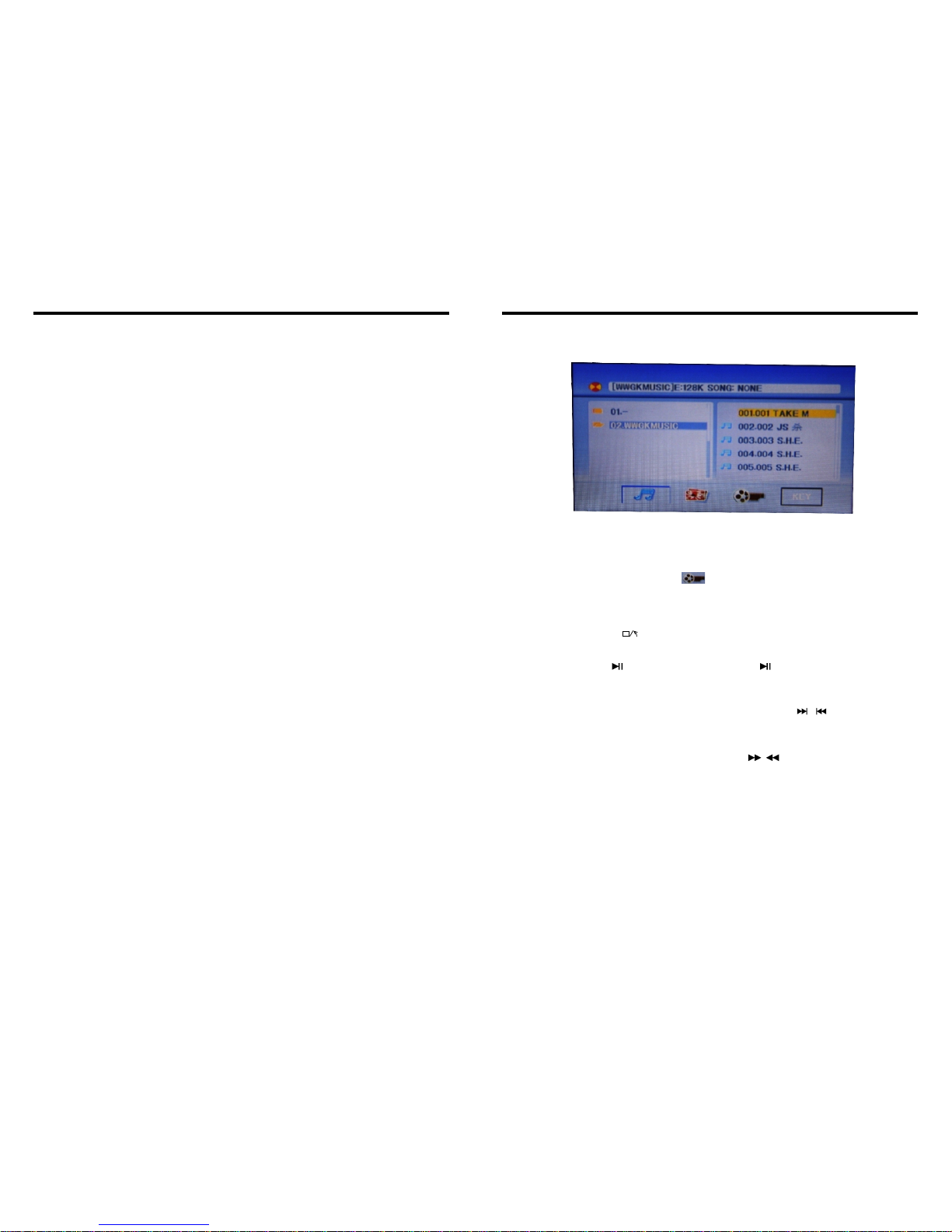
20.MP3/USB/SD OPERATION
1.Insert SD card or USB, MP3 disc; click the name of the song directly to select the song
you want to broadcast. If there are pictures or video document in the disc or SD card,
you can select the relative icon to broadcast.
2.playback MP4 files,the touch screen into the MP4 format,you can click directly or
throngh remote control and touch button to choose the direction you need MP4 repertoire.
KEY
3.This interface of DVD touch function will display if you click on KEY.
(Please refer to the instruction of DVD touch function)
Note:By a remote control stop button to return to the playback screen.
1.Pause play
In playing mode, press button on remote control, or touch button on display to
pause. Press again to back to normal play.
2.Previous/next song play
In playing mode, press SEEK + / SEEK - on remote control, or / touch button on
display to choose previous/next song.
3.Speed forward / backward play
Press SEEK + / SEEK - button on remote control, or / touch button on display to
speed forward or backward playing.
08 37

INSTRUCTIONS INSTRUCTIONS
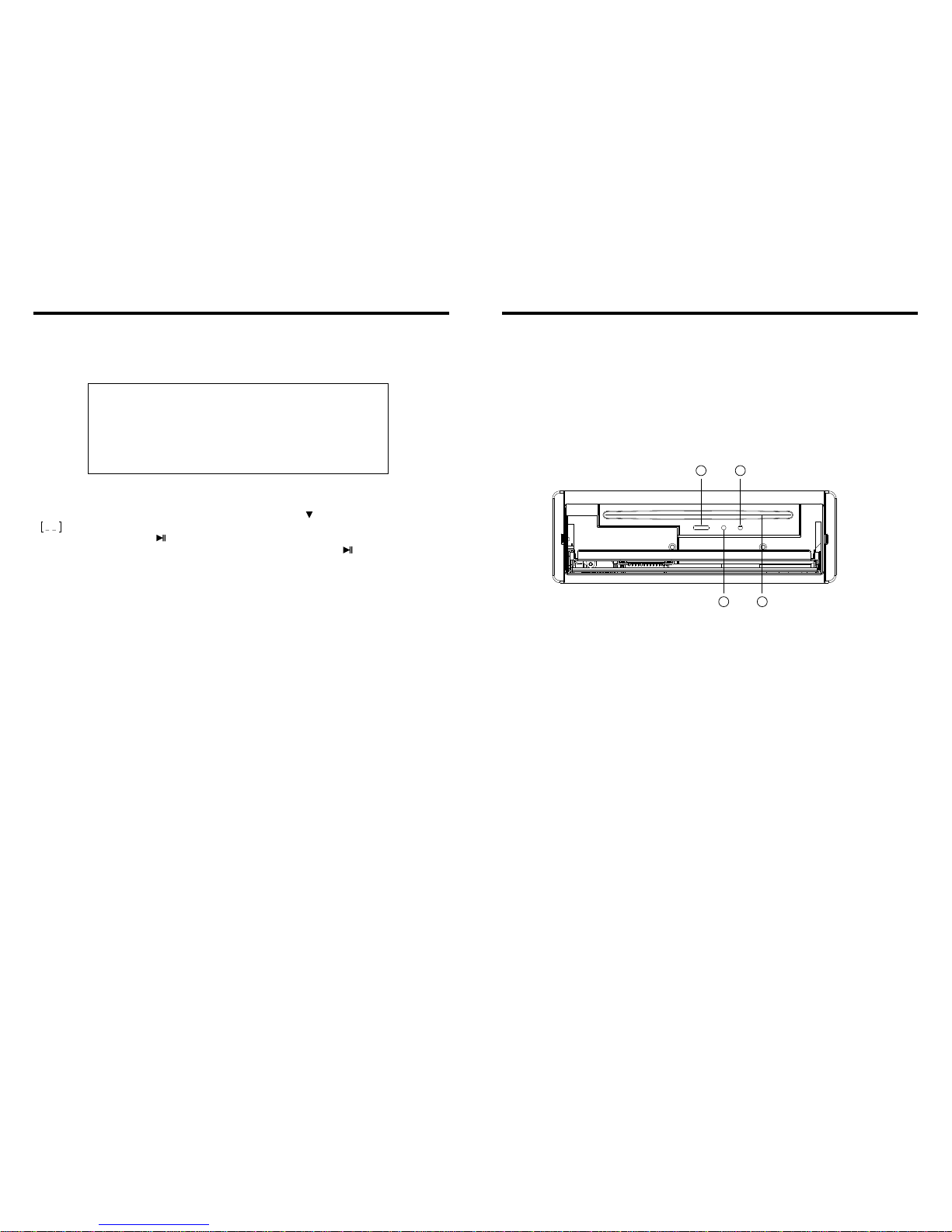
11. Slot indicator light
12. RESET Light
13. RESET Button
Press this button and this unit will be restored to the initial state.
14. Disc Slot
10. CD Program Play
In CD mode, you can set the sequence of playing by the program function, the operation
is as follows:
When CD is playing, press ST/PROG button, then the display shows:
Input the number of the song you want to program by the remote control, program the
first song, input your desired song, for example, the sixth song, and press number button
6 on the remote control. Program the second song, press button move the cursor to
2 . Input your desired song, for example, the ninth song, press number button 9 on
the remote control. Press button to program play.
Back to the normal mode, press the ST/PROG button, then press button.
Note: This function can only be worked by the remote control.
PROG
TC
3__:__
4__:__
TC
7__:__
8__:__
5__:__
6__:__
TC
11__:__
12__:__
9__:__
10__:__
TC
15__:__
16__:__
13__:__
14__:__
PLAY DELETE
1__:__
2__:__
09
36
11 12
13 14

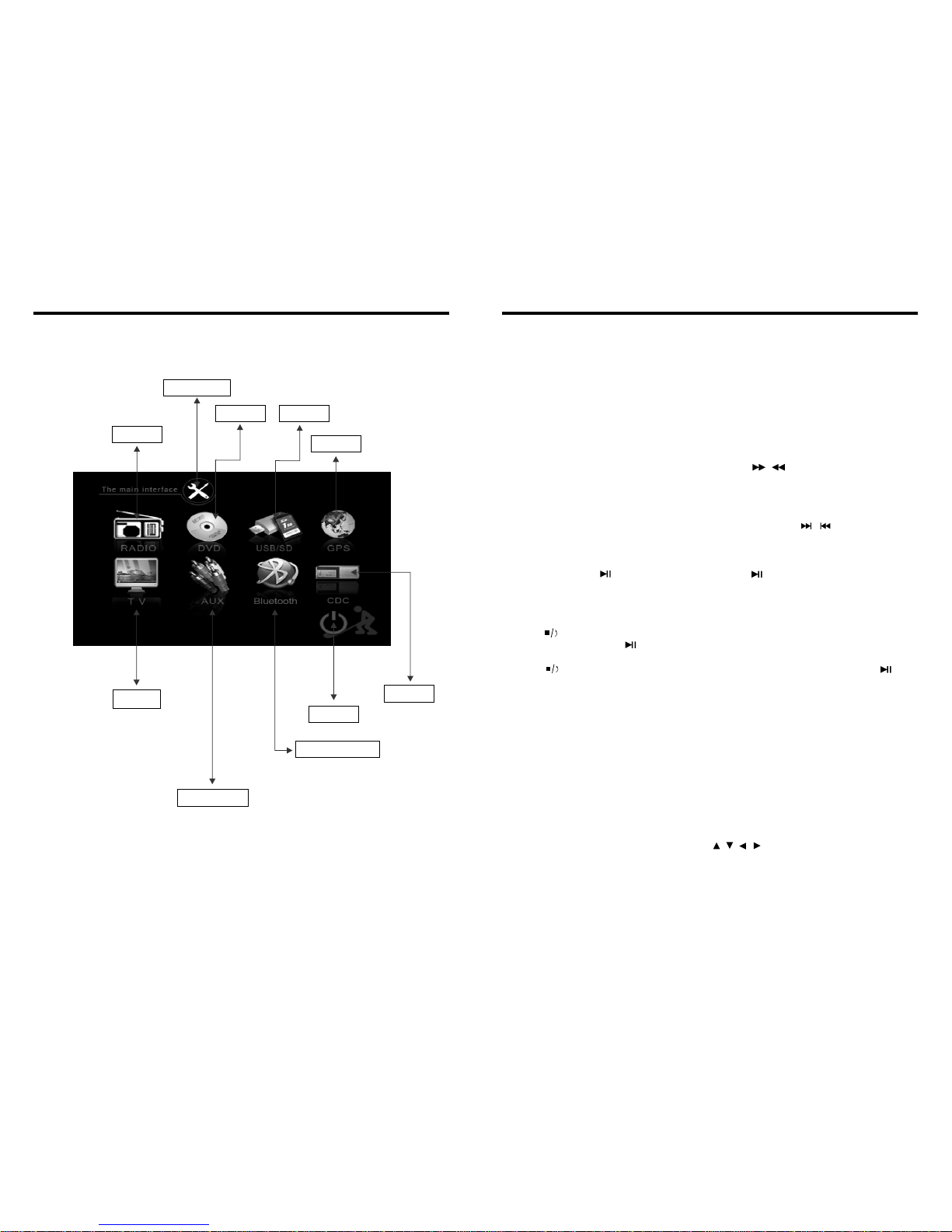
8.MAIN MENU TOUCH OPERATION
RADIO
AUX INPUT
DVD
BLUETOOTH
USB/SD
GPS
POWER
OSD SET
TV CDC
INSTRUCTIONS INSTRUCTIONS
* / This unit without CDC GPS/BLUETOOTH/TV function.
Slide in CD/MP3 disc, unit will play it automatically. If disc is in slot, press DVD touch
button on main menu can to play.
1. Repeat Play
In CD/MP3 mode, press AMS/RPT button on remote control, to startup following, repeat
2. Fast Forward/Fast Rewind
Press SEEK + / SEEK - button on remote control, or / touch button on display to
speed forward or backward playing.
Note: Hold above button a bit longer to operate.
3. Previous/Next Song Play
In playing mode, press SEEK + / SEEK - on remote control, or / touch button on
display to choose previous/next song.
4. Pause Play
In play mode, press button on remote control, or button on display to pause.
Press again to go back to normal play.
5. Stop Play
In play mode:
1) Press button on remote control to enter the pause mode, the position will be stored
in unit. At that time, press button on remote control or touch button on display to
resume playing at the stored position.
2) Press button on remote control twice to enter into stop mode, here, press
button on remote control or touch button on display, unit will play from the first song.
6. OSD
In playing mode, short press OSD on remote control to show all information of present
dis .
7. Randomly Play
In CD mode, press LOC/RDM button on remote control, to instantly play each song.
Press again to back to the normal play.
8. EQ Mode
1) This function can only be worked by remote control.
2) When playing CD/MP3, press the “ZOOM” button on the remote control, you can
choose the sound mode.
3) When enter this function, press the button / / / to move the course to select
sound mode which in the system menu, after your selection position will show red color
to indicate the confirmation.
9. OPEN
Press OPEN button on panel to eject disc.
CD disc:
MP3 disc: Directory repeat
c
Single song repeat→ Repeat play off.
Single song repeat→ → Repeat play off.
19.CD BASIC OPERATION
10 35

INSTRUCTIONS INSTRUCTIONS
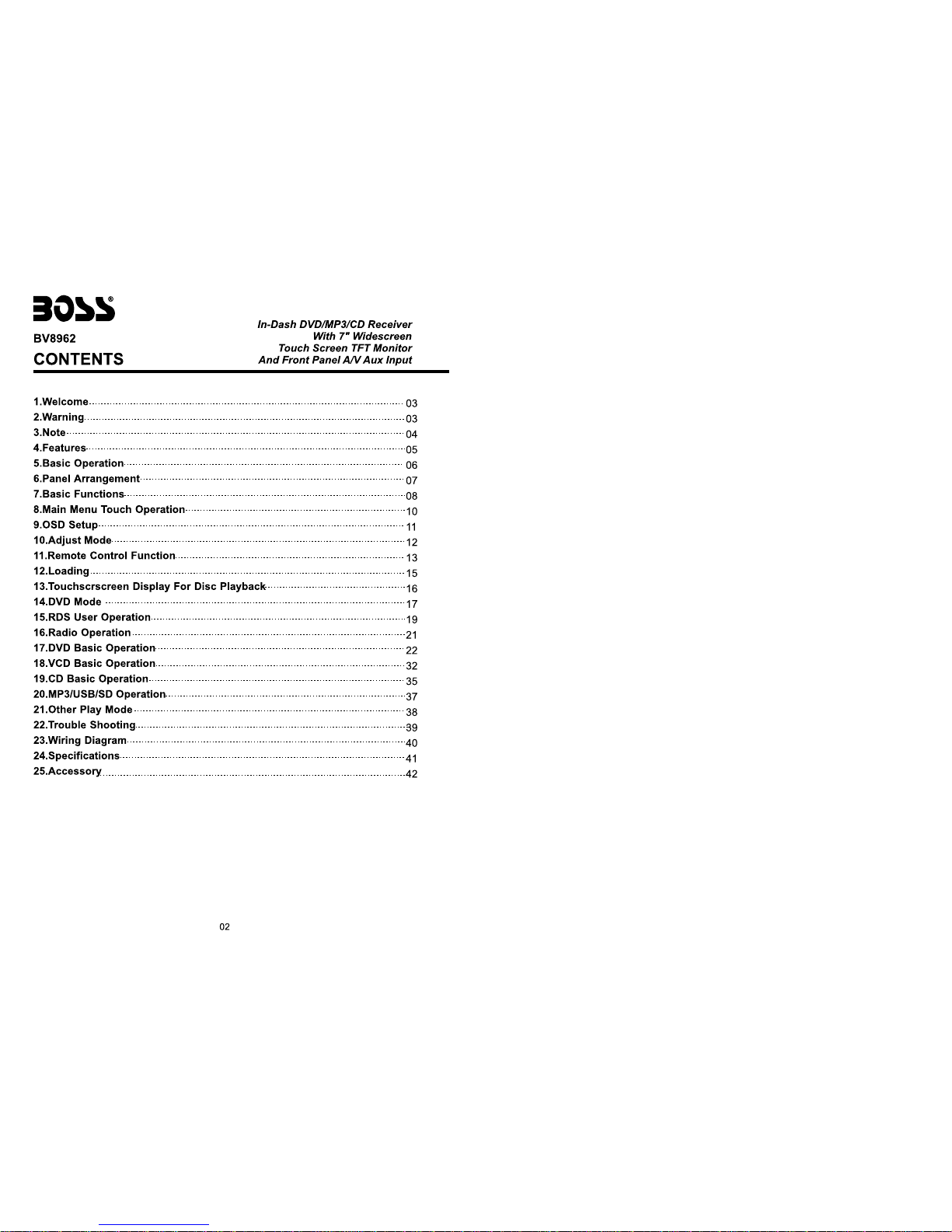
9.OSD SETUP
PROG
TC
3__:__
4__:__
TC
7__:__
8__:__
5__:__
6__:__
TC
11__:__
12__:__
9__:__
10__:__
TC
15__:__
16__:__
13__:__
14__:__
PLAY DELETE
1__:__
2__:__
15. VCD Program Playing
In VCD mode, you can set playing sequence of songs by program play function.
The program playing operation steps are as follows:
In VCD mode, press ST/PTOG button, display will show:
Input the songs which you want to programmed by the number buttons on remote control.
For example: Program the first song, input your desires song, for example, the fourth song,
and press number button 4 on the remote control. Program the second song, press
button move the cursor to 2 . Input your desired song, for example, the eighth song,
press number button 8 on the remote control. Press button to program play. Back to
the normal mode, press the ST/PROG button, then press button.
Note: This function can only be worked by the remote control.
11
34
Indice
Altri manuali BOSSCO Ricevitore per auto

BOSSCO
BOSSCO BV7348B Manuale utente

BOSSCO
BOSSCO BV7300 Manuale utente

BOSSCO
BOSSCO 632UAB Manuale utente

BOSSCO
BOSSCO CD-3025R Manuale utente

BOSSCO
BOSSCO BV9980NV Manuale utente

BOSSCO
BOSSCO HIR7A Manuale utente

BOSSCO
BOSSCO BV9755 Manuale utente

BOSSCO
BOSSCO 508UAB Manuale utente

BOSSCO
BOSSCO BV6824B Manuale di istruzioni

BOSSCO
BOSSCO RDS610CA Manuale utente

BOSSCO
BOSSCO BV7345 Manuale utente

BOSSCO
BOSSCO 625UAB Manuale utente

BOSSCO
BOSSCO BV9386NV Manuale utente

BOSSCO
BOSSCO MR1308UAB Manuale utente

BOSSCO
BOSSCO RDS610C Manuale utente

BOSSCO
BOSSCO BV6550 Manuale utente

BOSSCO
BOSSCO 742RGB Manuale utente

BOSSCO
BOSSCO MR1525UI Manuale utente

BOSSCO
BOSSCO 612UA Manuale utente

BOSSCO
BOSSCO BV8968 Manuale utente