Boundless ADDS 5600 Manuale di servizio

BOUNDLESS TECHNOLOGIES
ADDS 5600 Linux Based Terminal
Administrator’sGuide
Boundless Corporation
50 Engineers Lane, Unit 2
Farmingdale NY, 11735
1-800-231-5445

Boundless Technologies
ADDS 5600 Linux-Based Terminal 1
ADDS 5600 LINUX-BASED TERMINAL
Administrator’s guide

Boundless Technologies
ADDS 5600 Linux-Based Terminal 2
Table of contents
Introduction ___________ 4
Getting started _________ 5
Configuration Wizard________ 5
Language ______________________ 6
Information_____________________ 6
Keyboard ______________________ 6
User Interface___________________ 7
Display ________________________ 7
Hostname ______________________ 8
Network _______________________ 8
Static IP Information __________________ 9
Domain, WINS and DNS ______________ 9
End of Wizard__________________ 10
User Environment _________ 10
Kiosk mode____________________ 10
Desktop mode _________________ 12
Hotkeys_______________________ 13
Administering the client__ 14
Overview ________________ 14
Administration____________ 15
Setup ________________________ 15
Remote Administration _______________ 15
Remote Shadowing __________________ 16
Remote Access _____________________ 17
User Permissions _______________ 18
Login as Administrator ___________ 19
Configuration File_______________ 20
Connections______________ 21
Global Internet Settings__________ 21
Configuration __________________ 22
User Interface__________________ 22
Configuration_____________23
Data Storage___________________23
Share via SMB and FTP protocol_______ 25
Fonts Servers __________________25
XFS Font Server____________________ 26
NFS Font Server____________________ 27
Printers _______________________27
Overview _________________________ 28
Local Printer Configuration ___________ 28
Network SMB Printer Configuration ____ 30
Network LPR Printer Configuration_____ 31
Display _______________________31
Input _________________________32
Keyboard _________________________ 32
Mouse____________________________ 34
Touch screen_______________________ 34
Serial Port _____________________34
Language _____________________35
Screen Saver___________________35
Network_________________36
Hosts File _____________________36
Configuration __________________37
Network Configuration_______________ 37
Ethernet Devices____________________ 38
IP Configuration____________________ 38
DHCP Settings _____________________ 39
Wireless LAN______________________ 40
Disk Mounting__________________42
SMB Disk Mounting ________________ 43
NFS Disk Mounting _________________ 43
Tools _________________________44
Ping______________________________ 44
Traceroute_________________________ 45
Ifconfig___________________________ 45
System__________________46
Power Management _____________46


Boundless Technologies
ADDS 5600 Linux-Based Terminal 3
Factory Default Settings__________ 47
Information Panel_______________ 47
Shutdown _____________________ 49
Reboot _______________________ 49
Upgrade Firmware ______________ 49
FTP Upgrade _______________________ 49
HTTP Upgrade _____________________ 50
Upgrade options_____________________ 50
Time and Date ____________ 51
Time and Date _________________ 51
Time Zone ____________________ 51
Setting up connections __ 52
Overview ________________ 52
Connections available____________ 53
Server IP address or name _______ 53
Commonly used settings _________ 53
Interface___________________________ 54
Window size _______________________ 54
Automatic Start _____________________ 55
Add to Menu _______________________ 55
Add Shortcut to Desktop ______________ 55
Failover Connection _________________ 55
Connection ending option _____________ 56
PN Agent ________________ 56
Tarantella _______________ 57
Terminal-Emulator ________ 58
Rexec __________________ 59
Telnet __________________60
VNC ____________________60
Web-Browser_____________61
Mozilla Firefox browser___________61
Built-in plugins _________________63
DIALUP _________________63
General PPP settings_____________64
PSTN specific parameters_________64
ISDN specific parameters_________65
ADSL (PPoE) specific parameters___66
SSH ____________________67
VPN PPTP________________68
Advanced _____________69
HTTP Administration _______69
Maintenance _____________71
Rescue Panel___________________71
Remote Access through SSH ______71
Tuning __________________73
ShellScript_____________________73
Autorun a script from a USB Key ___74
Customization of images _________79
Command line tools and tips ______79
Smart Card scripts ______________81
Illustrations ___________82

Boundless Technologies
ADDS 5600 Linux-Based Terminal 4
Introduction
Congratulations on purchasing the ADDS 5600 running state-of-the-art full-
featured embedded linux.
The ADDS 5600 provides powerful and flexible computing capabilities for
networks that have many types of servers as well as Web resources. The ADDS 5600
can initiate simultaneous, multiple connections to Windows 2003 Servers, Windows
2000 Servers, Windows NT Terminal Servers, UNIX-based servers, mainframes,
minicomputers, intranets, and the Internet, depending on the software version
installed in the 5600.
This Administrator’s guide is primary intended for system administrators. It
aims to describe how to set up and to use an ADDS 5600. Please note that it does
not aim to describe the workings of servers systems or the meanings of network
related terms.
This guide is divided into the following sections:
Getting Started
Instructions for a quick installation
Administering the Client
Configuration of the global settings
Setting up Connections
Configuration of the connections
Advanced Administration
Advanced configuration of the client

Boundless Technologies
ADDS 5600 Linux-Based Terminal 5
Getting started
By following the simple setup
instructions, the 5600 will be installed on
your network within a few minutes.
Configuration Wizard
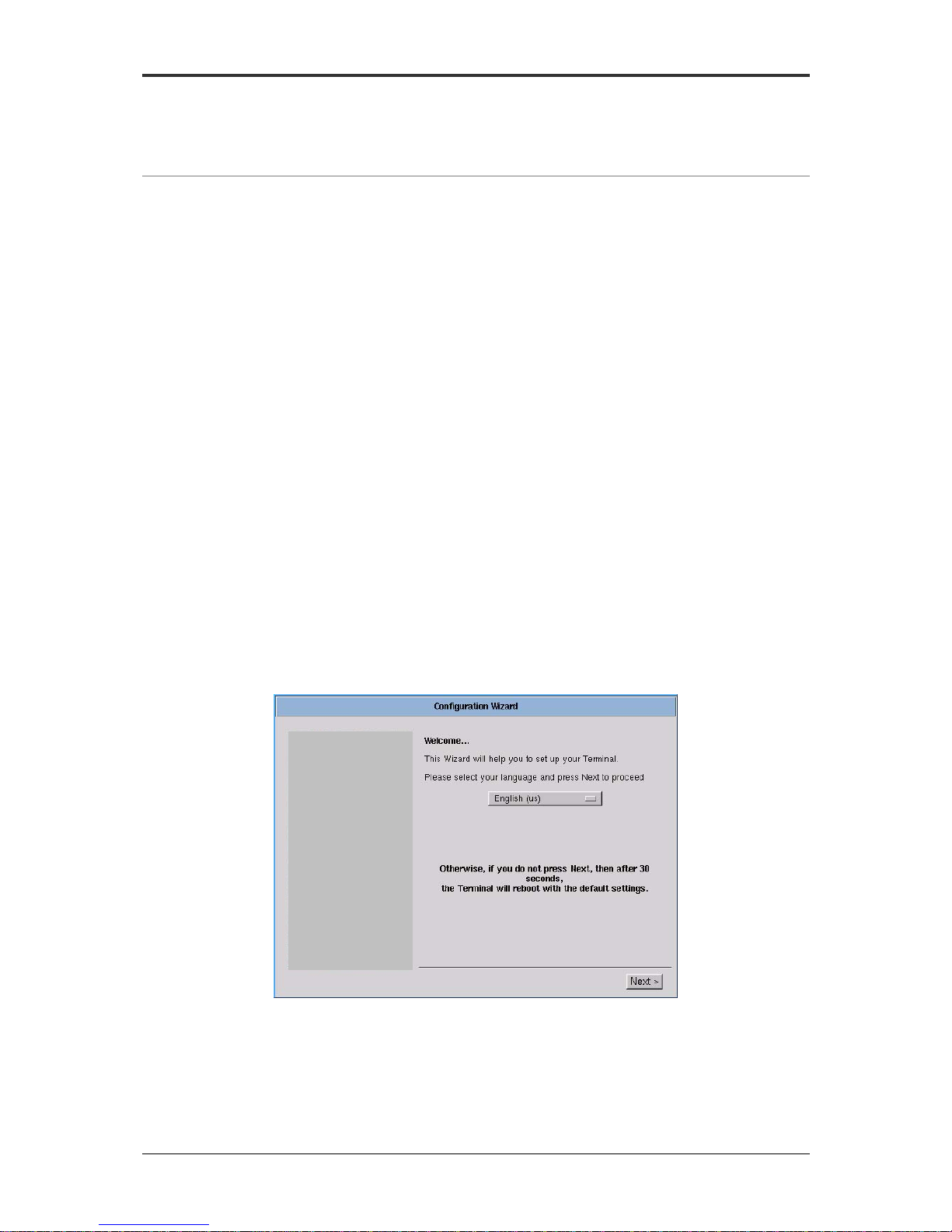
At first boot, the Configuration Wizard comes up in order to allow a smooth
configuration of the basic settings.
Figure 1 – Configuration wizard
When using a remote management server, it might be comfortable to bypass
the Configuration Wizard. For this purpose, after 30 seconds of inactivity, the
Terminal will reboot with the default factory settings.

Boundless Technologies
ADDS 5600 Linux-Based Terminal 6
Language
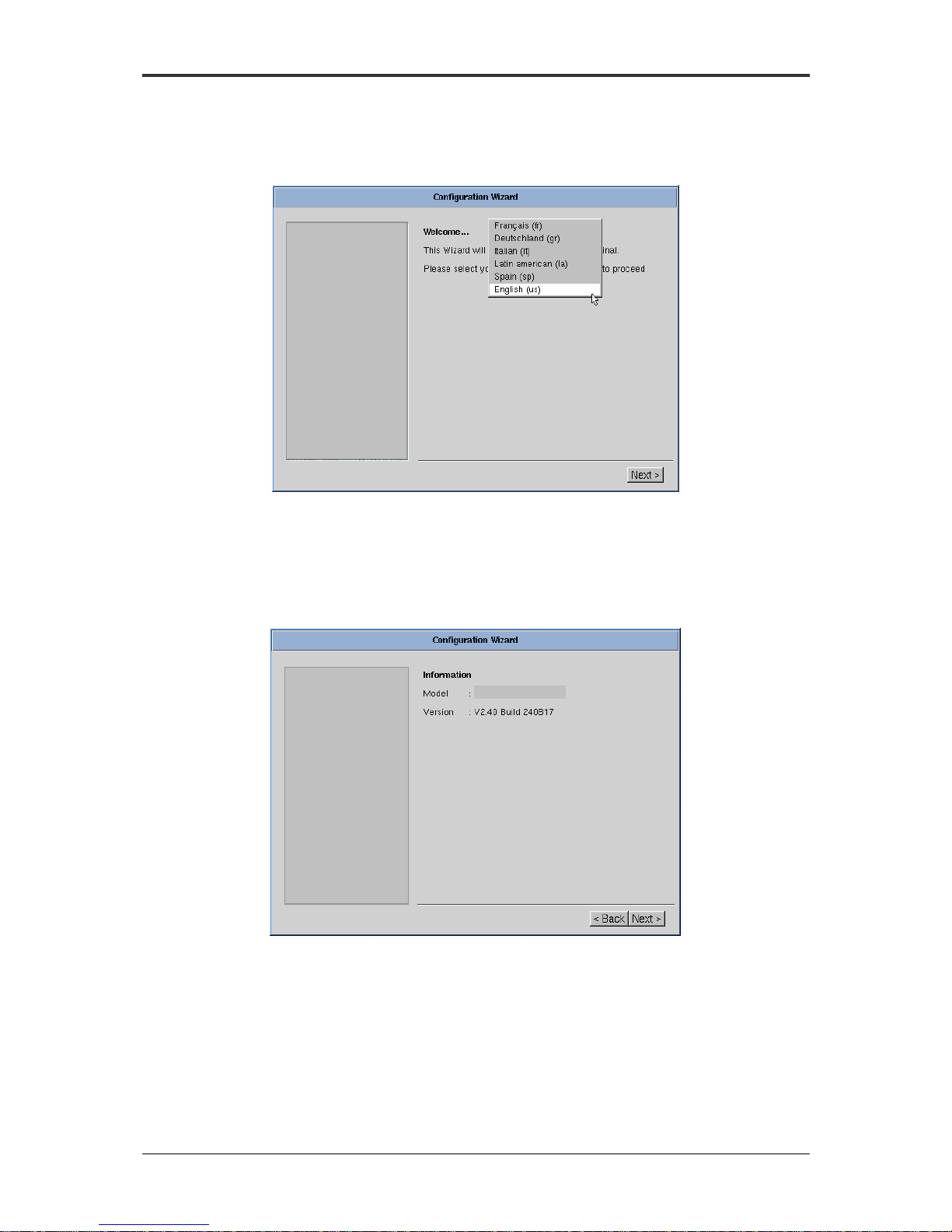
The ADDS 5600 offers up to six languages including English, French, German,
Italian, Spanish and Latin American. See page 33 for more details.
Figure 2 - Configuration Wizard: Language
Information
This screen displays ADDS 5600 version number. If available, it displays the
client model name and its reference number.
Figure 3 - Configuration wizard: Information
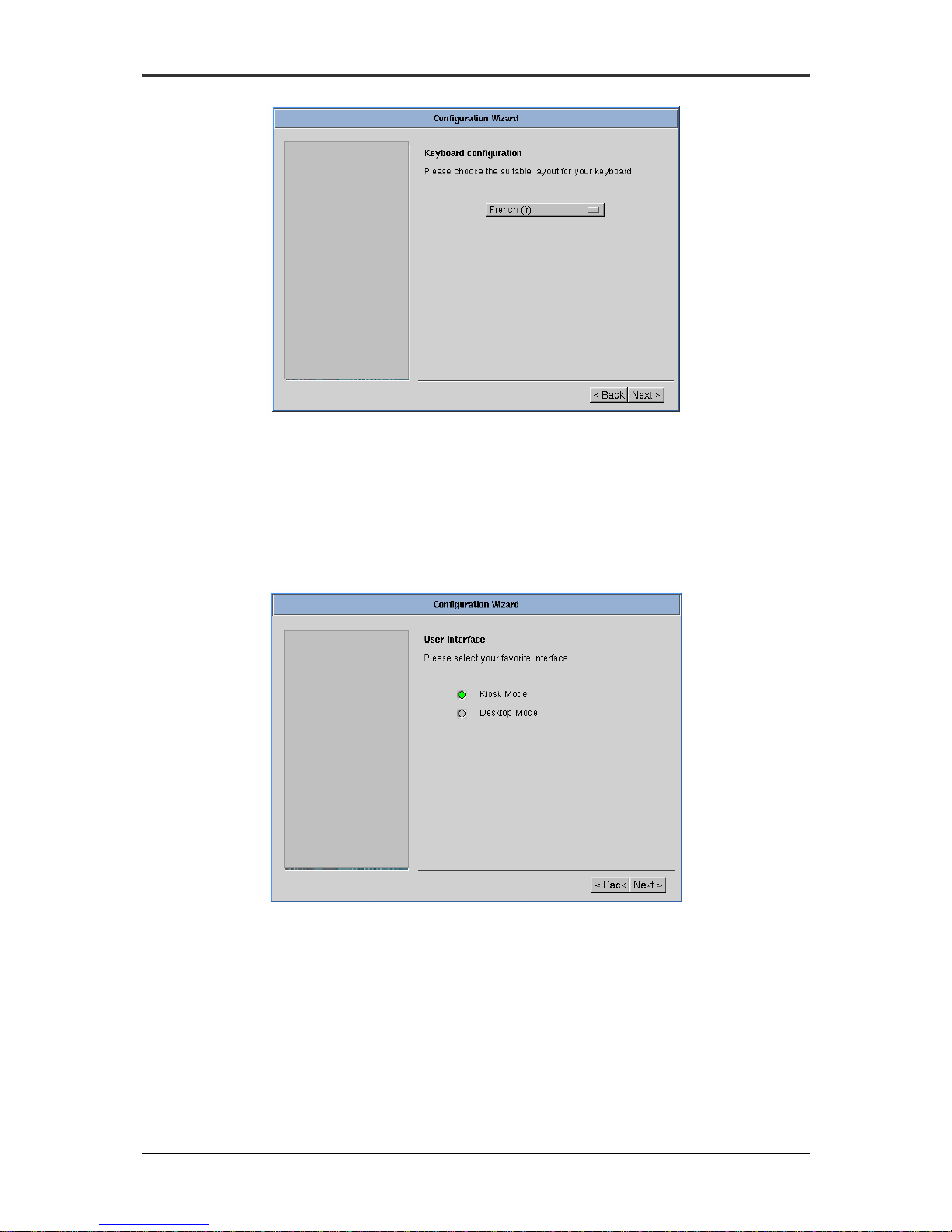
Keyboard
Displays the keyboard layouts supported by the ADDS 5600. See page 33 for a
complete list of supported keyboard.
ADDS 5600

Boundless Technologies
ADDS 5600 Linux-Based Terminal 7
Figure 4 - Configuration wizard: Keyboard
User Interface
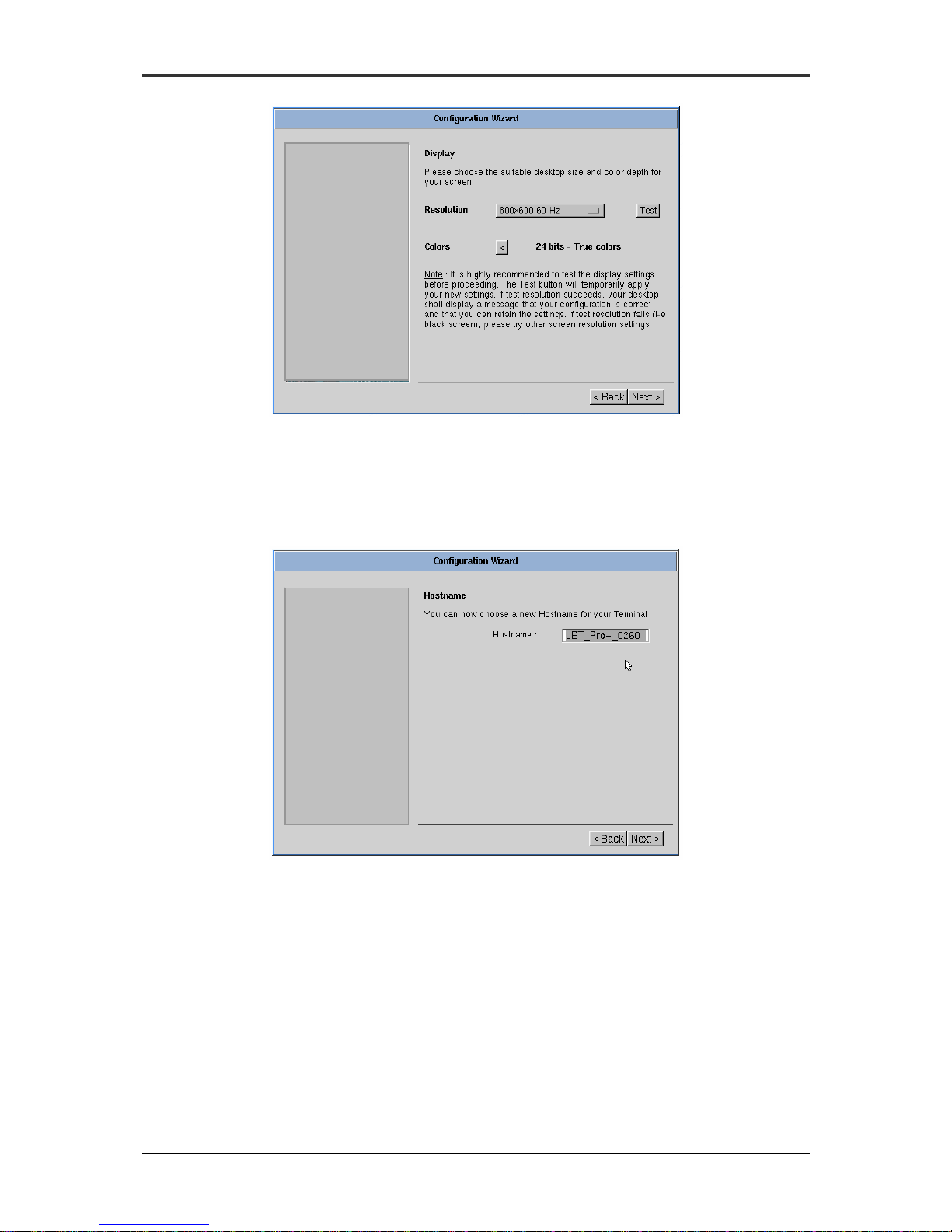
The ADDS 5600 enables to choose from two user interfaces: Kiosk mode and
Desktop mode. Kiosk is particularly useful when administrator wishes to publish a full
environment, whereas Desktop is useful when administrator wish to publish
standalone applications.
Figure 5 - Configuration: User Interface
Display
This panel allows configuring the display for your monitor by defining the
resolution and the color depth.

Boundless Technologies
ADDS 5600 Linux-Based Terminal 8
Figure 6 - Configuration Wizard: Display
Hostname
This value is used by Unix/Linux systems as a hostname. The default
Hostname utilizes the last six digits of the device’s MAC Address.
Figure 7 - Configuration wizard: Hostname
Network
The following panels enable to configure your Ethernet devices, whether they
are onboard, PCI add-on card or USB Adapter. For each device detected, you will be
prompted to configure the Ethernet settings.

Boundless Technologies
ADDS 5600 Linux-Based Terminal 9
Figure 8 - Configuration Wizard: Network
Static IP Information
Enter the IP address assigned to the client, its Net mask and its Gateway.
Figure 9 - Configuration Wizard: Network - Static IP Information
Domain, WINS and DNS
Enter the domain name used by your local network for Domain Name Service.
If needed, type the IP address of a DNS and/or a WINS server on your network.
Altri manuali per ADDS 5600
1
Indice
Altri manuali Boundless Terminale touch