
BTC BCE5232IA Manuale utente

Dual Digital Drive
CD-RW 5232IA
User’s Manual

DANGER INVISIBLE LASER RADIATION WHEN OPEN AVOID DIRECT EXPOSURE TO BEAM
VORSICHT INSICHTBARE LASERSTRAHLUNG WENN ABDECKUNG GEÖFFNET NICHT
DEM STRAHL AUSSETSEN
ATTENTION RADIATION DU FAISCEAU LASER INVISIBLE EN CAS D’OUVERTURE.
EVITER TOUTE EXPOSITION AUX RAYONS.
Copyright Statement
It is a criminal offence, under applicable copyright laws, to make unauthorised
copies of copyright-protected material, including computer programs, films,
broadcasts and sound recordings. This equipment should not be used for such
purposes.
CLASS 1 LASER PRODUCT
APPAREIL A LASER DE CLASSE 1
LASER KLASSE 1
LUOKAN 1 LASERLAITE
PRODUIT LASER
CATEGORIE 1

FCC Compliance Statement
This device complies with Part 15 of the FCC Rules. Operation is subject to the
following two conditions:
1. this device may not cause harmful interference, and
2. this device must accept any interference received, including interference that
may cause undesired operation.
FCC Warning Statement
This equipment has been tested and found to comply with the limits for a Class B
digital device, pursuant to Part 15 of the FCC Rules. These limits are designed to
provide reasonable protection against harmful interference in a residential
installation. This equipment generates, uses and can emit radio frequency energy
and, if not installed or used in accordance with the instructions, may cause
interference to radio communications. However, television reception interference
can be determined by turning the equipment off and on. The user is encouraged to
correct the interference by one or more of the following measures:
• Reorient or relocate the receiving antenna
• Increase the separation between the equipment and the receiver
• Connect the equipment into an outlet different from that to which the receiver
is connected
• Consult the dealer or an experienced radio/TV technician for help.
CAUTION
Changes or modifications not expressly approved by the party responsible for
compliance could void the user’s authority to operate the equipment.
FOR EUROPE
“The drive is in conformity with the EMC directive and low-voltage
directive.”

Table of Contents
INTRODUCTION 1
SYSTEM REQUIREMENTS 2
PACKAGE CONTENTS 2
INSTALLATION 3
HOST INTERFACE CONNECTIONS 3
HARDWARE INSTALLATION 4
DRIVER INSTALLATION 6
For the CD-RW Drive 6
For the Card Reader 6
SOFTWARE INSTALLATION 9
Windows Environment 9
CONNECTION & OPERATION 10
FRONT PANEL 10
REAR VIEW 12
TECHNICAL DATA 14

Dual Digital Drive
1
INTRODUCTION
Thank you for the purchase of CD-RW 5232IA, a perfect and compact dual
storage drive with the combination of an IDE CD-ReWritable drive and a
USB-connected card reader. CD-RW 5232IA backs up all writing modes
and different CD formats. It supports maximum 52x speed writing ability on
CD-R discs, 32x speed on CD-RW discs and 52x speed reading
performance. Other than that, the built-in 7 in 1 card reader which offers
read-write capabilities of 7 memory card types simplifies the process of
exchanging data between Digital cameras, voice recorders, PDAs, MP3s…
and your computer. With this multi-functional solution and the bundled
software package, you can view, archive, or write files/photos/video/music
directly from the drive and enjoy the fascinating digital entertainment on
your desktop.
Here are some important features of CD-RW 5232IA:
♦ Easy installation with CD-RW drive of IDE and card reader of USB
1.1 interface (on-board connection)
♦ 8X, 16X, 24X, 32X, 40X, 48X and 52X writing speed on CD-R media
♦ 4X, 10X, 12X, 16X, 20X, 24X and 32X writing speed on CD-RW
media
♦ Adopts “MTKSuperLink” to prevent Buffer Underrun
♦ Supports MultiRead function
♦ Supports writing modes of TAO, DAO, SAO and packet writing
♦ Four-slot integration works with CompactFlash, MicroDrive, Memory
Stick, Memory Stick Pro, MultiMediaCard, Secure Digital, and
SmartMedia

Dual Digital Drive
2
System Requirements
For IBM compatible PCs, the system requirements recommended are as
follows:
♦ Pentium II 350MHz above with at least 64MB of memory
♦ Fast and sufficient hard disk space (minimum 200MB for installation,
1GB or more is recommended.)
♦ IDE host interface supporting ATAPI MMC command & USB host
interface (if you don’t have USB on-board connection)
♦ Operating system: Microsoft Windows 98SE/ME/2000/XP
Package Contents
♦ Dual Digital Drive, CD-RW 5232IA
♦ Audio cable
♦ Application software disc
♦ 4pcs of screws/bag
♦ Quick Installation Guide
Dual Digital Drive
3
INSTALLATION
Host Interface Connections
Most current mainboards have two IDE ports (primary and secondary)
which can connect two IDE cables. Two IDE cables allow you to connect
up to four devices, but it is recommended that you separate IDE ports for
your hard drive and your CD-ReWritable drive. This will ensure that your
hard drive’s performance and speed won’t be affected by having the CD-
RW drive on the same cable.
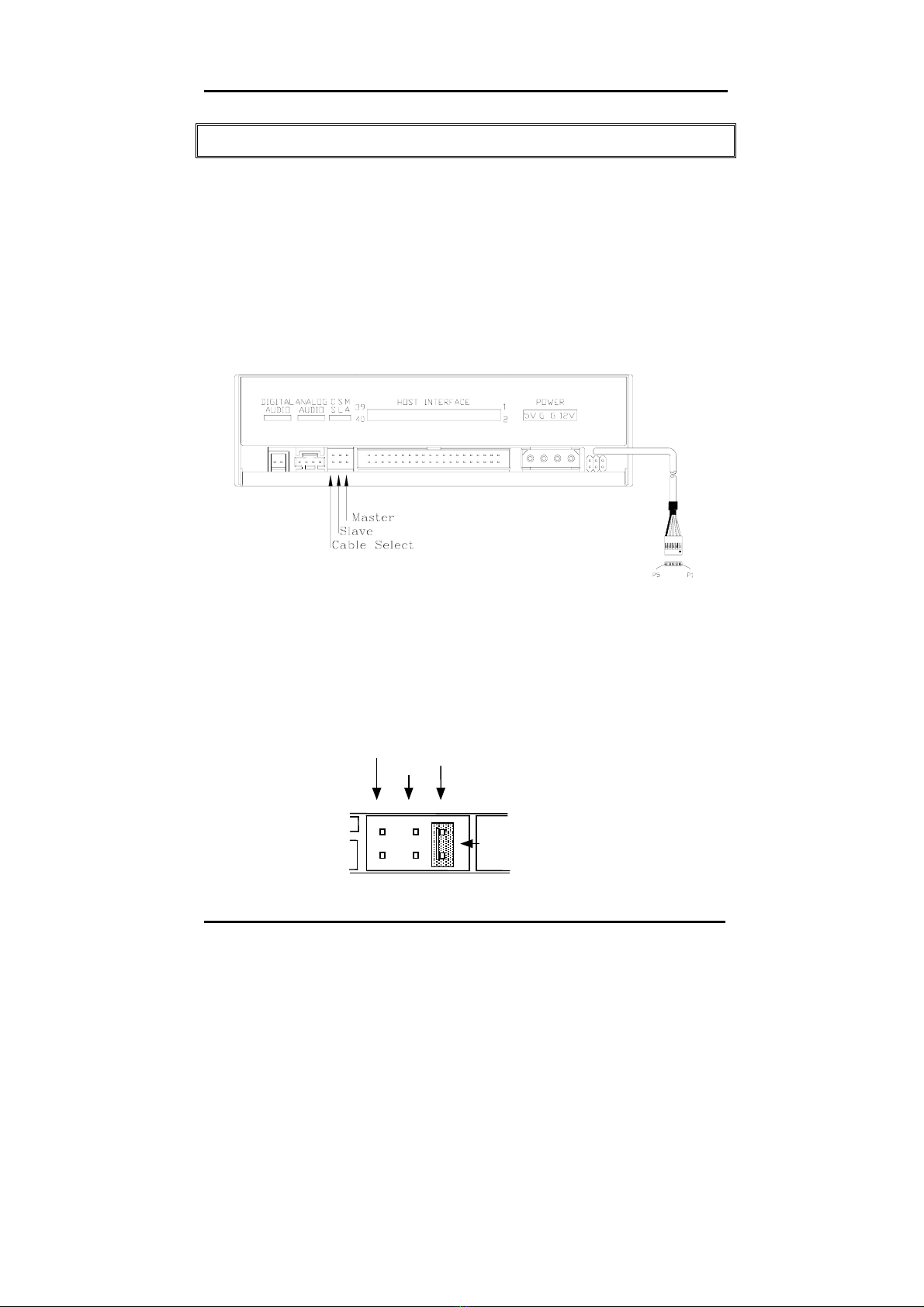
If you connect only one device on the cable, you can set the jumper as
“MASTER” or “SLAVE”.
If you connect two devices (e.g. CD-ROM & CD-RW) on the same cable,
set different jumpers for each device (CD-ROM as “MASTER”, CD-RW as
“SLAVE” and vice versa.) The same rule applies to the connection of
having your hard disk and another device on the same cable.
Master
Cable Select
Slave
Jumper
Dual Digital Drive
4
Hardware Installation
1. Turn off the power to the computer system.
2. Disconnect the power cord and all cables from the back of your
computer, and then remove the cover of the computer.
3. Insert the drive into one of the vacant 5.25" drive bays and secure it
with screws to your PC.
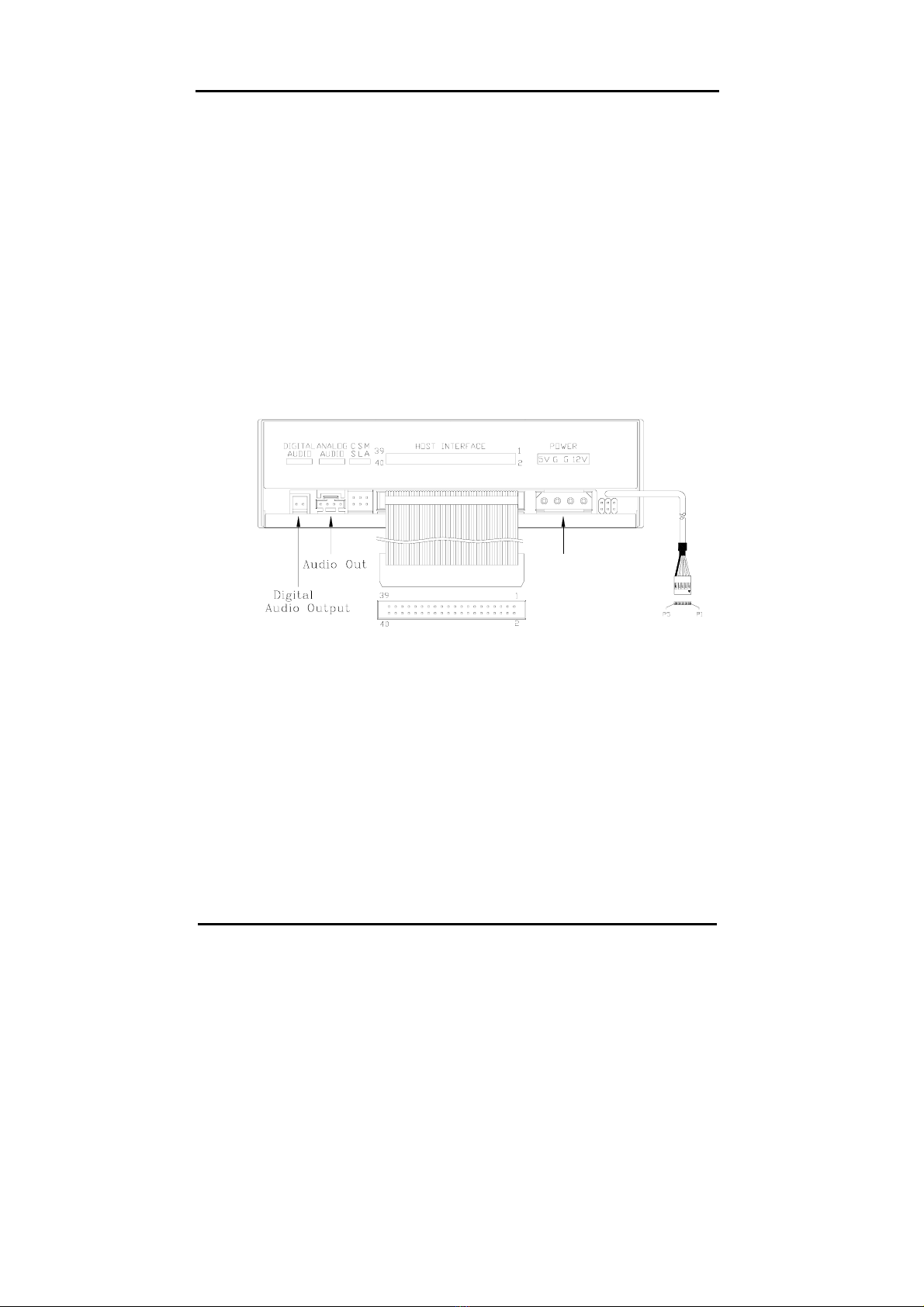
4. Connect one end of the 40-pin IDE cable to the IDE connector of this
drive and the other end to the IDE port on your mainboard. Also,
connect the power supply cable to the back of the drive.
Power In
Make sure to align and connect the red-edge of the IDE Cable to Pin
1 on the drive.
5. If you have a sound card that can be connected to this drive, you can
connect the drive (as Audio-out) and the sound card (as Audio-in)
with a 4-pin audio cable.
If your mainboad is integrated with built-in sound system, plug the 4-
pin audio cable into the CD-IN connector on the mainboard as
Audio-in.
Dual Digital Drive
5
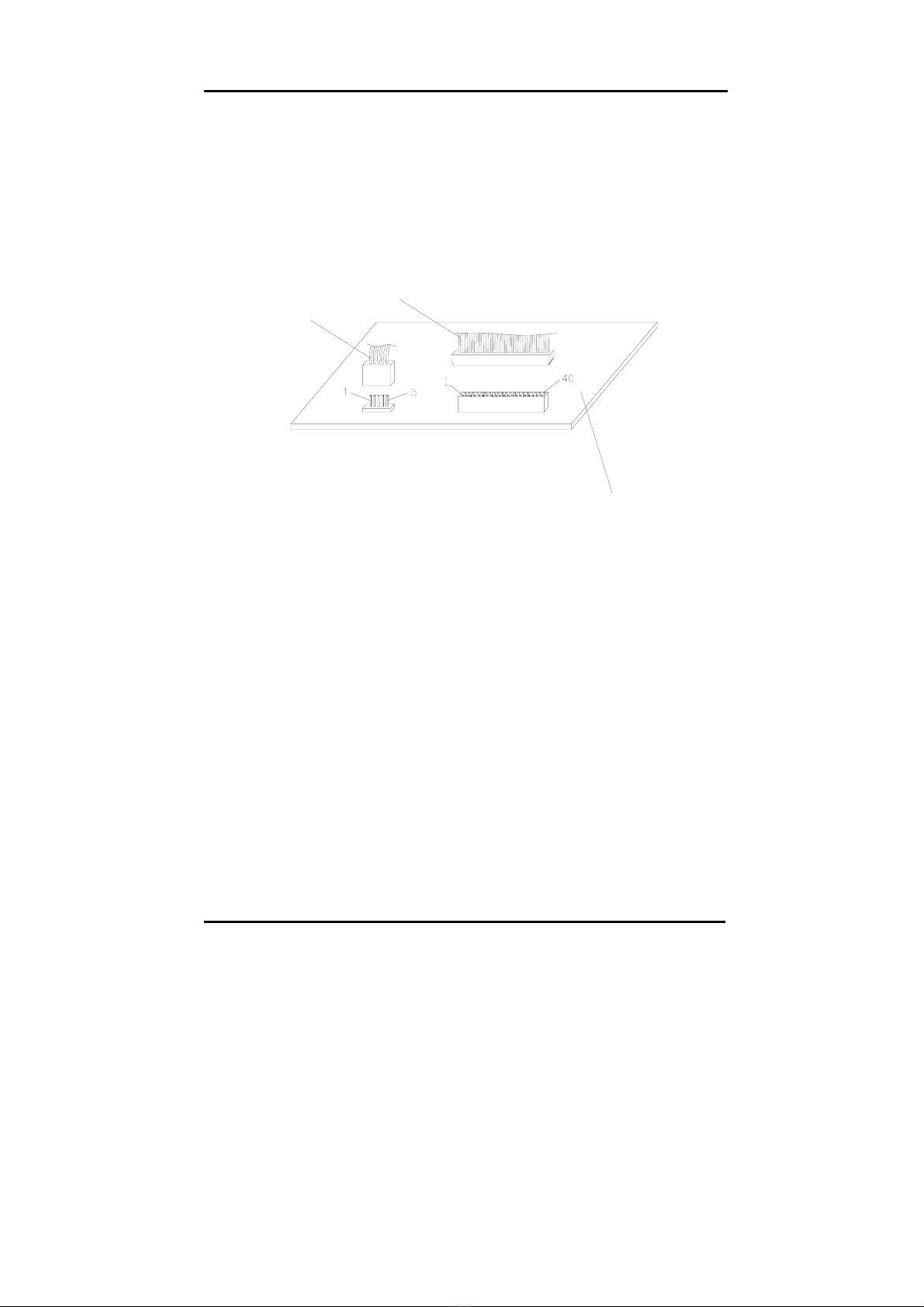
6. Connect the USB cable at the back of the drive to the USB
connector on the mainboard. The red wire of the cable needs to
plug into Pin 1 on the board.
This drive supports USB 1.1 and if you connect to USB 2.0
connector, only transfer rate of USB 1.1 will be available.
IDE
RED WIRE
MOTHER
BOARD
USB
RED WIRE
7. Re-attach the cover of your computer, and reconnect the power cord
and all cables.

Dual Digital Drive
6
Driver Installation
For the CD-RW Drive
For the CD-RW drive itself of CD-RW 5232IA, it is an IDE device
supporting Plug & Play, and Windows 98SE/ME/2000/XP can
automatically detect the drive and load the appropriate driver.
For the Card Reader
Windows 98SE/2000
If you run Window 98SE or 2000, please install the provided driver:
1. Insert the application disc.
2. Select:\Card Reader Driver
3. Click “setup.exe”, and follow the on-screen instructions:
Questo manuale è adatto per i seguenti modelli
1
Indice
Altri manuali BTC Unità CD/CDR




Manuali Unità CD/CDR popolari di altre marche


SmartDisk
SmartDisk Firewire CD-R/W Manuale utente

Axis
Axis CD-ROM SERVER Manuale utente

LG
LG CRD-8322B Manuale utente

Memorex
Memorex 32023234 - 52x32x52x External USB2.0 CD... Istruzioni per l'installazione

Yamaha
Yamaha CD Recordable/Rewritable Drive CRW3200 Manuale utente

Sony
Sony CRX230AE Manuale utente


