
Buffalo BSL-PS-G2108M Manuale utente

www.bualotech.com
User Manual
Gigabit Managed Switch with PoE+
BSL-PS-G2108M
BSL-PS-G2116M

- 1 -
Contents
Chapter 1 - Product Overview .........................................4
Features .................................................................................. 4
Diagram ................................................................................... 6
MAC Address Learning ........................................................... 9
PoE Plus ................................................................................. 10
Chapter 2 - Conguration ................................................11
Settings ................................................................................... 11
Accessing settings ......................................................................... 11
Home ............................................................................................. 13
Panel Display ................................................................................. 13
Main ........................................................................................ 14
System Info .................................................................................... 14
Basic ....................................................................................... 15
System ........................................................................................... 15
MAC Address Filtering ................................................................... 16
Flow Control Status ........................................................................ 17
Flow Control ................................................................................... 18
Admin Account ............................................................................... 19
Date and Time ................................................................................ 20
PoE Status ..................................................................................... 21
Port PoE Settings ........................................................................... 22
PoE Proles ................................................................................... 24
Turn Off LEDs ................................................................................ 28
Advanced ................................................................................ 29
VLANs ............................................................................................ 29
PVIDs ............................................................................................. 31
QoS Status ..................................................................................... 32
QoS Mapping ................................................................................. 33

- 2 -
Authentication Servers ................................................................... 34
RADIUS ......................................................................................... 35
Port Authentication ......................................................................... 36
Password Authentication ................................................................ 38
Port Trunking .................................................................................. 40
Trafc Storm Control ...................................................................... 41
Mirrored Ports ................................................................................ 42
BPDU Forwarding .......................................................................... 43
Loop Prevention ............................................................................. 44
Management ........................................................................... 46
Update Firmware ........................................................................... 46
Save and Restore Settings ............................................................ 47
Reboot ........................................................................................... 48
Initialize .......................................................................................... 49
MAC Address Table (Port Order) ................................................... 49
MAC Address Table (MAC Address Order) .................................... 50
Statistics ......................................................................................... 51
Logs ............................................................................................... 53
Syslog Settings .............................................................................. 53
Restore from USB .......................................................................... 54
Ping ................................................................................................ 56
I’m here! ......................................................................................... 56
Support .................................................................................... 57
Support .......................................................................................... 57
Chapter 3 - Troubleshooting ............................................58
Power LED is not lit ................................................................. 58
Link LED is not lit .................................................................... 58
Can’t access via browser ........................................................ 58
Forgot password and cannot login .......................................... 58
Power Problems ...................................................................... 59
Access from the Network ........................................................ 59

- 3 -
Appendix .....................................................................60
Default Conguration Settings ................................................ 60
Twisted Pair Cable and Port Specications ............................ 62

- 4 -
Chapter 1 - Product Overview
Features
Models Available
BSL-PS-G2116M
• 16 1000BASE-T/100BASE-TX/10BASE-T ports.
• 2 SFP ports. (SFP ports are used exclusively with the ports 15A to 16A.)
BSL-PS-G2108M
• 8 1000BASE-T/100BASE-TX/10BASE-T ports.
Common Hardware Specications
• All ports support Auto-MDIX.
• System memory: 64 MB
• Internal buer: 512 kB (packet buer)
• Equipped with LED indicators
• Equipped with a USB port
• Equipped with a hardware reset switch
Layer 2 Switching
• Supports 802.3x ow control and back pressure
• Throughput 1000M: 1488095 pps, 100M: 148810 pps, 10M: 14880 pps
• VLAN support (VLAN groups: 256, VLAN ID: 1 to 4094). IEEE 802.1Q tag VLAN support
• Supports Privacy Separator (private VLAN)
• Supports trunking (Fixed or by LACP)
• Port mirroring support
• Up to 8,192 MAC addresses can be entered
• Trac Storm Control (Broadcast, Multicast, and DLF)
• HOL blocking prevention
• Supports jumbo frames (up to 2kB receipt and 9kB switching)
Administration
• SNMP V1, V2c support
• MIB-2 System, MIB-2 Interfaces, Bridge MIB (dot 1d Base and dot 1d Tp), Q-Bridge MIB support

Chapter 1 Product Overview
- 5 -
• RMON group 1, 2, 3 and 9 support (Statistics, History, Alarm, and Event)
• The device can be congured by Web (HTTP)
To display the settings screen for a LAN port, the VLAN to which the port belongs must be a
Management VLAN.
• Firmware upgrades by HTTP
• Firmware upgrades by USB
• Saving and restoring settings by HTTP
• Saving and restoring settings by USB
• Loading conguration from USB on startup
• Syslog and Syslog server support
• SNTP client support
• Support for Bualo Network Admin Tools
• Supports loop prevention functions (MAC address thrashing, LDF, reception rate system)
Security
• Username and password
• IEEE 802.1X port authentication support (EAP-MD5, EAP-TLS, and EAP-MS-PEAP)
• IEEE 802.1X MAC authentication support (EAP-MD5, EAP-TLS, and EAP-MS-PEAP)
• Password authentication support (PAP)
• MAC authentication support (PAP)
When performing IEEE 802.1X MAC authentication, EAPOL-Start must be issued from the
supplicant to start authentication.
When performing IEEE 802.1X MAC authentication, Web authentication, or MAC authentication,
authentication is possible for a maximum of 12 devices per port.
• RADIUS authentication (IEEE 802.1X and login user authentication)
A separate RADIUS server is required.
• Able to set Session-timeout and enable or disable Termination-Action
• Supports setup of management VLAN
• Static MAC address ltering support (specied MAC addresses only can pass through the switch)
• Dynamic MAC address ltering support (preset number of units only can pass through the switch)
QoS
• Port-based packet prioritization
• Packet prioritization based on IEEE 802.1p
• IP packet prioritization based on TOS
• Level 4 queue support
• Weighted round robin or strict queue scheduling

- 6 -
Chapter 1 Product Overview
PoE (Power over Ethernet)
• Compliant with IEEE 802.3at and IEEE 802.3af
• Overcurrent protection function compliant with IEEE 802.3at and IEEE 802.3af
• Up to 30 W of power can be supplied at each port (proprietary Bualo function that is an extension
of the IEEE 802.3af standards, Supports IEEE 802.3at LLDP).
• If using the BSL-PS-G2116M, a maximum total of 180 W of power can be supplied to all devices.
• If using the BSL-PS-G2108M, a maximum total of 150 W of power can be supplied to all devices.
Power Saving
• Support for low-power idle operation (IEEE 802.3az)
• Power saving based on link status
• Power saving based on automatic determination of LAN cable length
• Proles for turning o LEDs
Diagram
BSL-PS-G2116M
Cooling fan
Power connector
Power cable
attachment band
1
2
3
4
5

Chapter 1 Product Overview
- 7 -
BSL-PS-G2108M
Cooling fan
Power connector
Power cable
attachment band
1
2
3
5
1. Indicators
Indicators are located on the front panel of the switch. The functions of each indicator are shown
below.
LED Status
Power (green) On: Power is on
O: Power is o
USB (green) On: USB device inserted
Blinking: Accessing the USB memory device
O: USB device removed
Diag (green or red) On (green): Normal
On (red): Hardware reset switch was activated during startup or
during self-diagnosis
Blinking (red): Loop was detected by loop detection function
Temp (red) On: Internal fan is stopped
O: Normal
Unplug the power cable when this indicator is lit to prevent
overheating.

- 8 -
Chapter 1 Product Overview
LED Status
PoE (green or orange) On (green): PoE is being supplied
On (orange): The load exceeds the specied value or a short circuit
was detected
O: PoE is not being supplied
1000/100/10M (green or orange) On (green): 1000M link established
On (orange): 100M link established
O: 10M link established or no link established
LINK/ACT (green) On: Link established
Blinking: Data transmission is in progress
O: No link established
2. Reset switch
If this switch is held until the Diag indicator is lit (approx. 3 seconds), the switch settings can be
restored to their factory defaults.
The reset switch is enabled by default. If the reset switch is disabled via the WEB UI, it will cease
functioning.
3. 1000BASE-T/100BASE-TX/10BASE-T ports
Each port supports autonegotiation. The optimal duplex mode (full-duplex/ half-duplex) and
transfer speed (1000 / 100 / 10 Mbps) are selected automatically.
Each port also supports AUTO-MDIX. As the port type at the other end is determined automatically,
there is no need to make a selection of either a straight cable or a crossover cable.
However, the AUTO-MDIX function is disabled if the transfer speed and duplex mode are xed.
The shared ports and SFP ports only support Auto Negotiation.
Note: When using 1000BASE-T, use a IEEE802.3ab compliant cable that supports Category 5e or higher as the
connection cable.
4. SFP ports
These are ports for attaching 1000BASE-LX and 1000BASE-SX modules. Optional modules (BS-SFP-
GLR, BS-SFP-GSR) (sold separately) are required to use these ports. These support autonegotiation
and ow control, and operate in full-duplex mode with a transfer speed of 1 Gbps.
The shared ports cannot be used at the same time as SFP ports. When cables are connected to SFP
ports, shared ports are disabled.
5. USB port
This is a port for connecting USB devices. Only USB 1.1 and FAT32 are supported. The USB memory is
attached when the switch is shipped. (Formatted with the FAT32 le system)
Do not remove the USB memory during USB access or while the switch is starting.
Chapter 1 Product Overview
- 9 -
Cooling Fan
A fan for cooling the power supply is installed in the rear panel of the switch. If the fan stops, a
buzzer sounds and PoE functionality is disabled. Although switching still functions, turn o the unit
and disconnect power until the fan is xed. Prolonged usage in this state can result in a re due to
overheating.
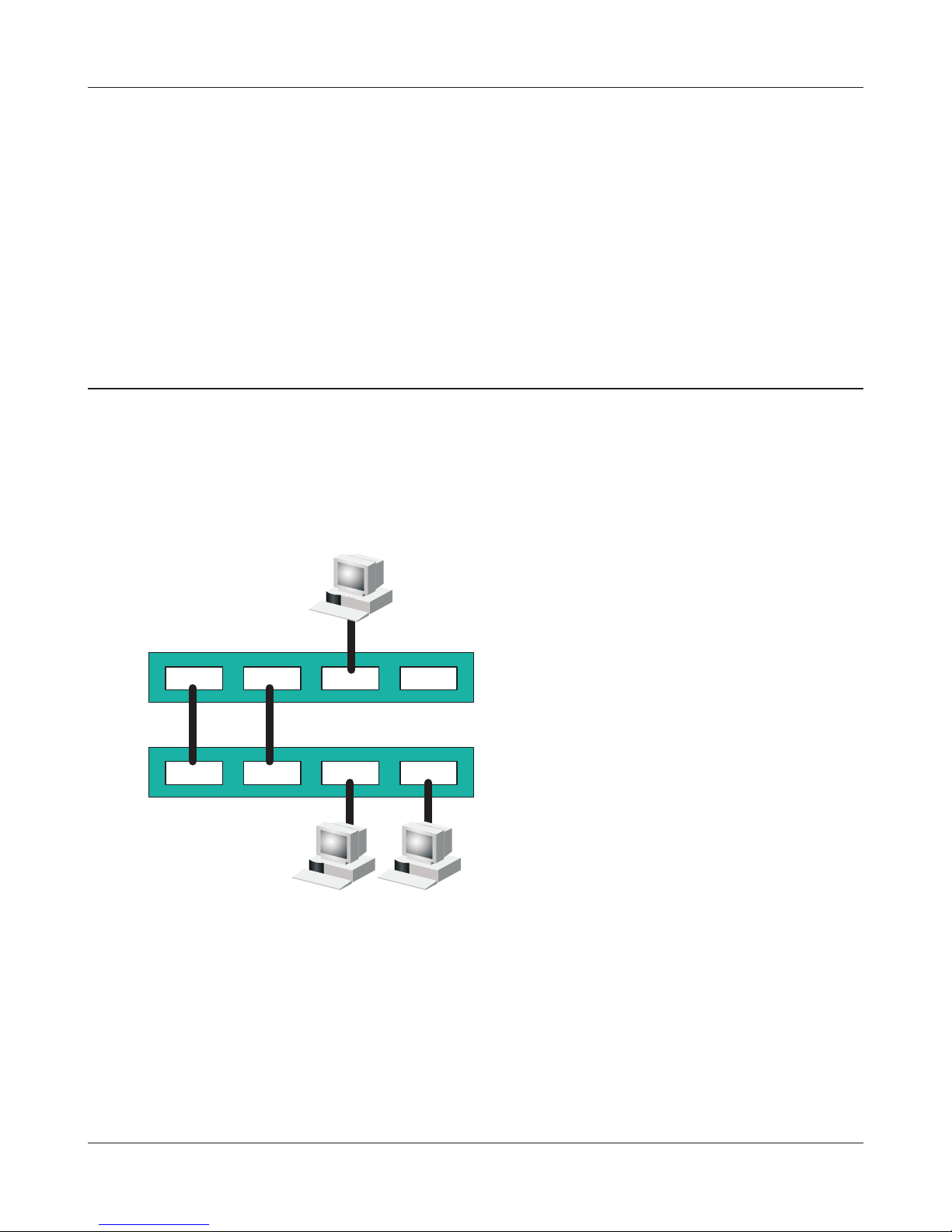
MAC Address Learning
The switch uses IVL to learn MAC addresses.
IVL is a method that retains a MAC address table for each VLAN. It diers from SVL, which retains a
shared MAC address table for the entire device.
Be sure you understand how IVL works before you create a VLAN with the switch.
Dierences between Operation of IVL and SVL
VLAN 1,3 VLAN 2,3 VLAN 1,2,3 VLAN 3
VLAN 1 VLAN 2 VLAN 1 VLAN 2
PC 1 PC 2
PC3
Switch 1
Switch 2
SVL
When PC 1 and PC 3 communicate,
PC 3 is learned by Port 1 on Switch
2 so PC 2 and PC 3 cannot
communicate.
IVL
When PC 1 and PC 3 communicate,
PC 3 is learned by both VLAN 1 and
VLAN 2 so PC 2 and PC 3 can
communicate. However, frames
sent from PC 3 to PC 1 are also
delivered to PC 2.
Port 1 Port 2 Port 3 Port 4
Port 1 Port 2 Port 3 Port 4
Questo manuale è adatto per i seguenti modelli
1
Indice
Altri manuali Buffalo Interruttore

Buffalo
Buffalo BS-GS20 Series Manuale utente

Buffalo
Buffalo BS-GU2008 Manuale utente

Buffalo
Buffalo BS-GU2008P Manuale utente

Buffalo
Buffalo BSL-WS-G2108M Manuale utente

Buffalo
Buffalo BS-GU2024 Manuale utente

Buffalo
Buffalo BS-GU2005 Manuale utente

Buffalo
Buffalo BS-GU2016 Manuale utente

Buffalo
Buffalo BS-MP20 Series Manuale utente

Buffalo
Buffalo BS-GU2016P Manuale utente

Buffalo
Buffalo BS-POE-G21M-EU Manuale utente


