
Cascade REVO C Manuale di installazione e funzionamento

REVO C/REVEX Service Panel Engineering Manual V1.0 Page 1
Engineering manual
REVO C / REVEX service terminal
PLEASE READ THIS MANUAL BEFORE ATTEMPTING TO CONNECT
AND/OR SWITCHING POWER ON THE MODULES. THIS DOCUMENT
CONTAINS VERY IMPORTANT INFORMATION THAT WILL PREVENT
WRONG CONNECTIONS THAT CAN CAUSE DAMAGE TO THE UNITS.

REVO C/REVEX Service Panel Engineering Manual V1.0 Page 2
Thank you for choosing the “REVO C/REVEX service terminal”
This manual should enable you to use your machine to full satisfaction.
Every effort has been made to provide you with maximum performance,
ergonomics and benefits from this premium quality product.
Version History:
07-02-2020 Initial version V1.0 for software version V100.001.

REVO C/REVEX Service Panel Engineering Manual V1.0 Page 3
This document describes the installation, service and configuration of the REVO
C/REVEX service terminal application in Pro-Face GP4116 touchscreen. It is a
technical manual for the equipment manufacturer. For the normal operation of this
equipment we refer to the user manual. You can use parts of this manual for the manual
that you supply with the equipment.
REMARK: CasCade strongly advises you read this manual
thoroughly before starting up the system. This can
prevent damage and a dangerous situation for yourself
and the end user of the equipment.
WARNING: The configuration/setup must be performed by
technically educated personnel. This can prevent
damage and a dangerous situation for yourself and the
end user of the equipment.
This system consists of:
1x Pro-face GP4116 touchpanel with COM1 3 wire RS-485 interface
1x REVO C/REVEX power module (1, 2 or 3 phase versions)
Care has been taken for the correctness of this manual. When there should be errors in this manual, CasCade, nor her
employees, can be held responsible for any consequential damage that could be caused by this.

REVO C/REVEX Service Panel Engineering Manual V1.0 Page 4
TABLE OF CONTENTS
TABLE OF CONTENTS
4
READ THIS FIRST
5
Explanation of symbols 5
Touchscreen introduction 6
Touchscreen maintenance 6
Touchscreen cleaning 7
1. CONNECT REVO C/REVEX MODULE AND GP-4116 screen
8
1.1 Connect communication cable between REVO C/REVEX and GP4116. 8
1.5 Connect power to GP-4116 11
2. CONFIGURING THE REVO C/REVEX COMMUNICATION PORT SETTINGS
12
3. SETUP of GP4116 touchpanel
17

REVO C/REVEX Service Panel Engineering Manual V1.0 Page 5
READ THIS FIRST
Explanation of symbols
The following signs have been used throughout this manual to draw your attention.
Hint: Useful hints for ease of operation.
Printed in Blue.
Info: Information you should know to fully understand your system and
benefit from its properties. Printed in green.
Warning: Read these important messages before executing the desired
operation.
Printed in red.
Warning: Read these important messages before executing the desired
operation.
Printed in red.

REVO C/REVEX Service Panel Engineering Manual V1.0 Page 6
Touchscreen introduction
Your machine has been equipped with a “Human Machine Interface” or HMI or -more popular
called-: A touch screen.
If you are familiar with touch screen operation, found nowadays on modern cell phones,
navigation systems, informational displays etc. you may want to skip this section. If however,
this is the first time you are using a touch screen, please keep in mind that in contradiction with
older fashioned operating panels utilizing mechanical buttons, lamps and displays, both the
displays and images on a touch screen can be interactive too, meaning they will react on a
touch by your finger. The interface on the touch screen is optimized for ergonomic operation. In
practice this means that all objects are positioned and sized such, that they can be touched
easily with your finger without the need for a stylus or precise positioning. A soft tipped stylus
can be used if preferred, but is normally not required for proper operation.
Touching objects on a touch screen can be compared with a mouse-click on a computer screen.
Based on the shown graphical user interface and your finger’s position on the screen, the
system can determine what action it should take when an object is touched.
To prevent accidental, unwanted actions some objects may require a prolonged
touch, meaning you should keep your fingers pressed longer on a certain object
(like a button or display) to invoke the required action.
Touchscreen maintenance
IMPORTANT - READ THIS FIRST
Never operate a machine until you have fully understood it’s safe working
conditions and operating principles.
Never operate the machine unless you are authorized to do so

REVO C/REVEX Service Panel Engineering Manual V1.0 Page 7
NORMAL EVERY DAY USAGE
Your touch screen utilizes a sensitive touch mechanism. The technique used provides reliable
operation, even when the screen is modestly covered with moist and dirt. It also allows the wear
of rubber gloves. And even under these conditions it should normally react already on a gentle
touch.
Some buttons may require a prolonged touch to prevent unwanted actions.
If the touch screen fails to respond, ask yourself first whether you have applied a valid
command. If in doubt, you could check the responsiveness of the touch screen by using other
commands.
Each valid command will invoke a short beep, confirming the reception of the touch. However,
whether or not the actual action is performed depends also on other conditions
Avoid applying excessive force on the touch screen and never use sharp or hard
objects (e.g. nails, tools, kitchenware or a pencil) to operate it !
In either case you might damage the screen and void your warranty.
Touchscreen cleaning
Your touch screen is provided with a durable front sheet which is water, oil and fat resistant. The
best way to clean the front sheet is with a soft, lukewarm and mildly moist cloth.
Special, disposable front cover protection sheets that will reinforce and protect your touch
screen, are available through your dealer.
Never use solvents (e.g. thinner, tri, turpentine) hot water, soda, abrasives or
other aggressive matter for cleaning.

REVO C/REVEX Service Panel Engineering Manual V1.0 Page 8
1. CONNECT REVO C/REVEX MODULE AND GP-
4116 screen
This part describes how to connect the power supply and communication cable to the REVO
C/REVEX. Also consult the CD Automation manual that was supplied with the REVO C/REVEX
module.
1.1 Connect communication cable between REVO C/REVEX
and GP4116.
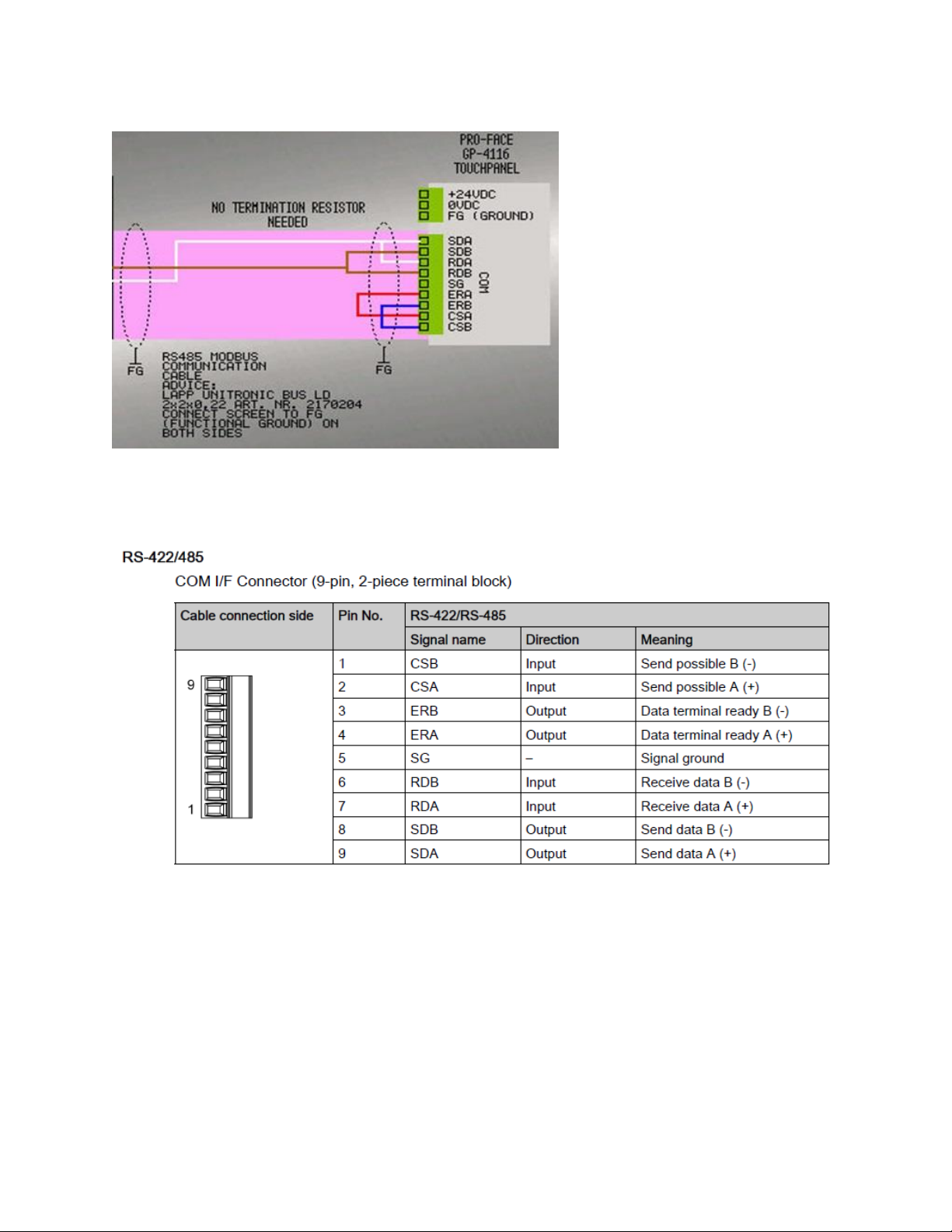
You can connect the RS485 modbus communication cable between the REVO C M5 port and
the GP4116 COM1 connector.
REVO C:
M5 point 9=B and M1 point A+ (white wire to GP4116) and M1 point B- (brown wire to GP4116)
REVEX: different connections depending on the size of the thyristor
For 30-40A and 60-90A: use M3
For the larger thyristors, use M1 point 11-12

REVO C/REVEX Service Panel Engineering Manual V1.0 Page 9
Here is the REVEX communication port for higher currents than above.
For good EMC/EMI immunity, use a Lapp RS-485 modbus communication cable that is 120ohm
impedance corrected. Use Lapp Unitronic bus LD 2x2x0.22 article number 2170204. You can
order per meter at Conrad electronic.
REVO C/REVEX Service Panel Engineering Manual V1.0 Page 10
Please also note the red and blue wires that are bridging signals on the GP-4116 connector.
For completeness here an extra informative picture from the Pro-face manual. You see here a
description of all signals that are present on the GP4116 COM1 connector.
Questo manuale è adatto per i seguenti modelli
1
Indice
Altri manuali Cascade Terminale touch


