CBN MGC6050F Manuale utente

M
MG
GC
C6
60
05
50
0F
F
U
Us
se
er
r’
’s
s
G
Gu
ui
id
de
e
Rev.1.0 (Dec.2013) 1
MGC6050F
Full HD Megapixel IP Camera

M
MG
GC
C6
60
05
50
0F
F
U
Us
se
er
r’
’s
s
G
Gu
ui
id
de
e
Rev.1.0 (Dec.2013) 2
Note
This equipment has been tested and found to comply with the limits for a Class A digital
device, pursuant to part 15 of the FCC Rules. These limits are designed to provide
reasonable protection against harmful interference in a residential installation. This
equipment generate, uses and can radiate radio frequency energy and, if not installed
and used in accordance with the instructions, may cause harmful interference to radio
communications. However, there is no guarantee that interference will not occur in a
particular installation. If this equipment does cause harmful interference to radio or
television reception, which can be determined by turning the equipment off and on, the
user is encouraged to try to correct the interference by one or more of the following
measures:
Reorient or relocate the receiving antenna.
Increase the separation between the equipment and receiver.
Connect the equipment into and outlet on a circuit different from that to which
the receiver is connected
Consult the dealer or an experienced radio/TV technician for help.
Directions
Be careful not to cause any physical damage by dropping or throwing MGC6050F. Especially
keep the device out of reach from children.
Do not disassemble MGC6050F. No After Service is assumed when disassembled.
Use only the power adapter provided with MGC6050F.
Be careful to prevent moisture or water penetration into the unit. Particular attention is
needed when installing MGC6050F. The screw holes for the installation screws and pipe should
be maintained water tight during the whole life time of the product.
All the electrical connection wires running into the unit should be prepared so that water from
the outside cannot flow into the unit through the surface of the wires. Penetration of the
moisture through the wire for extended period can cause malfunction of the unit or
deteriorated image.

M
MG
GC
C6
60
05
50
0F
F
U
Us
se
er
r’
’s
s
G
Gu
ui
id
de
e
Rev.1.0 (Dec.2013) 3
Revision History
Date Revision Details
2013-12-01 1.0 First manual revision creation.
Caution
Any changes or modifications in construction of this device which are not explicitly
approved by the party responsible for compliance could void the user’s authority to
operate the equipment.

M
MG
GC
C6
60
05
50
0F
F
U
Us
se
er
r’
’s
s
G
Gu
ui
id
de
e
Rev.1.0 (Dec.2013) 4
Contents
Contents ............................................................................................. 4
1. Introduction ..................................................................................... 5
1.1. Overview ................................................................................................ 5
1.2. Specification ........................................................................................... 6
1.3. Applications of MGC6050F ......................................................................... 8
2. Product Description .......................................................................... 9
2.1. Contents ................................................................................................ 9
2.2. Product Preview ...................................................................................... 9
2.3. Physical description ................................................................................ 10
2.4. Functional Description ............................................................................. 11
3. On Site Installation.......................................................................... 15
3.1. Stand Bracket ....................................................................................... 15
4. Getting Started ............................................................................... 16
4.1. PC Requirement .................................................................................... 16
4.2. Quick Installation Guide ........................................................................... 17
5. Trouble Shooting ............................................................................ 21
5.1. No power is applied ................................................................................ 21
5.2. Cannot connect to the Video ..................................................................... 22
5.3. Windows Vista or Windows 7 .................................................................... 23
5.4. Technical Assistance ............................................................................... 26

M
MG
GC
C6
60
05
50
0F
F
U
Us
se
er
r’
’s
s
G
Gu
ui
id
de
e
Rev.1.0 (Dec.2013) 5
1. Introduction
1.1. Overview
The MGC6050F is a state-of-the-art (Megapixel), triple-codec (H.264, MJPEG) IP camera (or network camera)
built with embedded software and hardware technology. It enables real time transmission of synchronized video
of up to 2 Megapixel or 3 Megapixel and audio data. Remote clients can connect to MGC6050F for the real time
video/audio data through various client solutions running on PC, mobile phones. Real time 2-way
communication is available through bidirectional audio communication feature.
Designed to be a stand-alone streaming audio & video transmission device, MGC6050F can be applied to
various application area such as video security, remote video monitoring, distance education, video conference
or internet broadcasting system.
Embedded PoE (Power over Ethernet, IEEE 802.3af) will enable the owner to reduce TCO (Total Cost of
Ownership) by reducing on-site wiring works for the installation.

M
MG
GC
C6
60
05
50
0F
F
U
Us
se
er
r’
’s
s
G
Gu
ui
id
de
e
Rev.1.0 (Dec.2013) 6
1.2. Specification
Category Sub-Category Details
Video Compression H.264/MJPEG
Resolution **Refer to the datasheet.
Audio
(Bi-directional)
Up 32 Kbps G.726
Down 128 Kbps PCM
Network
Interface RJ-45, 10/100 Mbps, PoE (802.3af)
Access network Static, DHCP, PPP/PPPoE
Application RTP, RTSP, SMTP, FTP, HTTP, SDP, NTP, DNS
I/O
RS-485 For providing RS-485 device
Sensor In 1 NC, NO Selectable
Relay Output 1 For alarm annunciation or
remote ON/OFF control (30V, 1A)
RS-232C For factory use only
Mic/Line In Selectable in Admin page
Line Out 1 V p-p output for amplified speaker
CVBS output For temporal use during installation
Power Supply PoE Power over Ethernet (IEEE802.3af)
DC Adaptor 12V DC adaptor (2A)
Mounting Stand Bracket
Motion Detection 3 zones Arbitrary shape with independent sensitivity
Upgrade Firmware upgrade over IP network
Administration Remote administration over IP network
Client & Viewer
Web Viewer Simple viewing over internet explorer
NVR-Pro Standard CMS software
3rd Party CMS Ask ICANTEK for details
Dynamic IP support DDNS support Supported
Security
Video/Audio stream encryption
ID and Password protection

M
MG
GC
C6
60
05
50
0F
F
U
Us
se
er
r’
’s
s
G
Gu
ui
id
de
e
Rev.1.0 (Dec.2013) 7
Security IP filtering for restricting administrative
access for audio and bi-audio
Time management
Sync to PC Synchronize to PC
Manual Manual time setting
Internet Time Server
Synchronize to Time Server
DLS Day Light Saving
SDK support
Active-X
HTTP

M
MG
GC
C6
60
05
50
0F
F
U
Us
se
er
r’
’s
s
G
Gu
ui
id
de
e
Rev.1.0 (Dec.2013) 8
1.3. Applications of MGC6050F
Security surveillance (buildings, stores, manufacturing facilities, parking lots, banks, government facilities,
military, etc.)
Remote monitoring (hospitals, kindergartens, traffic, public areas, etc.)
Teleconference (Bi-directional audio conference). Remote Learning, Internet broadcasting
Weather and environmental observation

M
MG
GC
C6
60
05
50
0F
F
U
Us
se
er
r’
’s
s
G
Gu
ui
id
de
e
Rev.1.0 (Dec.2013) 9
2. Product Description
2.1. Contents
The product package contains followings:
Contents Description Remarks
MGC6050F IP camera (MGC6050F ) main unit
Power Adaptor Default built in standard PoE module
(IEEE802.3af)
12VDC Adaptor
(Optional item)
Mounting bracket and
others
Standard mount bracket,
C ring, L wrench Supported
CD Software & User’s Guide
Quick Reference Guide
Quick installation guide
2.2. Product Preview
MGC6050F IP-Installer CMS Software
(NVR-Pro)
Mega pixel IP Camera PC software to allocate an IP
address to the IP Camera
PC software to view and record
the A/V streaming data transmitted
from IP camera.
(Simultaneous support of up to 64
IP cameras@D1)

M
MG
GC
C6
60
05
50
0F
F
U
Us
se
er
r’
’s
s
G
Gu
ui
id
de
e
Rev.1.0 (Dec.2013) 10
2.3. Physical description
2.3.1. External View
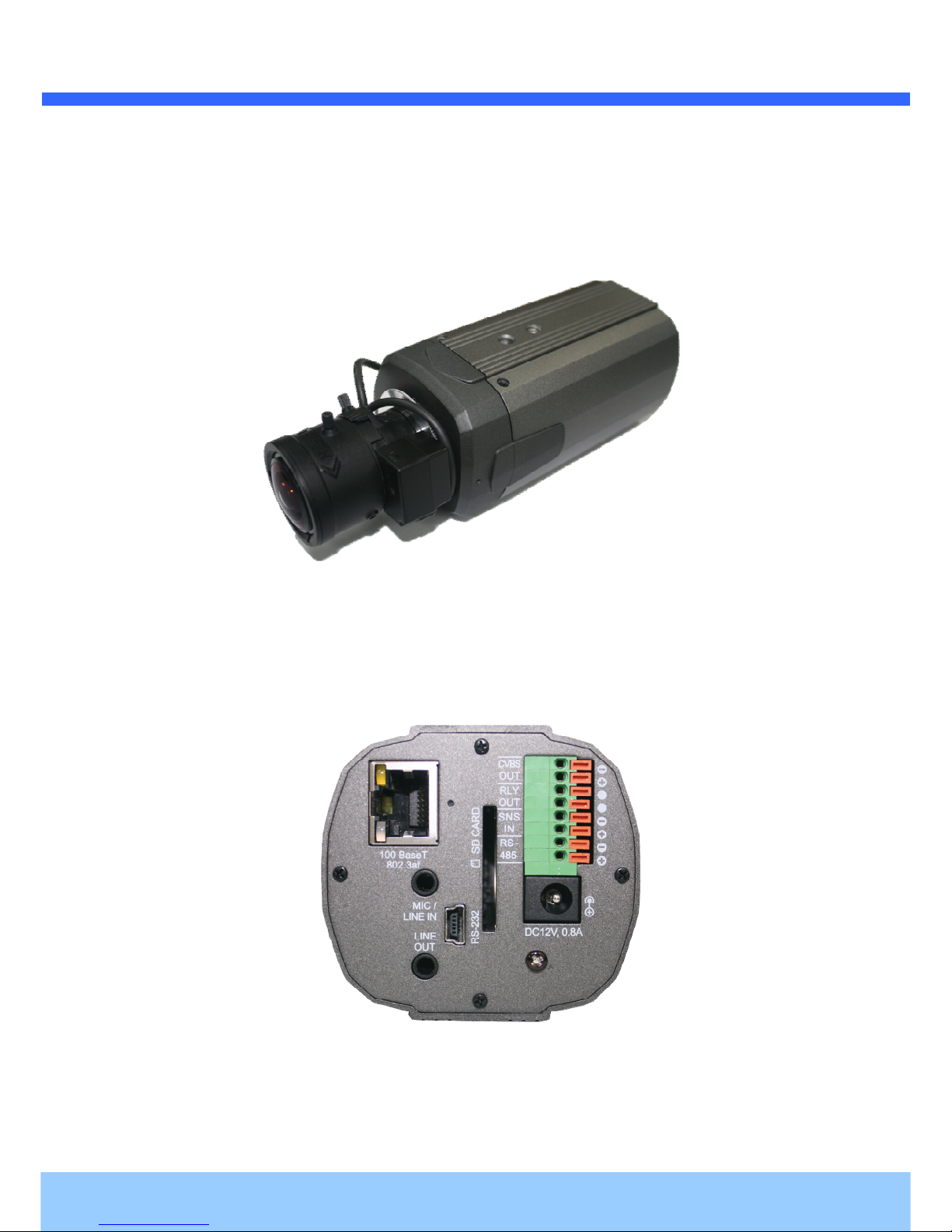
Figure 2-1. External view of MGC6050F
2.3.2. Rear panel
Figure 2-2. Rear panel of MGC6050F
Indice
Altri manuali CBN Telecamera IP