
CCTV Imports CC2300 Manuale utente

CC Series Middle Speed Dome Camera User Manual
CC Series Middle Speed
Dome Cameras
User Manual

CC Series Middle Speed Dome Camera User Manual
1
Version 1.0
Language: English
Published Date: Jan 2007
Edition Note:
Edition Edit Note Edit Date
Application Range:
Note: This Manual is applicable to below CC series middle speed dome
cameras
CC2300

CC Series Middle Speed Dome Camera User Manual
2
Preface
Thank you for purchasing CC series middle speed
dome cameras.
CC2300 series middle speed dome cameras feature
high-resolution, sensitivity, and chroma luminance. When
in use, they can realize below functions: preset positions
setting with altogether 128 preset positions; auto cruise;
pattern cruise; zone cruise; panning range 0~355º, tilt
range 0~355º; Iris, BLC, focus and WB have auto and
manual mode; also have high compatibility with various
protocols and baud rates, etc.
Hence, they are widely used in various industries
such as public security, telecommunication, water and
power, bank, supermarket, airport, bus station etc.

CC Series Middle Speed Dome Camera User Manual
3
Table of Contents
1. Function Description---------------------------------------4
1.1 Basic Functions--------------------------------------------------4
Special Functions------------------------------------------------5
2. Switch Settings---------------------------------------6
2.1 SW1 Settings-----------------------------------------------------7
2.2 SW2 Settings-----------------------------------------------------7
3. Installation----------------------------------------------8
4.Technical Parameters------------------------------12
5. Caution-------------------------------------------------22

CC Series Middle Speed Dome Camera User Manual
4
1. Function Description
1.1 Basic functions
Function Description
Pan and Tilt rotation Point the camera to specific positions
Zoom Tele and Zoom Wide Switch to monitor far or near distances
Focus Near and Focus Far Adjust the focus position to maximize the
high frequency content of a picture, when
the dome receives “focus adjust”
command, it’s lens will switch to manual
focus mode and keep this mode until it
receives pan, tilt, or zoom command
Iris Open and Iris Close Adjust iris effect
Preset The dome camera can save its current pan
tilt and zoom position when it receives “Set
Preset” command. While pointing to other
positions, it can switch to this specific
position which has been presetted if it
receives “go to preset” command

CC Series Middle Speed Dome Camera User Manual
5
1.2 Special Functions
In addition to the basic functions mentioned above, CC series middle
speed dome cameras also have some special functions through the use of
below preset functions.
Preset Number Function
55-63 Setting positions for pattern scan
82 Auto switch sequentially among presetted positions
89 Clear all preset positions
91 Auto focus
97 Pan continuously from 0 degree to 355 degree
CC Series Middle Speed Dome Camera User Manual
6
2. Switch Settings
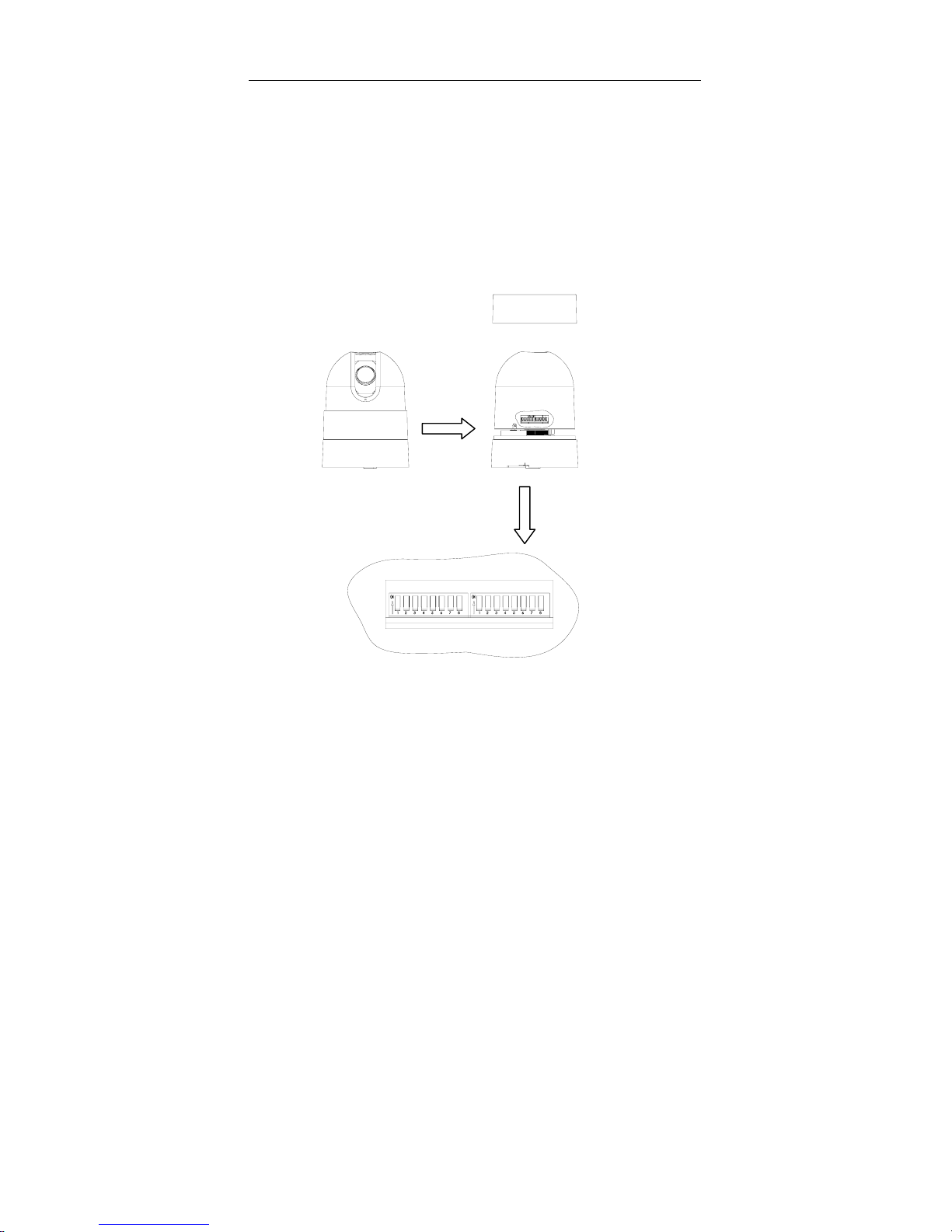
Before installing the dome drive, please make sure to configure the
receiver address, communication protocol, and baud rate setting. The DIP
switches are located at the side of the dome drive. Figure 1 shows clearly the
default settings, that is, all these switches are set to the “OFF” position.
Please refer to the following illustrations to set the dome address, baud
rate, and communication protocol for the dome camera.
SW1 SW2
Figure 1. Switch position and Default Switch Settings
Notes: Please unscrew the top ring before setting the DIP switches.

CC Series Middle Speed Dome Camera User Manual
7
2.1 SW1 Settings
SW1 switches are used to set the address of the dome camera, it is
calculated as below:
∑
=
−
×= 8
1
)1(
2
i
i
i
sAddressDome
⎩
⎨
⎧
−
−
=ONisiSWwhen
OFFisiSWwhen
Si11
10
Please refer to Table A for detailed address settings; Maximum number
of dome address is 255.
2.2 SW2 Settings
CC series dome cameras can be controlled via various communication
protocols, baud rates. By setting SW2 switches (1, 2, 3,and 4), different
protocols can be configured; and by setting SW2 switches (5, 6, 7, and 8),
different baud rates can be selected. Please refer to Table B for
communication protocol and baud rate settings. “Reserved” switches are
those that are reserved for future use, they are not available at present.

CC Series Middle Speed Dome Camera User Manual
8
3. Installation
There are four mounting modes: pendant (6 or 9 inch), surface,
in-ceiling, and pole for CC series middle speed dome cameras. Before
installing them please study figure 2, figure 3, and figure 4 carefully.
1. Install the chassis of the dome camera at a desired position.
*Note: the mount position should be solid enough.
2. Unscrew the top ring in order to set dome camera’s address,
communication protocol, and baud rate. Please refer to Table A
and B for more information about their settings. DIP switches SW1
and SW2 are at the side of the dome camera.
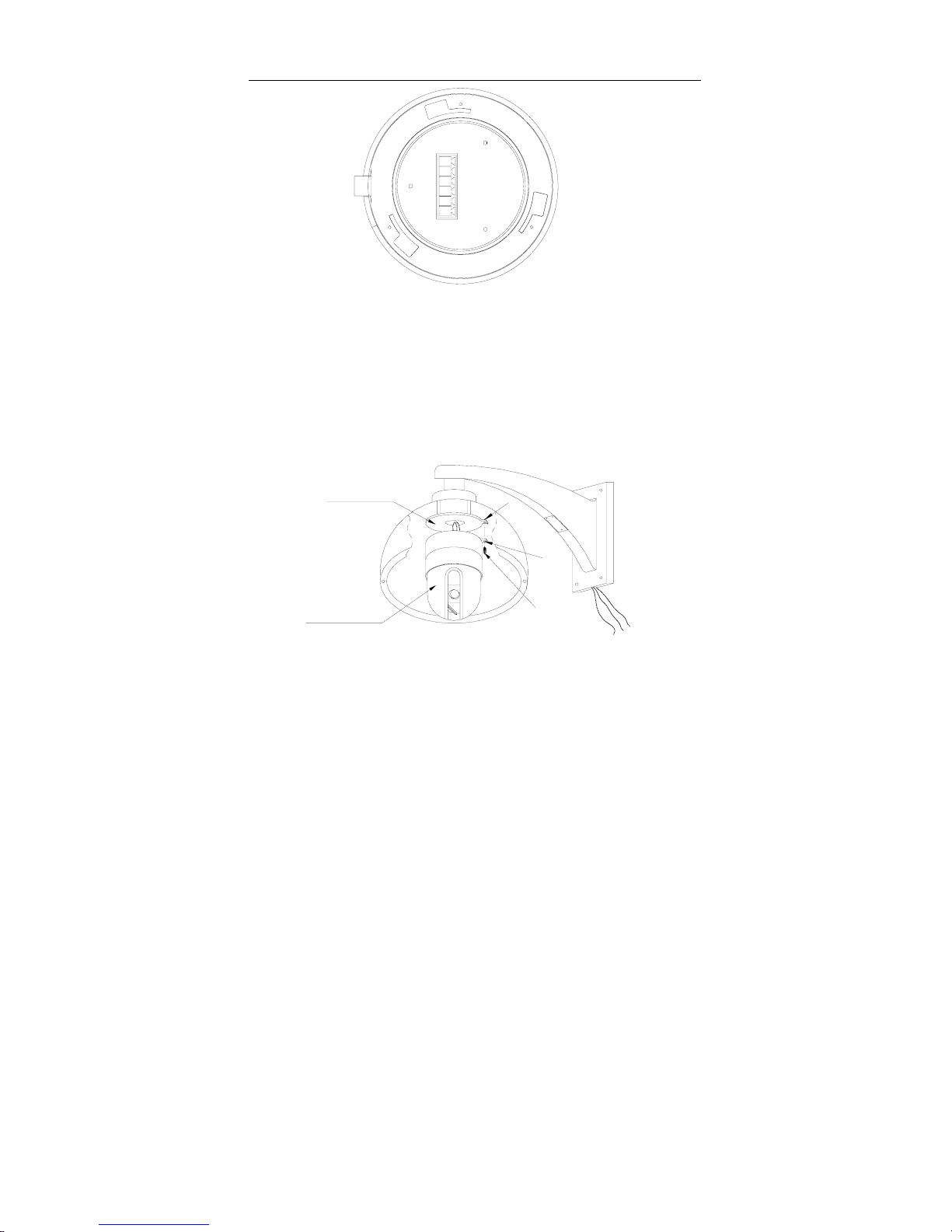
3. Plug the dome female connector inside of dome camera’s mount
into the dome camera’s male connector. Install the dome camera
into the dome mount, right rotate the dome camera until the dome
camera’s rectangle flange is lap over the dome camera mount’s
rectangle flange. Tighten these two flanges using a screw, the
diameter of which is 3mm.
4. Install the lower dome; tighten the screw to secure the lower dome
to the dome camera mount.
5. Connect wires of RS485, video and power.
CC Series Middle Speed Dome Camera User Manual
9
+12V
GND
RS485-
RS485+
VIDEO-
VIEDO+
Figure 2. Dome Camera’s Male Connector Pin Configuration
*Note: This figure is the bottom view of dome camera and the male
connector is enlarged. Definition of RS485, video, and power cables is
labeled outside of dome camera mount, and these cables are connected to a
female header at the internal of the dome camera mount. The only thing that
you have to do is plugging the female header to dome camera’s male
connector.
Mounting Plane
Dome Camera M3 Screw
a
b
Figure 3. Installing Sketch
Questo manuale è adatto per i seguenti modelli
1
Indice
Altri manuali CCTV Imports Telecamera di sicurezza


