Cellinx CamPilot MR310-CP93H Manuale utente

INSTRUCTION MANUAL
CamPilotMR310 1/56
CamPilot MR310
Vandal Proof IP DOME CAMERA
MR310-CP93H / CP93H-18IR
MR310-CP95H / CP95H-18IR
Instruction Manual
N V S
(Network Video Streamer)
User’s Guide
CamPilot MR310
Instruction Manual
20100802
Before installing and using the camera, please read
this manual carefully.
Be sure to keep it handy for later reference.

INSTRUCTION MANUAL
CamPilotMR310 2/56
•CamPilot MR310 is a Vandal-proof IP Dome Camera that transmits real-time
high-resolution digital video and audio data with H.264 high compression rate
over Internet or Intranet.
•CamPilot MR310 contains digital video/audio compressor, web server and
network interface. Users can simply connect power source and network cable for
operation. Additional operation equipments or programs are not required.
• CamPilot MR310 enables real-time web browser monitoring anytime, anywhere. It
can be installed in a variety of places including child care facilities, education
institutions, roads, amusement parks, stores, cyber shopping malls, tourist
attractions, construction and production sites and warehouses.
•Easy to use - CamPilot MR310 doesn’t require an additional PC for operation.
Users can monitor video /audio data from CamPilot MR310 through a regular
PC’s Web Browsers (Explorer or Netscape). IP address needs to be assigned at
the first installation of CamPilot MR310. Thereafter, users can get direct access
through Web Browsers.
•High compatibility - CamPilot MR310 supports TCP/IP for networking, SMTP for
e-mail exchange and FTP protocol for file transmission. Other online
communication protocols such as ICMP, DHCP and HTTP are also supported.
Therefore, CamPilot MR310 users can use any OS out of Window, Unix,
Macintosh and OS/2 to access CamPilot MR310.
•Simple environment setting - Internet Explorer or Firefox can be used to modify
user environment set in the CamPilot MR310.
•Embedded Linux O/S - CamPilot MR310 uses cutting-edge networking
technology. Cellinx Systems optimized Linux for this CamPilot MR310 operation
and runs it with 32bit RISC CPU.
FEATURES


INSTRUCTION MANUAL
CamPilotMR310 3/56
■Do not open or modify
Do not open the case except during maintenance and installation, as it may be
dangerous and cause damages.
■Do not put objects inside the unit
Make sure that no metal objects or flammable substances get inside the camera.
It could cause fire, short-circuits or damages.
■Be careful when handling the unit.
To prevent damage, do not drop the camera or subject it to strong shock or
vibration.
■Install away from electric or magnetic fields.
■Protect from humidity and dust.
■Protect from high temperature.
Be careful when installing close to the ceiling , in a kitchen or boiler room, as the
temperature may rise to high levels.
■Cleaning
Dirt can be removed from the case only by wiping it with a soft cloth moistened
with a soft detergent solution.
■Mounting Surface
The mounting surface material must be strong enough to support the camera.
PRECAUTIONS
WARNING:
TO PREVENT THE RISK OF FIRE OR ELECTRIC SHOCK,
DO NOT EXPOSE THIS APPLIANCE TO RAIN OR MOISTURE.

INSTRUCTION MANUAL
CamPilotMR310 4/56
Before sending the camera out for repair, check the items below.
If the problem persists after checking these items, contact your service center.
▲If no image appears
- Is the LAN cable attached securely?
- Are the power and voltage normal?
- Has the iris of the lens inside the camera been adjusted correctly?
(with the level volume)
- Is there adequate illumination?
▲If the image is unclear
- Is the lens in focus?
- Is the lens dirty?
- Dirt or fingerprints on the lens can adversely affect the images.
Gently wipe any dirt or fingerprints off the lens with a soft cloth or lens
cleaning paper and cleaning fluid (commercially available).
- Is the monitor adjusted correctly?
▲If the Audio is not work
- Is the audio cable attached securely?
- Are the connected devices(amplifier, microphone, speaker and etc.) normal?
- Are the Client software and devices normal?
▲If the DIO is not work
- Is the DIO cable attached securely?
- Is the connected sensor or alarm device normal?
TROUBLESHOOTING

INSTRUCTION MANUAL
CamPilotMR310 5/56
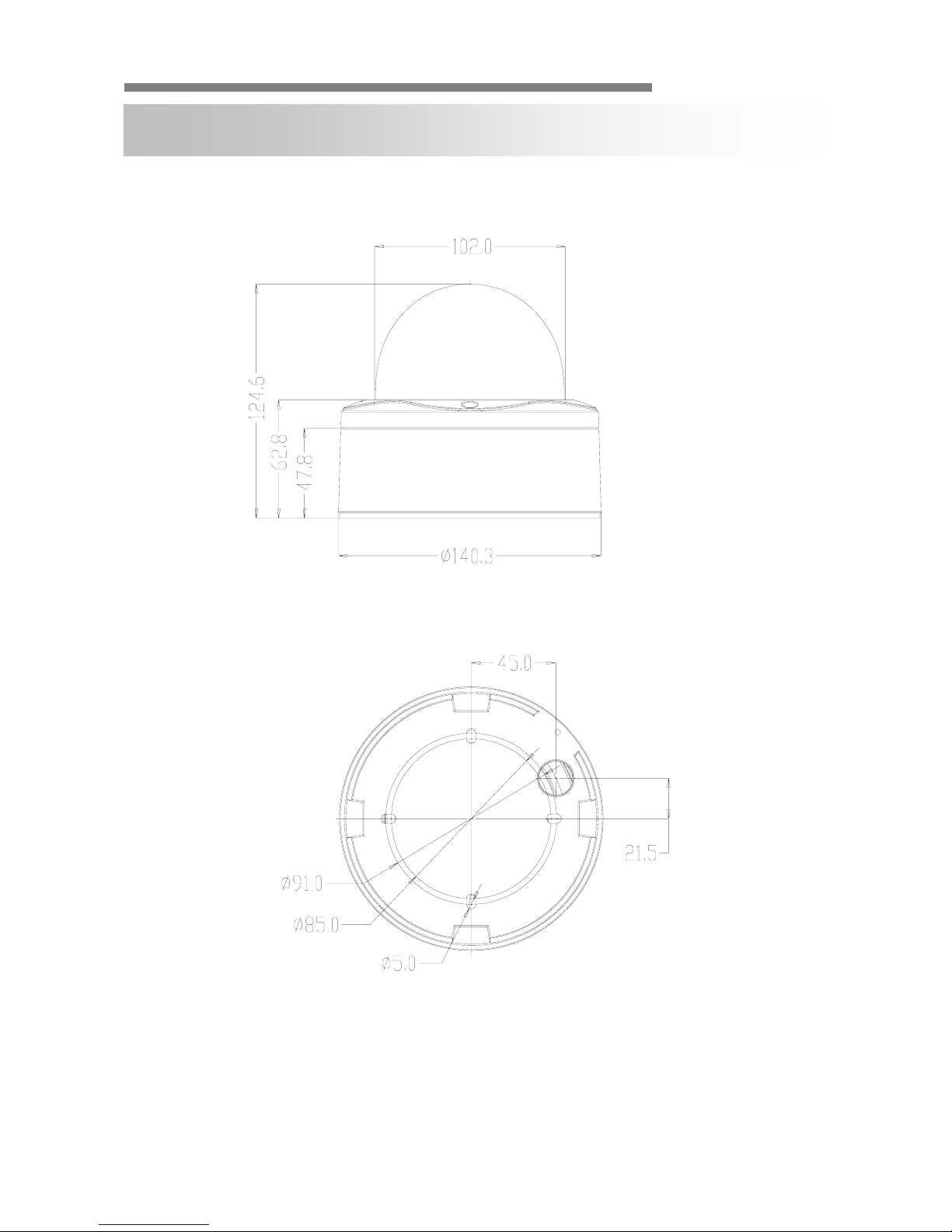
DIMENSION (mm)

INSTRUCTION MANUAL
CamPilotMR310 6/56
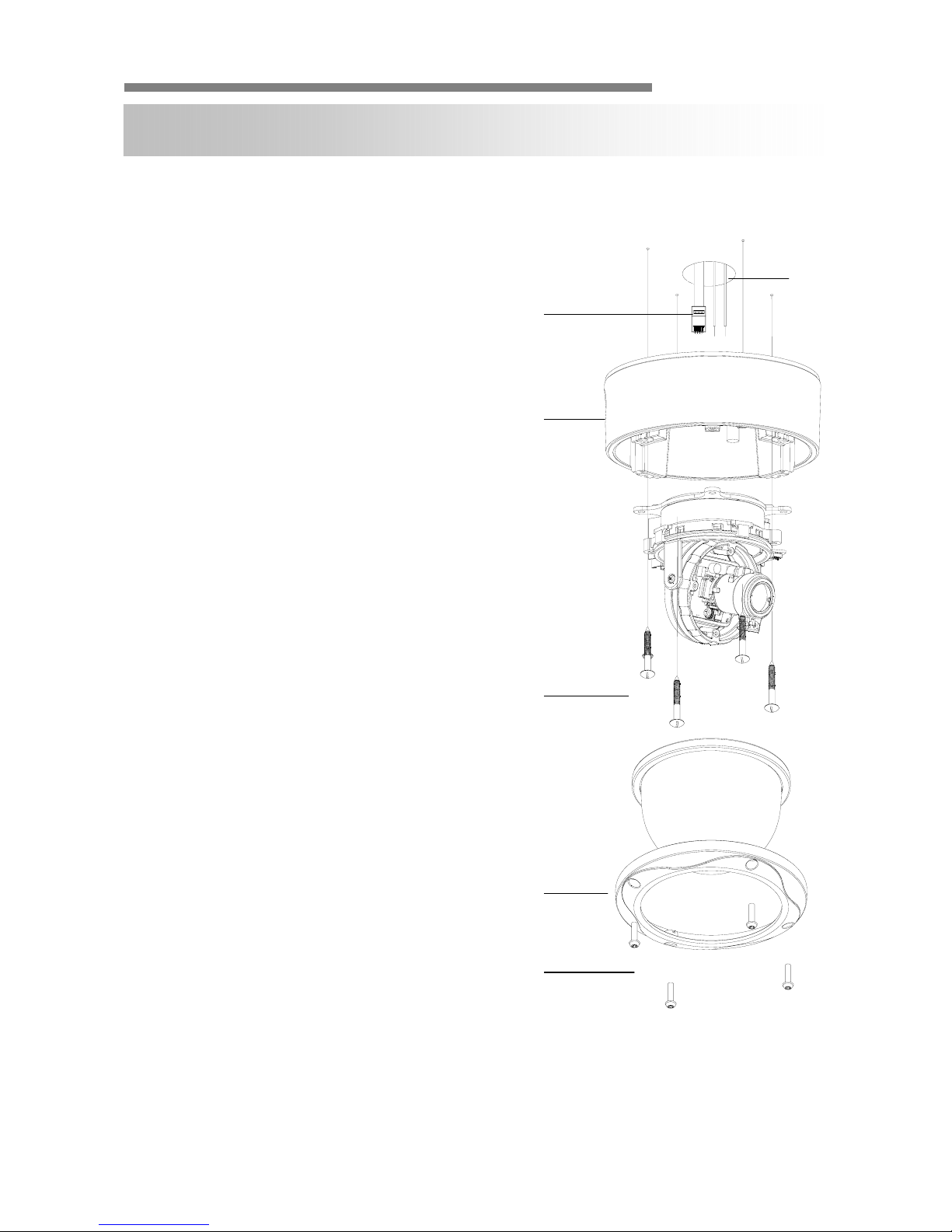
INSTALLATION
D
A
F
B
E
C
1. Use the supplied L-wrench to
remove the four fixing screws (B) of
dome cover (A).
2. Align the camera unit with the
surface of the ceiling, make marks
on the ceiling in the places where
the screw holes are to be drilled,
and then drill the four holes.
3. Cut a hole (diameter2.9in.73mm) in
the ceiling for routing the cables.
4. Pass the power cable (E) and LEN
cable (F) from the camera unit
through the cable hole in the ceiling.
5. Align the four screw holes in the
camera unit (D) with the screw holes
in the ceiling, and then secure the
camera in place by tightening the
four or more screws (C) through the
washers.
6. Carry out the settings and
adjustments for the camera.
7. Secure the dome cover (A) by
tightening the screws (B).

INSTRUCTION MANUAL
CamPilotMR310 7/56
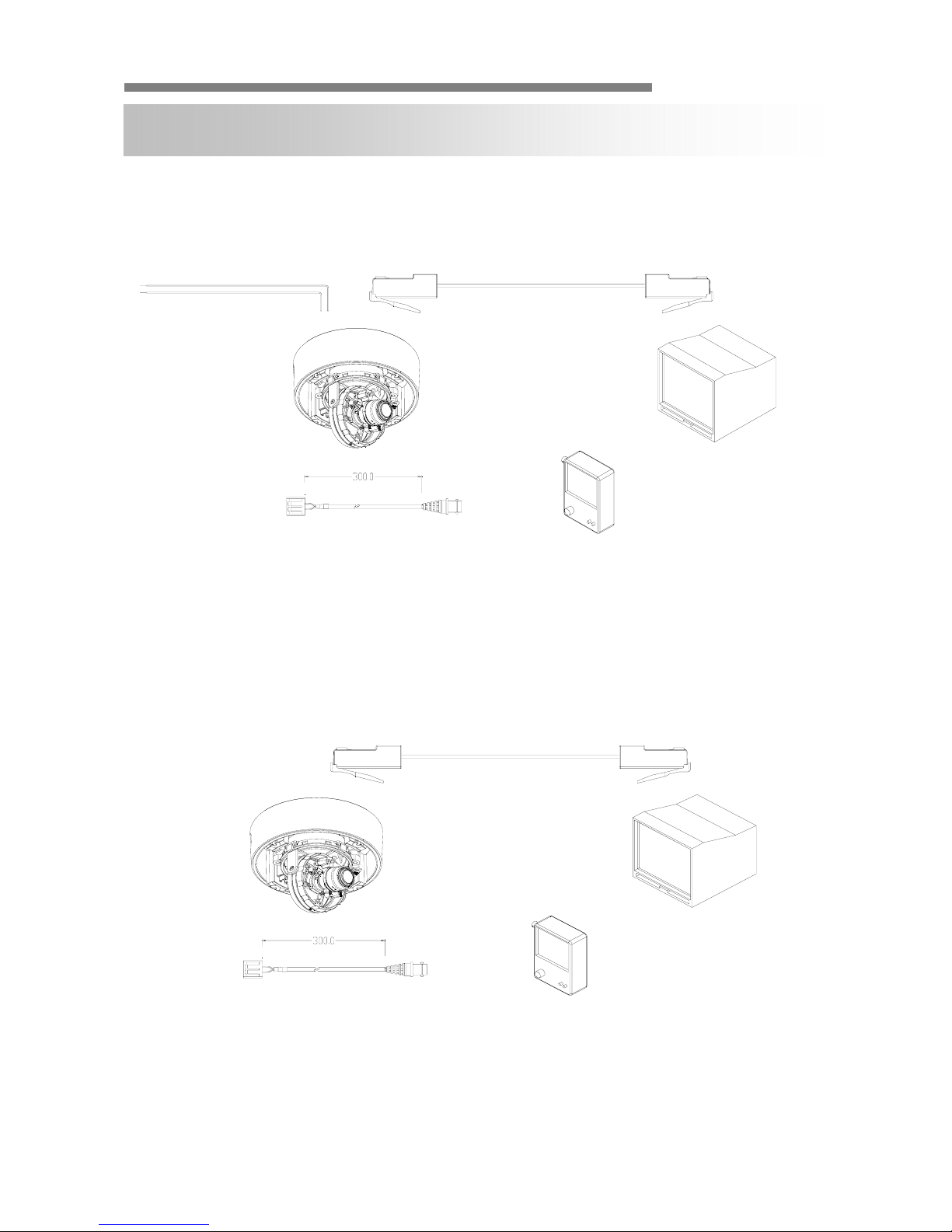
▲CONNECTION (Ⅰ)
▲CONNECTION (Ⅱ)
CONNECTION
DC12V / AC24V LAN(RJ45)
2nd VIDEO
CAUTION :
Check for polarity when using a DC 12V/ AC24V power supply.
LAN(PoE)
2nd VIDEO
CAUION :
Check for polarity when using a POE(Power of Ethernet) power supply.
- Su
pp
ort: IEEE 802.3a
f

INSTRUCTION MANUAL
CamPilotMR310 8/56
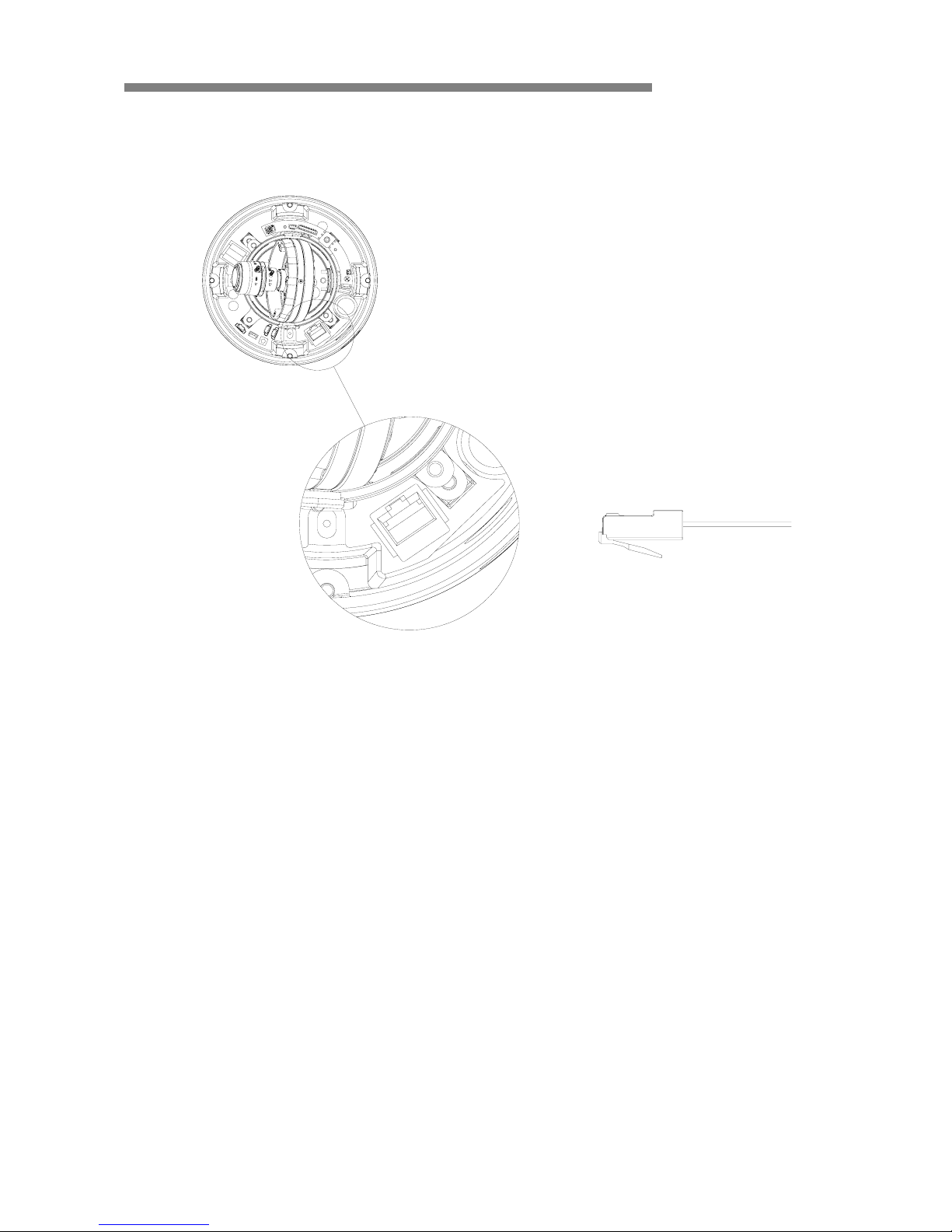
▲ETHERNET CONNECTION
Connect Ethernet cable to the network

INSTRUCTION MANUAL
CamPilotMR310 9/56
▲LENS ADJUSTMENT & GIMBAL ADJUSTMENT
CAMERA SETTING
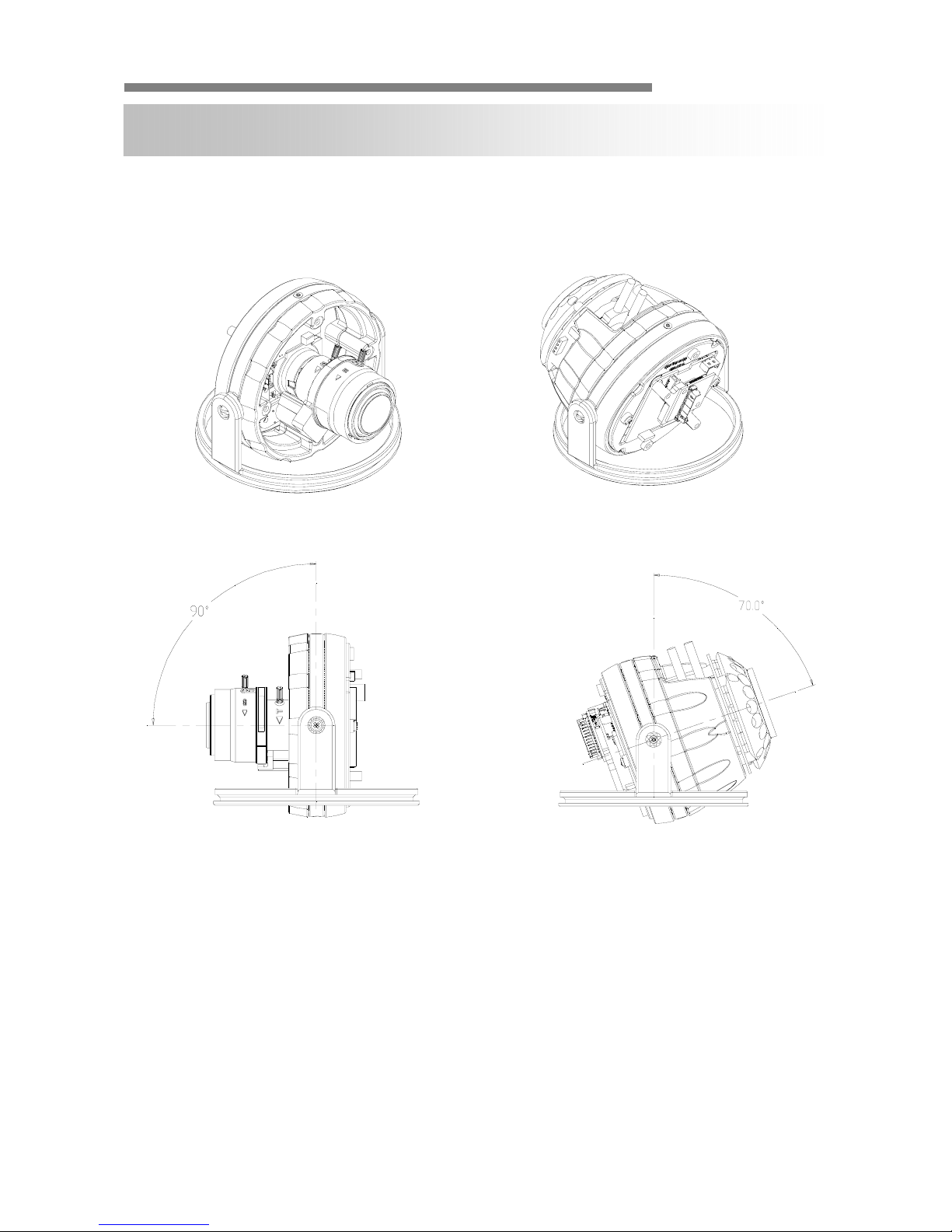
<DV LENS TYPE> <DV LENS & IR LED TYPE>
1. Adjust the panning(360˚) and tilt(90˚) position. (DV LENS TYPE)
Adjust the panning(360˚) and tilt(70˚) position. (DV LENS & IR LED TYPE)
2. Set the zoom lever as desired positiong by moving Zoom lever.
3. Set the Focus lever as the image is focussed by moving Focus lever.

INSTRUCTION MANUAL
CamPilotMR310 10/56
▲GIMBAL ADJUSTMENT
<
O
mni f
ocus
LEN
S
&
IR LED TYPE>
<Omni focus LENS TYPE>
1. Adjust the panning(360˚) and tilt(90˚) position.
(Omni focus LENS TYPE)
Adjust the panning(360˚) and tilt(70˚) position.
(Omni focus LENS & IR LED TYPE)
Questo manuale è adatto per i seguenti modelli
3
Indice
Altri manuali Cellinx Telecamera IP