
Chiayo SM-2100 IrDA Manuale utente
Operation manual
CHIAYO ELECTRONICS CO., LTD.
SM-2100 IrDA
UHF Belt-pack Transmitter
1
SM-2100 IrDA UHF Belt-pack Transmitter
Parts and functions
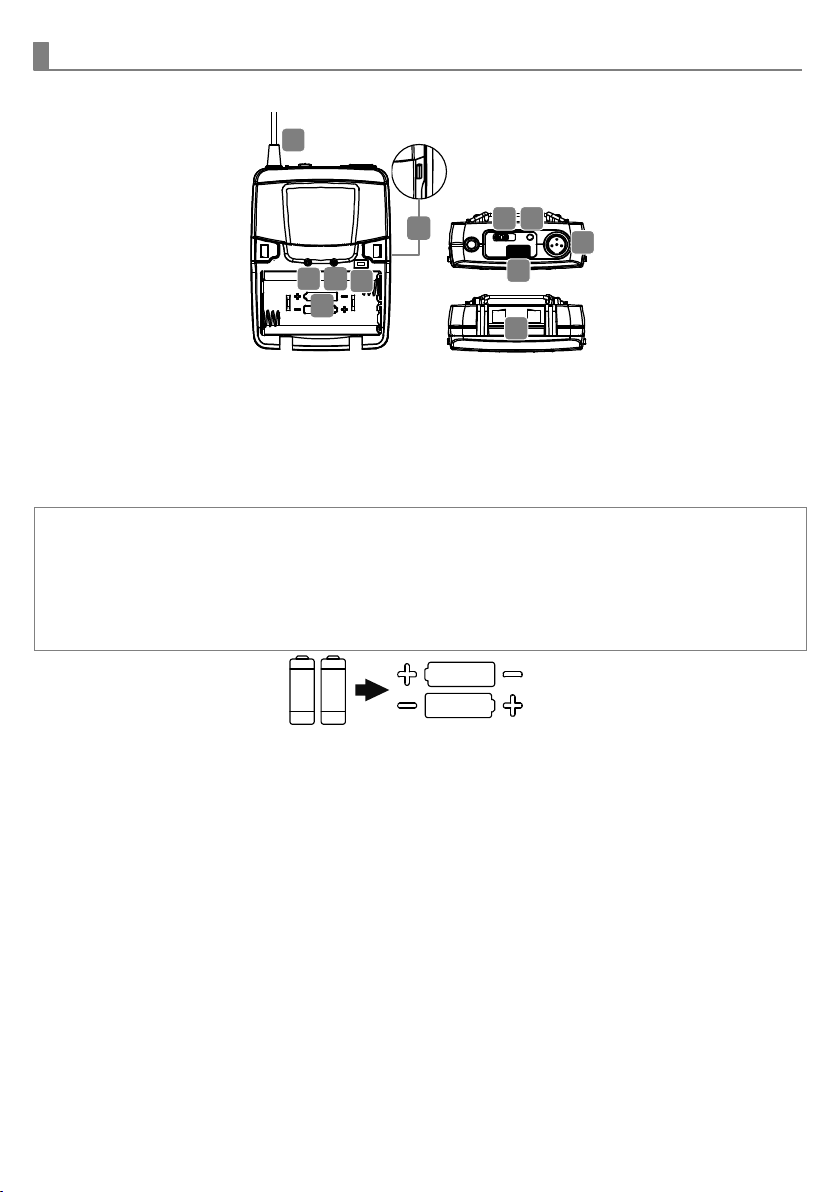
1 Antenna
2 High-impedance gain control
3 Low-impedance gain control
4
IrDA synchronizing button
5 Battery compartment
6 Cover release button
7 Power switch
8
Battery power LED
9 IrDA sensor area
10 Audio input connector
11 Charging contacts
Battery installation & indicator
●►○
●
When the transmitter is switched ON, the
battery power LED (red) will blink once to
denote the batteries installed are in good
condition.
If the LED remains illuminated the batteries
have expired and require replacement.
This transmitter requires two
AA batteries to operate.
To install, open the battery cover
and insert the batteries into the
battery compartment.
Note: Batteries contain a corrosive acid that may leak and damage the transmitter when stored for a long
period. Batteries should be removed from the transmitter before storing without use for more than 4 weeks.
11
8
9
10
7
1
2
3
5
4
6
2
Instructions
Channel synchronizing of the receiver and transmitter
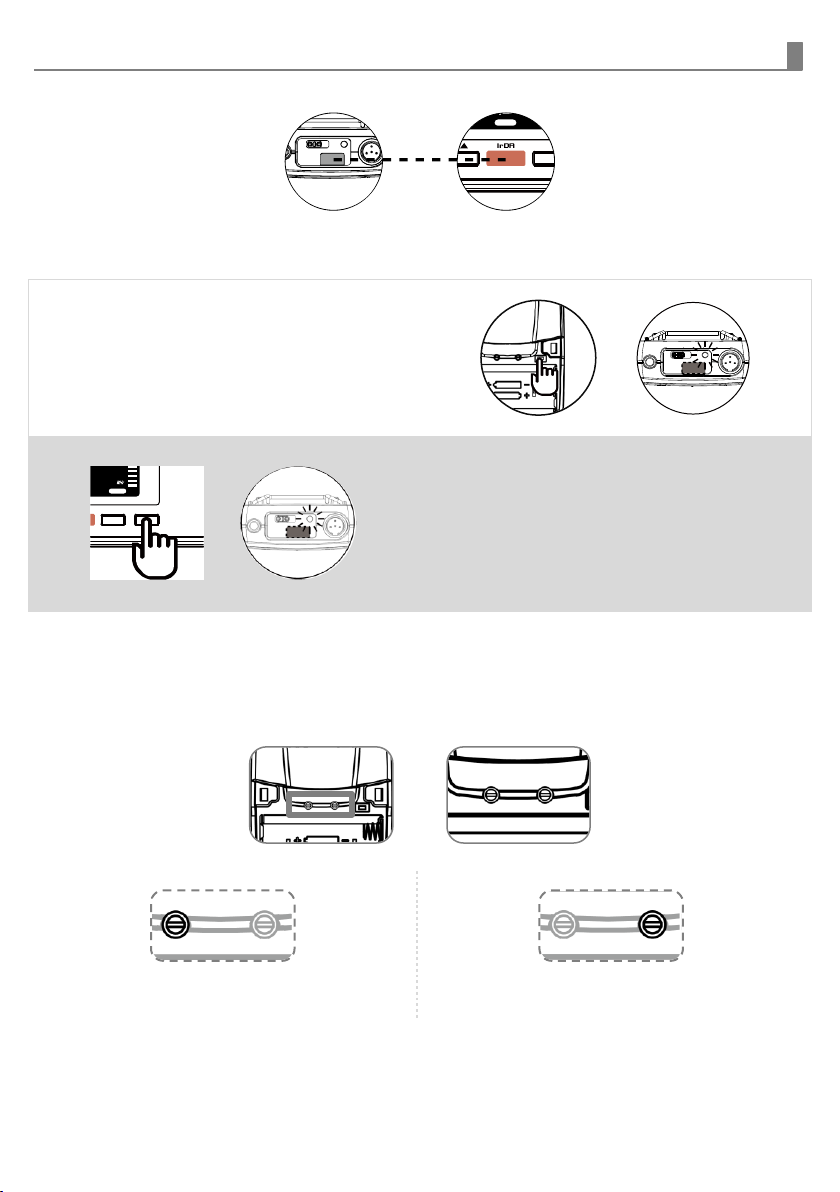
Align infrared areas of the receiver and transmitter within 10~30cm.
Changing the receiver’s channel
1 Press the synchronizing button of the
transmitter.
2 The transmitter's LED will grow to denote
transmitting the frequency to the receiver
and synchronizing the channels.
Changing the transmitter’s channel
1 Press the synchronizing button of the
receiver and the receiver will transmit the
frequency to the transmitter and
synchronize the channels
2 The transmitter's LED will grow to denote
its channel synchronized by the receiver.
If it doesn’t work check that you have the IR sensor panels aligned, that they are facing each
other, devices are within 10~30cm of each other, and try again.
GAIN setting (GT|MT)
Gain control enables the user to set different output levels.
GT (LEFT) is for the use of instrument with high
impedance, such as guitar.
MT (RIGHT)is for the use of low impedance such as
lapel or headset microphones.
FREQSQ
RF
6 3 00 00
VOL
SET
30cm
CH
FREQSQ
RF AF
AB
001
630000
VOL
CH
FREQSQ
RF AF
AB
0 0 1
630000
VOL
SDR-6120
WirelessReceiver SET SYNCSET SYNC
10~30cm

CHIAYO ELECTRONICS CO.,LTD.
Http://www.chiayo.com.tw|Email: sales@chiayo.com.tw
Office: 30, Lane 27, Section 4, Jen-Ai Road, Taipei 10685, Taiwan
Tel: 886-2-27415741|Fax: 886-2-27525242
Factory: 88, Chung-Hsiao Street 2, Chiayi 60080, Taiwan
Tel: 886-5-2711000|Fax: 886-5-5767611
Altri manuali Chiayo Trasmettitore

Chiayo
Chiayo SM-5016 Manuale utente

Chiayo
Chiayo SM-6000 Manuale utente

Chiayo
Chiayo SM-6100 IrDA Manuale utente

Chiayo
Chiayo SM-6100 IrDA Manuale utente

Chiayo
Chiayo SM-6100 IrDA Manuale utente

Chiayo
Chiayo SM-9000 IrDA Manuale utente

Chiayo
Chiayo DB-2400 Manuale utente

Chiayo
Chiayo SM-7100 IrDA Manuale utente

Chiayo
Chiayo NB-3100 Manuale utente


