
Clarion SIRHM Manuale utente
SIRHM
Home Installation Kit
Home Installation Guide
Clarion_SIRIUS_PnP_Shuttle_Home_Installation_Guide.book Page 1 Monday, February 16, 2004 5:01 PM

Clarion_SIRIUS_PnP_Shuttle_Home_Installation_Guide.book Page 2 Monday, February 16, 2004 5:01 PM

SIRHM 1
Dear Customer
Congratulations on your purchase of the world’s
finest brand in the electronic industry. At Clarion we
are committed to high-quality sound reproduction,
and are confident that you will be pleased with your
purchase.
Clarion’s Sirius Satellite Plug and Play Receiver
provides entertainment with the flexibility of both
home and car use.
100 streams (channels) of original programming
received in high-quality digital sound provide:
• 60 channels of commercial-free music
• 40 channels of news, sports and entertainment
This SIRHM installation kit contains the antenna and
power adapter required to provide satellite radio in
your home or office.The antenna connects to the
Plug and Play receiver cradle.
When traveling by car, you can enjoy satellite radio
by disconnecting the Plug and Play receiver from its
cradle at home and connecting it to the cradle in
your car (with the optional SIRCR Vehicle
Installation Kit).
Clarion and Sirius Satellite Radio welcome you to an
experience like no other.
To learn more about Clarion’s complete line of audio
products, please visit us at our Website:
www.clarion.com
Clarion_SIRIUS_PnP_Shuttle_Home_Installation_Guide.book Page 1 Monday, February 16, 2004 5:01 PM

Home Installation Guide
2
Precautions
Do not mount the Plug and Play receiver where it
obstructs any home entertainment component, such
as your:
• Television
• Stereo system indicators and displays
By adhering to all warning and safety considerations
you can avoid serious accidents and/or personal
injury.
FCC Notice
This unit complies with the interference limits
relative to a Class B digital device, applicable
under Part 15 of the FCC Rules regarding
installation in a residential environment. If the unit
is not installed in accordance with these
instructions, it could cause harmful interference to
radio or television reception. If this condition
persists after corrective action, consult your
dealer or experienced installation facility.
Copyright and Trademarks
This document is copyrighted by Clarion. You
may not copy any portion of it without permission.
SIRIUS is a registered trademark of SIRIUS
Satellite Radio.
Clarion_SIRIUS_PnP_Shuttle_Home_Installation_Guide.book Page 2 Monday, February 16, 2004 5:01 PM

SIRPNP 3
Contents
Package contents ..................................... 4
Installation cautions ................................ 5
Connections ............................................. 5
Position the antenna ................................ 6
Install the receiver ................................... 6
Removing the receiver ............................. 7
Mount the antenna ................................... 7
Determine the best position ........................7
Route the cable ...........................................8
Connect to the stereo .............................. 8
Limited warranty information ................ 12
Clarion_SIRIUS_PnP_Shuttle_Home_Installation_Guide.book Page 3 Monday, February 16, 2004 5:01 PM
Home Installation Guide
4
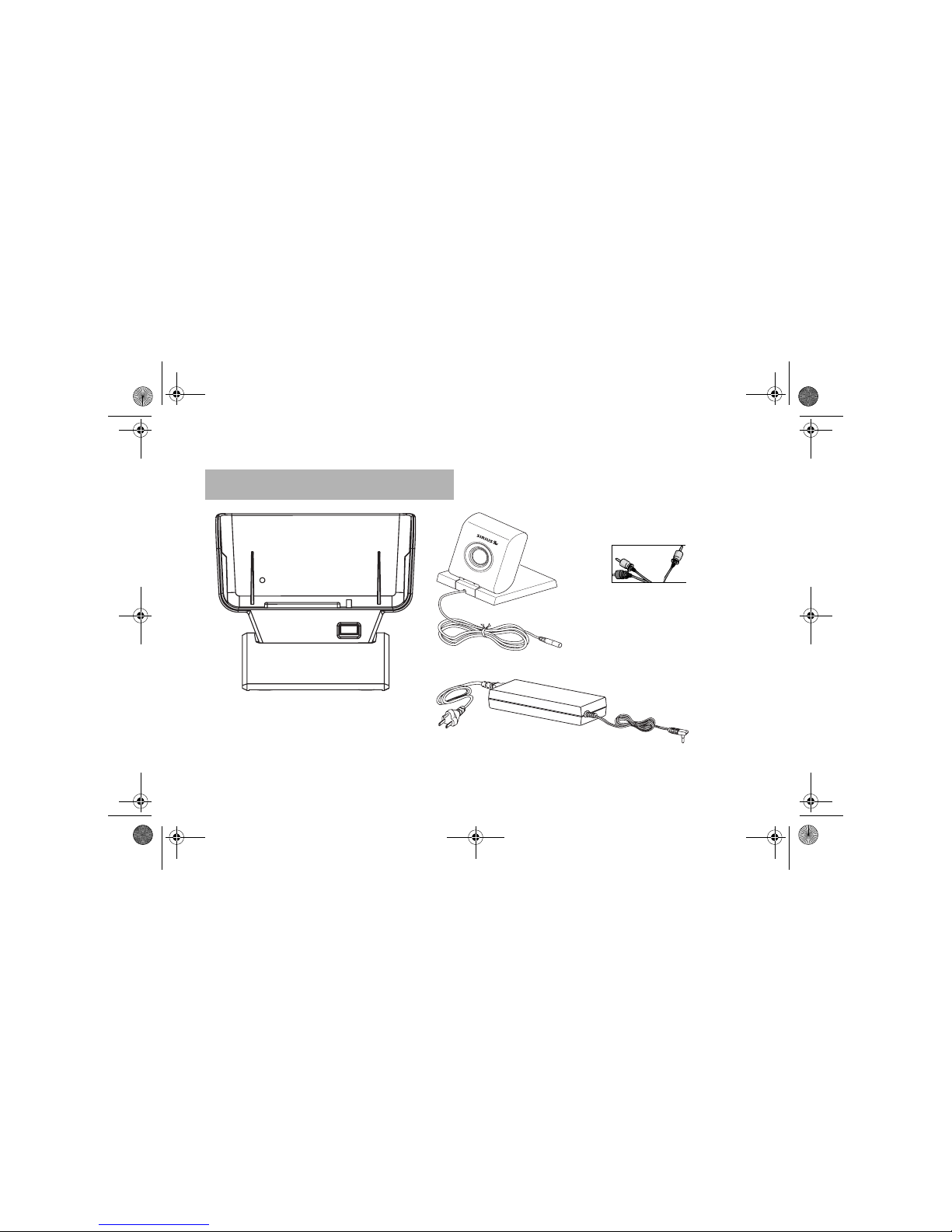
In addition to this manual, this kit includes the following:
1. Package contents
Home antenna
Power adapter
Audio cable
Cradle
Clarion_SIRIUS_PnP_Shuttle_Home_Installation_Guide.book Page 4 Monday, February 16, 2004 5:01 PM
SIRHM 5
• Don’t connect the power adapter cable to a wall
outlet until you’ve made and verified all other
connections. Connect the power adapter cable
last.
• Do not install the receiver where it will receive
direct sunlight or be subject to extreme temper-
atures.
• Incorrect installation may cause damage to the
system.
• When placing the antenna, see the antenna
aiming procedure in the Plug And Play Receiver
User’s Guide.
2. Installation cautions
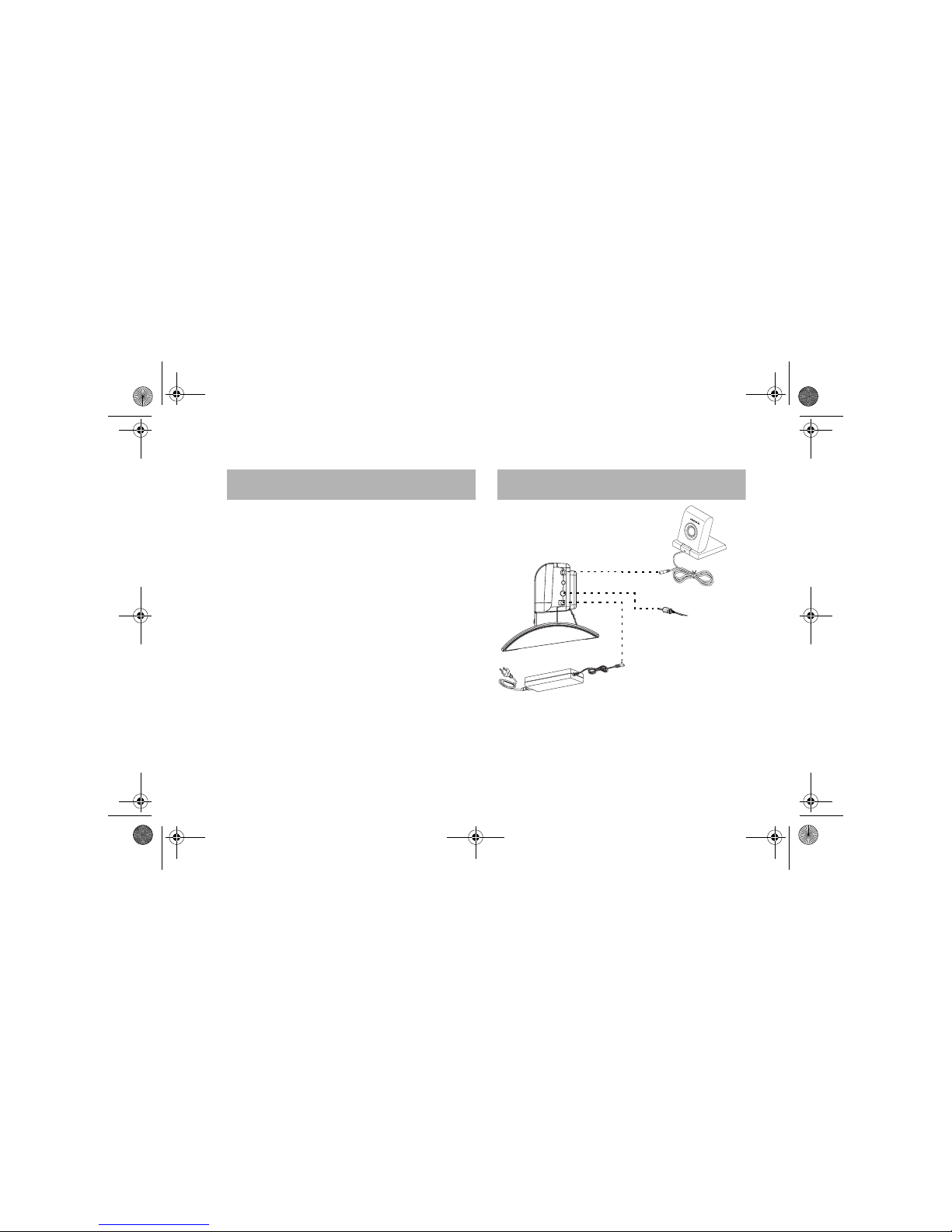
Overview of the connections
3. Connections
Cradle - left side
Clarion_SIRIUS_PnP_Shuttle_Home_Installation_Guide.book Page 5 Monday, February 16, 2004 5:01 PM
Home Installation Guide
6
For best reception, place the antenna near a
window. Initially, you may need to position the
antenna several times to find the optimum location.
• In a major city, where SIRIUS ground repeaters
are present, you can place the antenna away
from a window and still get good reception.
• You may place the antenna outside on your
roof, provided no overhead obstructions block
the antenna’s line-of-sight to the satellite.
Because the SIRIUS satellites orbit the earth, the
strength of the signal may change over time. In most
cases, the signal should be continuously available.
If you experience a loss of signal or audio problems,
reposition the antenna, moving it outside if
necessary.
4. Position the antenna
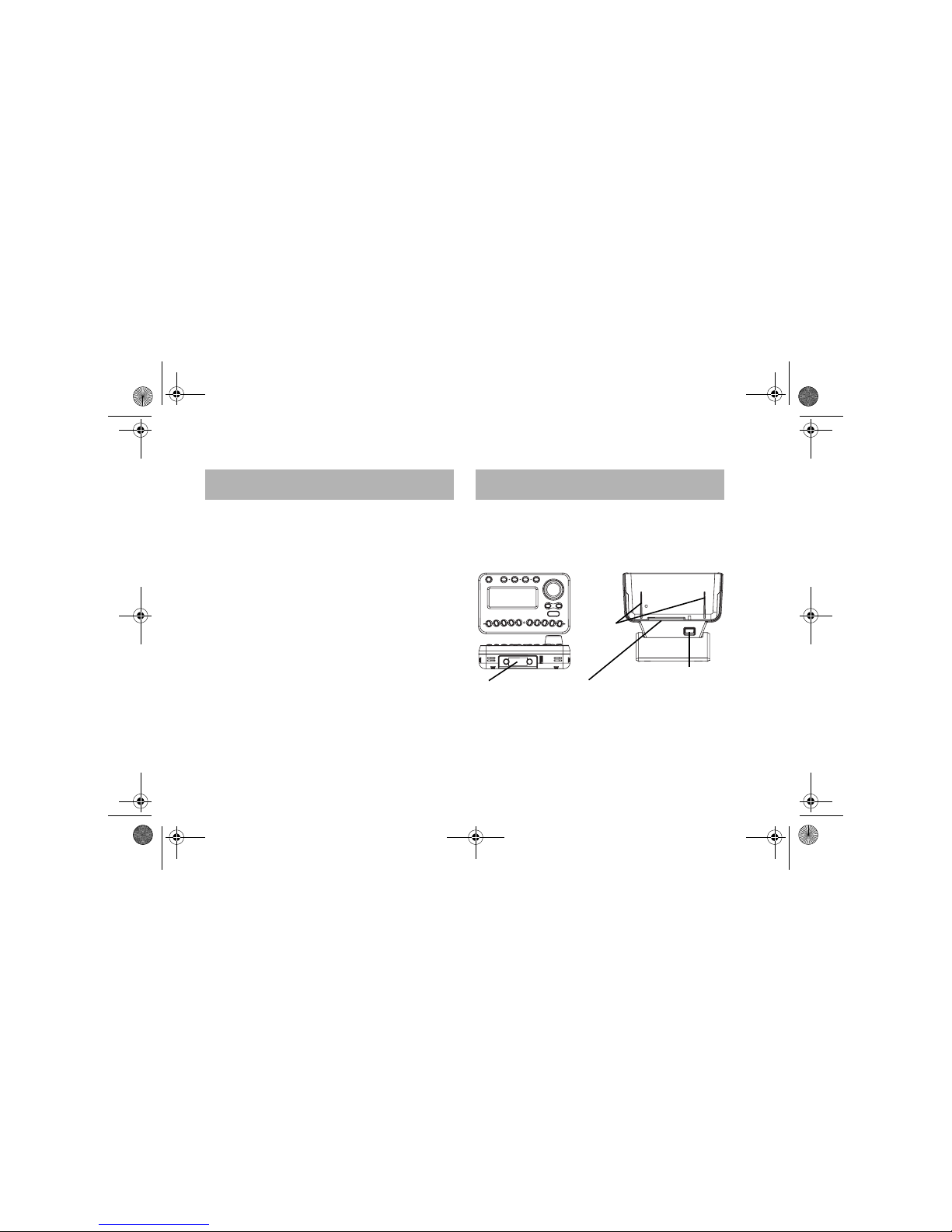
1. Using the guides, place the Plug and Play
receiver in the cradle so that the receiver
connectors are lined up.
Plug and Play receiver and cradle connectors
5. Install the receiver
Bottom of receiver
Front of cradle
This connector fits in this receptacle
Front of receiver
Release button
Guides
Clarion_SIRIUS_PnP_Shuttle_Home_Installation_Guide.book Page 6 Monday, February 16, 2004 5:01 PM
SIRHM 7
2. Gently slide the Plug and Play receiver into the
cradle.
3. Press on the top of the receiver to engage the
connectors.
The clip automatically engages.
Push the Release button and slide the Plug and
Play receiver upwards.
Place the antenna on a relatively flat surface.
Determine the best position
1. Plug the antenna into the connector on the side
of the cradle.
6. Removing the receiver
7. Mount the antenna
2. Place the antenna at the preferred location
inside or outside your home.
3. Press the power button to turn the Plug and
Play receiver’s power on.
4. Check the signal strength indicator in the
bottom left corner of the display.
If necessary, move the antenna to different
positions until the signal comes loud and clear.
5. If mounting the antenna outside, fix it in the best
position. Indoors, the antenna can be free-
standing.
6. Turn the Plug and Play receiver off.
Clarion_SIRIUS_PnP_Shuttle_Home_Installation_Guide.book Page 7 Monday, February 16, 2004 5:01 PM
Home Installation Guide
8
Route the cable
If the antenna is in the same room as your stereo
system, you may simply need to clip the antenna
cable to the window frame, baseboard etc. Coil any
surplus cable neatly and fasten with a cable tie.
If the antenna is outside or in another part of the
building:
1. Plan the routing of the antenna cable to the
Plug and Play receiver RF input.
Avoid any obstructions that could crimp, kink or
twist the cable.
2. Route the cable from the antenna position to
the cradle, bringing it through the basement,
under a window sill, etc.
Use protective grommets wherever you
encounter rough openings. Make adjustments
and take up slack whenever necessary.
1. Plug the supplied audio cable into the side of
the cradle and into your stereo system.
2. Plug the power cable into a 110-volt wall
receptacle.
The power LED on the power button glows red.
You’re ready to enjoy SIRIUS programming.
8. Connect to the stereo
Clarion_SIRIUS_PnP_Shuttle_Home_Installation_Guide.book Page 8 Monday, February 16, 2004 5:01 PM
Indice
Altri manuali Clarion Radio


