
Clarion M10II Manuale utente

Clarion/Hyperlink Bridge Kit Installation Manual Rev. A Page 1
Hyperlink Technologies, Inc.
Hyperlink/Clarion
M10II
Extended Range Wireless LAN Bridge Kit
Featuring the Clarion M10II 10 Mbit/sec Wireless Bridge
Installation Manual
Quick Installation Manual –Page 18
Copyright © 1996, Clarion Corporation of America. All rights reserved. No part of
the contents of this document may be transmitted or reproduced in any form or
by any means without the written permission of Clarion Corporation of America.
Portions Copyright © 1998, Hyperlink Technologies, Inc. All rights reserved
HyperGain and HyperAmp are trademarks of Hyperlink Technologies, Inc.

Clarion/Hyperlink Bridge Kit Installation Manual Rev. A Page 3
Hyperlink Technologies, Inc.
Contents
FCC Radio Interference Statement 4
Introduction 5
Features of the JX4000 5
Types of Installations 6
System Requirements 7
Kit Contents 7
Tools Required 7
M10II Front & Rear Panel Features 8
Connections & Features of the Amplified Antenna 9
The DC Power Injector/Lightning Protector 10
Overall System Configuration 11
Antenna System Connections 12
Surveying the Antenna Site 12
Preparing for System Installation 13
Mounting & Cabling the Amplified Antenna System 13
Basic System Checks 15
Amplifier & DC Power Injector LEDs 15
M10II LED Diagnostic Displays 16
Clarion M10II Specifications 17
Quick Installation Manual 18
APPENDICES
Antenna Mounting Instructions Appendix A

Clarion/Hyperlink Bridge Kit Installation Manual Rev. A Page 4
Hyperlink Technologies, Inc.
WARNINGS
The manufacturer assumes no responsibility for damage caused by interference
due to this equipment.
Radio Frequency Interference Statement
USA - Federal Communications Commission (FCC): This device complies
with Part 15 of FCC Rules. Operation of this device is subject to the following two
conditions:
This device may not cause harmful interference.
This device must accept any interference that may cause undesired operation.
Information to User: This device must be installed and used in strict accordance
with the manufacturer's instructions. However, there is no guarantee that
interference to radio communications will not occur in a particular commercial
installation. If this device does cause interference, which can be determined by
turning the host equipment off and on, the user is encouraged to consult the
instruction manual of the host equipment or the local device supplier. In case the
device does cause harmful interference with an authorized radio service, the
user/operator shall promptly stop operating the device until harmful interference
has been eliminated.
The manufacturer is not responsible for any radio or television interference
caused by unauthorized modification of this device or the substitution or
attachment of connecting cables and equipment other than those supplied. The
correction of interference caused by such unauthorized modification, substitution
or attachment will be the responsibility of the user.

Clarion/Hyperlink Bridge Kit Installation Manual Rev. A Page 5
Hyperlink Technologies, Inc.
Introduction
The Clarion M10II is a wireless transceiver providing 10 Mbit/sec burst data rate
to support wireless connections in IEEE 802.3 and Ethernet II (TCP/IP) LAN.
Equipped with a Hyperlink Extended Range Amplified Antenna System, the
M10II offers an ultra high-performance long-range building-to-building network
bridge.
The M10II functions as an Ethernet MAU. It uses a state-of-the-art spread
spectrum technology to implement robust 10 Mbps burst transmission. It also
actualizes efficient utilization of frame buffers and coordination of RF and wired
interface traffic to maintain high throughput.
The M10II offers true “Plug and Play” installation. No additional driver software
is required for operation. That is, the M10II can be connected not only to a
computer but also to a hub or to a router.
FEATURES OF THE M10II
The Clarion M10II has the following features:
•Full wireless Ethernet 10 Mbps data rate.
•State-of-the-art spread spectrum technology provides
reliable, secure, long range, radio link operation.
•True “Plug and Play” installation for compatibility with all
802.3 and Ethernet II LAN devices, all operating
systems and all protocol stacks.

Clarion/Hyperlink Bridge Kit Installation Manual Rev. A Page 6
Hyperlink Technologies, Inc.
Types of Installations
The type of application will determine which type of kit to install:
Building-to-Building or Tower-to-Tower:Typically these installations will
typically require directional Yagi or Grid Antenna kits.
Central Node in a Multipoint Network or Mobile Network:This type of
installation typically requires an Omni Directional Kit at the central node for 360
degree coverage.
System Requirements
The Clarion/HyperGain™ Amplified Extended Range Bridge Kit provides a

Clarion/Hyperlink Bridge Kit Installation Manual Rev. A Page 7
Hyperlink Technologies, Inc.
complete plug-and-play solution for linking buildings in an outdoor environment.
All you need to add is suitable masts or towers and some basic site planning.
Please read this manual in its entirety before beginning the installation.
Kit Contents:
Each Kit contains the following items:
Clarion M10II Radio and DC Power Supply
HyperAmp Remote Mounted Amplifier
HyperGain Antenna (Omni, Yagi, or Grid)
HyperGain DC Power Injector/Lightning Protector
Signal Filter
50 ft. Antenna Cable
4 ft. Jumper Cable
Mounting Hardware
Sealant Tape
Manual
Tools Required:
7/16" open-end wrench or Adjustable Wrench
#12-10 AWG or similar wire (for grounding)
Wire Cutter / Stripper
Pliers
Other Required Equipment:
Suitable mast or tower hardware
Transceiver
Other Helpful Equipment and Tools:
Cellular telephones or Walkie-talkies
Binoculars
Compass
Handheld GPS

Clarion/Hyperlink Bridge Kit Installation Manual Rev. A Page 8
Hyperlink Technologies, Inc.
M10II Front and Rear Panel Features
Internal antenna
(inside of the top
cover)
MAU port
External antenna port
DC 6.2V port
MAU LED
TX LED
RX LED
Power LED
Power Switch
FCC Certification label
(bottom)

Clarion/Hyperlink Bridge Kit Installation Manual Rev. A Page 9
Hyperlink Technologies, Inc.
Connections and Features of the Amplified Antenna
Familiarize yourself with the connections and features of the Amplifier Unit:
Mounting Flanges:
Two sets of mounting holes are provided on the amplifier’s mounting flanges for
either mast mounting using the included U-bolts, or bolted directly to a bracket or
other structure.
Power/Transmit Indicator LED:
This LED glows green in receive mode when power is applied to the amplifier,
and it flashes a red/orange color when transmitting.
Radio Connection:
This connection attaches to the DC Power Injector via the antenna feed cable,
and provides both signal and DC coupled power.

Clarion/Hyperlink Bridge Kit Installation Manual Rev. A Page 10
Hyperlink Technologies, Inc.
The DC Power Injector/ Lightning Protector
The DC Power Injector (also known as a "Bias-T") is an in-line device which
couples DC power onto a coaxial cable, enabling the cable to carry both RF
(radio frequency) signals and DC power. The amplifier is powered remotely
through the coaxial antenna feed cable by the way of this device. The DC Power
Injector included with the kit also provides integral lightning protection.
The DC Power Injector provides both Power and Remote Transmit Detect
indicator LEDs. The Power LED indicates that the DC Power Supply is
functioning. The Remote Transmit Detect indicator LED detects changes in the
DC current traveling through the antenna feed cable supplying the amplifier.
When the amplifier enters the transmit mode this indicator LED will be
illuminated, providing positive indication that the amplifier is functioning properly.
Clarion/Hyperlink Bridge Kit Installation Manual Rev. A Page 11
Hyperlink Technologies, Inc.
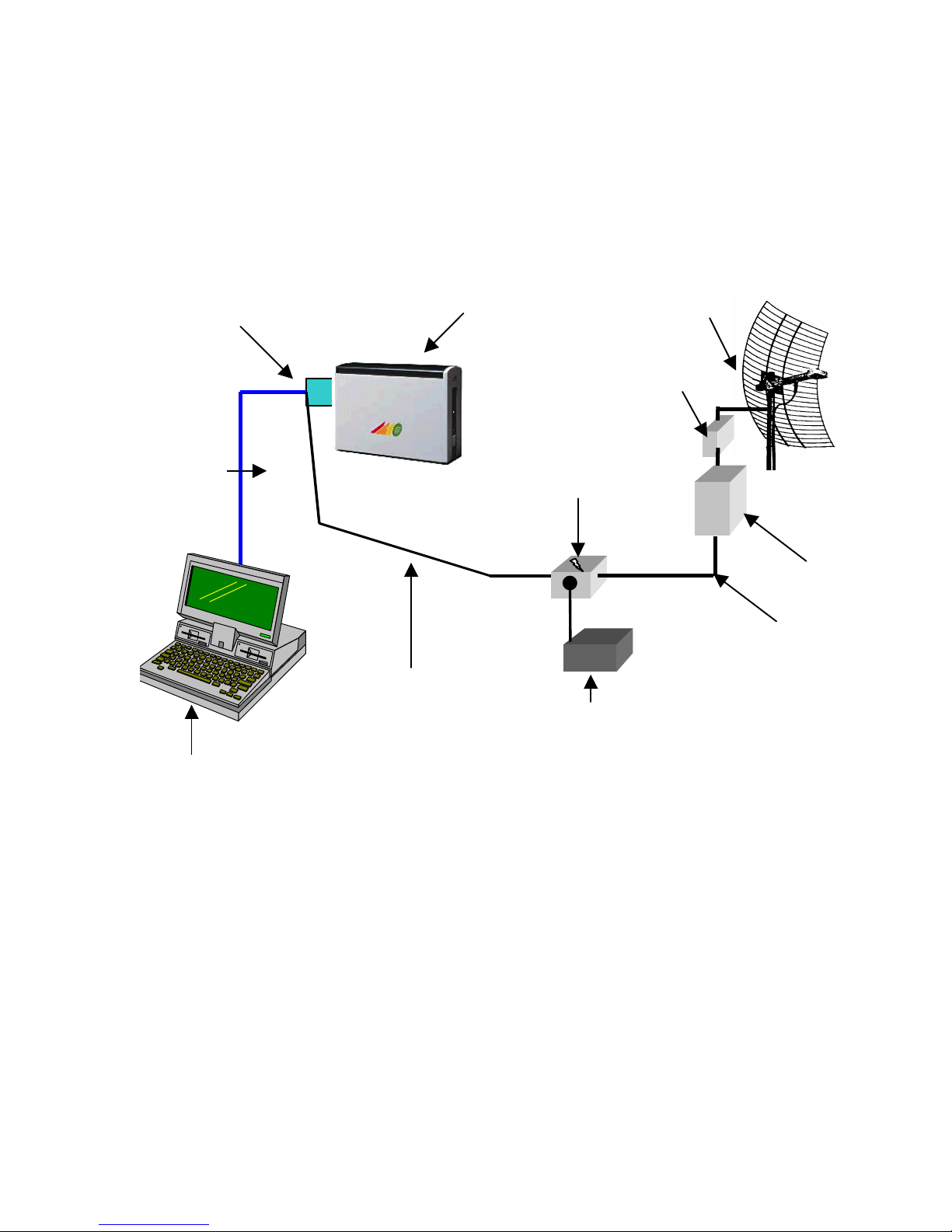
Overall System Configuration
The overall system configuration is shown below. Refer to this
diagram while reading the section which follows, and during
system installation.
Transceiver
AUI to 10BaseT
10BaseT
Cable
JX-4000
Adapter
Cable 4ft.
DC Power
Injector
Antenna
Cable 50ft.
Antenna
Network
Workstation
Amplifier
Signal Filter
DC Power
Supply
Indice


