
Colorado time systems Pro Pace Clock Manuale utente
User Guide
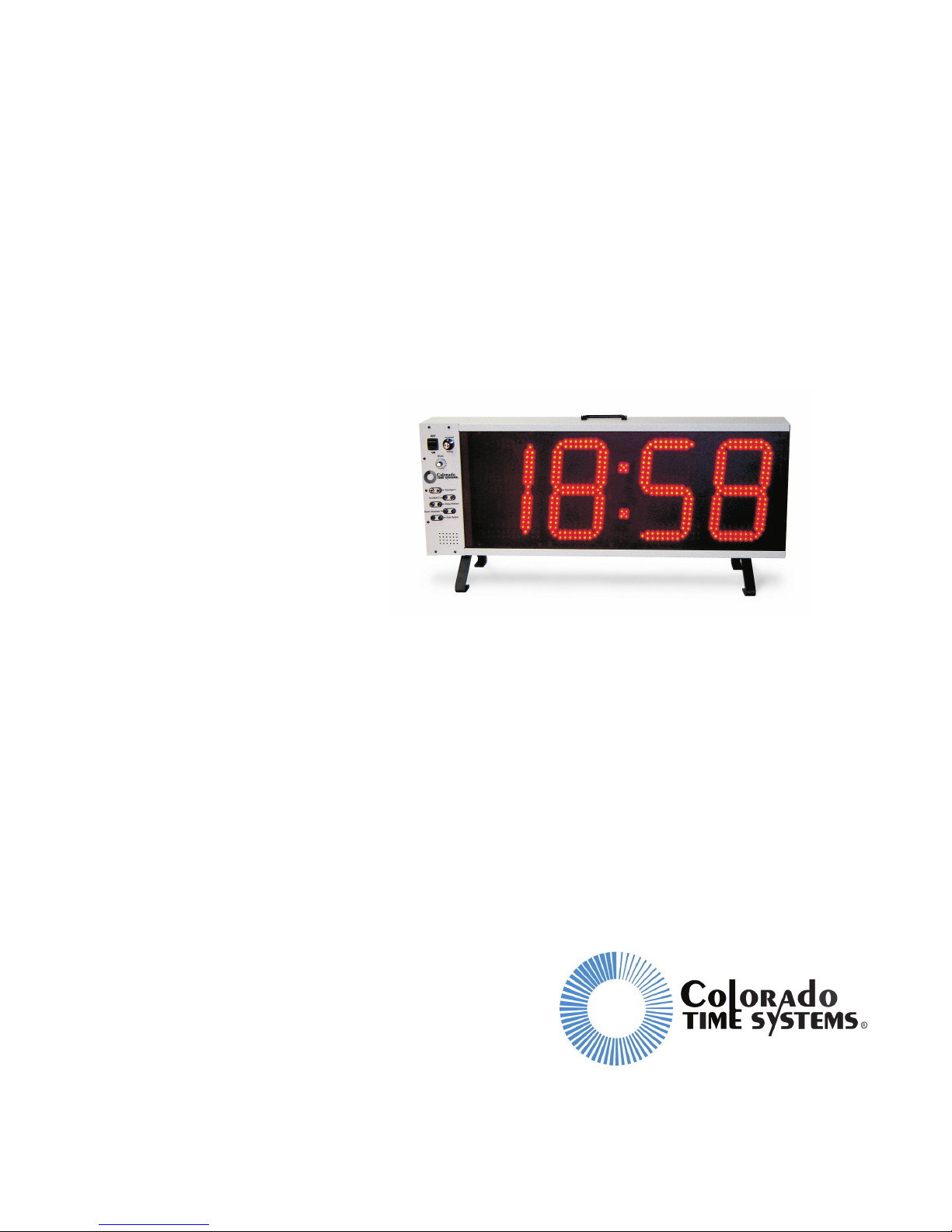
Pro Pace Clock
and Shot Clock
F891 Rev. 1106

Colorado Time Systems
Corporate Office
1551 East 11th Street
Loveland, CO 80537 USA
Sales - 1-800-279-0111 or +1 970-667-1000
Service: 1-800-287-0653 x256 or +1 970-667-1000 x256
FAX: 970-667-1032
Web: www.coloradotime.com
Email: [email protected]
Part Number F891 Rev. 1106
© 2006. Colorado Time Systems. All rights reserved.

Table of Contents
1 Introduction
How to Set Intensity and Mode .......................................................1
Intensity .....................................................................................1
Mode ..........................................................................................2
Physical Connections.......................................................................2
Scoreboard/Training ..................................................................2
Input Modes ...............................................................................3
Battery........................................................................................3
Horn ...........................................................................................3
Legs............................................................................................4
2 Pace Clock Operation
Standalone Pace Clock.....................................................................5
Pace Clocks in Series.......................................................................5
Without Timer or Controller......................................................5
With Timer or Controller ..........................................................5
3 Water Polo Operation
Physical Setup..................................................................................7
Displaying Information....................................................................7
Shot time ....................................................................................7
Game time..................................................................................8
Time out time.............................................................................8
Team scores ...............................................................................8
Time of day................................................................................8
4 Training Modes
Lap counter ......................................................................................9
Simple Pace Clock .........................................................................10
Pace clock with Cumulative Splits ................................................10
Pace clock with Lap Splits.............................................................11
Relay Exchanges............................................................................11
Start Reaction.................................................................................12
Turn Speed.....................................................................................12
Breakout Time ...............................................................................13
Start Reaction and Breakout Time.................................................13
Single Lane Timer .........................................................................14

Mid-Race Timing...........................................................................16
Test Mode ......................................................................................17
5 Scoreboard Modes
Physical Setup................................................................................19
Swimming .....................................................................................20
Lane Times...............................................................................20
Event/Heat ...............................................................................20
Training Pace Clock.......................................................................20
Lane Times...............................................................................20
Diving ............................................................................................20
Dive Number and Position.......................................................20
Current Round/Current Diver ..................................................21
Synchronized Swimming...............................................................21
Award.......................................................................................21
All Sports .......................................................................................21
Time of Day .............................................................................21
6 Appendix
Firmware prior to 2.0 .....................................................................23

1
Introduction
Thank you for purchasing a Colorado Time Systems Pro Pace
Clock/Shot Clock.
Introduction This introductory chapter describes physical features of your Pro
Pace Clock/Shot Clock. Subsequent chapters describe how to set up
and use your Pro Pace Clock/Shot Clock in a variety of ways.
Pace Clock Operation Chapter 2, beginning on page 5, describes how to physically set up
single or multiple Pro Pace Clocks for basic pace clock operation.
Water Polo Chapter 3, beginning on page 7, describes using the units for Water
Polo as shot clocks and also for displaying game time and other
scoreboard data.
Training Modes Chapter 4, beginning on page 9, describes the training modes, in-
cluding what the mode does and which other devices are needed for
the mode.
Displaying Other Information Chapter 5, beginning on page 19, describes using a Pro Pace
Clock/Shot Clock to display additional information. The information
available for display varies by sport.
How to Set Intensity
and Mode
Use the Mode switch on the front panel to set intensity and mode, as
follows:
Intensity When a Pro Pace Clock is turned on, the clock will first display in
and a number for Intensity. While in is displayed, the Mode switch
adjusts the intensity of the display. Fifteen levels of intensity are
available, from 1 (lowest) to 15/16 (highest). Select the desired in-
tensity.
NOTE: The initial intensity displayed will be the last setting saved
before the clock was turned off. It will not change until the knob is
turned for the first time.
Introduction
1
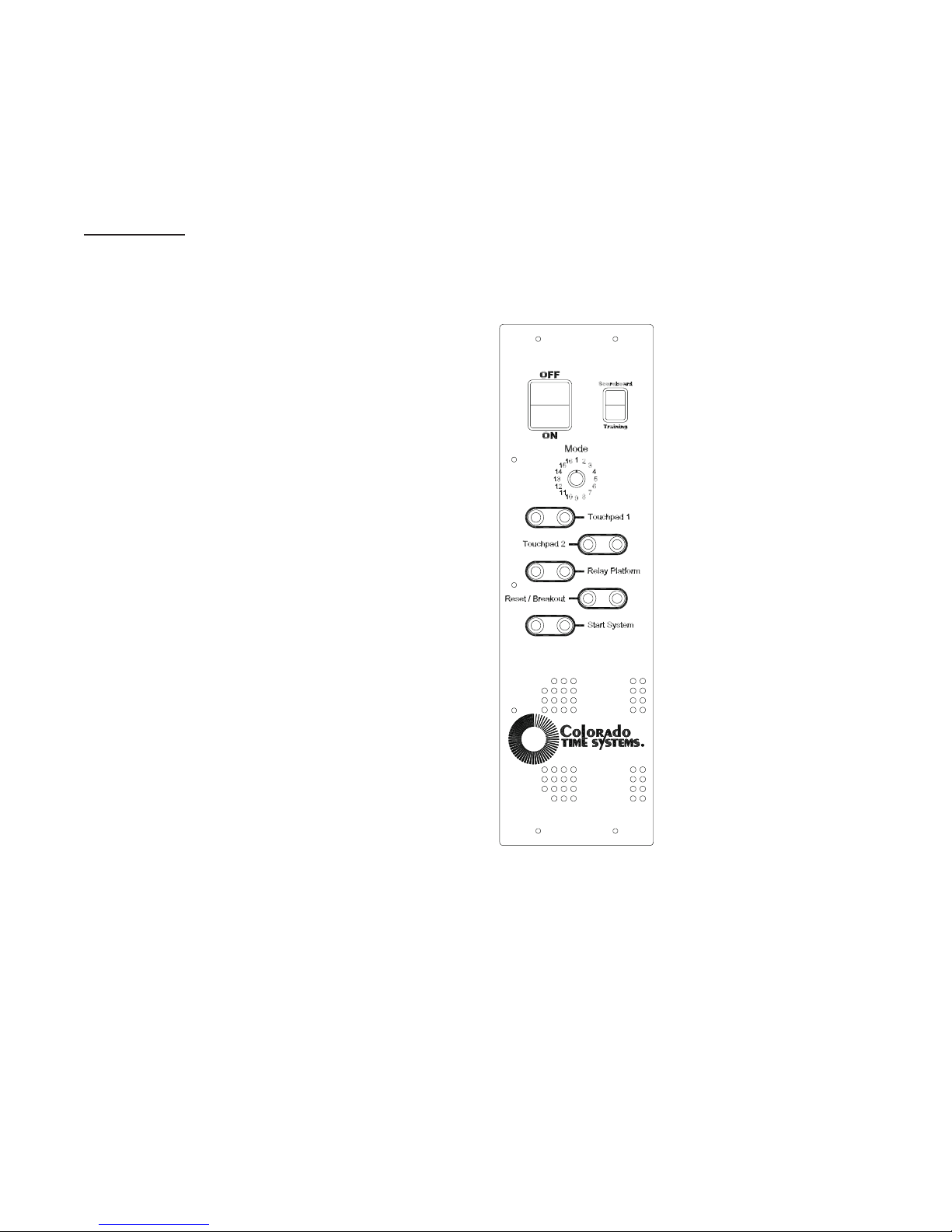
Mode After the Mode switch has been in the same intensity setting for 4
seconds, the clock will display the firmware revision, and then the
current mode. At this point, the Mode switch changes the mode (and
only the mode) until the clock is turned off and then on again.
Physical
Connections
The physical connections are on the left side of the front panel.
Scoreboard/Training When the switch is set to scoreboard, and the clock is connected to
a timer or controller through the quarter-inch phono plug (RS-232)
or the round 4-pin connector (RS-485), the clock will display infor-
mation from the timer or controller based on the clock's Mode switch
setting. See Chapter 3, beginning on page 7, for information that can
be displayed for Water Polo, and Chapter 5, beginning on page 19,
for other information that can be displayed.
Introduction
2
When the switch is set to training, the training mode that is selected
using the 16-position mode switch will be displayed. The various
training modes are described in Chapter 4 beginning on page 9.
Input Modes Most of the various training modes require input from one or more
of the following: touchpads, relay platform, pushbutton or start sys-
tem. Plug the device(s) providing the input into the proper connec-
tor(s) on the front panel.
Most input connections are self-explanatory.
Pushbuttons For all input connectors, a pushbutton operated by a human judge
may be connected to provide input; however, some precision in tim-
ing will be lost. The pace clock records to a hundredth of a second,
but a human with a pushbutton can’t come close to that level of ac-
curacy!
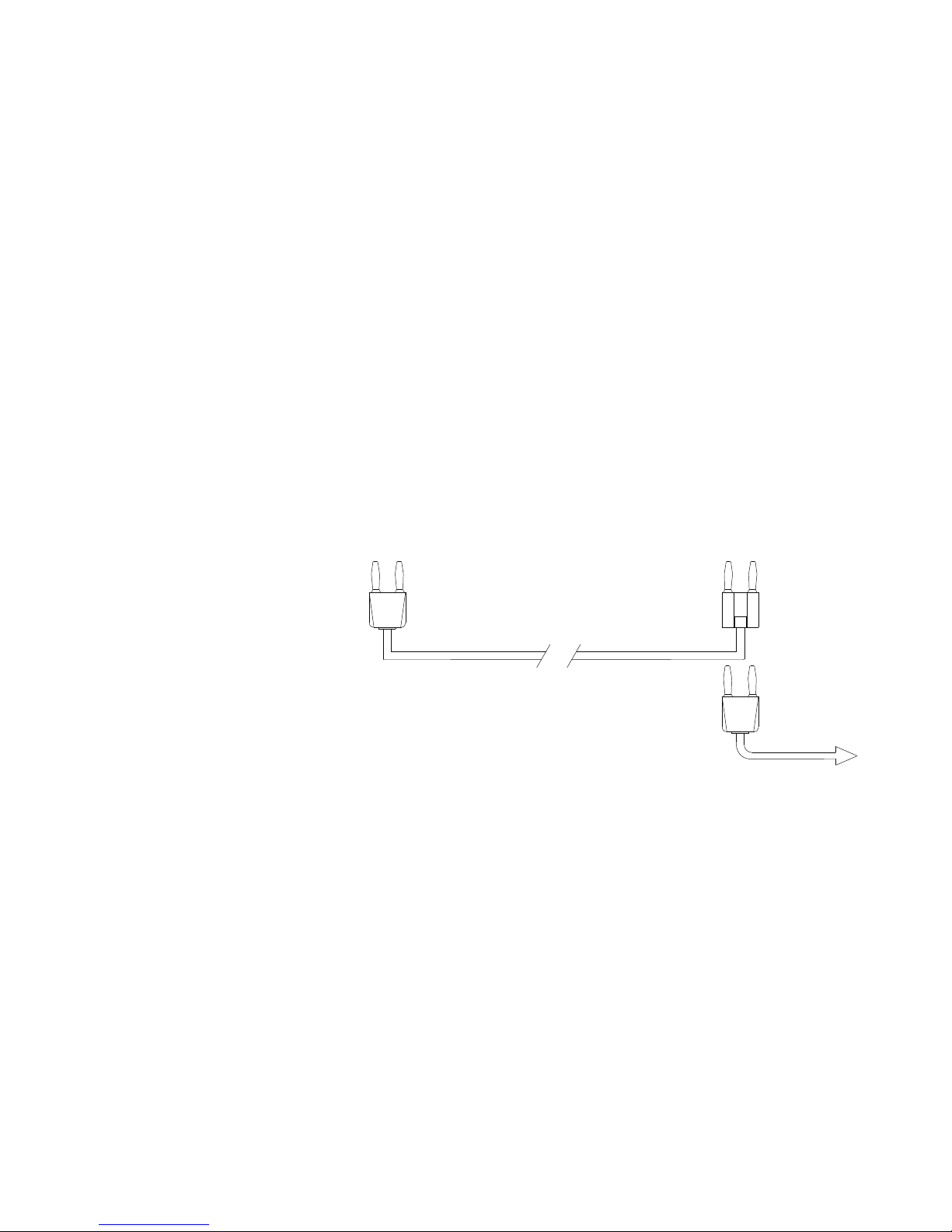
Touchpads There are two touchpad inputs to allow for touchpad input from both
ends of the pool. The touchpad inputs are connected to the same in-
ternal signal, so it makes no difference which one is used.
To take input from touchpads at both ends of the pool, plug the
touchpad from one end of the pool into either touchpad input on the
Pro Pace clock. Plug the touchpad from the other end into the other
touchpad input, using an extension cable (CTS SJ series) with a
stackable, open-ended dual banana plug.
Battery The internal battery can supply power to the pace clock. A fully
charged battery will run the unit for a minimum of 6 hours. Leave
the unit plugged in overnight to fully charge the battery after use.
The battery charges any time the unit is plugged in to AC power.
Horn The internal horn is controlled by a CTS timer connected to the unit,
and requires no user intervention, other than selecting the proper set-
Introduction
3
plug into Pace Clock
Pro touchpad input
extension cable
stackable,
open-ended dual
banana plug
to touchpad
Cabling for far end touchpad input
ting on the mode switch, as described in the Water Polo chapter, be-
ginning on page 7.
Legs The pace clock includes legs. If you would like to use the legs, attach
them with the hardware included to the threaded mounting holes in
the bottom of the clock.
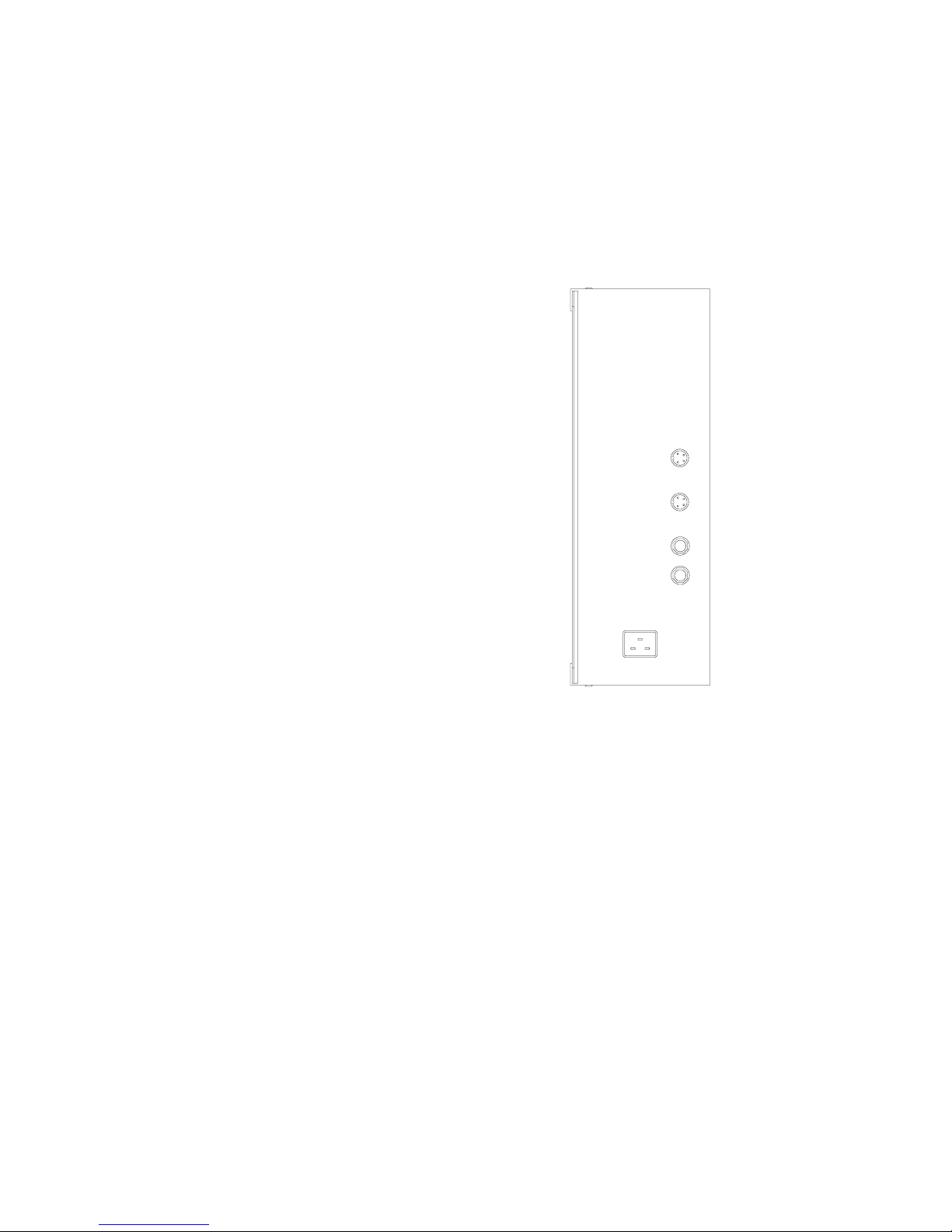
Side panel
Data cable
connections
On the right end panel, there are four data cable connectors and a
power receptacle. The upper two data cable connections are round,
4-pin connectors for RS-485; the lower two are quarter-inch phono
connectors for RS-232.
AC Power
connection
The power receptacle accepts a standard power cord for 110 VAC. If
220 VAC is required, the power supply can be modified at the fac-
tory. Modified units are labeled accordingly.
Introduction
4

2
Pace Clock Operation
Standalone Pace
Clock
For simple pace clock operation, turn the Pro Pace Clock on. Set the
Scoreboard/Training switch to Training, and set the Mode switch to
2. The pace clock will display 02 (for mode 2), and then reset itself
to :00 and begin counting up. After displaying 59:59, the display
rolls over to :00.
Pace Clocks in
Series
Without Timer or
Controller
To run a series of pace clocks without an external controller, set the
Scoreboard/Training switch on the front panel of the first pace clock
to Training, and set the Mode switch to 2. Set the other pace clock(s)
to Scoreboard and Mode 1. Connect the pace clocks with data cables
using the round 4-pin (RS-485) connectors. All connected pace
clocks will display the same information.
Turn the pace clocks on with the power switch on the front panel.
The pace clocks will begin counting up from zero, displaying time as
minutes and seconds. After displaying 59:59, the displays will roll
over to :00.
With Timer or
Controller
A clock or series of clocks can be controlled using a CTS timer or
pace clock controller. The clock(s) will display information from the
timer or pace clock controller based on the setting of the Mode dial.
See Chapter 3 starting on page 7 for specifics about Water Polo, and
Chapter 5 starting on page 19 for specifics on other sports.
Pace Clock Operation
5

Pace Clock Operation
6
Questo manuale è adatto per i seguenti modelli
3
Indice
Altri manuali Colorado time systems Orologio

Colorado time systems
Colorado time systems Slim Pace Manuale utente

Colorado time systems
Colorado time systems QuickStart Pro Manuale utente

Colorado time systems
Colorado time systems Counting Clock Pro Manuale utente

Colorado time systems
Colorado time systems MS-0043 Manuale utente

Colorado time systems
Colorado time systems Ultimate Pace Clock Manuale utente


