CommPact Control system Manuale utente

Installation Manual
For quick installation information please refer to the CommPact
Quick Start Installation Guide provided on our website: www electronics-line com

ii
Table of Contents
1. Introduction ................................................................................................................................................................................ 1
1.1. Documentation Conventions...................................................................................................................................1
1.2. Specifications..........................................................................................................................................................2
1.3. System Overview ....................................................................................................................................................3
1.4. Hardware Layout.....................................................................................................................................................4
2. System Installation..................................................................................................................................................................... 7
2.1. Pre-Installation Planning .........................................................................................................................................7
2.2. Installation Procedure .............................................................................................................................................8
2.3. Back Tamper ........................................................................................................................................................12
2.4. Internet Communication Setup .............................................................................................................................12
3. Basic System Operation .......................................................................................................................................................... 14
3.1. Front and Back Panel Layouts..............................................................................................................................14
3.2. Front Panel System Status LEDs .........................................................................................................................15
3.3. Front Panel Keypad ..............................................................................................................................................15
3.4. LCD Display ..........................................................................................................................................................16
3.5. Audible Notification ...............................................................................................................................................17
3.6. Setting and Unsetting............................................................................................................................................18
3.7. Additional Setting Options.....................................................................................................................................21
4. Advanced System Operation................................................................................................................................................... 23
4.1. Menu Navigation ...................................................................................................................................................23
4.2. Cancel Report .......................................................................................................................................................24
4.3. Zone Omitting .......................................................................................................................................................24
4.4. User Codes ...........................................................................................................................................................24
4.5. Follow-Me..............................................................................................................................................................27
4.6. Event Log..............................................................................................................................................................27
4.7. Service Menu ........................................................................................................................................................28
5. Telecontrol and Two-Way Audio ............................................................................................................................................. 34
5.1. Incoming Calls ......................................................................................................................................................34
5.2. Outgoing Calls.......................................................................................................................................................36
6. PGM Control.............................................................................................................................................................................. 38
6.1. Keyfob Control ......................................................................................................................................................38
6.2. Telephone Control ................................................................................................................................................38
7. Devices...................................................................................................................................................................................... 39
7.1. Device Descriptors................................................................................................................................................39
7.2. Wireless Devices ..................................................................................................................................................39
7.3. Zones ....................................................................................................................................................................41
7.4. Keyfobs .................................................................................................................................................................45
7.5. Wireless Keypads .................................................................................................................................................46
7.6. Repeaters .............................................................................................................................................................47
7.7. Wireless Sounder .................................................................................................................................................47
8. Entry/Exit Timers and System Tones...................................................................................................................................... 49
8.1. Entry/Exit Delay.....................................................................................................................................................49
8.2. Set on Exit.............................................................................................................................................................49
8.3. Supplementary Entry Delay...................................................................................................................................49
8.4. Entry Deviation......................................................................................................................................................50
8.5. Setting Tones........................................................................................................................................................50
8.6. System Trouble Tones..........................................................................................................................................51

iii
8.7. Tones Options.......................................................................................................................................................52
9. System Options......................................................................................................................................................................... 53
9.1. Code Lockout........................................................................................................................................................53
9.2. Set/Unset Options.................................................................................................................................................53
9.3. Panic Alarm...........................................................................................................................................................54
9.4. AC Loss Delay ......................................................................................................................................................55
9.5. Display Options .....................................................................................................................................................55
9.6. PGM Output Options.............................................................................................................................................56
9.7. "No Set" Indication ................................................................................................................................................58
9.8. Jamming Detection ...............................................................................................................................................58
9.9. "No Motion" Time ..................................................................................................................................................58
9.10. Vocal Messages....................................................................................................................................................59
9.11. Engineer Access ...................................................................................................................................................59
9.12. Daylight Savings....................................................................................................................................................59
9.13. Entry/Exit Trouble..................................................................................................................................................59
9.14. Report Fail Trouble ...............................................................................................................................................60
9.15. Immediate Setting from WUApp ...........................................................................................................................60
10. Communications....................................................................................................................................................................... 61
10.1. System Reporting..................................................................................................................................................61
10.2. Report Cycles........................................................................................................................................................63
10.3. Vocal Message Dialer ...........................................................................................................................................63
10.4. Remote Programming...........................................................................................................................................65
10.5. Service Call ...........................................................................................................................................................67
10.6. Communications Options......................................................................................................................................67
10.7. GSM Options.........................................................................................................................................................70
10.8. TWA Event Report Options...................................................................................................................................72
10.9. Event Options for Central Station Reporting.........................................................................................................74
10.10. Vocal Message Dialer Event Options ...............................................................................................................75
11. Internet Options .......................................................................................................................................................................... 77
11.1. ELAS Connection Parameters ..............................................................................................................................77
11.2. Control System Parameters..................................................................................................................................77
11.3. GPRS Network Parameters..................................................................................................................................78
12. System Initialization ................................................................................................................................................................. 79
12.1. Initialization............................................................................................................................................................79
12.2. Default Program Restore ......................................................................................................................................79
12.3. Clear User Codes..................................................................................................................................................79
12.4. Clear Wireless Transmitters .................................................................................................................................79
Appendix A: Menu Structure ............................................................................................................................................................. 80
Appendix B: Transmitter Installation................................................................................................................................................ 87
PIR Detectors (EL-2645/EL-2645PI)..................................................................................................................................87
Directional PIR (EL-2650XL)..............................................................................................................................................90
Wireless PIR (EL-2652SR) ................................................................................................................................................95
Magnetic Contact (EL-2601)..............................................................................................................................................99
Universal Transmitter (EL-2602)......................................................................................................................................101
Glassbreak Detector (EL-2606) .......................................................................................................................................102
Vibration Detector (EL-2607) ...........................................................................................................................................106
Smoke Detector (EL-2703) ..............................................................................................................................................108
Keyfobs (EL-2711M / EL-2711P / EL-2614E and EL-2714).............................................................................................116
1-Way Wireless Keypad (EL-2620)..................................................................................................................................117
Wireless Indication Keypad (EL-2621).............................................................................................................................118

iv
Flood Detector (EL-2661) ................................................................................................................................................120
Gas Leak Detector (EL-2762)..........................................................................................................................................122
Carbon Monoxide Detector (EL-2764) .............................................................................................................................125
Outdoor Sounder and Strobe (EL-2626AC).....................................................................................................................130
Repeater (EL-2635) .........................................................................................................................................................133
Transmitter Specifications................................................................................................................................................136
Appendix D: Event Table................................................................................................................................................................. 139
Appendix E: Zone Types ................................................................................................................................................................. 142

1 Introduction
CommPact Installation Manual
1
1. Introduction
This manual is designed to help you install the CommPact Control System1. We strongly urge you
to read through this manual, in its entirety, before beginning the installation process so that you can
best understand all that this security system has to offer. This manual is not intended for end user
use. End users are encouraged to read the user manual provided with the system. f you have any
questions concerning any of the procedures described in this manual please contact Electronics Line
3000 Ltd. at (+972-3) 963-7777.
1.1. Documentation Conventions
Throughout the manual, we have tried to include all of the operating and programming functions
using a similar structure and order as they appear in the menu. A detailed explanation of how to
navigate the Control System’s menu is included in p. 23, 4.1 Menu Navigation. n order to simplify
the procedures that appear in the rest of this manual, the following conventions are used:
Table 1-1: Documentation Conventions
Item Description
Select Use the arrow keys to scroll through the options and press '√'
From the Event Log Menu,
select Clear Log. Enter the main menu by pressing 3and entering your user code. Using the arrow
keys, navigate until you reach Event Log and press √. Using the arrow keys,
navigate until you reach Clear Log and press '√'.
From the Service menu,
select Time/Date, Set Date.
The same as above only this time you are navigating through three menu levels.
[7012] The shortcut to a specific menu item from the main menu. In this case, this is the
shortcut for Set Date. These appear in the procedures as an additional aid to menu
navigation.
[#5] A shortcut to a specific item in a sub-menu. For example, [#5] is the shortcut to Bell
enable disable in the sub-menu that is opened once you have selected the detector
you want to program.
√The symbol on a key that appears on the Front Panel keypad
5. Interface Test The text that actually appears on the CommPact LCD display (bold).
Due to the occurrence Important note, please pay attention.
The CommPact Control
System is
Caution: description of a potentially hazardous situation.
Warning Do not test
with flame!
Warning: description of a potentially hazardous situation that is a threat to
human life.
1The terms Control System, Control Panel, and CP refer to the same notion.

1 Introduction
CommPact Installation Manual
2
1.2. Specifications
General
Zones: 32 wireless zones (1 transmitter per zone), 1
hardwire zone (Zone 33).
Wireless Keyfobs: 19 (Controlled or Non-controlled)
Wireless Keypads: up to 4, including one way or two-
way
Repeaters: 4
Wireless Sounder: 1 (2-way)
User Codes: 32
Setting Methods: Full, Part or Perimeter.
Event Log: 1022 event capacity, time and date stamped
Weight: 1.350g
Dimensions: 210x153x40 mm
Communications
Event Reporting Accounts: up to 6, including Central
Station, Follow-Me, and Voice.
Telephone Numbers: 6 event reporting accounts, RP
Callback, Service Call.
Communication Interface Options: GPRS, GSM, PSTN.
Receiver
Type: Super-heterodyne, fixed frequency
Frequency: 418MHz, 868.35 or 433.92 (optional).
Data Encryption: SecuriCode™
Electrical
*
Power Input: 230VAC, 50Hz, 120VAC, 60Hz/9VAC,
15VA (Model 1332)
AC Current Consumption: 30mA (alarm), 17mA
(standby)
DC Current Consumption: 280mA (alarm), 130mA
(standby)
Maximum Auxiliary Output Current Rating : 50mA
Battery low: below 7.15V
Backup Battery Pack: 4.8V 1.3Ah Part No. BT3021
(4 x 1.2 NiMH, size AA, rechargeable cells,)
The maximum charging current for the BT-5780 is 1.8 Ah
Fuse Ratings: 63mA/250V for 230VAC – Part No.
EF1063,
PGM Relay Output Contact Rating: 100mA (max. load)
Built-in Sounder: 93dB @ 10ft
Tamper Switch: N.C.
Operating Temperature: -10°C to 55°C (14°F to 131°F)
* The measurements are with fully charged battery. AC current was measured on fuse F1 and DC current was measured
on fuse F2.
!
Power connection to the unit should be according to the national electrical code for
permanent installation.
The power supply should be fed from a readily accessible disconnect device.
If the unit is permanently wired to the mains power, use a 2-pole disconnect device (15A max.)
and the wires should be min. 0.75mm2in a conduit of at least 16mm.
If the mains power is connected with a plug, the plug should be indicated as the disconnecting
device and the socket shall be max. 2m from the Control System.
Batteries shall be provided by a distributor and replaced by authorized service personnel.
The backup battery pack should be replaced every five years.
Batteries should be stored in a cool, dry place.

1 Introduction
CommPact Installation Manual
3
1.3. System Overview
The CommPact Control System is a full-featured wireless Control System that is expected to
provide a solution to the needs of most residential installations. This system has been developed
based upon a design concept geared towards easy installation and use. With this in mind, the user
interface is based on a simple, menu-driven model that suits the essential requirements of both the
user and engineer alike. You can program the CommPact Control System on-site using the Front
Panel keypad or PC, or off-site via a PC using local programming option of the Remote
Programmer.
The system offers GPRS network connectivity, providing high-speed central station reporting via a
GPRS interface.
The Electronics Line Application Server (ELAS) handles all communication between the system,
service providers and web users enabling monitoring and control to be performed via the Web.
Backup communication is carried out via PSTN or GSM.
Central station communication and remote parameters programming and maintenance employ
GPRS, GSM or standard PSTN communication. SMS messaging provides an innovative method
used for both central station and Follow-Me user monitoring. Additionally, SMS messages can be
sent to the Control System enabling the user to send commands to the system from anywhere on
the planet.
Figure 1-1 shows the components that make up the system and the system’s interaction with
external communication networks for all the available configurations.

1 Introduction
CommPact Installation Manual
4
Figure 1-1: System Architecture
1.4. Hardware Layout
The aim of this section is to acquaint you with the circuit boards that make up the system. The
CommPact Control System housing has two PCBs: the Main Board and the Power Supply and
Connections Board.

1 Introduction
CommPact Installation Manual
5
1.4.1. Main Board
The Main Board is the brain of the system. t coordinates all the Control System activity.
The Main Board (see Figure 1-2) enables GSM and GPRS communication that allows reporting
events to the Central Station send or receive SMS messages, implement cellular Two-Way Audio
and remote software update.
This Board also has a standard dialer for communication via the Public Switched Telephone
Network (PSTN). Backup communication with event reporting, and Two-Way Audio (TWA) are
also available via PSTN.
The Main Board also has connectors to the Built-in Sounder and the Speaker.
Additionally, the Main Board includes a USB port for PC programming.
Figure 1-2: Main Board
1. Built-in Sounder Connector
2. Buzzer
3. LCD Contrast Control
4. USB Port
5. SIM-Card Holder
6. Speaker Connector
7. Flat-Cable Interface Connector to the Power Supply and
Connections Board
8. Sounder Strength Control Jumper (JP1)
Table 1-2: Main Board Jumper Settings
JPI Sounder Strength
(see Figure 1-2, Main Board)
Installed: 105dB
Removed: 85dB
Do not use VoIP phone lines for communication to the central monitoring station.
In certain cases the system may not transmit alarm signals successfully over the
VoIP network.
To reduce the risk of fire, use only o. 26AWG or larger telecommunication wire.
Flat cable (8) is not Removable!

1 Introduction
CommPact Installation Manual
6
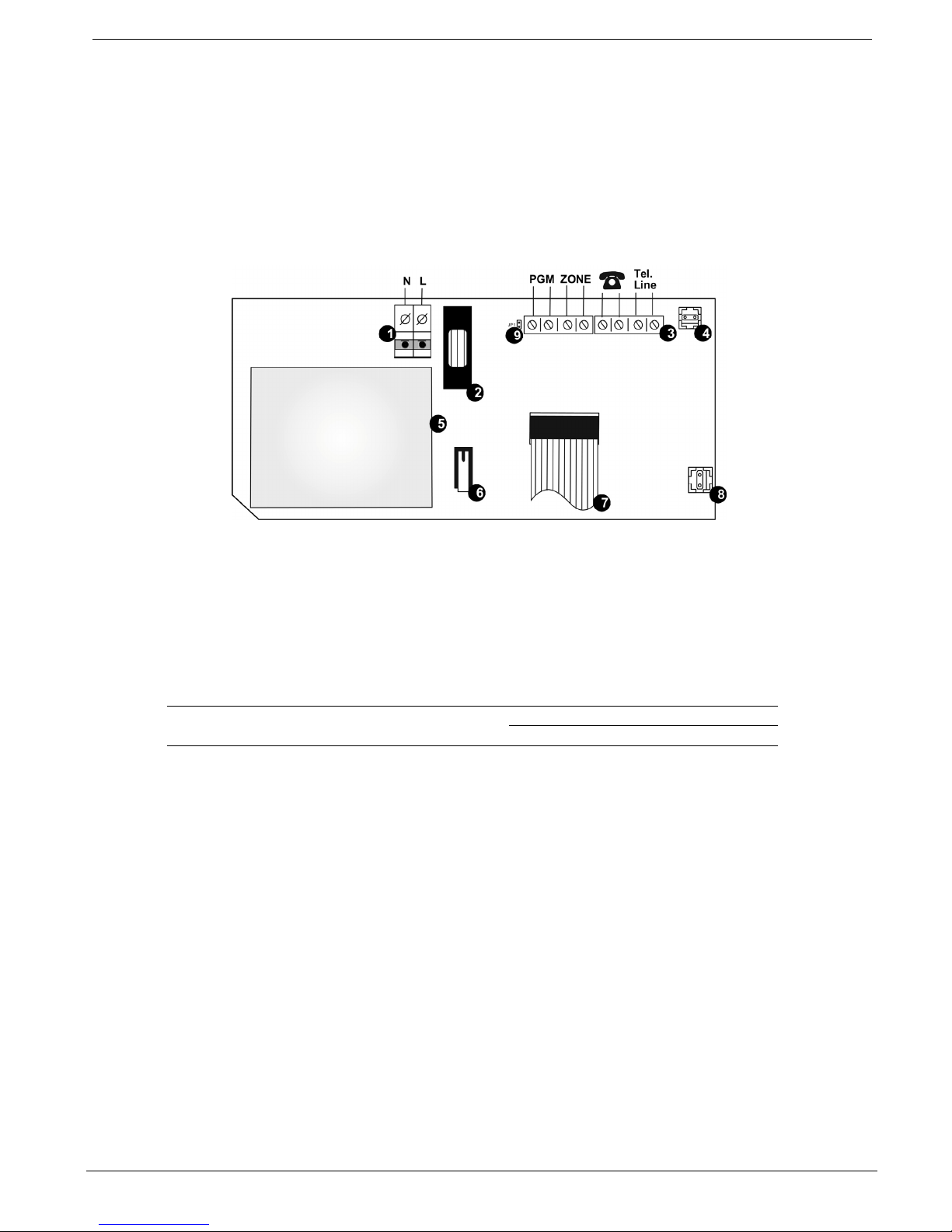
1.4.2. Power Supply and Connections Board
As the name suggests, the Power Supply and Connections Board has the AC and battery connectors,
power connection fuses, and the transformer. This Board also serves as the interface to the PGM
programmable output, the Hardwire Zone, Telephone, Telephone Line, and Back Tamper. On the rear
side of the Board, there is a battery switch that allows applying battery power at first installation.
Figure 1-3: Power Supply and Connections Board
1. AC Power Connector
(N=Neutral, L=Live)
2. AC Fuse
3. Terminal Block
4. Back Tamper Connector
5. AC to AC Transformer
6. Front Tamper Switch
7. Flat-Cable Interface Connector to the Main Board
8. Battery Connector
9. PGM Control Jumper (JP1)
Table 1-3: Jumper Settings
JPI PGM (see Figure 1-3, Power Supply
and Connections Board)
Installed: Open Collector
Removed: Dry Contact
Indice