
COMPRO COMPRODVD Manuale utente

ComproDVD User's Guide
Version 1.0
Compro Technology, Inc.
www.comprousa.com

Copyright © 2001-2003. Compro Technology, Inc. No part
of this document may be copied or reproduced in any form
or by any means without the prior written consent of
Compro Technology, Inc.
Compro, VideoMate, Poladyne, Play with Power, and the
Compro logo are trademarks of Compro Technology, Inc.
Other names and marks are trademarks of their respective
owners.
COMPRO makes no warranties with respect to this
documentation and disclaims any implied warranties of
merchantability, quality, or fitness for any particular purpose.
The information in this document is subject to change
without notice. COMPRO reserves the right to make
revisions to this publication without obligation to notify any
person or entity of any such changes.
Compro Technology, Inc.
Tel. +886 2 2918 0169, Fax +886 2 2912 1465
3/F, No.12, Alley 6, Lane 45, Pao Shin Road
Hsintein City, Taipei, Taiwan, R.O.C.
www.comprousa.com

Table of Contents
Table of Contents
1Introduction ................................................................1
Main Features .............................................................. 1
Specifications (DVD Video Format).............................. 3
A Visual Overview ........................................................ 4
2Using ComproDVD.....................................................8
Region Code Settings ..................................................8
Playing Other Media Files............................................9
DVD Video Recording (VR) Format ...........................13
3Configuration ...........................................................15
General Configuration................................................15
Skin Configuration......................................................17
Video Configuration.................................................... 17
Advanced Video Configuration................................... 17
Audio Configuration ................................................... 17
Parental Control Configuration...................................17
Information Configuration...........................................18

Introduction
1
1 Introduction
Stability, simplicity, and superiority. ComproDVD
epitomizes these traits to the maximum and gives users all
they wish for in a DVD player.
ComproDVD features include importing and exporting
bookmarks, creating personal video profiles, support for all
rewritable DVD formats available on this planet,
automatically resuming from the last scene, your own
virtual surround system settings, LFE boost and much,
much more!
So continue your amazing DVD journey with ComproDVD,
an experience that you had never thought possible, nor
imaginable. Life just got better.
Note: This guide provide the basic instruction of how to
start and use the ComproDVD, for more detail information
about the functions in ComproDVD, please refer to the
on-line help.
Main Features
Supports full resolution video playback at 720x480 for
NTSC and 720x576 for PAL
Correct aspect ratio and deinterlaced video frame
capturing
Supports DVD (MPEG-2), DVD VR, VCD (MPEG-1),
SVCD, cDVD, cdDVD, miniDVD formats and DVD
files on hard disk drive (HDD) playback
Enriched playback smoothness and removal of
jitter/jerkiness
Certified Dolby Digital decoder (2-channels)
Supports MPEG-2 audio and LPCM (Linear Pulse
Code Modulation) decoding
Supports Microsoft DirectShow standard interface for
DVD Video or game play

Introduction
2
Supports karaoke and MP3 playback
Titles and chapters navigation through numerous and
blazing fast methods
Navigation slider allows a direct and instantaneous
link to any scene
Step frame feature incorporating both forward and
backward directions
Proprietary dual subtitles capability
Closed captioning support
Language and subtitles selection
Supports all DVD Video and DVD Video Recording
formats
Customize your own toolbar
Place your virtual speakers anywhere
(A3D/DirectSound3D)
Auto-Resume continues exactly where DVD playback
had left off previously
Digital zoom at 4X or 9X equipped with location
indicator
A-B repeat function that lets you set your favorite
scenes for instant repeat to your heart's delight
Import and export your bookmarks
Bookmark viewer provides a visual display of all
bookmarked scenes
Create playlist along with shuffle and repeat functions
Implemented Analog Protection System (Macrovision)
that supports PC to TV display
Microsoft DirectX Video Acceleration WHQL certified
Supported video and audio file formats: MPG, VOB,
ASF, M1V, M2V, MOV, QT, AVI, WMV, DAT, VRO,
WAV, MID, WM, WMA, MP2, MP3, RMI

Introduction
3
Unrivalled Hardware Compatibility
Works with all sound cards, motherboards, and new
DVD-ROM, DVD-ROM/CD-RW combo, DVD-RAM,
DVD-RW, and DVD+RW drives with 1394, ATAPI, SCSI, or
Card Bus interface.
Specifications (DVD Video Format)
Video
MPEG-2 video streams comply with Main Profile at Main Level
and Simple Profile at Main Level
MPEG-1 video stream
Supports MPG, VOB, ASF, M1V, M2V, MOV, QT, AVI, WMV,
DAT, VRO video file formats
Audio
Dolby Digital (AC-3) audio support for DVDs
Sampling rates: 32, 44.1, and 48KHz
Audio channels: 2 channels
Linear PCM (LPCM)
Sampling rates: 48 and 96KHz
Quantization level: 16, 20 and 24 bits per sample
May be downmixed to 2 channels
MPEG Audio
Sampling rates: 32, 44.1, and 48KHz
Introduction
4
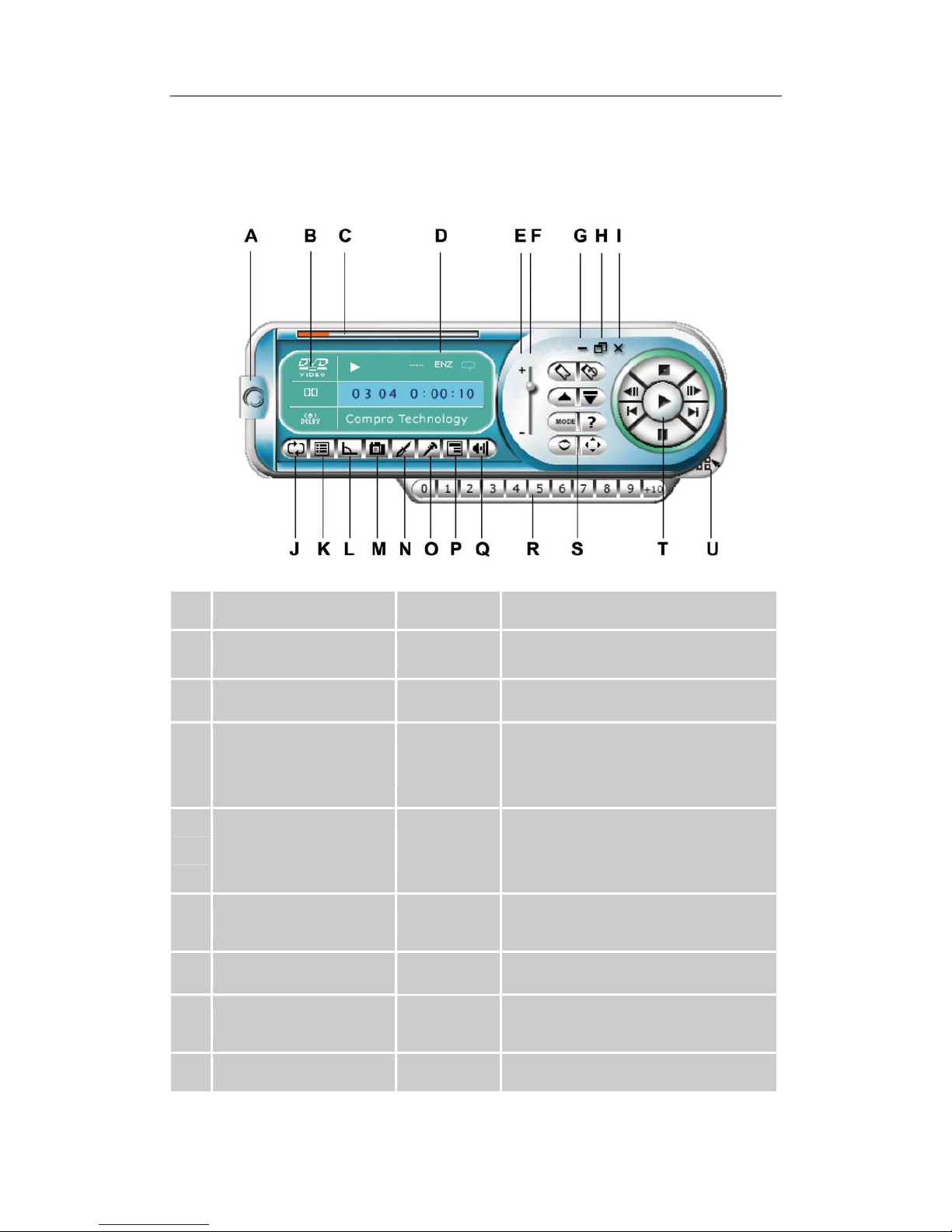
A Visual Overview
Main Controls
Button/Icon Hot Key Description
A About Ctrl-A Displays information about
ComproDVD
B Current Media Type Display the current media type
C
Navigational Slider
Visually displays elapsed time.
Click along slider to jump to other
locations
D
Display Area
Displays current such as audio
coding, audio mode, language, and
subtitles
E Volume Control +, - Control volume level by click the +
and -
F Volume Level Displays volume level
G Minimize Ctrl-N
Minimizes user interface to taskbar
H Full Screen Z Selects full screen mode

Introduction
5
I Power Off Ctrl-X Exits ComproDVD
J Repeat Ctrl-R Repeat playing tracks on playlist
K Menu L Open the playlist dialog box
L Angle A Switches among available viewing
angles if any
M Capture Frame C Captures video content as bitmap
image files
N Configuration Ctrl-C Configuration settings are all
located here
O Karaoke K Switches among karaoke modes
P Subtitles U Switches among available subtitles
during playback
Q Mute Mute the volume
R Number Pad For entering numeric data
S Advanced Select Refer to “Advanced Select” page
T Control Wheel Refer to “Control Wheel” page
U Show/Hide Number
pad Ctrl-T Display or hide number pad

Introduction
6
Advanced Select
Button/Icon Hot Key Description
A Bookmarks
Ctrl-F2
Adds current scene to
bookmark list
B Go Up
R
Goes up to previous section
when navigating DVD title
menu selection
C Mode
Ctrl-O
Selects media source for
playback (from disk or file)
D Audio Stream H Select audio stream
(languages)
E Go to Bookmarks F2 Directly goes to bookmarked
scenes
F Eject Ctrl-E
Ejects discs from
CD/DVD-ROM drive
G Help F1 Accesses online help
H Shuffle Random playing mode

Introduction
7
Control Wheel
Button/Icon Hot Key Description
A Stop S Stops playback
B Step Backward Ctrl-B Goes to previous frame
C Previous P Returns to previous chapter
D Pause Space Bar Pauses playback
E Step Forward T Goes to next frame
F Play Enter Plays media
G Next N Jumps to next chapter
Indice
Altri manuali COMPRO Software


Manuali Software popolari di altre marche


Canon
Canon Vixia HF21 Manuale utente

Canon
Canon ZR950 Manuale utente

Samsung
Samsung Auto Backup Manuale utente

Polycom
Polycom Vortex EF2201 Istruzioni per l'installazione e il funzionamento

Brocade Communications Systems
Brocade Communications Systems Brocade 8/12c Manuale utente

Novell
Novell SP2 - S Manuale di istruzioni