CORA CS1030 Manuale utente

CS1030 Wall Receptacle Outlet
User Guide
Long-range, switchable, wall receptacle outlet supporting LoRaWAN
or Coralink wireless protocols. Ideal for applications in smart-building,
home automation, and smart city lighting and control.
Version: 1.0
February 2022

CS1030 Long Range Wall Receptacle Outlet – User Guide
Page 2
Contents
Getting Started ........................................................................................................................... 3
What’s In the Box .................................................................................................................... 3
Registering / Claiming the Device ........................................................................................... 4
User Interface ......................................................................................................................... 5
Push Button ........................................................................................................................ 5
Status Indicators ................................................................................................................. 6
Attaching to the Network ......................................................................................................... 6
About LoRaWAN .................................................................................................................... 7
Terminology ............................................................................................................................ 7
Installation .................................................................................................................................. 8
Important Safety Notice .......................................................................................................... 8
Getting Ready ......................................................................................................................... 8
Outlet Installation .................................................................................................................... 8
Event Notifications and Reports ................................................................................................12
Reset Notifications .................................................................................................................13
Firmware Version ...................................................................................................................13
Configuration and Integration ....................................................................................................14
Specifications ............................................................................................................................15
Temperature Measurements and Thermal Heating ................................................................15
Dimensions ............................................................................................................................16
Ordering Information .................................................................................................................17
Communication Options .........................................................................................................17
Product SKU ..........................................................................................................................17
FCC Statement .........................................................................................................................19
© Copyright 2022 Codepoint Technologies, Inc.
All Rights Reserved

CS1030 Long Range Wall Receptacle Outlet – User Guide
Page 3
Getting Started
The CS1030 is a long-range, switchable, wall receptacle outlet supporting LoRaWAN or
Coralink wireless protocols. The 120V, 15-amp rated unit also provides a 2.4 Amp USB Type A
output. One device outlet can be controlled remotely or configured to turn on/off automatically
with built-in scheduler, while the other outlet is always on. The CS1030 supports advanced
scheduling capabilities including dynamic sunrise or sunset alarms, repetitive alarms, and
advanced programmable schedule triggers that can be initiated by LoRaWAN.
Ideal for smart home / smart building / smart city applications the device improves efficient
energy management and enhanced safety and security. Control lighting and equipment from
very long distances supporting a wide variety of public and private LoRa networks.
The outlet can be configured to monitor temperature supporting real-time measurements,
statistics, and threshold notifications.
What’s In the Box
The standard CS1030 single wall outlet package includes:
A. In-wall receptacle LoRaWAN compatible outlet: U.S. standard AC output rated for
100-120VAC
B. Cross Head Screw (M3)(2)
C. Slotted Head Screw (M3)(2)
Figure 1 - Items included in the C1030 package

CS1030 Long Range Wall Receptacle Outlet – User Guide
Page 4
Registering / Claiming the Device
The outlet is easily registered or claimed by scanning the QR claim key found on the side of the
outlet or on a removable sticker adhered to the front. Please consult your IoT application
provider for details on scanning the claim key and registering the device with your account.
Figure 2 – CS1030 QR claim key simplifies device registration and activation.
Once the device is registered or claim. The application provider will have secure access to the
device identity information, which will allow provisioning the device on any supported LoRaWAN
network.

CS1030 Long Range Wall Receptacle Outlet – User Guide
Page 5
User Interface
The CS1030 user interface is shown in the figure below.
Figure 3 – Performing Network or Factory Reset on the Wall Outlet
The device provides one switched outlet and one always-on outlet, a 2.4A (5V) USB charger, an
LED Indicator, and a push button.
Push Button
The Status LED on the front of the CS-1030 indicates the following status:
Action Description
One (1) quick press Default toggles the switched outlet on/off.
Two (2) quick presses Default turns on switched outlet for three minutes
Press and hold > 10 seconds
Network Reset
Press and hold the SET button for 10 seconds, but less than 25,
then release. The device will reset all LoRaWAN Settings, which
does not affect device operation or configuration.
Press and hold > 25 seconds
Factory Reset
Press and hold the SET button for > 25 seconds, then release.
The device will reset all parameters to factory defaults.
Following reboot, a Factory Reset event uplink (confirmed) will
be sent upon rejoining the LoRaWAN network.

CS1030 Long Range Wall Receptacle Outlet – User Guide
Page 6
Figure 4 – CS1030 LED Status Indicators
Status Indicators
The Status LED on the front of the CS-1030 indicates the following status:
LED Status
Blinking on/off (1sec interval) Not Joined to LoRa Network
On Switchable Outlet On (energized)
Off Switchable Outlet Off (de-energized)
Attaching to the Network
Once AC Power is connected, the CS1030 will automatically attempt to join the LoRaWAN
network automatically and the Status LED will blink continuously. After a while, the join
schedule will become less aggressive and up to 12 hours will elapse between join attempts. To
immediately force the CS1030 to join, perform a Network Reset operation.
To learn more about the capabilities of the CS1030, see Configuration and Integration.

CS1030 Long Range Wall Receptacle Outlet – User Guide
Page 7
About LoRaWAN
LoRaWAN is a low-power, secure, wide area (LPWAN) networking protocol designed to
wirelessly connect devices to the internet in regional, national, or global networks. To use the
CS1030 Wall Outlet, wireless connectivity to an internet connected LoRaWAN gateway is
required.
For more information about LoRa and LoRaWAN visit the LoRa Alliance webpage:
https://lora-alliance.org/.
Terminology
Message sent from the Wall Outlet to the network are referred to as “uplink messages” or
“uplinks”.
Messages sent to the Wall Outlet from the network are referred to as “downlink messages”
or “downlinks”.
Both uplink and downlink messages may be of either “confirmed” or “unconfirmed” type.
Confirmed messages are guaranteed to be delivered but will consume extra wireless
bandwidth and battery life. These mechanisms are analogous to TCP (confirmed) vs UDP
(unconfirmed) protocols used for IP networks.
Before a device, such as the CS1030 Wall Outlet can transmit messages using LoRaWAN it
must go through a “join” process. The Join process involves key-exchange with the cloud-
hosted network provider (The Things Network, Helium, etc.) and is defined in the LoRaWAN
protocol standard. If connectivity is lost due to RF interference, power loss or other
temporary internet outages, the device will need to rejoin the network prior to being able to
transmit messages. This process happens automatically but is managed in a power-efficient
manner and may take significant time depending upon network congestion and availability.

CS1030 Long Range Wall Receptacle Outlet – User Guide
Page 8
Installation
Important Safety Notice
If you are not comfortable working with 120V electrical wiring, please consult or hire
a qualified electrician. Turn off circuit(s) at the breaker or fuse panel and confirm
there is no voltage in the box before starting the installation (there may be multiple live circuits
within the switch box). Failure to use best electrical safety practices can result in injury or death!
All wiring connections must be made after the power is turned off to avoid personal injury and/or
damage to the outlet.
In-wall Outlet is designed and intended for indoor use only!
Total 15-amp maximum current. (Refer to the equipment or light bulb/fixture specifications if
in doubt).
Outlet is designed and intended only for permanently installed fixtures, and in accordance
with the national and local electrical codes and regulations of the United States or Canada,
as applicable
Getting Ready
Please ensure that the following equipment and electrical requirements are met before installing
the outlet.
Existing wall outlet replacement or new box with wiring ready has three wires: line (black),
neutral (white), ground (green).
At least two (2) inches of box depth is required (2 1/8” deep electrical boxes are typical).
Tools: you will need a Phillips screwdriver, flat-head screwdriver, wire strippers, and
voltage tester.
Outlet Installation
Turn off Circuit(s) at the breaker or fuse panel and confirm there is no
voltage in the electrical box before starting installation (there may be
multiple live circuits within the switch box).
Unscrew and remove the outlet plate; then use a voltage tester to
confirm the circuit is dead

CS1030 Long Range Wall Receptacle Outlet – User Guide
Page 9
Unscrew the outlet from the
electrical box and pull it out with the
wires still attached.
Three wires will be attached to the
outlet: an incoming line (hot) wire,
which is black; a neutral wire, which
is white; and a grounding wire, which
is green or bare typically copper.
There may be other wires in the box,
but you should only be working with
the wires connected directly to the
outlet
Compare your new outlet with
the one you are replacing to find
the corresponding locations for
the electrical screw connectors.
With the power off, transfer the
wires one at a time, matching
the same color to the
appropriate locations on the new
outlet.
Connect the first wire, unscrew the
associated screw terminal on the In-
Wall Outlet
Before Connecting, ensure about
½ inch of the wire is exposed.
Strip off excess shielding as
necessary
Insert the wire into the terminal
Tighten the screw terminal
Gently tug on the wire to ensure
a tight connection

CS1030 Long Range Wall Receptacle Outlet – User Guide
Page 10
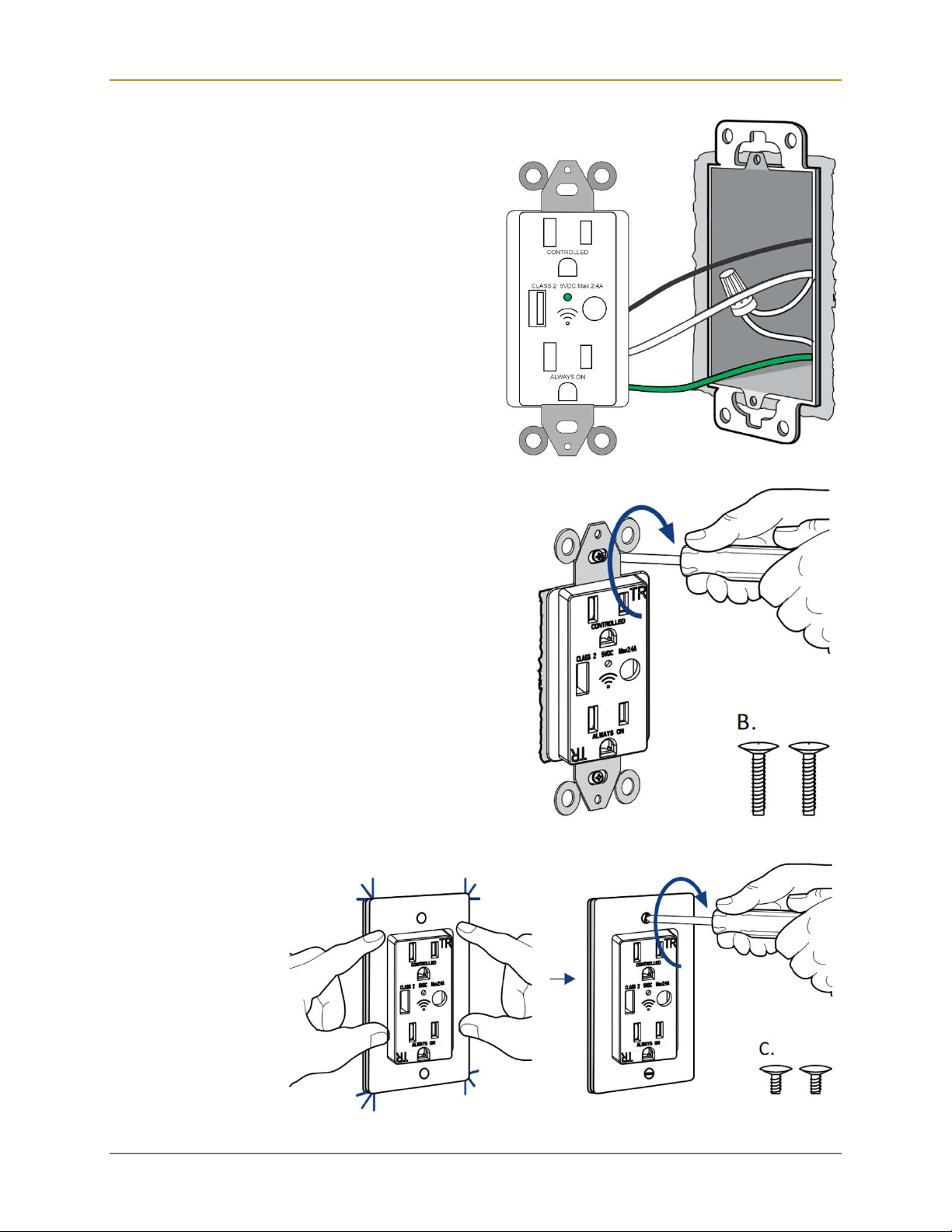
Gently push the new, wired outlet back into
the electrical box and screw it in place.
Secure the outlet to the box with the two screws.
Snap on the plate and affix with the provided
screws.
Indice
Altri manuali CORA Accessori