
Corega 108M Manuale utente

User Manual
108M Wireless Cardbus Adapter
WLCB54GS


WLCB54GS Manual
1
1. Preface............................................................................................................ 1
1.1 Features.................................................................................... 2
1.2 Packing Content..................................................................... 2
1.3 Hardware description........................................................... 3
1.4 System Requirements.......................................................... 3
1.5 Wireless LAN Modes.............................................................. 4
A. Infrastructure mode............................................. 4
B. Ad-Hoc mode......................................................... 5
2. Software Installation................................................................................... 6
2.1 Before You Start.. .................................................................... 6
2.2 Install Software....................................................................... 6
3. Driver Installation.......................................................................................10
4. Setting Network Protocol.........................................................................12
5. Wireless configuration..............................................................................14
5.1 Connect to AP (Infrastructure Mode)............................. 14
5.2 Connect to network adapter (Ad-Hoc Mode).............. 16
5.3 If no available AP for connecting................................... 19
6. Security Configuration............................................................................. 21
6.1 Setting ESSID........................................................................ 22
6.2 Setting WEP........................................................................... 23
6.3 Setting WPA.......................................................................... 25
[WPA-PSK]................................................................. 25
[WPA-Enterprise]..................................................... 26
7. Utility Introduction................................................................................... 28
7.1 Configuration....................................................................... 28
7.2 Status...................................................................................... 29
7.3 Option.................................................................................... 30
7.4 About...................................................................................... 30
8. FAQ................................................................................................................ 31
9. Specification............................................................................................... 33
10. About corega........................................................................................... 34
目 錄

WLCB54GS Manual
2
22
corega WLCB54GS gives you both freedom of movement and
flexibility of access! Designed to the IEEE802.11g specification,
this versatile PC card offers speeds up to nearly five times fast-
er than widely deployed IEEE 802.11b wireless networks found
in homes, businesses, and public wireless hotspots around the
world. With Atheron Super G mode, the transmission rate can
even speed up to 108Mbps!
1.1 Features
• Works with both IEEE802.11b & IEEE802.11g
• Speeds up to 108Mbps
• Office roaming for notebook PC users
• 64&128&152bit WEP, WPA encryption
• Shared broadband Internet access and resources
1.2 Packing Content
Before installation, please make sure the packing content is com-
pleted. If something loss please contact your local vender.
- Wireless 108 Mbps Access Point
- Power Adapter
- Ethernet Cable
- Product Stand
- Detachable antenna
- Quick Installation Guide
- Manual
1Preface
33
WLCB54GS Manual
3
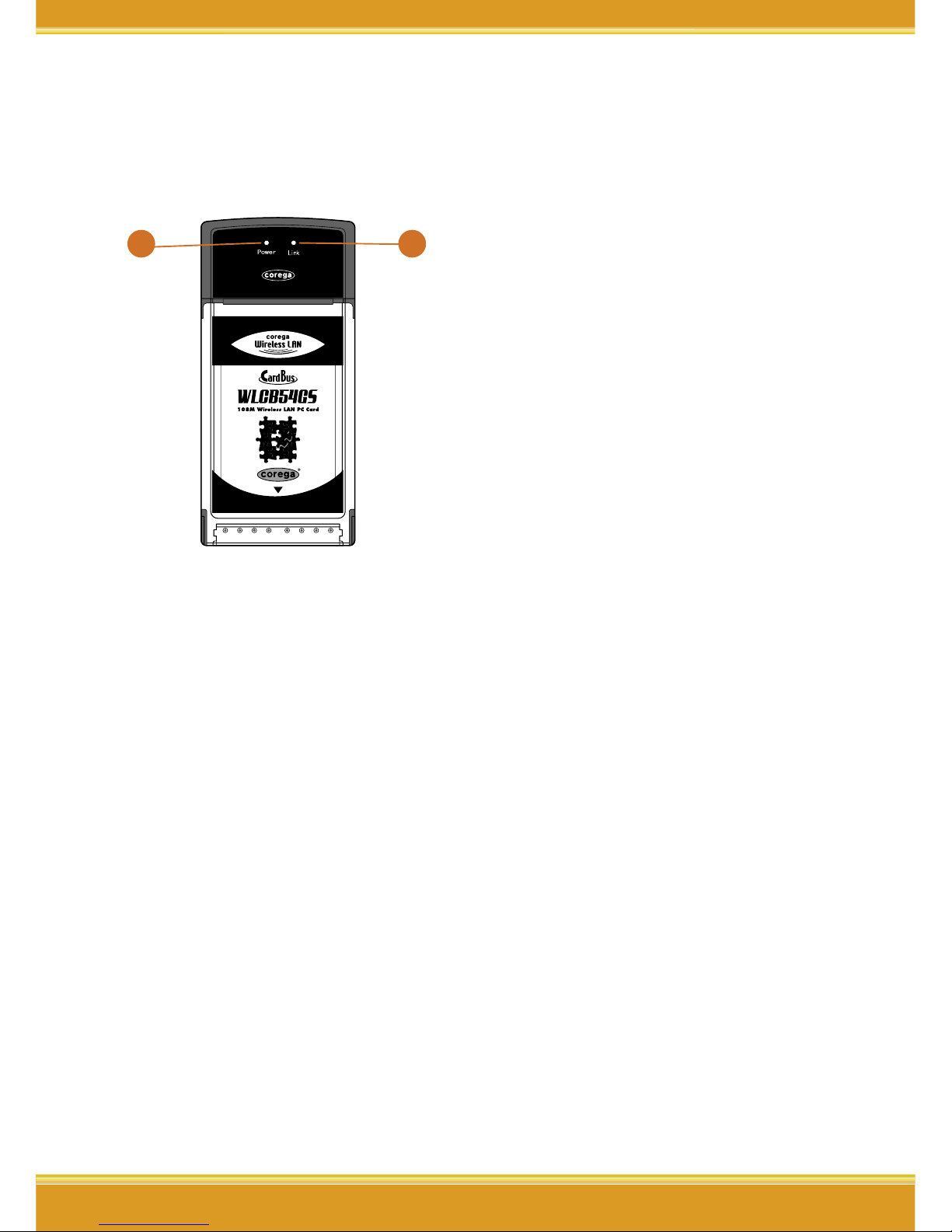
1.3 Hardware description
1
2
1. Power LED
Indicate power status.
2. Link LED
Blink: searching for wireless
signal
On: connected
Off: disconnected
1.4 System Requirements
• A laptop or notebook computer with an available 32-bit
cardbus slot
• Windows XP/2000/Me/98SE
• At least 32 MB of memory and a 300 MHz processor
• An 802.11g or 802.11b access point (for Infrastructure
mode), or another 802.11g or 802.11b wireless adapter (for
Ad-Hoc, Peer-to-Peer networking mode).

WLCB54GS Manual
4
4
1.5 Wireless LAN Modes
There are two basically modes of networking for setting:
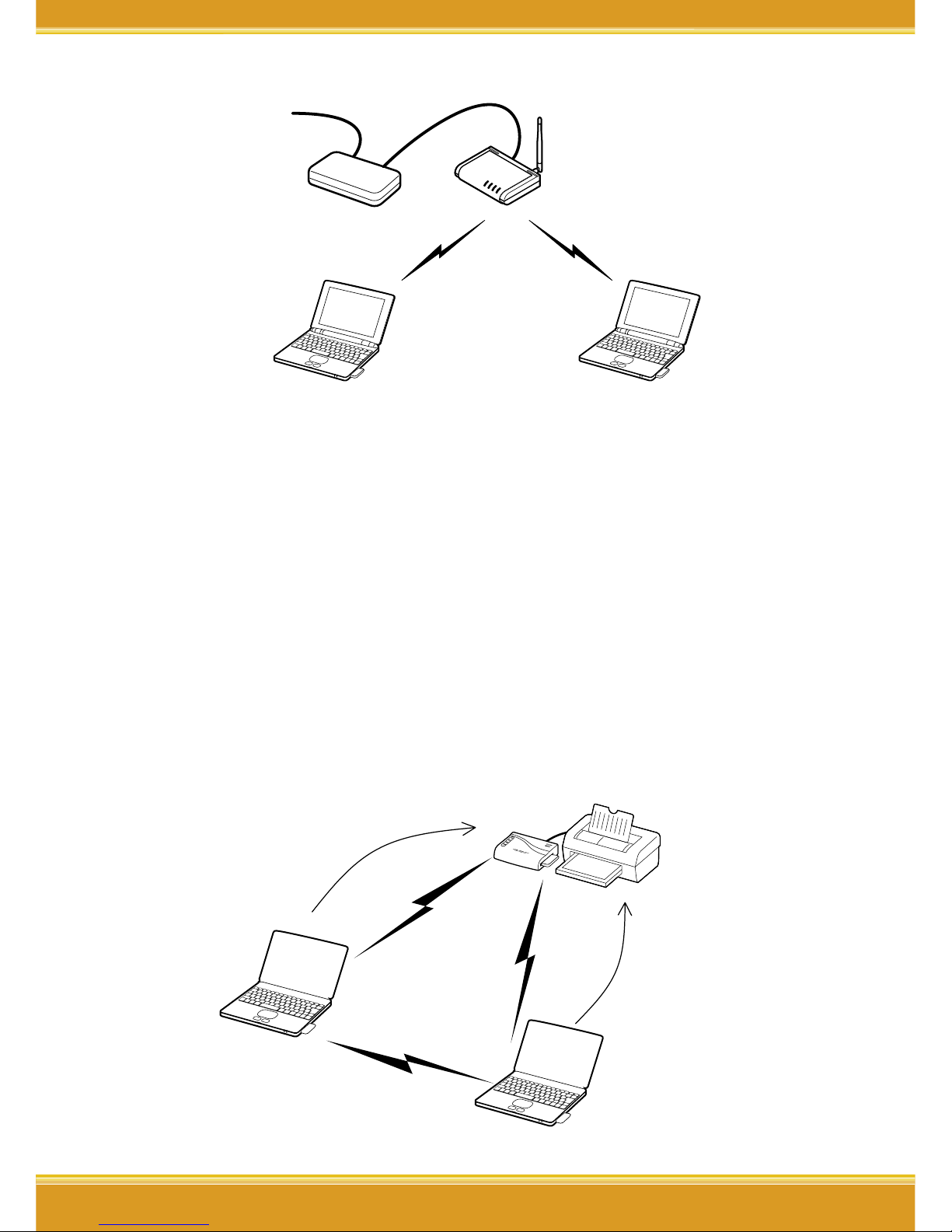
A. Infrastucture mode
Infrastructure networking differs from ad-hoc networking
in that it includes an access point. Unlike the ad-hoc struc-
ture where users on the LAN contend the shared band-
width, on an infrastructure network the access point can
manage the bandwidth to maximize bandwidth utilization.
Additionally, the access point enables users on a wireless
LAN to access an existing wired network, allowing wireless
users to take advantage of the wired networks resources,
such as Internet, email, file transfer, and printer sharing.
Infrastructure networking has the following advantages
over ad-hoc networking:
• Extended range: each wireless LAN computer within the
range of the access point can communicate with other
wireless LAN computers within range of the access
point.
• Roaming: the access point enables a wireless LAN
computer to move through a building and still be con-
nected to the LAN.
• Wired to wireless LAN connectivity: the access point
bridges the gap between wireless LANs and their wired
counterparts.
5
WLCB54GS Manual
5
Notebook with installed WLCB54GS
Wirless Access Point
Connect to Internet
Modem
Notebook with installed WLCB54GS
B. Ad-Hoc mode
Also known as a peer-to-peer network, an ad-hoc network is
one that allows all workstations and computers in the network
to act as servers to all other users on the network. Users on the
network can share files, print to a shared printer, and access
the Internet with a shared modem. However, with ad-hoc
networking, users can only communicate with other wireless
LAN computers that are in the wireless LAN workgroup, and
are within range.

WLCB54GS Manual
6
2Software Installation
66
2.1 Before You Start..
1. Hardware Installation: please insert corega WLCB54GS into
the carbus slot in your notebook first, and when it appears
following screen please click [Cancel] to ignore it.
2. Please prepare OS installation driver CD (Windows 98/Me)
before the installation.
3. Please notice next section is taken Windows XP OS for in-
stance, and some screens will differ from others.
2.2 Software Installation
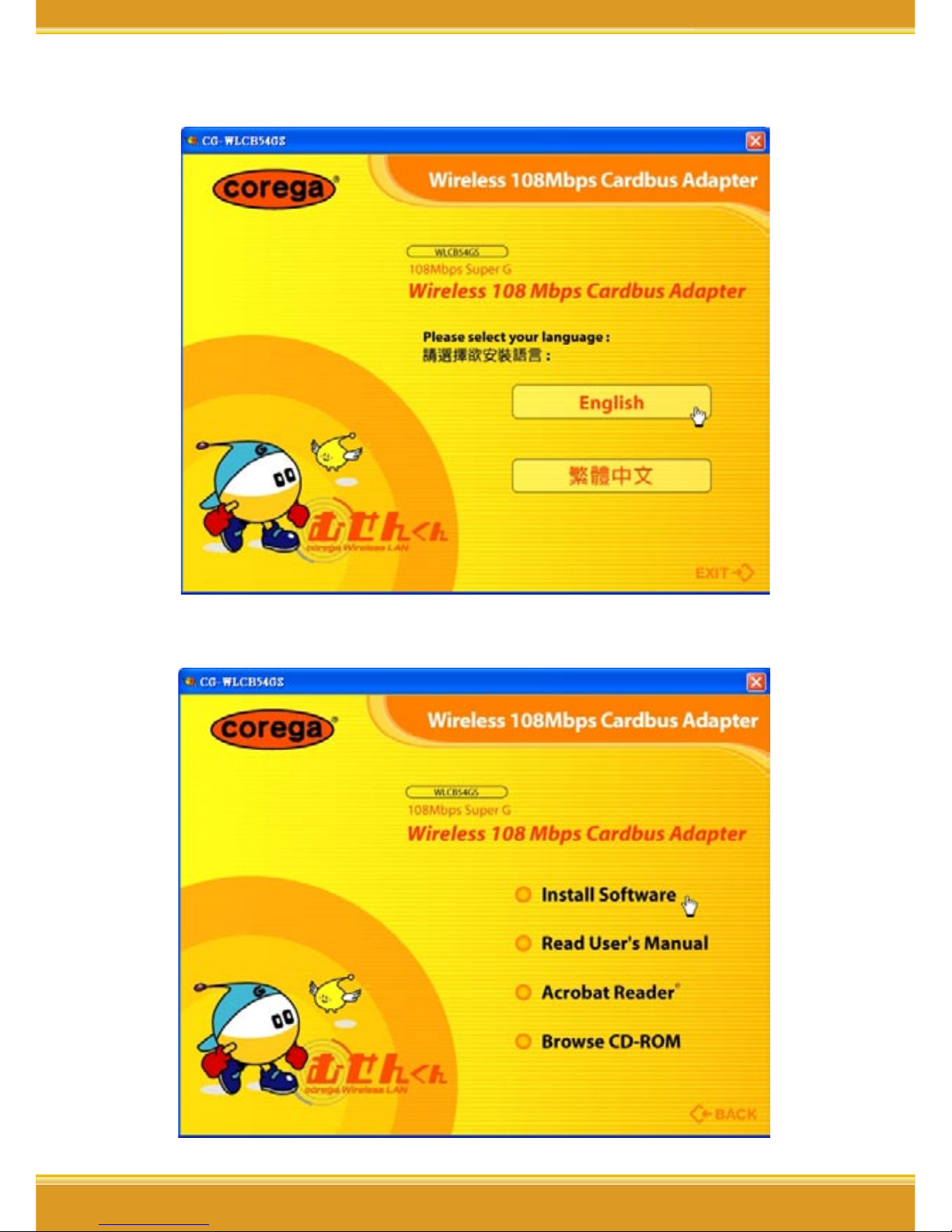
1. Please put installed CD into CD-ROM.
77
WLCB54GS Manual
7
2. Please select [English].
3. Please select [Install Software].
WLCB54GS Manual
8
8
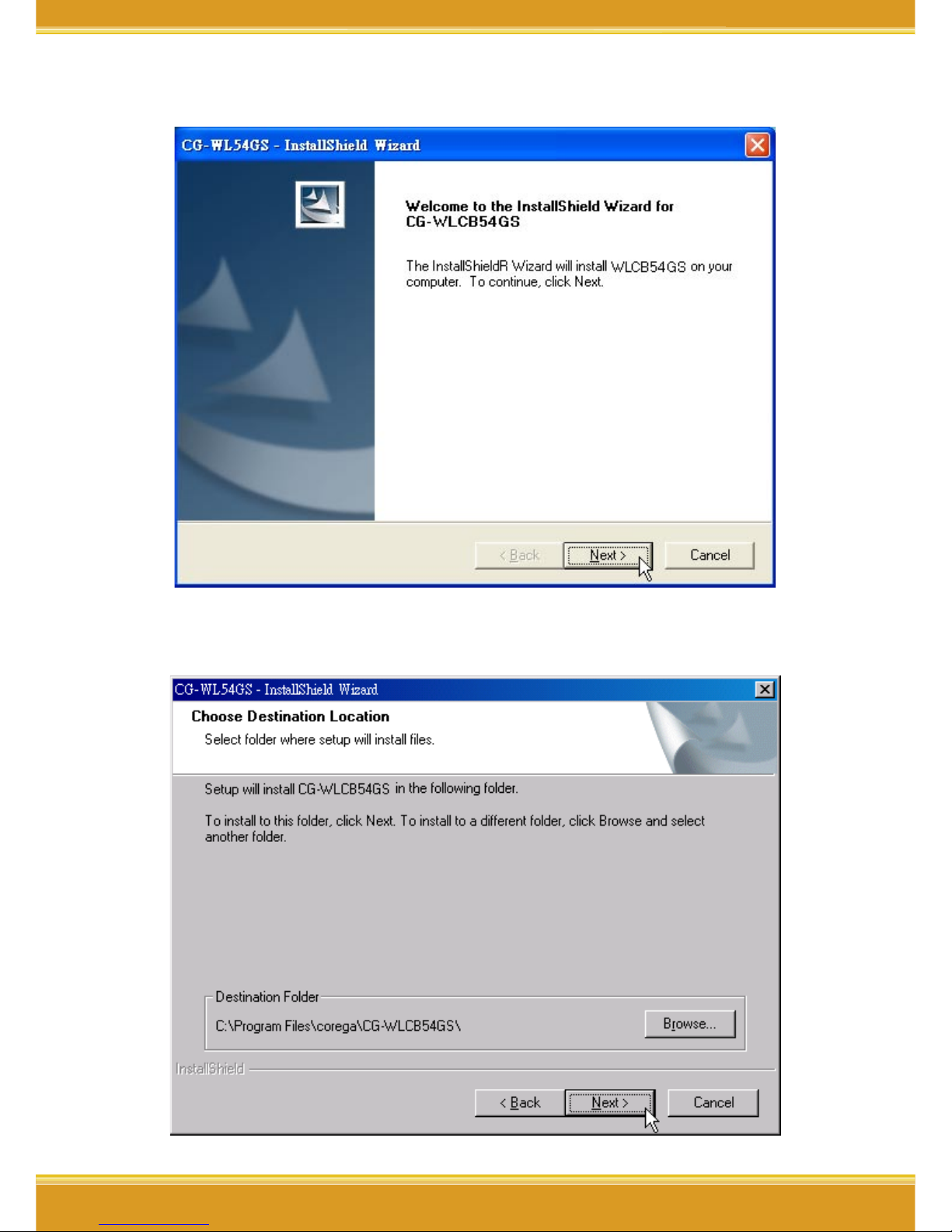
4. Click [Next].
5. Please confirm the path, if no changes please click [Next].
Questo manuale è adatto per i seguenti modelli
1
Indice
Altri manuali Corega Adattatore


