
DAITEM SC902 Manuale utente

GB
89
Contents
Presentation 90
Description 92
➢The external units 92
• External caller unit 92
• The controller unit 92
➢The indoor station 93
Installation of the DoorPhone 95
➢Installation rules 95
➢Installation of the caller unit 96
➢Installation of the controller 97
➢Installation of the indoor station 99
• With battery operated base 99
• With mains operated base 100
➢Testing 101
➢Adjusting the type and volume of ring tone 101
Appendices 102
➢Radio recognition (*) 102
➢Programming the caller unit with keypad 103
➢Adjusting the door control 104
➢Adjusting the motorized gate control 104
Quick installation 106
What to do if...? 108
Technical specifications 110
(*) The products supplied in a kit function together as soon as you insert the
batteries. It is not necessary to carry out radio recognition for these products.
Any handsets purchased as an accessory to a kit or issued as replacements
will require radio recognition as described in the appendix.

Presentation
90
1 button
caller unit 2 button
caller unit
2 button
caller unit
with
keypad handset
standard station
(battery operated base)
standard station
(mains operated
base)
multifunction
station (battery
operated base)
base
➌
➊
caller unit cable
(supplied) controller
(garden
side)
caller unit
(street side)
R1
R2
R2: controlling an
electric door strike
(or an electric lock)
R1: controlling
a motorized gate
Indoor station
Street Assembly
COMPOSITION OF A DOORPHONE
requires as a minimum ➊+ ➋+ ➌
1 button
caller unit
with keypad
➋

GB
91
Presentation
Every kit comprises as a minimum:
➊Acaller unit on the street side for visitors.
➋Acontroller installed on the same pillar (garden side),
ensuring:
• the radio link with the indoor station
• the powering by batteries of the caller unit and controller
• output connections described in R1 and R2.
These products are connected by a cable that passes through
(or around) the pillar.
➌An indoor station (base and handset) for the reception of calls
and the remote control.
There are 2 models of handset:
• the standard handset (6 keys) allows:
- the control of a door strikes (or electric lock)
- the control of a motorised gate
- the control of lighting (2)
• the multifunction handset (10 keys) allows:
- the control of 2 door strikes (or electric locks) (1)
- the control of 2 motorized gates (1)
- the control of 2 automatic devices
(eg.: motorized garage door…) (2)
- the control of lighting (2)
(1) requires the installation of 2 caller units and controllers
(2) requires a lighting and automatic device controller
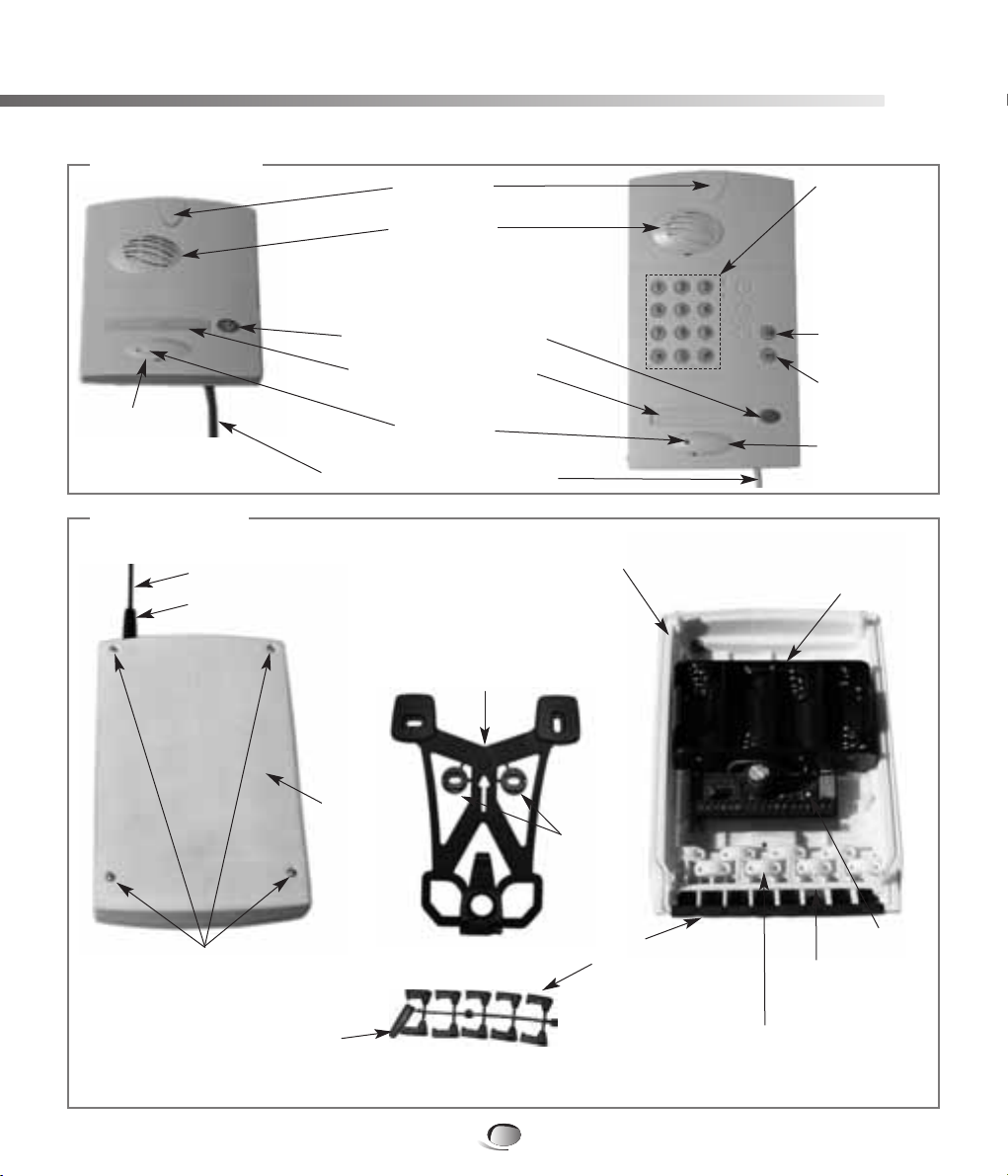
➢The outdoor units
• The caller units
•The controller
Description
92
Pillar mounting bracket
(on the reverse side of
the controller and locked
in place by a screw located
inside the controller)
Controller base
Captive screw for locking the base
onto the mounting bracket
Telescopic antenna
Antenna sleeve
Cable grommets
(to be detached) Cable clamp
(do not detach)
Battery housing
Controllers
lid
4 captive screws
for fixing lid
Antenna sleeve
(detachable)
Washers
(detachable)
Push
button
Loudspeaker
NB: The antenna sleeve, cable grommets, cable clamps and cable clamp screws are in the accessory packet.
Personalised name label
(label sheet supplied)*
Keypad for entry
of the access
code preceding
the pedestrian
and vehicle
access
commands
Cable (2.5 m long) for connecting
the caller unit to the controller
Call button
(1 or 2 depending on model)
* Not required
for armoured cover
Microphone
Screw cover
Screw cover*
Screw cover*
Vehicle access
command
button
Pedestrian
access
command
button

GB
93
Description
Wall mounting bracket
for internal operator unit
(located on the underside
of the base unit)
Base unit cover
Base unit underside
Captive screws to secure
base unit cover
(2 other screws on top)
Mains
adaptor
cable
channels
Jack socket
Screw cover
Feet
➢The indoor station (base)
• Battery operated base
• Mains operated base

Description
94
Call button
Control and setting buttons
(according to model)
Display
Telescopic antenna
Loudspeaker
Microphone
2
12
1
Low batteries Indoor station base unit
Status (open or closed)
of automatic gate
(entry 1 / entry 2)
External caller unit 1
Handset
Status
(open or closed)
of electric door
(entry 1/ entry 2)
Radio reception level
Status (open or closed)
of automatic device 1 (garage door) Status (open or closed)
of automatic device 2 (garage door)
Level bars
External
Caller Unit 2
Volume level
Ring level
Lighting status
NB: only the indicators specific to your installation will be displayed.
NB: the battery cover is located at the rear of the handset
Display
➢The indoor station (handset)
• The handset (see user guide for more of details on the handsets keys)
Installing the DoorPhone
95
➢Installation rules
In order to ensure its weather-tightness:
➀The technical controller must always be fitted antenna upwards.
➁Ensure the antenna is tightened correctly.
➂At the time of installing, always use the cable grommets.
➃After wiring, ensure the controller’s lid is correctly fitted.
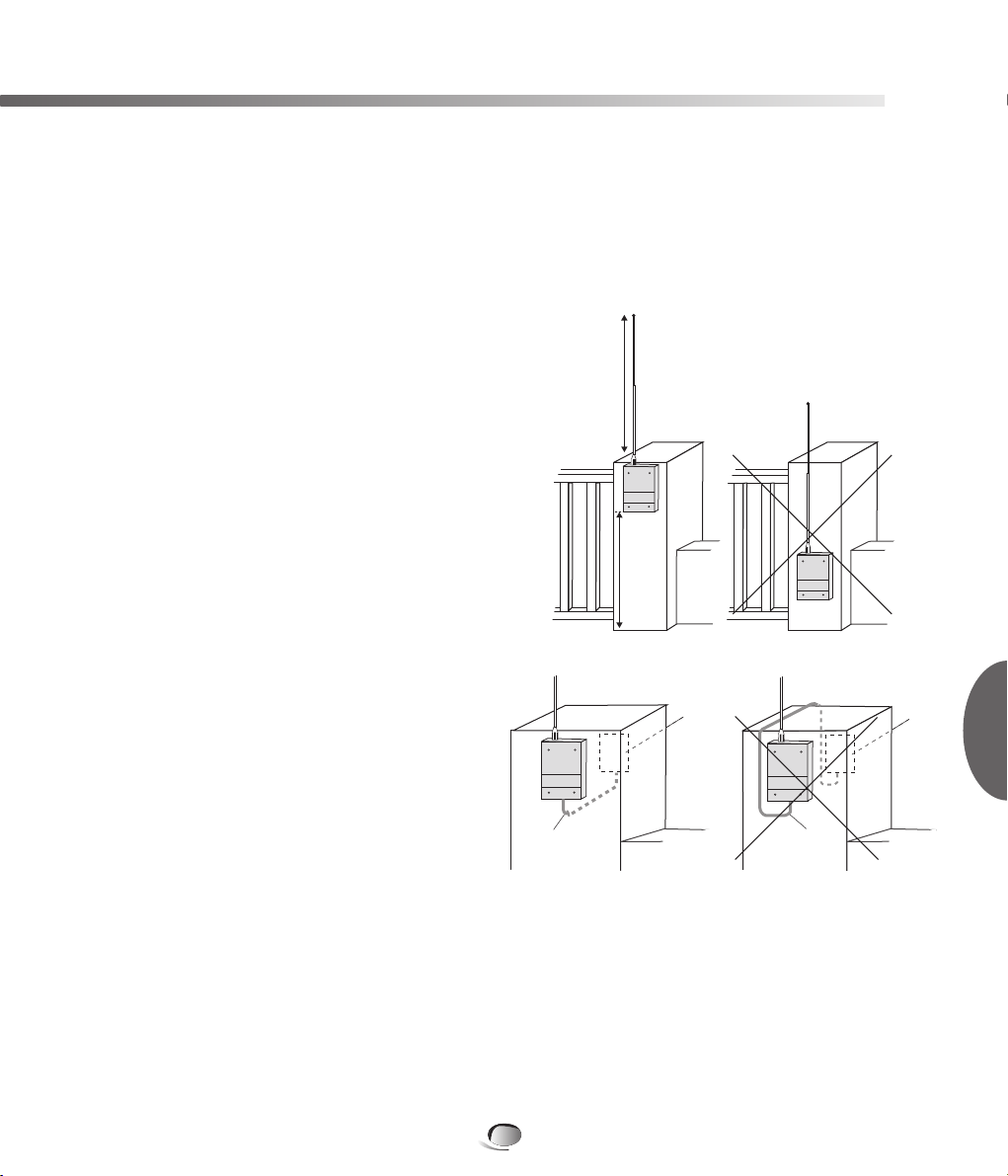
In order to ensure good radio range:
➀Reserve a free space around the technical
controller's antenna (to a height of about
80 cm).
Clear all dense vegetation in proximity and
ensure it is maintained.
➁Place the controller as high as possible and
ensure the antenna is clear of the mounting
surface (example: the antenna must not touch
the gate pillars cap).
➂Limit the presence of obstacle between the
location of the controller and the house where
handsets are installed.
➃The antenna must be completely extended.
➄Never run a cable along side of the antenna
(notably the cable between the caller unit
and the technical controller).
Don't coil the cable close to or in the controller,
but cut the surplus.
➅Also avoid placing the products close to metallic items (metal grilles, enclosures, metallic
gates...) or sources of electromagnetic disturbance:
- for the technical controller: electric meter, high tension electric lines, automatic gate controller,
lighting controller, radio receiver…
- for the handset: television, cordless telephone, domestic electric devices, electricity meter
or panel, computer, hi-fi, lighting controller….
➆The technical controller must be at least 2 m from the handset location.
NB: if it is necessary to improve the radio range, see the recommendations in the “What to do if?”
section of this guide.
80 cm
As high
as
possible
caller unit cable caller unit cable
caller
unit
caller
unit
GB

Installing the DoorPhone
96
Required equipment
• Drill and 6mm dia. Bit
• If the cable goes through the pillar, drill and 8mm dia. bit minimum.
• Philips or pozidrive no2 type screwdriver for mounting screws
• 3.5mm dia. flat screwdriver for terminal block screws
• All mounting screws and plugs are supplied.
➢Installing the external caller unit
1
For ease of use,
we recommend you
install the external caller
unit approximately 1.20m
from the ground.
2
Use the drilling template
(provided at the end of
this manual), mark
and pierce with a 6mm
dia. drill.
A - If the cable passes
through the pillar, use the
drilling template to mark
the cable hole (8mm dia.
drill bit recommended)
B - If the cable goes
around the pillar, pierce
one of the openings located
on the sides of the caller
unit using a rat-tail file
or a cutter for cable entry.
4
Push out the 2 screw
covers using a flat
screwdriver at the back
of the external caller unit.
5
Run the cable (according
to step 3).
Fix the external caller
unit (screws and plugs
supplied). Re-fit the screw
covers.
6
Write the users name with
a permanent marker on
one of the labels. Stick one
of the transparent
protective labels over it.
To preserve water tightness, never attempt
to open the external caller unit!
1,20 m
A
B
3
!
For the installation
of armoured caller
units, see the mounting instructions
provided with the armoured housing.
!
This step is not necessary
for armoured housing.
!

GB
97
Installing the DoorPhone
➢Installing the controller
So that it is easier to hook the base on the mounting bracket, choose a flat surface on the garden
side pillar (or make it as flat as possible), especially for the top of the part.
If necessary, use a wedge (not supplied)
To remove the fixing bracket, unscrew the locking screw situated inside the controller.
1 2
Fix the bottom
then the top
of the bracket.
Detach
the unused
washer
!
3
Attach the controllers
base to the mounting
bracket.
4
Fix the base to the bracket
with the use of the locking
screw.
5 6
Detach a cable grommet
and pierce it just to the
diameter of cable using
a crosshead screwdriver
in order to allow the
passage of the cable
of the caller unit.
Mark the 3 mounting
points and drill the pillar
with a 6mm dia. drill.
4cm
minimum Washers
Remove the antenna
sleeve and slide it onto
the antenna from the top
towards the bottom.
Firmly screw the antenna
onto the controllers base
and lower the antenna
sleeve as far as possible.
Cable from the external caller unit
Fix
without washer
Fix using washer

Installing the DoorPhone
98
*If connecting a strike or electric 12V lock, the position
contact input of the motorised gate must be connected.
Refer to the Connections chapter in the appendices.
7 8
Connect the 6 wires from
the external caller unit to
terminals 7 to 12.*
7 & 8: Data bus
9: Loudspeaker
10: Microphone
11: +6V
12: 0V
9
Slot the grommets into their
slots and position them to
ensure the weather
resistance of the controller.
Be sure to also fit any
un-pierced grommets.
It is imperative to fit all
cable grommets.
10
Use the screws provided
to hold the connected
cable(s) by tightening
the cable clamps.
11 12
Insert the cover onto
the base and secure
it with the 4 screws.
Cut the cable to the
required length.
Pass the cable through
the cable grommet. Strip
the ends of the wires.
The cable must be completely uncoiled.
!
Ensure correct orientation
of the grommets.
!
Do not remove the cable clamps
from their holder.
!
Push the batteries
into the holder
ensuring good contact
between the + pole of the battery
and the metal clip.
!
Insert the four 1.5 V LR20
batteries supplied. Press
the push button to initialise
the controller.
13
Fully extend
the telescopic
antenna in order
to get optimal radio
range.
!
7 (yellow)
8 (brown)
9 (grey)
10 (green)
11 (pink)
12 (white)
+
+
+
+
78910 11 12
Indice
Altri manuali DAITEM Sistema di interfono


